
1. Produktüberschreitungview
The Cudy GS108D is an 8-port Gigabit Ethernet Network Switch designed for expanding your network connectivity. It offers high-speed data transfer for devices such as computers, IPTVs, printers, NAS, game consoles, and routers. Featuring a plug-and-play design, fanless operation, and energy-efficient technology, this switch provides a reliable and quiet solution for both home and office networks.

Bild: Vorderseite view of the Cudy GS108D switch, highlighting its 8 Gigabit Ethernet ports and LED indicators.
Hauptmerkmale:
- 8 Gigabit-Ethernet-Ports: Bietet schnelle kabelgebundene Verbindungen für mehrere Geräte.
- Plug-and-Play: Requires no software installation or configuration for immediate use.
- Lüfterloses Design: Gewährleistet einen geräuscharmen Betrieb und ist für jede Umgebung geeignet.
- Energieeffizient: Compliant with IEEE802.3az standard, saving power when ports are idle.
- Vielseitige Montage: Geeignet für die Aufstellung auf dem Schreibtisch und die Wandmontage.
2. Packungsinhalt
Überprüfen Sie, ob Ihr Paket die folgenden Artikel enthält:
- Cudy GS108D 8-Port Gigabit Ethernet Network Switch
- Netzteil
- Bedienungsanleitung (dieses Dokument)
- Ethernet Cable (may vary by region/package)

Image: Contents of the Cudy GS108D package, showing the switch, power adapter, and an Ethernet cable.
3. Physikalische Beschreibung
Vorderseite:
The front panel features eight 10/100/1000 Mbps RJ45 ports. Each port has an associated LED indicator to show link/activity status.
- Betriebs-LED: Zeigt den Stromstatus des Switches an.
- Link/Act-LEDs (1-8):
- Durchgängig grün: A device is connected and the link is active.
- Grün blinkend: Am Port werden Daten gesendet oder empfangen.
- Aus: No device is connected or the link is inactive.

Bild: Detailliert view of the Cudy GS108D's front panel, showing the 8 RJ45 ports and their corresponding LED indicators.
Rückwand:
The rear panel typically contains the power input port.
Abmessungen:
The compact design of the GS108D allows for flexible placement. Approximate dimensions are 138mm (5.43") L x 61.5mm (2.42") W x 24mm (0.94") H.
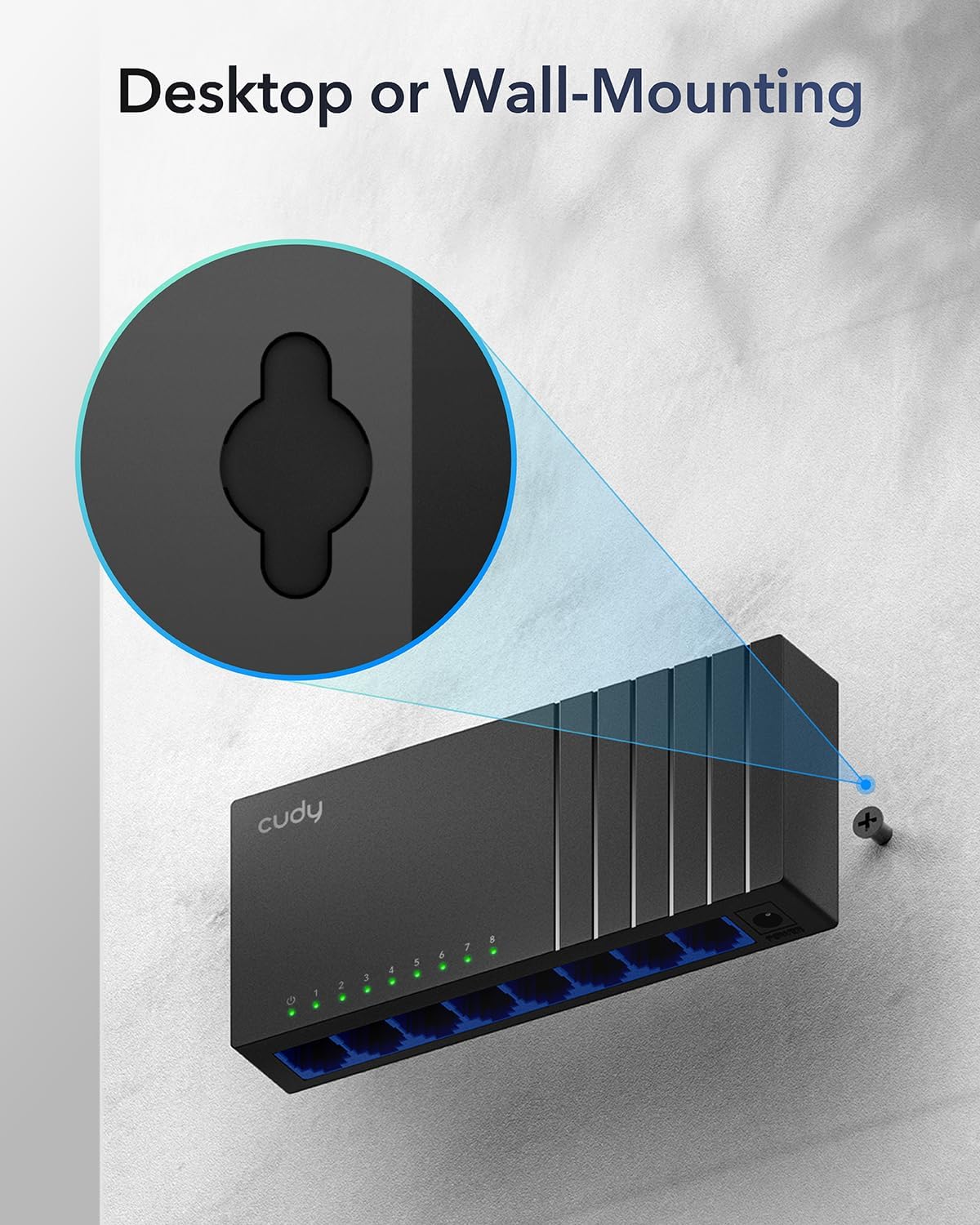
Image: The Cudy GS108D switch with its compact dimensions clearly indicated.
4. Einrichtungsanweisungen
The Cudy GS108D switch is designed for simple plug-and-play installation. No complex configuration is required.
Schritt 1: Stromanschluss
- Connect one end of the provided power adapter to the power port on the rear panel of the GS108D switch.
- Stecken Sie das andere Ende des Netzteils in eine normale Steckdose.
- Prüfen Sie, ob die Power-LED auf der Vorderseite leuchtet. Dies zeigt an, dass der Schalter mit Strom versorgt wird.

Image: The Cudy GS108D switch with its power adapter connected and ready for use.
Schritt 2: Geräteverbindung
- Connect your network devices (e.g., computer, router, NAS, game console) to any of the 8 RJ45 ports on the front panel using standard Ethernet cables (Cat5e or higher recommended for Gigabit speeds).
- Ensure the Link/Act LED for each connected port illuminates, indicating a successful connection. If the LED is flashing, data is being transmitted.

Image: A laptop being connected to the Cudy GS108D switch with an Ethernet cable, demonstrating a typical setup.
Schritt 3: Montageoptionen
The GS108D supports both desktop placement and wall mounting.
- Desktop-Platzierung: Stellen Sie den Schalter einfach auf eine ebene, stabile Oberfläche.
- Wandmontage: The switch features mounting slots on its underside. Use appropriate screws (not included) to secure the switch to a wall.

Image: The Cudy GS108D switch shown with its wall-mounting slots, illustrating how it can be securely attached to a wall.
5. Bedienungsanleitung
Once connected, the Cudy GS108D operates automatically without further user intervention.
Automatische Aushandlung
Each port on the switch automatically detects the network speed (10/100/1000 Mbps) and duplex mode (Half/Full Duplex) of the connected device and adjusts accordingly for optimal performance.
Verkehrsoptimierung
The switch features a 4 Mbit packet buffer to ensure stable and efficient data forwarding, reducing packet loss and improving overall network performance, especially during high traffic loads.
Energy Efficiency (IEEE 802.3az)
The GS108D incorporates energy-efficient Ethernet technology. It automatically adjusts power consumption based on cable length and network traffic, reducing energy usage when ports are idle or when connected devices are turned off.

Image: Visual representation of the power-saving feature, showing reduced energy consumption when ports are idle.
Fernübertragung
The switch supports long-distance Ethernet cable runs, allowing for reliable data transmission up to 170 meters (557 feet) with Cat5e or higher Ethernet cables.

Image: Illustration of the Cudy GS108D's capability for long-distance transmission, up to 170 meters, requiring Cat5e or higher cables.
6. Wartung
To ensure optimal performance and longevity of your Cudy GS108D switch, follow these maintenance guidelines:
- Platzierung: Place the switch in a cool, dry location away from direct sunlight, heat sources, and excessive moisture. Ensure adequate ventilation around the device.
- Reinigung: Reinigen Sie die Außenseite des Schalters mit einem weichen, trockenen Tuch. Verwenden Sie keine flüssigen oder Aerosolreiniger.
- Leistung: Verwenden Sie ausschließlich das mitgelieferte Netzteil. Trennen Sie das Netzteil bei Gewittern oder längerer Nichtbenutzung vom Stromnetz.
- Kabel: Ensure all Ethernet cables are securely connected and free from damage.
7. Fehlerbehebung
If you encounter issues with your Cudy GS108D switch, refer to the following common troubleshooting steps:
Kein Strom
- Stellen Sie sicher, dass der Netzadapter sowohl mit dem Schalter als auch mit einer funktionierenden Steckdose fest verbunden ist.
- Prüfen Sie die Funktionsfähigkeit der Steckdose, indem Sie ein anderes Gerät anschließen.
- Verify that the Power LED on the switch is illuminated. If not, try a different power outlet.
Keine Verbindung/Aktivität an einem Port
- Stellen Sie sicher, dass das Ethernet-Kabel sowohl am Switch-Port als auch am angeschlossenen Gerät fest eingesteckt ist.
- Try using a different Ethernet cable to rule out cable damage.
- Schließen Sie das Gerät an einen anderen Port des Switches an.
- Verify that the connected device (e.g., computer, router) is powered on and its network adapter is enabled.
- If connecting to a router, ensure the router's port is active.
Langsame Netzwerkgeschwindigkeit
- Ensure you are using Cat5e or higher Ethernet cables for Gigabit speeds. Older Cat5 cables may limit speed.
- Check the Link/Act LED for the port. A solid green light indicates a Gigabit connection. If it's amber or off, there might be a speed mismatch or connection issue.
- Verify that the connected devices also support Gigabit Ethernet.
- Die Netzwerküberlastung lässt sich durch die Begrenzung gleichzeitiger bandbreitenintensiver Aktivitäten verringern.
8. Spezifikationen
| Besonderheit | Beschreibung |
|---|---|
| Marke | Cudy |
| Modellnummer | GS108D |
| Anzahl der Ports | 8 |
| Schnittstelle | RJ45 |
| Datenübertragungsrate | 1000 Megabit pro Sekunde (Gigabit) |
| Schaltertyp | Managed Gigabit Ethernet Switches |
| Kompatible Geräte | Camera, Desktop, Laptop, Router |
| Bandtage | 28 Volt (Eingang für Netzteil) |
| Betriebstemperatur | 40 °C bis 104 °C (4.4 °F bis 40 °F) |
| Gehäusematerialart | Plastik |
| Artikelabmessungen (L x B x H) | 7.87" x 5.91" x 5.91" (Product packaging dimensions, actual device is smaller) |
| Artikelgewicht | 200 Gramm |
9. Garantie und Support
Garantieinformationen:
The Cudy GS108D 8-Port Gigabit Ethernet Network Switch comes with a 2 Jahr Garantie Ab Kaufdatum. Bitte bewahren Sie Ihren Kaufbeleg für Garantieansprüche auf. Diese Garantie deckt Material- und Verarbeitungsfehler bei normalem Gebrauch ab.
Technische Unterstützung:
For technical assistance, troubleshooting, or further inquiries, please visit the official Cudy website or contact Cudy customer support. Cudy is committed to delivering high-performance, user-friendly communication technology and provides resources to help you with your product.
Oft finden Sie dort Unterstützungsangebote, FAQs und Kontaktinformationen. Cudy Store on Amazon or the main Cudy webWebsite.


