
1. Einleitung
This manual provides detailed instructions for the setup, operation, and maintenance of your BolyGuard BG310-M 4G Wireless Trail Camera. This device is designed for wildlife monitoring and outdoor surveillance, featuring 4G cellular connectivity for remote access to images and videos.
Packungsinhalt
Bitte überprüfen Sie vor Beginn, ob alle unten aufgeführten Artikel in Ihrem Paket enthalten sind:
- BolyGuard BG310-M Trail Camera
- Antenne
- USB-Kabel
- Befestigungsgurt
- Bedienungsanleitung
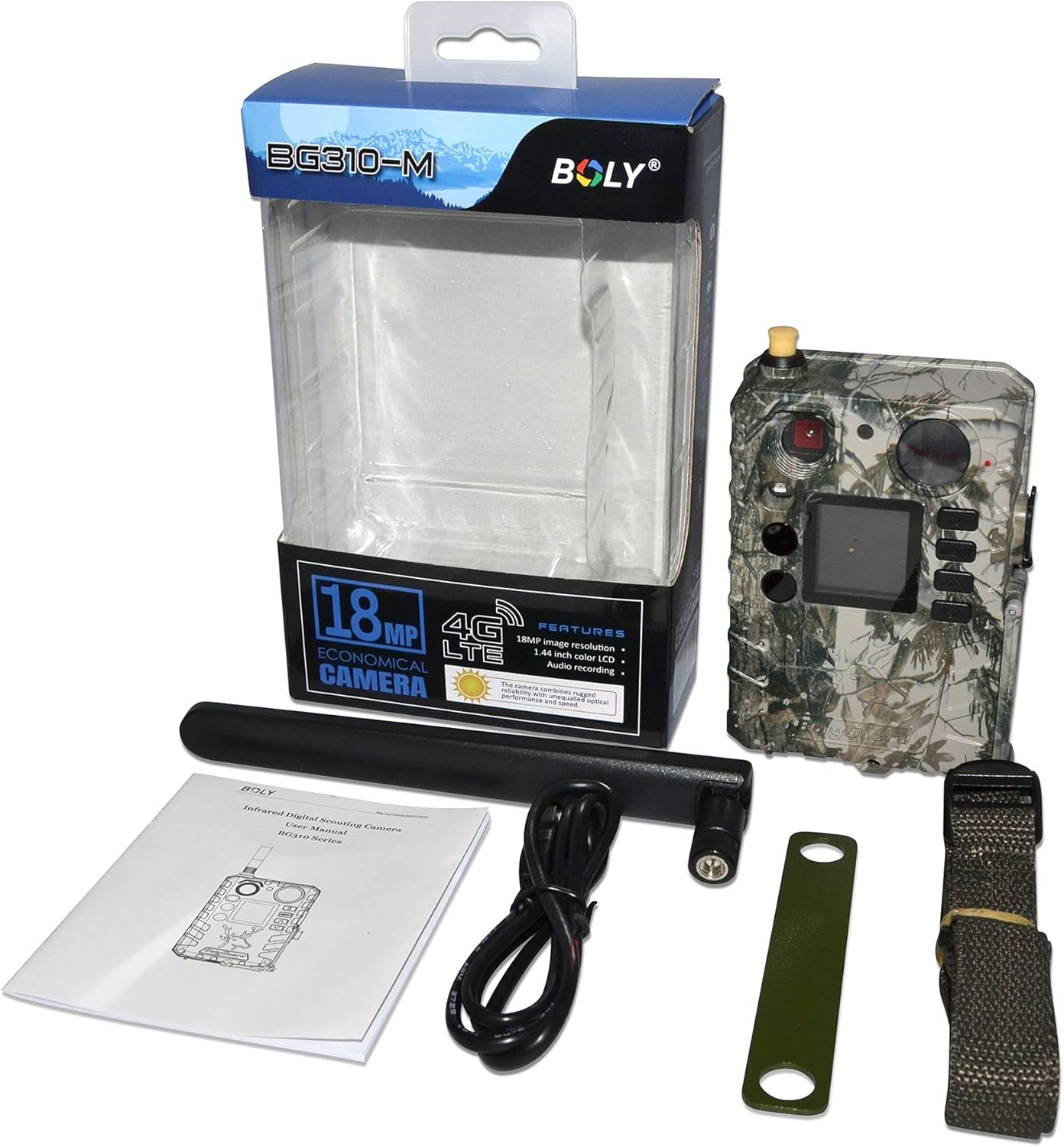
Abbildung 1.1: Packungsinhalt. Displays all items included in the product package, ensuring users can verify they have received everything necessary for setup.
2. Sicherheitshinweise
Bitte lesen und verstehen Sie alle Sicherheitshinweise, bevor Sie dieses Produkt verwenden. Die Nichtbeachtung dieser Anweisungen kann zu Verletzungen oder Schäden am Gerät führen.
- Do not immerse the camera in water beyond its IP65 rating.
- Use only recommended batteries and power sources.
- Setzen Sie die Kamera keinen extremen Temperaturen und keiner längeren direkten Sonneneinstrahlung aus.
- Versuchen Sie nicht, die Kamera zu zerlegen oder zu verändern.
- Entsorgen Sie Batterien ordnungsgemäß entsprechend den örtlichen Vorschriften.
3. Produktkomponenten
Familiarize yourself with the various parts of your BolyGuard BG310-M camera:
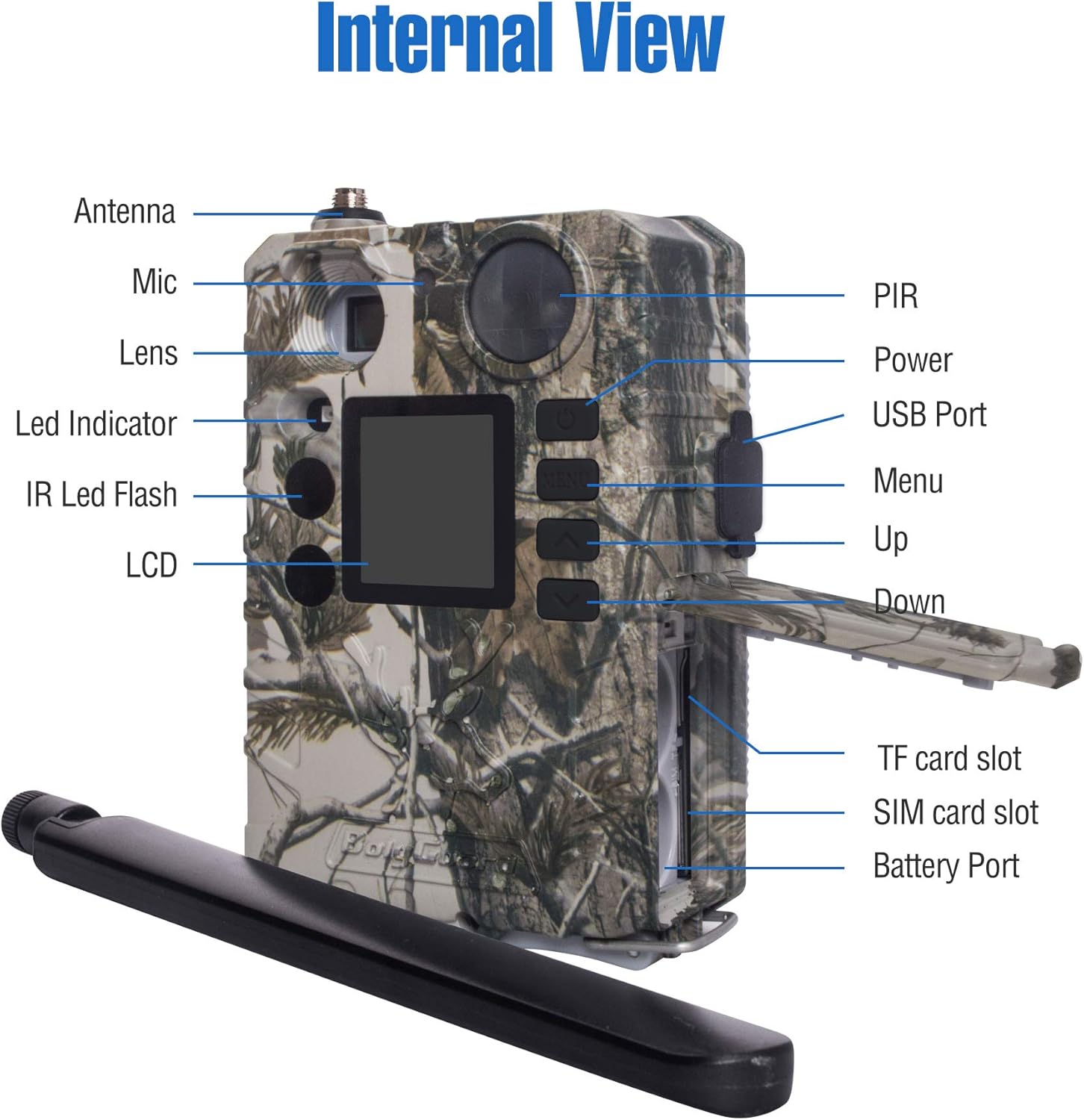
Abbildung 3.1: Intern und Extern View. A detailed diagram identifying the key components and ports of the BG310-M camera, essential for setup and operation.
- Antenne: Für 4G-Mobilfunkkommunikation.
- Linse: Nimmt Bilder und Videos auf.
- PIR-Sensor: Passiver Infrarotsensor zur Bewegungserkennung.
- IR LED Flash: 940nm no-glow infrared LEDs for night vision.
- LCD Anzeige: 1.44-inch TFT screen for menu navigation and viewing media.
- Bedientasten: Menu, Up, Down, OK buttons for navigation.
- USB-Anschluss: Zum Anschluss an einen Computer.
- TF-Karten-Slot: For inserting a MicroSD card (storage).
- SIM-Kartensteckplatz: For inserting a 4G SIM card (cellular data).
- Batterieanschluss: For battery installation.
4. Installationsanleitung
Befolgen Sie diese Schritte, um Ihre Kamera für den Einsatz vorzubereiten:
4.1. Batterien einlegen
- Öffnen Sie das Batteriefach.
- Legen Sie die erforderliche Anzahl AA-Batterien ein und achten Sie dabei auf die richtige Polarität.
- Verschließen Sie das Batteriefach fest.
4.2. TF-Karte einlegen
- Suchen Sie den TF-Kartensteckplatz.
- Insert a formatted MicroSD card (up to 32GB, Class 10 or higher recommended) into the slot until it clicks.
4.3. SIM-Karte einlegen
The BG310-M supports 4G LTE connectivity. A compatible SIM card (e.g., AT&T or Verizon) is required for cellular functions.
- Suchen Sie den SIM-Kartensteckplatz.
- Insert an activated 4G SIM card into the slot.
4.4. Attach Antenna
- Screw the provided antenna onto the antenna port at the top of the camera.
- Ensure it is securely fastened but do not overtighten.

Figure 4.1: Camera with Antenna. Front view of the BolyGuard BG310-M 4G Wireless Trail Camera, showcasing seine Tarnung casing and attached antenna.
4.5. Erste Inbetriebnahme und Netzwerkkonfiguration
- Schalten Sie die Kamera in den Modus „SETUP“.
- The camera will power on and display the main menu.
- Navigate to the 'Network' settings to configure your cellular connection. This may involve selecting your carrier and setting up APN details if not automatically detected.
- Download the Molnus Cloud App on your smartphone or access the web portal to link your camera for remote control and viewing.
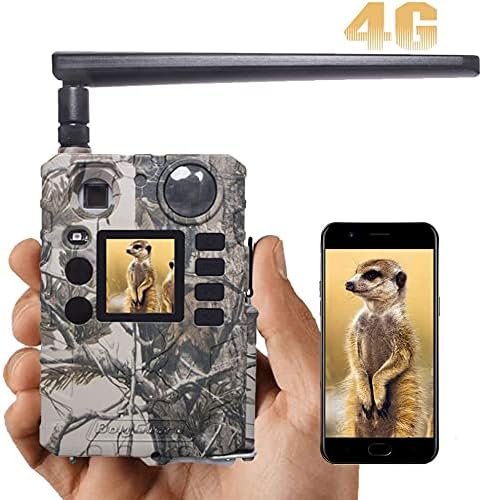
Figure 4.2: App Connectivity. This image illustrates the camera's cellular capability, showing a captured image on both the camera's screen and a connected smartphone via the Molnus app.
5. Bedienungsanleitung
5.1. Kameramodi
The BG310-M typically operates in three modes:
- AUS: Die Kamera ist ausgeschaltet.
- KONFIGURATION: Allows access to menu settings, viewing photos/videos, and manual testing.
- AUF: Camera is active and will capture photos/videos based on its settings and motion detection.
5.2. Menünavigation
Use the control buttons (MENU, UP, DOWN, OK) to navigate through the camera's settings. Common settings include:
- Modus: Wählen Sie Foto, Video oder Foto+Video.
- Bildgröße: Set photo resolution (e.g., 18MP, 12MP).
- Videogröße: Videoauflösung einstellen (z. B. 720P).
- Auslöseintervall: Zeitverzögerung zwischen den Erkennungen.
- Empfindlichkeit: Adjust PIR sensor sensitivity.
- Zeitraffer: Enable time-lapse photography.

Figure 5.1: Image Resolution. Demonstrates the superior clarity of 18MP images compared to 12MP, highlighting the camera's high-resolution capture capability.
5.3. Aufnehmen von Bildern und Videos
Once configured and switched to 'ON' mode, the camera will automatically capture images or videos when motion is detected within its 100ft detection range. The 0.7-second trigger speed ensures minimal delay.

Figure 5.2: Fast Trigger Speed. This image emphasizes the camera's fast 0.7-second trigger speed, capable of capturing quick movements.
5.4. Nachtsicht
The camera utilizes 940nm no-glow IR LEDs for discreet night vision, allowing it to capture clear images and videos in low-light conditions without disturbing wildlife.

Figure 5.3: 940nm No-Glow IR. Illustrates the effectiveness of 940nm no-glow infrared LEDs for discreet night vision, showing clear images of wildlife in both day and night conditions.
Video 5.1: Clear Night Video. This video showcases the BolyGuard BG310-M trail camera's night vision performance, capturing clear footage of a skunk in a backyard setting during nighttime.
5.5. Remote Monitoring (Molnus App/Web Portal)
Utilize the Molnus Cloud App or web portal to remotely view captured media, change camera settings, and receive real-time alerts. Ensure your camera has a strong 4G signal for optimal performance.
6. Wartung
Durch sachgemäße Wartung wird die Langlebigkeit und optimale Leistung Ihrer Wildkamera sichergestellt.
- Reinigung: Gently wipe the lens and PIR sensor with a soft, dry cloth to remove dirt or smudges. Do not use abrasive cleaners.
- Batteriewechsel: Tauschen Sie die Batterien aus, sobald die Anzeige für niedrigen Batteriestand aufleuchtet oder die Leistung nachlässt. Ersetzen Sie immer alle Batterien gleichzeitig durch neue des gleichen Typs.
- TF-Kartenverwaltung: Regularly format the TF card to prevent data corruption and ensure sufficient storage space. Back up important files vor der Formatierung.
- Wetterschutz: While the camera is IP65 waterproof, ensure all compartments (battery, SIM/TF card) are securely closed to maintain its water resistance, especially in harsh weather conditions.

Figure 6.1: IP65 Waterproofing. Shows the camera's IP65 waterproof design, ensuring reliable operation in various weather conditions like rain and snow.
7. Fehlerbehebung
Sollten Sie Probleme mit Ihrer Kamera haben, beachten Sie bitte die folgenden häufigen Probleme und Lösungen:
| Problem | Mögliche Ursache | Lösung |
|---|---|---|
| Kamera lässt sich nicht einschalten | Niedrige oder leere Batteriespannung; falsche Batteriepolarität. | Replace batteries with fresh ones, ensuring correct orientation. |
| Es wurden keine Bilder/Videos aufgenommen | TF card full or not inserted correctly; PIR sensor blocked; camera in 'OFF' or 'SETUP' mode. | Check TF card, ensure it's formatted; clear sensor path; switch to 'ON' mode. |
| Schlechte Bild-/Videoqualität | Verschmutzte Linse; schlechte Lichtverhältnisse; falsche Auflösungseinstellungen. | Clean the lens; ensure adequate lighting or proper night vision settings; adjust resolution. |
| Keine Mobilfunkverbindung | SIM card not activated or incorrectly inserted; poor signal strength; incorrect APN settings. | Verify SIM card activation; reinsert SIM; check signal; configure APN settings manually if needed. |
| Camera not responding to app | No cellular connection; camera not linked to Molnus account; app issues. | Ensure cellular connection; verify camera is linked in Molnus; restart app/camera. |
8. Technische Daten
| Besonderheit | Spezifikation |
|---|---|
| Modell | BG310-M |
| Bildauflösung | 18 MP (Effektive Standbildauflösung) |
| Videoauflösung | 720p, 1080p (Video Capture Resolution) |
| Konnektivität | 4G LTE Cellular, Wi-Fi (Wireless Communication Technology) |
| Nachtsicht | 940nm No-Glow IR LEDs, 100 Feet Range |
| Auslösegeschwindigkeit | Weniger als 0.7 Sekunden |
| Erfassungsbereich | 100 Fuß |
| Fachgebiet View | 57 Grad |
| Anzeige | 1.44" TFT display |
| Wasserdichtigkeit | IP65 (International Protection Rating) |
| Stromquelle | Batteriebetrieben (Batterien erforderlich: Ja) |
| Abmessungen (L x B x H) | 4.99 x 2 x 2 Zoll |
| Artikelgewicht | 1 Pfund |
| Empfohlene Verwendung | Game & Trail, Outdoor |
9. Garantie und Support
9.1. Produktgarantie
BolyGuard offers a 2-Year Hassle-Free Guarantee for this product, exceeding the standard 1-year market warranty. This includes support and potential free replacements for manufacturing defects.
9.2. Kundendienst
For technical assistance, troubleshooting, or warranty claims, please contact BolyGuard customer service. Refer to the contact information provided on the product packaging or the official BolyGuard webBesuchen Sie die Website für die aktuellsten Supportinformationen.