
Einführung
This manual provides essential information for the safe and efficient use of your ONN 42-Inch Full HD LED Smart TV, Model 100018254. Please read these instructions thoroughly before operating your television and retain them for future reference.
Lieferumfang
Vergewissern Sie sich vor dem Fortfahren mit der Einrichtung, dass alle Komponenten vorhanden sind.
- ONN 42-Inch Full HD LED Smart TV
- Fernbedienung
- TV-Ständer (2-teilig)
- Schrauben für TV-Ständer
- Netzkabel
- Kurzanleitung (nicht in diesem Handbuch enthalten)

Bild: Vorderseite view of the ONN 42-inch Smart TV displaying the Roku TV home screen with various streaming app icons like Netflix, Disney+, Apple TV, Hulu, Peacock, and Roku Channel. The TV is black with slim bezels and two stand feet.
Aufstellen
1. Anbringen des TV-Ständers
- Legen Sie den Fernseher vorsichtig mit dem Bildschirm nach unten auf eine weiche, saubere Oberfläche, um Beschädigungen zu vermeiden.
- Richten Sie jedes Standfußteil an den entsprechenden Schraubenlöchern an der Unterseite des Fernsehers aus.
- Befestigen Sie jedes Ständerteil mit den mitgelieferten Schrauben. Achten Sie darauf, dass diese fest angezogen sind.

Image: A diagram illustrating the dimensions of the ONN 42-inch TV, showing its width as 43 inches and height as 37 inches when placed on its stand.
2. Wandmontage (optional)
This TV is compatible with VESA standard wall mounts. Refer to your wall mount's instructions for proper installation. Ensure the wall mount can support the weight of the television.

Bild: Rückseite view of the ONN 42-inch TV, highlighting the VESA mounting screw holes in a square pattern and various input ports on the side and bottom right.
3. Geräte anschließen
Schließen Sie Ihre externen Geräte wie Kabelreceiver, Spielekonsolen oder Blu-ray-Player an die Eingangsanschlüsse des Fernsehers an.
- HDMI: For high-definition audio and video. Use an HDMI cable to connect devices like set-top boxes, game consoles, or streaming sticks.
- USB: Zum Anschließen von USB-Speichergeräten zur Medienwiedergabe files.
- W-lan: For internet connectivity to access smart TV features and streaming services.
4. Ersteinrichtungsassistent
- Stecken Sie das Netzkabel in den Fernseher und dann in eine Wandsteckdose.
- Drücken Sie den Ein-/Ausschalter auf der Fernbedienung oder am Fernseher selbst.
- Follow the on-screen instructions to complete the initial setup, including language selection, network connection (Wi-Fi), channel scanning, and linking to your Roku account (if applicable).
Bedienung des Fernsehers
1. Fernsteuerung überview
The remote control allows you to navigate the TV's interface and control various functions.
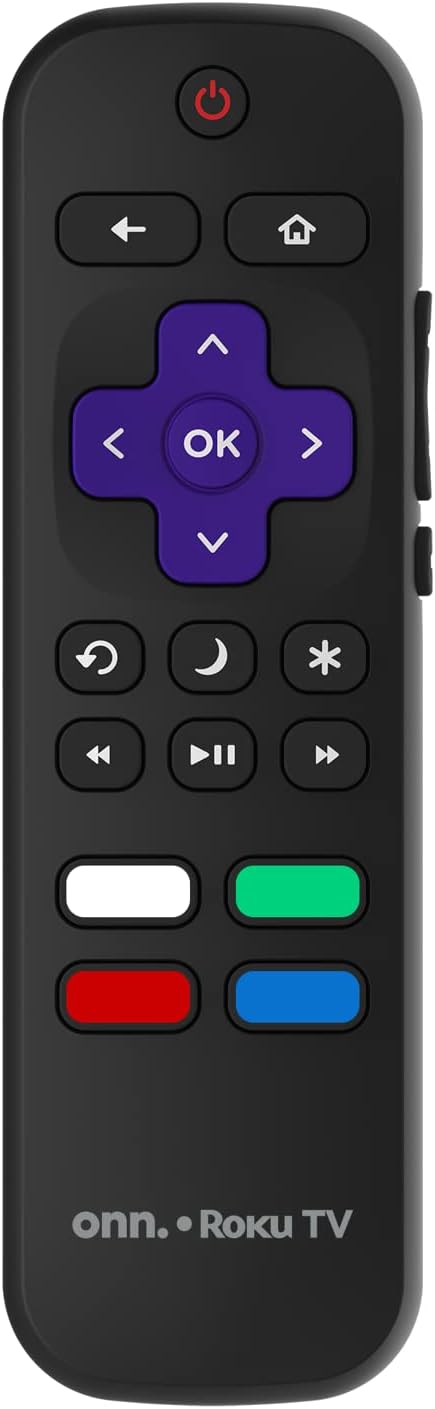
Image: The ONN Roku TV remote control, featuring a power button, directional pad, OK button, home button, back button, volume controls, and dedicated buttons for popular streaming services.
- Netzschalter: Schaltet den Fernseher ein oder aus.
- Directional Pad (D-Pad) & OK: Navigiert durch Menüs und bestätigt Auswahlen.
- Home "Button: Kehrt zum Roku TV-Startbildschirm zurück.
- Zurück-Schaltfläche: Kehrt zum vorherigen Bildschirm oder Menü zurück.
- Lautstärke erhöhen/verringern: Regelt die Lautstärke.
- Stummschaltfläche: Schaltet den Ton stumm oder hebt die Stummschaltung auf.
- Kanal hoch/runter: Wechselt die Kanäle (für Antennen-/Kabeleingänge).
- Spezielle App-Schaltflächen: Quick access to popular streaming services like Netflix, Hulu, etc.
2. Smart-TV-Funktionen
Your ONN Smart TV provides access to a wide range of streaming content and smart functionalities.
- Streaming-Dienste: Access pre-installed apps like Netflix, YouTube, and many more through the Roku Channel Store.
- Sprachsteuerung: Compatible with Alexa and Google Assistant for hands-free control (requires a separate compatible voice assistant device).
- Automatic Software Updates: The TV will automatically update its software when connected to the internet, ensuring you have the latest features and security.
3. Eingabeauswahl
To switch between connected devices (e.g., cable box, game console), use the Eingang button on your remote or select the desired input from the Roku TV home screen.
4. Bild- und Toneinstellungen
Access the TV's settings menu to customize picture and sound preferences. Navigate to Settings > TV picture settings or Einstellungen > Audio to adjust options like brightness, contrast, color, sound mode, and equalizer settings.
Wartung
1. Reinigen des Bildschirms
- Vor der Reinigung immer den Fernseher ausschalten und den Stecker ziehen.
- Verwenden Sie ein weiches, fusselfreies Tuch, leicht feucht.ampmit Wasser oder einem speziellen Bildschirmreiniger abspülen.
- Sprühen Sie den Reiniger nicht direkt auf den Bildschirm. Tragen Sie ihn zuerst auf ein Tuch auf.
- Vermeiden Sie die Verwendung von Scheuermitteln, Alkohol, Benzol oder Verdünnern, da diese den Bildschirm beschädigen können.
2. Software-Updates
Ensure your TV is connected to the internet to receive automatic software updates. These updates improve performance, add features, and enhance security. You can manually check for updates in the Einstellungen > System > Systemupdate Speisekarte.
Fehlerbehebung
Sollten Sie Probleme mit Ihrem Fernseher haben, beachten Sie bitte die folgenden gängigen Lösungsansätze:
Kein Strom
- Prüfen Sie, ob das Netzkabel sowohl am Fernseher als auch an der Wandsteckdose fest eingesteckt ist.
- Überprüfen Sie die Funktion der Wandsteckdose, indem Sie ein anderes Gerät anschließen.
- Versuchen Sie, den Ein-/Ausschalter am Fernseher selbst zu drücken, nicht nur auf der Fernbedienung.
Kein Bild / Verzerrtes Bild
- Stellen Sie sicher, dass die richtige Eingangsquelle ausgewählt ist (z. B. HDMI 1, HDMI 2).
- Überprüfen Sie alle Kabelverbindungen zwischen dem Fernseher und den externen Geräten.
- Versuchen Sie gegebenenfalls ein anderes HDMI-Kabel.
- Adjust picture settings (brightness, contrast) in the TV menu.
Kein Ton / Leise Lautstärke
- Check if the TV is muted or if the volume is turned down.
- Ensure external audio devices (soundbars, receivers) are properly connected and powered on.
- Überprüfen Sie die Audioeinstellungen im TV-Menü.
Probleme mit der Netzwerkverbindung
- Überprüfen Sie, ob Ihr WLAN-Router eingeschaltet ist und funktioniert.
- Starten Sie Ihren Router und Ihr Modem neu.
- Gehe zu Einstellungen > Netzwerk > Verbindung prüfen auf Ihrem Fernseher, um das Problem zu diagnostizieren.
- Stellen Sie sicher, dass Sie das richtige WLAN-Passwort eingeben.
Technische Daten
| Besonderheit | Detail |
|---|---|
| Modellnummer | 100018254 |
| Bildschirmgröße | 42 Zoll |
| Display-Technologie | LED |
| Auflösung | 1080p (Full HD) |
| Bildwiederholrate | 60 Hz |
| Konnektivität | USB, WLAN |
| Unterstützte Internetdienste | Netflix, YouTube (and others via Roku platform) |
| Kontrollmethode | Voice (via Alexa & Google Assistant compatible devices), Remote Control |
| Montagetyp | Wandmontage (VESA-kompatibel) |
| Farbe | Schwarz |
| UPC | 671227025567 |

Image: Energy Guide label for Television Model 100018254, indicating an estimated yearly energy cost of $11 based on 12 cents per kWh and 5 hours use per day.
Garantie und Support
For warranty information and technical support, please refer to the documentation included with your purchase or visit the official ONN support webWebsite. Bewahren Sie Ihren Kaufbeleg für Garantieansprüche auf.