1. Einleitung
This user manual provides essential information for the proper setup, operation, and maintenance of your Beelink MINI S12 Mini PC. Please read this manual thoroughly before using the device to ensure optimal performance and longevity.
2. Packungsinhalt
Überprüfen Sie, ob alle Artikel im Paket vorhanden sind:
- Beelink MINI S12 Mini PC
- Power Adapter (Optional: US / EU / UK / JP / AU plug types)
- HDMI Cables (2 included)
- Wall-mounted Bracket (VESA mount)
- Bedienungsanleitung

Image: Included accessories for the Beelink MINI S12 Mini PC, showing the user manual, VESA mount, HDMI cables, and various power adapter options.
3. Produktüberschreitungview
3.1 Front and Rear Panel Interfaces
The Beelink MINI S12 Mini PC features a variety of ports for connectivity:

Bild: Detailliert view of the front and rear interfaces of the Beelink MINI S12 Mini PC. The front panel includes an RTC Key, two USB 3.2 Gen2 (10Gbps) ports, an earphone jack, and a power button. The rear panel features two USB 3.2 Gen2 (10Gbps) ports, a 2.5G LAN port, two 4K 60Hz HDMI ports, a DC power input, and a locking slot.
- Vorderseite: RTC Key, 2x USB 3.2 Gen2 (10Gbps), 3.5mm Earphone Jack, Power Button.
- Rückwand: 2x USB 3.2 Gen2 (10Gbps), 1x 2.5G LAN Port, 2x 4K 60Hz HDMI Ports, DC Power Input, Locking Slot.
3.2 Interne Komponenten und Erweiterung
The MINI S12 supports high-speed storage and memory configurations:

Bild: Intern view of the Beelink MINI S12 Mini PC highlighting the dual M.2 2280 SSD slots. One slot supports PCIe 3.0 x1 (not compatible with SATA3 SSDs), and the other supports PCIe 3.0 x4 (compatible with SATA3 SSDs). The device ships with a SATA3 SSD, with optional 256GB or 512GB configurations.
- Lagerung: Built-in 256GB M.2 SATA3 SSD. Supports M.2 2280 NVMe/SATA3 SSD, configurable up to 4TB storage.
- Erinnerung: 8GB DDR4 RAM. Single-channel support up to 16GB (dependent on memory type), optional single-channel 8GB/16GB memory.

Image: A SO-DIMM DDR4 3200MHz memory module, illustrating the type of high-quality memory used in the Beelink MINI S12 for stable operation.
3.3 Processor and Cooling
The MINI S12 is powered by an Intel N95 Processor and features an efficient cooling system.

Image: A data comparison table highlighting the specifications of the Intel N95 processor (4 cores, 4 threads, 3.4GHz Max Turbo Frequency, 1.7GHz Base Frequency, 25W TDP-up) against the N5105 processor.
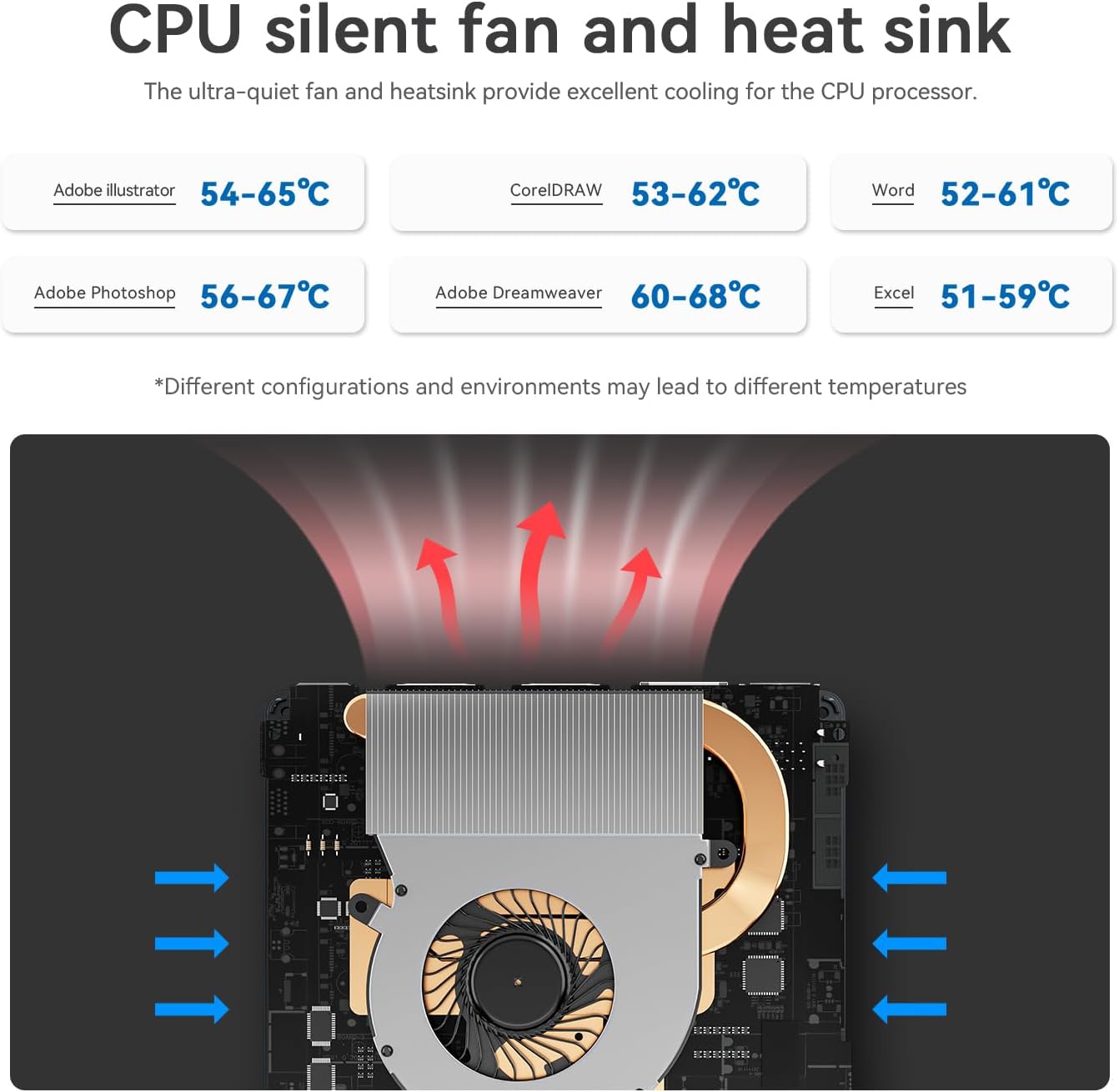
Image: Diagram illustrating the CPU silent fan and heat sink, designed to provide excellent cooling for the processor. It shows air intake and exhaust paths, with typical operating temperatures for various applications.
3.4 Hauptmerkmale
- Energieeinsparung: Entwickelt für geringen Stromverbrauch.
- Kabellose Verbindung: WiFi5 (802.11ax) for fast data transfer and Bluetooth 4.2.
- Netzwerk: 2.5G LAN port for high-speed wired internet.
- Anzeige: Dual HDMI ports supporting 4K FPS video playback and dual-screen 4K display.
- Wake-on-LAN: Supports auto power on via network signal.
- Montage: VESA mount included for behind-monitor or wall installation.

Image: Infographic displaying key features such as energy saving, WiFi5 (867Mbps), Wake on LAN/Auto Power On, Dual Display support (4K resolution), LAN 2.5G (312.5MB/s), and Wall Mount capability.
4. Installationsanleitung
4.1 Anschließen von Peripheriegeräten
- Connect your monitor(s) to the HDMI ports on the rear panel using the provided HDMI cables.
- Schließen Sie Ihre Tastatur und Maus an die verfügbaren USB-Anschlüsse an.
- For wired internet, connect an Ethernet cable to the 2.5G LAN port. For wireless internet, ensure your WiFi network is available.
- If desired, mount the Mini PC using the VESA bracket on the back of your monitor or a wall.
4.2 Einschalten
- Connect the power adapter to the DC power input port on the rear panel.
- Stecken Sie das Netzteil in eine Steckdose.
- Drücken Sie den Netzschalter an der Vorderseite, um den Mini-PC einzuschalten.
The Mini PC comes pre-installed with Windows 11 Home. Follow the on-screen instructions for initial Windows setup.
Video: An official product video from Beelink Limited showcasing the Beelink MINI S12 N95 Mini PC, demonstrating its compact size, various ports, internal components, and dual-screen 4K display capabilities. This video provides a visual overview of the product's features and setup.
5. Bedienungsanleitung
5.1 Grundlegende Bedienung
- Einschalten: Drücken Sie den Netzschalter auf der Vorderseite.
- Ausschalten: Use the standard Windows shutdown procedure (Start Menu > Power > Shut down).
- Neustart: Use the standard Windows restart procedure (Start Menu > Power > Restart).
- Schlafen: Use the standard Windows sleep procedure (Start Menu > Power > Sleep).
5.2 Dual-Display-Setup
To utilize the dual 4K display feature:
- Connect two monitors to the two HDMI ports on the rear of the Mini PC.
- Sobald beide Monitore angeschlossen und eingeschaltet sind, sollten sie von Windows automatisch erkannt werden.
- Right-click on the desktop, select "Display settings," and configure your preferred display mode (e.g., Extend, Duplicate) and resolution.
6. Wartung
6.1 Reinigung
- Reinigen Sie die Außenseite des Mini-PCs regelmäßig mit einem weichen, trockenen Tuch.
- Use compressed air to gently clear dust from the ventilation grilles to maintain optimal airflow and cooling.
- Flüssige Reinigungs- oder Lösungsmittel dürfen nicht direkt auf dem Gerät verwendet werden.
6.2 Softwareaktualisierungen
- Keep your Windows operating system updated by regularly checking for updates via "Settings > Windows Update."
- Ensure your device drivers are up-to-date for optimal performance and compatibility. Visit the official Beelink webAuf dieser Website finden Sie bei Bedarf die neuesten Treiber.
7. Fehlerbehebung
7.1 Kein Strom
- Stellen Sie sicher, dass das Netzteil sowohl mit dem Mini-PC als auch mit einer funktionierenden Steckdose fest verbunden ist.
- Überprüfen Sie die Funktionsfähigkeit der Steckdose, indem Sie ein anderes Gerät anschließen.
- Versuchen Sie es gegebenenfalls mit einem anderen, kompatiblen Netzteil.
7.2 Keine Anzeige
- Prüfen Sie, ob die HDMI-Kabel sowohl mit dem Mini-PC als auch mit dem/den Monitor(en) fest verbunden sind.
- Stellen Sie sicher, dass der Monitor eingeschaltet und auf die richtige Eingangsquelle (HDMI 1, HDMI 2 usw.) eingestellt ist.
- Versuchen Sie, einen anderen Monitor anzuschließen oder ein anderes HDMI-Kabel zu verwenden.
7.3 Probleme mit der Netzwerkverbindung
- Kabelgebunden (LAN): Überprüfen Sie die Ethernet-Kabelverbindung. Stellen Sie sicher, dass Ihr Router/Modem ordnungsgemäß funktioniert.
- Drahtlos (WLAN): Stellen Sie sicher, dass WLAN in den Windows-Einstellungen aktiviert ist. Prüfen Sie, ob Ihr WLAN-Netzwerk sichtbar ist und geben Sie das richtige Passwort ein. Starten Sie Ihren Router/Ihr Modem neu.
7.4 Systemverlangsamung
- Schließen Sie unnötige Anwendungen, die im Hintergrund laufen.
- Prüfen Sie, ob Windows-Updates oder Treiberaktualisierungen ausstehen, und installieren Sie diese gegebenenfalls.
- Stellen Sie sicher, dass auf Ihrer SSD ausreichend freier Speicherplatz vorhanden ist.
- Führen Sie einen Virenscan durch, um nach Schadsoftware zu suchen.
8. Spezifikationen
| Besonderheit | Spezifikation |
|---|---|
| Prozessor | Intel N95 (bis zu 3.4 GHz, 4 Kerne/4 Threads, 4 MB Cache) |
| RAM | 8 GB DDR4 |
| Lagerung | 256 GB M.2 SATA3 SSD (Expandable up to 4TB) |
| Grafik | Intel UHD-Grafik |
| Betriebssystem | Windows 11 Home |
| Kabellose Konnektivität | WiFi5 (802.11ax), Bluetooth 4.2 |
| LAN | 2.5G Ethernet |
| Videoausgang | 2x HDMI (4K @ 60Hz) |
| USB-Anschlüsse | 4x USB 3.2 Gen2 (10 Gbit/s) |
| Audio | 3.5mm Kopfhörerbuchse |
| Maße | Ungefähr 4.52 x 4.01 x 1.54 Zoll |
| Gewicht | Ungefähr 1.57 Pfund |
9. Garantie und Support
All Beelink products have obtained FCC, CE, and RoHS Certification. We offer a 1-year free warranty from the date of purchase. For technical assistance or any questions, please contact our customer support. We provide 7 days/24 hours serving.
If you require assistance with installing a Windows 10 system or have other inquiries, please send us a message through the official support channels.