
1. Einleitung
This manual provides detailed instructions for the setup, operation, and maintenance of your DAYTECH CI02-2 DE 10-Channel Wireless Intercom System. Please read this manual thoroughly before using the product to ensure proper function and safety. This wireless intercom system is designed for clear and reliable communication within homes, offices, or other environments, offering a long operational range without requiring internet or phone lines.
2. Produktüberschreitungview
2.1 Packungsinhalt
Das Standardpaket umfasst typischerweise:
- DAYTECH CI02-2 DE Wireless Intercom Units (quantity may vary based on purchase)
- Power Adapters for each unit
- Benutzerhandbuch (dieses Dokument)
2.2 Hauptmerkmale
- 10-Channel Wireless Communication
- Long Range Operation (up to 0.5 kilometers in open areas, 60-100 meters indoors)
- Clear Voice Transmission
- VOX (Voice Operated Exchange) Function for hands-free communication
- Group Call Capability to broadcast messages to multiple units
- Monitor Function for listening to other units
- Simple Setup and Operation (Plug and Play)
- No internet or phone line required
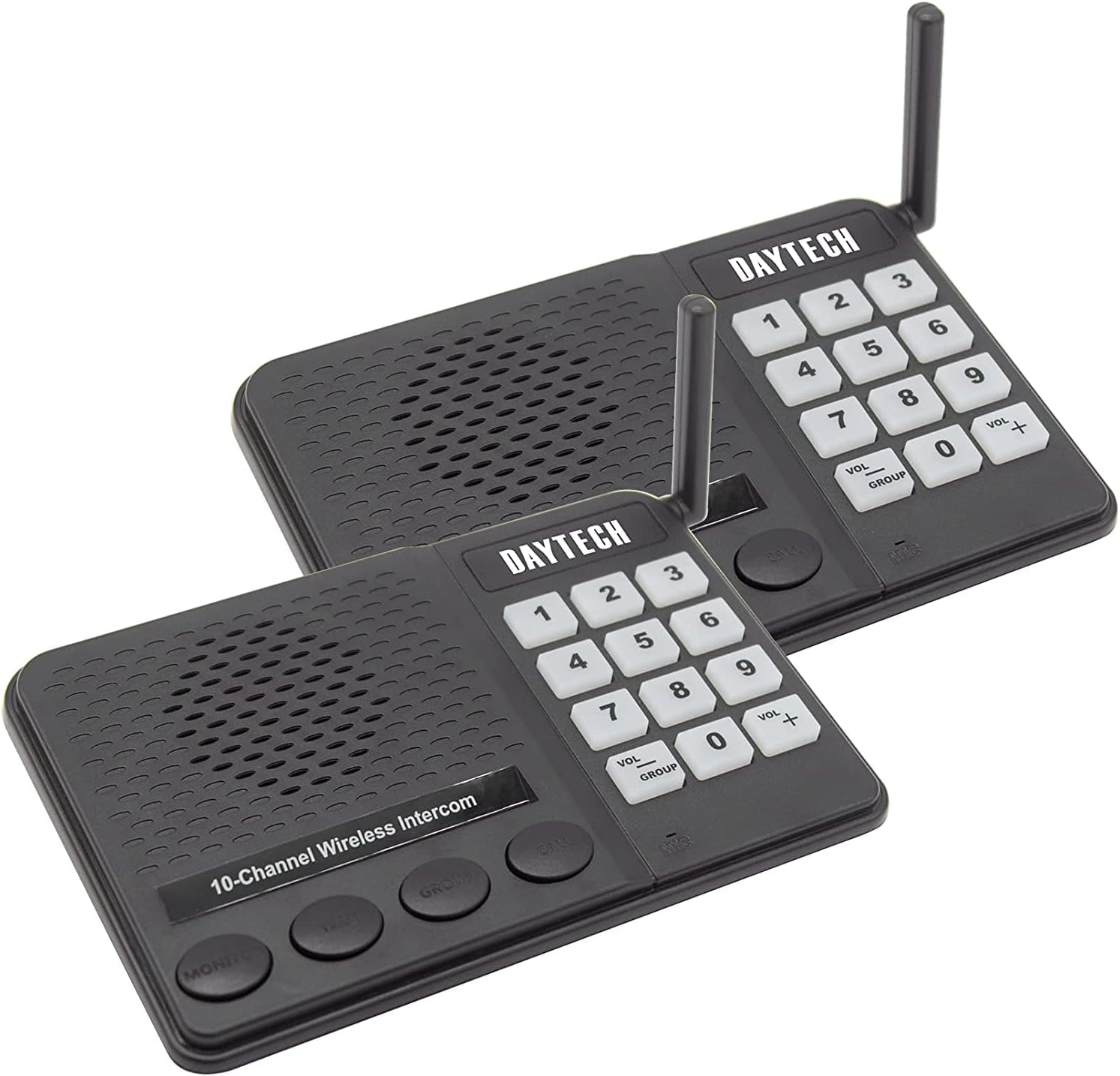
Image 1: Two DAYTECH CI02-2 DE wireless intercom units, showing the keypad, speaker, microphone, and antenna on each device.
3. Bedienelemente und Anzeigen
Each intercom unit features the following controls and indicators:
- Tastatur (0-9): Used for selecting channels and codes.
- Anrufknopf: Initiates a call to a selected channel.
- TALK-Taste: Press and hold to speak; release to listen.
- MONITOR-Taste: Activates the monitoring function or VOX mode.
- GROUP-Taste: Initiates a group call to all units on the same channel.
- VOL+ / VOL- Tasten: Stellt die Lautsprecherlautstärke ein.
- Betriebsanzeige: Shows the unit's power status.
- Antenne: For wireless signal transmission and reception.
4. Einrichtungsanweisungen
4.1 Einschalten
- Connect the provided power adapter to the DC IN port on the back of each intercom unit.
- Stecken Sie das Netzteil in eine normale Steckdose.
- The power indicator light on the unit will illuminate, indicating it is powered on and ready for use.
4.2 Setting Channels and Codes
For communication between units, they must be set to the same channel and code. The system supports 10 channels.
- On each intercom unit, use the keypad to select a desired channel (e.g., press '1' for Channel 1).
- Ensure all units intended to communicate with each other are set to the same channel.
- The system may also support a sub-code feature for privacy; refer to the unit's display or specific instructions for setting codes if available.
4.3 Platzierungsrichtlinien
Optimal placement enhances communication range and clarity:
- Place units in central locations within their intended communication area.
- Avoid placing units near large metal objects, thick concrete walls, or other electronic devices that may cause interference.
- Ensure the antenna is upright and unobstructed for best signal reception.
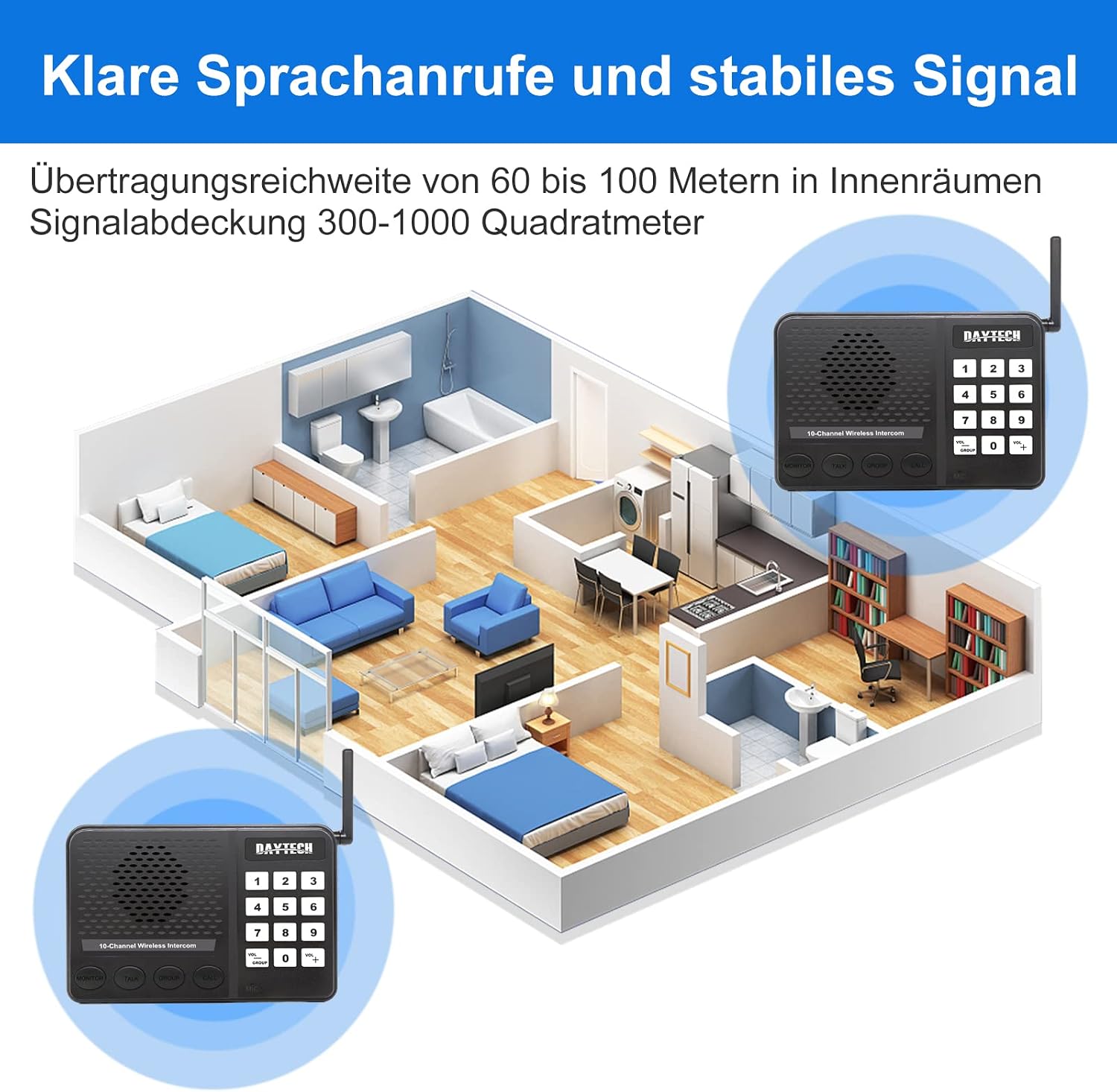
Image 2: Illustration of intercom units placed in different rooms, demonstrating effective indoor communication range (60-100 meters) and signal coverage (300-1000 square meters).
5. Bedienungsanleitung
5.1 Anruf tätigen
- Ensure your unit and the receiving unit are on the same channel.
- Drücken Sie die ANRUF Drücken Sie den Knopf. Das Empfangsgerät klingelt.
- Once the receiving unit answers (by pressing SPRECHEN), you can begin speaking.

Image 3: Depiction of the intercom system in an office environment, highlighting the simplicity of a one-click call without requiring internet or phone connections.
5.2 Empfangen eines Anrufs
- When your unit rings, press and hold the SPRECHEN Schaltfläche zum Antworten.
- Speak clearly into the microphone. Release the SPRECHEN Zum Anhören drücken.
5.3 Two-Way Communication (TALK Button)
Der SPRECHEN button enables two-way communication:
- To speak: Press and hold the SPRECHEN Taste.
- To listen: Release the SPRECHEN Taste.

Image 4: Instructions for using the intercom. To answer a call, hold the "TALK" button. To enter VOX mode (two-way hands-free listening), press the "MONITOR" button.
5.4 Lautstärkeregelung
Verwenden Sie die Lautstärke+ Und vol- buttons on the keypad to increase or decrease the speaker volume to a comfortable level.
6. Erweiterte Funktionen
6.1 VOX-Funktion (Sprachgesteuerte Vermittlungsstelle)
The VOX function allows for hands-free communication. When activated, the intercom will automatically transmit your voice when you speak, without needing to press the TALK button.
- To activate VOX mode, press the MONITOR Taste.
- In VOX mode, the unit will automatically transmit when it detects speech.
- To exit VOX mode, press the MONITOR erneut die Taste.

Image 5: Depiction of the VOX function for internal communication, enhancing office efficiency by allowing hands-free conversations.
6.2 Gruppenanruffunktion
The Group Call function allows you to broadcast a message to all other intercom units set to the same channel and code simultaneously.
- Drücken Sie die GRUPPE Taste.
- Speak your message. All units on the same channel will receive the broadcast.
- Lassen Sie den GRUPPE button when finished speaking.
6.3 Überwachungsfunktion
The Monitor function allows you to listen in on another intercom unit that is set to the same channel and code. This can be useful for monitoring a child's room or an office area.
- Drücken Sie die MONITOR Taste.
- Your unit will now receive audio from any other unit on the same channel that is transmitting or in VOX mode.
- To exit monitoring, press the MONITOR erneut die Taste.

Abbildung 6: Beispielamples of practical applications for the intercom system in various home and office environments, such as a garage, bedroom, living room, dining room, cellar, and secretary's office.
7. Wartung
- Reinigung: Wipe the units with a soft, dry cloth. Do not use abrasive cleaners or solvents.
- Lagerung: If storing for an extended period, disconnect from power and store in a cool, dry place.
- Feuchtigkeit vermeiden: Keep the units away from water and high humidity.
8. Fehlerbehebung
| Problem | Mögliche Ursache | Lösung |
|---|---|---|
| Kein Strom | Netzteil nicht angeschlossen oder Steckdose defekt. | Überprüfen Sie den Anschluss des Netzteils. Versuchen Sie es mit einer anderen Steckdose. |
| Es kann keine Kommunikation mit einer anderen Einheit hergestellt werden. | Units on different channels/codes; out of range; interference. | Ensure both units are on the same channel and code. Move units closer. Check for sources of interference. |
| Schlechte Audioqualität | Schwaches Signal; Störungen; Lautstärke zu niedrig/zu hoch. | Adjust volume. Reposition units for better signal. Reduce interference sources. |
| Gerät reagiert nicht | Vorübergehender Softwarefehler. | Disconnect power, wait 10 seconds, then reconnect power to reset the unit. |
9. Spezifikationen
- Modellnummer: CI02-2 DE
- Marke: DAYTEE
- Kanäle: 10
- Drahtlose Reichweite: Up to 0.5 kilometers (open area), 60-100 meters (indoors)
- Signalabdeckung: 300-1000 Quadratmeter
- Technische Daten: 16 x 10 x 3 cm
- Artikelgewicht: 700 g
- Batterien erforderlich: NEIN
- Stromquelle: AC Power Adapter (included)
10. Sicherheitshinweise
- Das Gerät darf nicht selbst zerlegt oder repariert werden. Alle Wartungsarbeiten dürfen nur von qualifiziertem Fachpersonal durchgeführt werden.
- Halten Sie das Gerät von Wärmequellen, direkter Sonneneinstrahlung und brennbaren Materialien fern.
- Use only the provided power adapter. Using unauthorized adapters may damage the unit and void the warranty.
- Setzen Sie das Gerät keinen extremen Temperaturen oder hoher Luftfeuchtigkeit aus.
- Außerhalb der Reichweite von Kindern aufbewahren.
11. Garantie und Support
For warranty information or technical support, please refer to the documentation provided with your purchase or contact DAYTEE customer service directly. Keep your purchase receipt as proof of purchase.