
1. Einleitung
This manual provides detailed instructions for the safe and proper use of your GEEKVAPE L200 Classic Kit. Please read this manual thoroughly before operating the device to ensure optimal performance and safety. The GEEKVAPE L200 Classic is a robust box mod kit featuring an IP68 rating for water and dust resistance, shock resistance, and a maximum output of 200W. It is designed for use with dual 21700 or 18650 external batteries (not included) and includes the Geekvape Z Max Tank.

Bild 1.1: Überview of GEEKVAPE L200 Classic Kit key features.
2. Packungsinhalt
Bitte überprüfen Sie, ob alle unten aufgeführten Artikel in Ihrem Paket enthalten sind:
- 1x GEEKVAPE L200 Classic Mod
- 1x Geekvape Z Max Atomizer (6.0ml)
- 1x Coil Tool
- 1x Spare Parts Pack
- 1x Spare Glass Tube (4.0ml)
- 1x USB-Kabel (Typ-C)
- 1x Pre-installed Geekvape M Series Coil (0.14Ω, 60-80W)
- 1x Spare Geekvape M Series Coil (0.2Ω, 70-85W)
- 2x 18650 Battery Adapter
Note: Batteries (21700 or 18650) are not included and must be purchased separately.
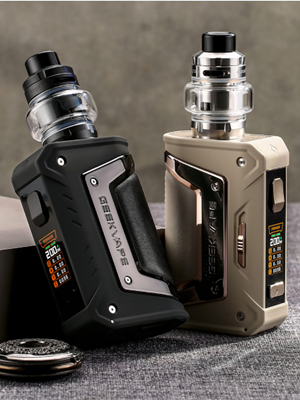
Image 2.1: Standard Edition Package Contents.
3. Einrichtung
3.1 Einlegen der Batterie
- Öffnen Sie die Abdeckung des Batteriefachs an der Unterseite des Geräts.
- Insert two 21700 batteries according to the polarity markings (+/-). If using 18650 batteries, first insert them into the provided 18650 battery adapters, then insert the adapters with batteries into the device.
- Schließen Sie den Batteriefachdeckel fest.

Image 3.1: Battery installation in the L200 Classic Mod.
3.2 Coil Installation and Tank Assembly (Geekvape Z Max Tank)
- Disassemble the Z Max Tank by unscrewing the base.
- Push the desired M Series coil into the tank base until it is firmly seated.
- Reassemble the tank components, ensuring all parts are securely tightened.
Video 3.2: Official introduction to the Geekvape Z Max Tank's leakproof system, demonstrating assembly and coil installation.
3.3 Füllen des Tanks
- Locate the top cap of the Z Max Tank.
- Twist or slide the top cap to reveal the filling ports.
- Carefully fill the tank with e-liquid through the filling ports. Avoid overfilling the tank or getting e-liquid into the central airflow tube.
- Close the top cap securely.
- Nach dem Befüllen einer neuen Spule sollte das E-Liquid vor der ersten Benutzung mindestens 5-10 Minuten einziehen, um Dry Hits zu vermeiden.
4. Bedienungsanleitung
4.1 Ein-/Ausschalten
- To power on the device, press the fire button 5 times rapidly.
- To power off the device, press the fire button 5 times rapidly until the screen indicates power off.
4.2 Einstellungen anpassen
- Use the '+' and '-' buttons to adjust the wattage or temperature settings.
- To enter the menu and change modes (e.g., Power, TC, TCR, Bypass), press the fire button 3 times rapidly. Navigate using the '+' and '-' buttons and confirm with the fire button.
4.3 A-Lock Function
The A-Lock (Accidental Press Protection Lock) switch is located on the side of the device. Slide the switch up to lock the device, preventing accidental button presses that could lead to overheating or unintended firing. Slide it down to unlock.
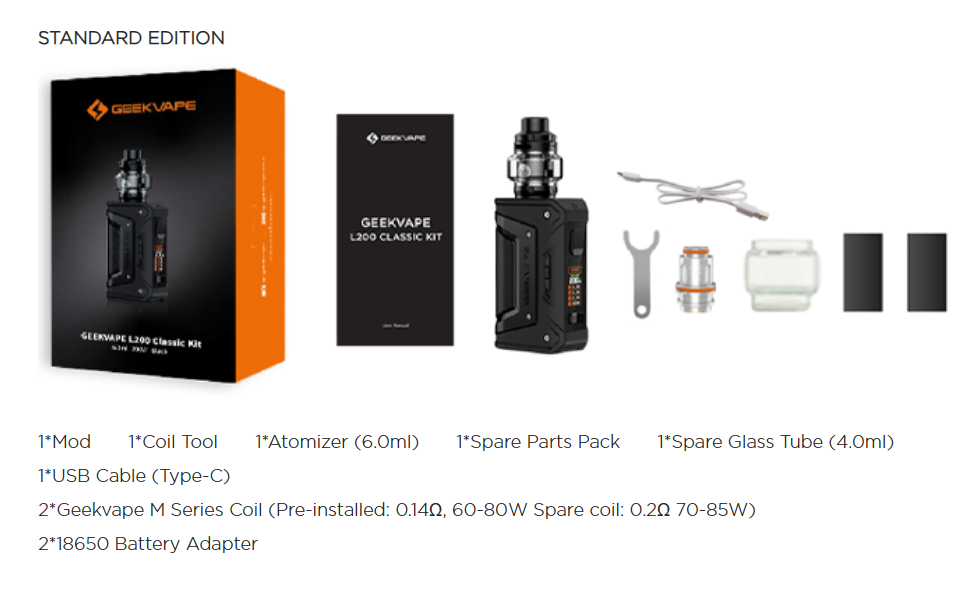
Image 4.1: A-Lock switch for accidental press protection.
4.4 Boost-Modus
Boost Mode automatically selects the maximum output for increased vapor production. This mode can be activated through the device menu.

Image 4.2: Boost Mode and 1.08-inch Full Screen Display.
4.5 Informationen anzeigen
The 1.08-inch full screen displays essential vaping information, including battery level, atomizer resistance, current wattage und die Anzahl der Züge.
Video 4.3: A showcase of the GEEKVAPE Aegis Legend 5 Mod kit, demonstrating its design, screen, and overall appearance, which is similar to the L200 Classic.
5. Wartung
5.1 Reinigung
- Regularly clean the 510 connection and battery contacts with a dry cloth to ensure good conductivity.
- Clean the tank and mouthpiece with warm water. Ensure all parts are completely dry before reassembly.
5.2 Zündspulenwechsel
Coils should be replaced when you notice a burnt taste, reduced vapor production, or diminished flavor. Follow the coil installation steps in Section 3.2 to replace the coil.
6. Fehlerbehebung
- Gerät feuert nicht: Check if the device is powered on (5 clicks of the fire button). Ensure the A-Lock switch is in the unlocked position. Verify that the battery is charged and correctly installed. Check if the atomizer is properly connected and the coil is seated correctly.
- "No Atomizer" Message: This indicates the device is not detecting the tank. Ensure the tank is screwed on tightly and the coil is correctly installed. Clean the 510 connection on both the mod and the tank.
- "Low Battery" Message: Laden Sie die Batterien auf oder ersetzen Sie sie.
- Undichter Tank: Ensure all tank components are securely tightened, especially the coil and glass sections. Check O-rings for damage and replace if necessary. Avoid overfilling the tank.
- Verbrannter Geschmack: This usually means the coil needs to be replaced or was not properly primed. Ensure the e-liquid has fully saturated the coil before use.
7. Spezifikationen
| Besonderheit | Spezifikation |
|---|---|
| Marke | GEEKVAPE |
| Modell | L200 Klassik |
| Ausgang Wattage | Bis zu 200 W |
| Batteriekompatibilität | Dual 21700 or 18650 (with adapter, not included) |
| Tankinhalt | 6.0ml (Standard), 4.0ml (Spare Glass Tube) |
| Anzeigebildschirm | 1.08-inch Full Screen |
| Schutzklasse | IP68 Wasser- und Staubbeständigkeit, Stoßfestigkeit |
| Maße | 13.5 x 8.3 x 7.9 cm |
| Gewicht | 470 Gramm |
8. Sicherheitshinweise
- This product is intended for adults over the age of 21 only.
- Außerhalb der Reichweite von Kindern und Haustieren aufbewahren.
- Do not use if you are pregnant or breastfeeding, have heart conditions, high blood pressure, diabetes, or are taking medication for depression or asthma.
- Use only original GEEKVAPE coils and accessories.
- Setzen Sie das Gerät keinen extremen Temperaturen oder direkter Sonneneinstrahlung aus.
- Zerlegen oder modifizieren Sie das Gerät nicht.
- Always use external battery chargers for optimal battery life and safety.
- Batterien und Gerät sind gemäß den örtlichen Vorschriften verantwortungsvoll zu entsorgen.
9. Garantie und Support
GEEKVAPE products are manufactured to high-quality standards. For warranty information, please refer to the warranty card included in your product packaging or visit the official GEEKVAPE website. For technical support or service inquiries, please contact your retailer or GEEKVAPE customer service directly.


