
1. Produktüberschreitungview
The SAKO Hybrid Solar Inverter is a high-performance device designed for home solar power systems. It integrates advanced MPPT solar charging technology, a pure sine wave inverter, and a UPS function in a compact unit. This inverter ensures efficient power conversion and reliable operation for various household applications.

This diagram illustrates the main features of the inverter, including 100A MPPT, photovoltaic input range, compatibility with LiFePO4 batteries, USB/RS232/RS485 communication, WiFi, large LCD display, and support for operation without a battery.
Hauptmerkmale:
- Fortschrittliche Technologie: Utilizes advanced MPPT technology for charging with up to 99.9% efficiency and DC to AC SPWM technology for pure sine wave power output.
- High-Level Configuration: Features an LCD screen and 3 LED indicators for dynamic display of system data and operating status. Equipped with an intelligent variable-speed fan for efficient heat dissipation.
- Mehrere Modi: Offers various charging modes (solar only, utility priority, solar energy priority, hybrid utility charging) and output modes (inverter and utility).
- Umfassende Schutzfunktionen: Includes protection against short circuits, overvoltage, Untervoltage, overload, and reverse polarity.
- Fernüberwachung: Supports WiFi remote monitoring for convenient use and improved work efficiency.
2. Installation und Einrichtung
Proper installation is crucial for the safe and efficient operation of your SAKO Hybrid Solar Inverter. Please follow these guidelines carefully.
2.1 Packungsinhalt:
- 1 x Hybrid Solar Inverter
- 1 x Verbindungskabel
- 1 x Bedienungsanleitung (evtl. nicht in deutscher Sprache).
2.2 Verbindung beendetview:
The inverter features clearly labeled ports for AC input/output, battery connection, and solar input. Ensure all connections are secure and correctly polarized.

This composite image shows the front and side panels of the inverter, labeling key components such as the LCD display, status indicator, charging indicator, fault indicator, operation keys, AC input/output, battery input, solar input, overcurrent protection, USB communication interface, RS232 communication interface, and the main power switch.
2.3 System Diagram:
Refer to the system diagram below for a typical setup connecting solar panels, battery, and household loads to the inverter.

A schematic diagram illustrating a complete solar power system. It shows 300W/30V solar panels connected to a lithium battery power bank, which then connects to the hybrid solar inverter. The inverter powers various household appliances like a 200L refrigerator, 25W LED light, 50in LED TV, and a fan.
2.4 Erstes Einschalten:
- Ensure all connections (solar, battery, AC input/output) are correctly made and secure.
- Turn on the battery breaker first, then the solar array breaker (if applicable).
- Finally, turn on the AC input breaker (if applicable) and the inverter's main power switch.
- Observe the LCD display and LED indicators for normal operation.
3. Bedienungsanleitung
The SAKO Hybrid Solar Inverter offers flexible operating modes to suit various energy needs. Use the control panel and LCD display to configure settings.
3.1 Control Panel and Display:
The inverter features an intuitive control panel with an LCD screen and three LED indicators (AC/INV, CHG, FAULT) to provide real-time system status and data.
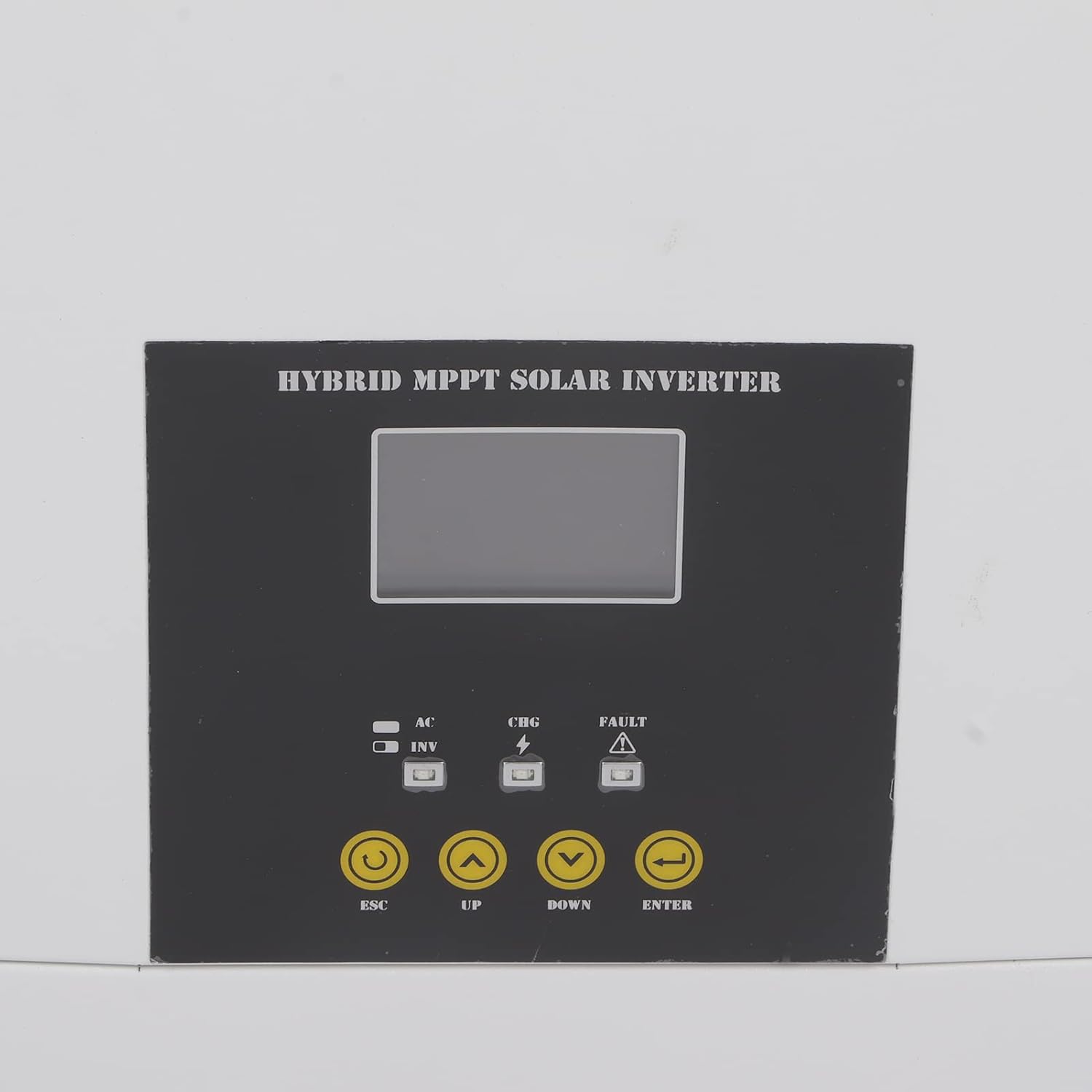
Eine Nahaufnahme view of the inverter's control panel, featuring the LCD screen, LED indicators (AC/INV, CHG, FAULT), and operation buttons (ESC, UP, DOWN, ENTER) for system management.
3.2 Betriebsarten:
You can select from various charging and output modes to optimize energy usage:
- Lademodi:
- Nur Solar
- Versorgungspriorität
- Solar Energy Priority
- Hybrid Utility Charging
- Ausgabemodi:
- Inverter (Battery/Solar)
- Utility (Bypass)
3.3 Remote Monitoring (WiFi):
The inverter supports WiFi remote monitoring, allowing you to view system data and adjust settings from a distance. Refer to the dedicated WiFi module instruction manual for setup and application details.

A detailed shot of the communication ports on the inverter, specifically showing the Ethernet (COMM PORT) and USB ports for data transfer and remote monitoring.
4. Wartung
Regular maintenance ensures the longevity and optimal performance of your hybrid solar inverter.
- Reinigung: Reinigen Sie die Außenseite des Wechselrichters regelmäßig mit einem weichen, trockenen Tuch. Achten Sie darauf, dass die Lüftungsöffnungen frei von Staub und Schmutz sind, um eine Überhitzung zu vermeiden.
- Verbindungsprüfung: Annually inspect all electrical connections for tightness and signs of corrosion. Loose connections can lead to power loss or overheating.
- Umgebungsbedingungen: Ensure the inverter is operating within its specified temperature range (-10-50℃) and in a well-ventilated area, free from excessive humidity or direct sunlight.
- Firmware-Updates: Überprüfen Sie die Angaben des Herstellers webAuf dieser Website finden Sie alle verfügbaren Firmware-Updates, um sicherzustellen, dass Ihr Wechselrichter über die neuesten Funktionen und Fehlerbehebungen verfügt.
5. Fehlerbehebung
This section provides guidance for common issues you might encounter. For complex problems, please contact technical support.
5.1 Häufige Probleme und Lösungen:
- Keine Leistungsabgabe:
- Check if the inverter is powered on and all breakers are engaged.
- Überprüfen Sie die Batterielautstärketage liegt im Betriebsbereich.
- Check for any fault indicators on the LCD or LED display.
- Überlastschutz ausgelöst:
- Reduzieren Sie die angeschlossene Last. Der Wechselrichter verfügt über einen Überlastschutz, um Schäden zu vermeiden.
- Restart the inverter after reducing the load.
- Fehleranzeige an:
- Refer to the specific error code displayed on the LCD (if any) in the detailed instruction manual for diagnosis.
- Common faults include overvoltage, Untervoltage, short circuit, or reverse polarity.
- WiFi Remote Monitoring Issues:
- Ensure the WiFi module is correctly installed and connected.
- Überprüfen Sie Ihre Netzwerkverbindung und Routereinstellungen.
- Verify the monitoring application is up to date.
6. Technische Daten
Detailed specifications for the SAKO Hybrid Solar Inverter.
| Spezifikation | Wert |
|---|---|
| Artikeltyp | Hybrid-Solar-Wechselrichter |
| Material | Eisen, ABS |
| Kapazität | 5.5 KVA, 5500 W |
| Farbe | Weiß und Schwarz |
| Leistungsfaktor | 1.0 |
| Betriebstemperaturbereich | -10-50℃ |
| Inverter Mode DC Input | 48 V DC, 127 A. |
| Inverter Mode AC Output | 230 VAC, 50/60 HZ, 23.9 A |
| Solar Charger Mode MPPT Rated Current | 100 A |
| Solar Charger Mode Rated Power | 6000 Watt |
| Solar Charger Mode Maximum Solar Input Current | 18 A |
| Solar Charger Mode Rated Operating Voltage | 240 V Gleichspannung |
| Solar Charger Mode Maximum Solar Voltage (VoC) | 500 V Gleichspannung |
| Solar Charger Mode MPPT Voltage Reichweite | 120-450 V DC |
| Datum der ersten Verfügbarkeit auf Amazon.com.be | 2. November 2022 |
| Hersteller | Tefola |
| Herstellerreferenz | Tefolai9goq3mhkp |
| Verfügbarkeit von Ersatzteilen | Informationen zu Ersatzteilen sind nicht verfügbar. |
| Empfohlene Verwendungen für das Produkt | Heim |
| Stromquelle | Sonnenenergie |
| Gesamtzahl der Steckdosen | 1 |
| Eingangslautstärketage | 48 Volt |
| Ausgangsleistung | 500 Watt |
| Effizienz | 99.9 % |
| Ausgangsvolumentage | 240 Volt |
7. Garantie und Support
For warranty information, technical support, or service inquiries, please contact the manufacturer, Tefola, or your authorized dealer. Keep your purchase receipt as proof of purchase.
The included instruction manual provides more detailed information on specific error codes and advanced settings.