
Sinotimer TM618N-2
Sinotimer Digital Programmable Timer TM618N-2 User Manual
Model: TM618N-2
1. Produktüberschreitungview
The Sinotimer TM618N-2 is a versatile 7-day weekly digital programmable timer designed for automated control of electrical equipment. It allows users to set specific daily or weekly schedules for turning devices on and off, ensuring efficient energy management and convenience. This timer is suitable for a wide range of applications, including controlling lighting, heating, ventilation, and other electrical appliances.

Abbildung 1: Vorderseite view of the Sinotimer TM618N-2 Digital Timer, showing the display and control buttons.
2. Hauptmerkmale
- Wöchentlich programmierbar: Allows up to 16 ON/OFF programs per day or week.
- Multifunktional: Includes Clock display, Timer, Countdown, Automatic weekly time deviation correction, and Sleep mode.
- Hohe Kapazität: Unterstützt 16 Amp / 220 Volt AC loads.
- Breites Volumentage Kompatibilität: Operates with 220V, 230V, 240V AC.
- Eingebaute Batterie: Behält die Einstellungen während des Stromausfalls beitages (Lithium battery type).
- Vielseitige Anwendungen: Ideal for controlling dryers, defrosting equipment, swimming pool pumps, gates, lighting, and more.
3. Spezifikationen
| Besonderheit | Detail |
|---|---|
| Modell | TM618N-2 |
| Marke | Sinotimer |
| Bandtage | 220 V / 230 V / 240 V Wechselstrom |
| Aktuelle Bewertung | 16 Amp |
| Anzahl der Programme | 16 EIN/AUS-Programme |
| Material | Plastik |
| Akku-Typ | Lithium (internal, non-replaceable by user) |
| Farbe | Multi-color (typically white/grey) |
4. Installation
Wichtiger Sicherheitshinweis: Installation should only be performed by a qualified electrician. Ensure power is disconnected before attempting any wiring.
- Montage: The TM618N-2 is designed for DIN rail mounting or screw mounting. Secure the timer in a suitable electrical enclosure.
- Verdrahtung: Refer to the wiring diagram on the back of the unit.
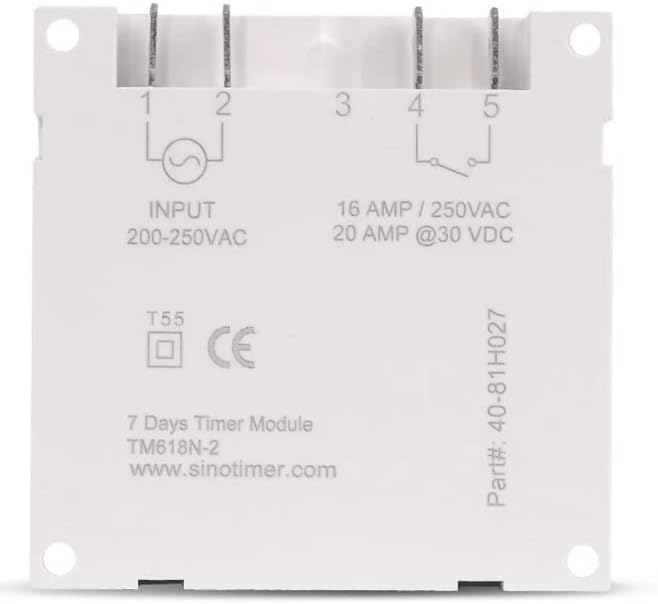
Abbildung 2: Zurück view of the Sinotimer TM618N-2, showing input/output terminals and wiring diagram.
- Input (Terminals 1 & 2): Connect your 200-250VAC power supply to these terminals.
- Output (Terminals 3, 4, & 5):
- Anschluss 3: Gemeinsame Anschlussstelle (COM)
- Terminal 4: Normally Open (NO) - Connect your load here for switched power.
- Terminal 5: Normally Closed (NC) - (Less commonly used for timer applications, but available).
- Einschalten: Once wiring is complete and secure, restore power to the circuit. The timer display should illuminate.

Figure 3: Technical drawing showing the dimensions of the Sinotimer TM618N-2 timer.
5. Bedienungsanleitung
5.1. Tastenfunktionen
- UHR: Dient zum Einstellen der aktuellen Uhrzeit und des Wochentags.
- PROG: Enters/exits programming mode for ON/OFF schedules.
- WOCHE: Selects the day(s) of the week during time or program setting.
- STUNDE: Passt die Stunde während der Zeit- oder Programmeinstellung an.
- MIN: Passt die Minute während der Zeit- oder Programmeinstellung an.
- ABRUFEN: Recalls or cancels a program setting.
- HANDBUCH: Manually overrides the timer's current state (ON/AUTO/OFF).
- R (Zurücksetzen): Small button (requires a pointed object) to reset the timer to factory defaults.
5.2. Einstellen der aktuellen Uhrzeit und des Tages
- Halten Sie die UHR Taste.
- Halten Sie UHRdrücken WOCHE den aktuellen Tag einstellen (MO, DI, MI, DO, FR, SA, SO).
- Halten Sie UHRdrücken STUNDE um die aktuelle Stunde einzustellen.
- Halten Sie UHRdrücken MIN um die aktuelle Minute einzustellen.
- Lassen Sie den UHR Schaltfläche, um die Einstellungen zu speichern.
5.3. Programmierung von Ein-/Ausschaltzeiten
The timer supports up to 16 ON and 16 OFF programs. Each program can be set for a specific day or group of days.
- Drücken Sie die PROG Drücken Sie die Taste einmal. Im Display erscheint „1 EIN“.
- Drücken WOCHE repeatedly to select the desired day(s) for this program (e.g., MO, TU, WE, TH, FR, SA, SU; MO-FR; SA-SU; MO-SA; etc.).
- Drücken STUNDE um die gewünschte Einschaltzeit einzustellen.
- Drücken MIN die gewünschte Einschaltzeit einstellen.
- Drücken PROG Erneut wird im Display „1 AUS“ angezeigt.
- Wiederholen Sie die Schritte 2-4, um die gewünschte Abschaltzeit für das erste Programm einzustellen.
- Drücken PROG to move to the next program ("2 ON", "2 OFF", etc.) and repeat the process for up to 16 programs.
- Um den Programmiermodus zu verlassen und die Einstellungen zu speichern, drücken Sie die Taste UHR Taste.
5.4. Manuelle Übersteuerung
Drücken Sie die HANDBUCH Taste zum Durchschalten der Ausgabemodi:
- AUF: Output is continuously ON, ignoring programs.
- WAGEN: Output follows the programmed schedules.
- AUS: Output is continuously OFF, ignoring programs.
Stellen Sie sicher, dass der Timer eingeschaltet ist. AUTO mode for programmed operation.
5.5. Den Timer zurücksetzen
To clear all settings and return the timer to its factory default state, insert a pointed object (like a paperclip) into the small R (Reset) hole and press gently.
6. Wartung
The Sinotimer TM618N-2 requires minimal maintenance.
- Halten Sie das Gerät sauber und staubfrei. Verwenden Sie zum Reinigen ein weiches, trockenes Tuch.
- Keine Scheuer- oder Lösungsmittel verwenden.
- Ensure the timer is installed in a dry environment, away from direct moisture or extreme temperatures.
- The internal battery is designed for long life and is not user-replaceable. If the display goes blank or settings are not retained after a power outage, the battery may need professional service.
7. Fehlerbehebung
| Problem | Mögliche Ursache | Lösung |
|---|---|---|
| Anzeige ist leer. | Keine Stromversorgung; interne Batterie leer. | Check power connections. If power is present, the internal battery may need charging (leave connected to power for several hours) or replacement (professional service required). |
| Der Timer schaltet nicht wie programmiert ein/aus. | Timer is not in AUTO mode; incorrect program settings; wiring issue. | Drücken HANDBUCH bis „AUTO“ angezeigt wird. Review and correct program settings. Verify wiring connections. |
| Die Einstellungen gehen nach einem Stromausfall verloren.tage. | Der interne Akku ist leer oder defekt. | Leave the timer connected to power for at least 4 hours to charge the internal battery. If the problem persists, the battery may need replacement (professional service recommended). |
| Tasten reagieren nicht. | Temporary software glitch; unit needs reset. | Führen Sie einen vollständigen Reset mit dem R button. If the issue continues, contact support. |
8. Garantie und Support
Informationen zur Garantie und zum technischen Support finden Sie in der mitgelieferten Dokumentation oder wenden Sie sich an Ihren Händler. Bewahren Sie Ihren Kaufbeleg für Garantieansprüche auf.
Manufacturer: Sinotimer