1. Einleitung
The Oral-B iO Series 3 Limited Electric Toothbrush is designed to provide a superior cleaning experience. It features advanced iO technology with gentle micro-vibrations and a unique round brush head for effective plaque removal along the gumline. This manual provides essential information for the safe and optimal use of your new electric toothbrush.

Figure 1: Oral-B iO Series 3 Limited Electric Toothbrush with accessories.
2. Packungsinhalt
Your Oral-B iO Series 3 Limited package includes:
- 1 Oral-B iO Series 3 Limited Handle
- 2 Oral-B iO Brush Heads (1 Ultimate Clean, 1 Gentle Care)
- 1 Ladestation
- 1 Reisekoffer
- 1 Brush Head Refill Holder
For a visual guide on unboxing and included items, please refer to the video below:
Video 1: Unboxing und erster Eindruckview of the Oral-B iO Series 3 Limited Electric Toothbrush.
3. Einrichtung
3.1 Aufladen der Zahnbürste
- Stecken Sie die Ladestation in eine Steckdose.
- Place the toothbrush handle on the charging base. The battery indicator will light up to show charging progress.
- Eine vollständige Aufladung dauert in der Regel etwa 16 Stunden.
3.2 Anbringen des Bürstenkopfes
Align the brush head with the shaft of the toothbrush handle and push it down until it clicks into place. Ensure it is securely attached before use.
4. Bedienungsanleitung
4.1 Ein-/Ausschalten
Drücken Sie den Ein-/Ausschalter, um die Zahnbürste ein- oder auszuschalten.
4.2 Reinigungsmodi
The Oral-B iO Series 3 Limited offers 3 cleaning modes:
- Tägliche Reinigung: Für die tägliche Reinigung.
- Empfindlich: For gentle yet thorough cleaning of sensitive areas.
- Bleaching: Entwickelt zum Polieren und Aufhellen der Zähne.
Press the mode button (below the power button) to cycle through the available modes. The active mode will be indicated by an illuminated icon on the handle.

Figure 2: Icons indicating the three cleaning modes.
4.3 2-Minuten-Timer
The built-in 2-minute timer ensures you brush for the dentist-recommended duration. The toothbrush will briefly pause every 30 seconds to signal when to move to the next quadrant of your mouth, and will automatically turn off after 2 minutes.
4.4 Intelligenter Drucksensor
The pressure sensor helps protect your gums and teeth from excessive brushing force. It provides real-time feedback:
- Grünes Licht: Optimal brushing pressure.
- Rotlicht: Brushing too hard. Reduce pressure immediately.
- Blaues Licht: Brushing too softly. Apply slightly more pressure.
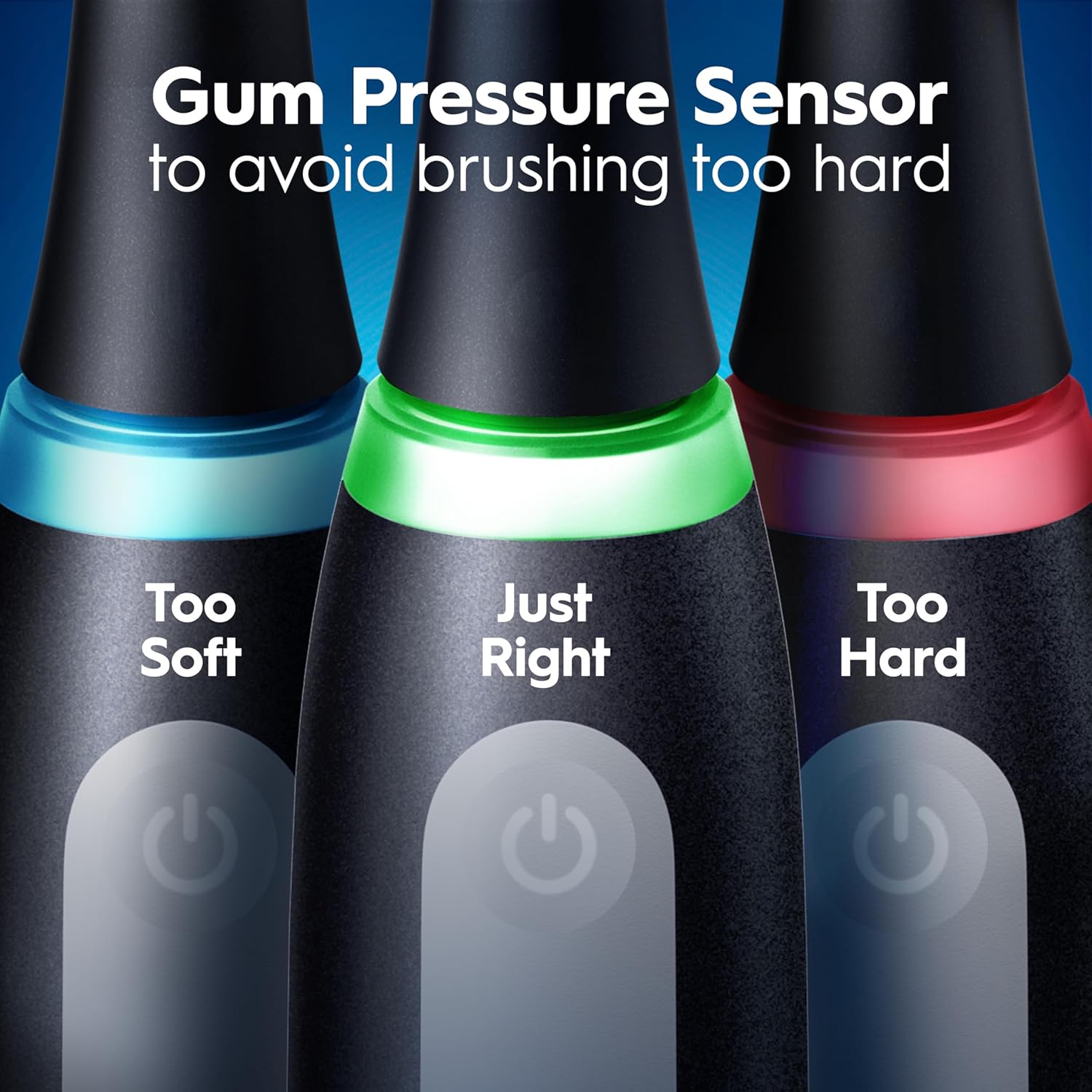
Figure 3: Pressure sensor light indicators.
For a detailed breakdown of the toothbrush's working modes and pressure sensor, watch this video:
Video 2: Demonstration of cleaning modes and pressure sensor functionality.
5. Wartung
5.1 Reinigung der Zahnbürste
After each use, rinse the brush head thoroughly under running water. You can also detach the brush head and rinse both the head and the handle separately. Wipe the handle dry with a clean cloth.
5.2 Bürstenköpfe austauschen
Dentists recommend replacing your brush head every 3 months, or sooner if the bristles become worn or frayed. The blue indicator bristles on your brush head will fade to white over time, signaling when it's time for a replacement.
6. Travel Case
The included travel case allows you to conveniently store and transport your toothbrush and up to two brush heads, keeping them hygienic and protected during travel.

Figure 4: Oral-B iO Series 3 Limited with travel case.
7. Fehlerbehebung
- Zahnbürste lässt sich nicht einschalten: Stellen Sie sicher, dass die Zahnbürste vollständig aufgeladen ist.
- Pressure sensor not working: Check if the brush head is correctly attached. If issues persist, contact customer support.
- Reduzierte Akkulaufzeit: Ensure the charging base is properly connected and the toothbrush is placed correctly on it.
8. Spezifikationen
| Modellnummer | iO G3.2i6.1KD |
| Stromquelle | Batteriebetrieben (1 Lithium-Ionen-Akku im Lieferumfang enthalten) |
| Besondere Merkmale | Brushing Timer, Pressure Sensor, Rechargeable, Travel Size |
| Altersspanne | Adult (Do not use on children under age 3) |
| Hersteller | Procter & Gamble |
9. Garantie und Support
The Oral-B iO Series 3 Limited Electric Toothbrush comes with a 2-year warranty. Additionally, Oral-B offers a 30-day money-back guarantee. For further assistance or warranty claims, please refer to the contact information provided in your product packaging or visit the official Oral-B webWebsite.