
VTech 80-519403
VTech Marble Rush Corkscrew Challenge Bedienungsanleitung
Modell: 80-519403
1. Einleitung
Welcome to the exciting world of VTech Marble Rush! The Corkscrew Challenge set provides a dynamic and engaging construction experience, allowing children to build intricate marble runs with various interactive elements. This manual will guide you through the assembly, operation, and maintenance of your Marble Rush Corkscrew Challenge set.
This set is designed for children aged 4 years and up, promoting creativity, problem-solving skills, and an understanding of cause and effect through hands-on play.

Figure 1: Fully assembled VTech Marble Rush Corkscrew Challenge.
2. Sicherheitshinweise
Bitte lesen und verstehen Sie alle Sicherheitshinweise, bevor Sie dieses Produkt verwenden.
2.1 Allgemeine Sicherheit
- Warnung vor Kleinteilen: This product contains small parts (marbles and various building components) which may pose a choking hazard for children under 3 years of age. Adult supervision is recommended during play.
- Do not throw or launch marbles at people or animals.
- Ensure all connections are secure during assembly to prevent parts from detaching during play.
2.2 Batteriesicherheit
- The electronic light-up hand crank corkscrew requires 3 x AA batteries.
- Batteries are included for demo purposes only. New batteries are recommended for regular use.
- Batterien immer mit der richtigen Polarität (+ und -) einlegen.
- Mischen Sie keine alten und neuen Batterien.
- Mischen Sie keine Alkali-, Standard- (Kohle-Zink) oder wiederaufladbaren (Nickel-Cadmium) Batterien.
- Entfernen Sie leere Batterien aus dem Spielzeug.
- Entfernen Sie die Batterien, wenn das Produkt längere Zeit nicht verwendet wird.
- Schließen Sie die Versorgungsklemmen nicht kurz.
- Nicht wiederaufladbare Batterien dürfen nicht wiederaufgeladen werden.
- Das Laden von Akkus darf nur unter Aufsicht eines Erwachsenen erfolgen.
- Akkus sind vor dem Laden aus dem Spielzeug zu entnehmen.
3. Lieferumfang
The VTech Marble Rush Corkscrew Challenge set includes the following components:
- Marble Rush Corkscrew Challenge electronic unit
- Kurzanleitung
- 10 Murmeln
- 100 Building Components (various tracks, connectors, bases, and special features)
- Farbcodierte Bauanleitung

Figure 2: Product packaging highlighting key features and included items.

Figure 3: The 10 included marbles.
4. Aufbau und Montage
The Marble Rush Corkscrew Challenge is designed for easy assembly. Follow the included colour-coded build guide for step-by-step instructions.
4.1 Einlegen der Batterie
- Locate the battery compartment on the electronic light-up hand crank corkscrew unit.
- Öffnen Sie mit einem Schraubendreher den Batteriefachdeckel.
- Insert 3 x AA batteries, ensuring correct polarity (+ and -).
- Bringen Sie die Batteriefachabdeckung wieder an und sichern Sie sie mit der Schraube.
4.2 Building the Marble Run
- Refer to the detailed colour-coded build guide for various construction options, ranging from beginner to advanced.
- Connect the base plates securely to form the foundation of your marble run.
- Assemble the vertical towers and horizontal tracks by snapping the colour-coded pieces together.
- Integrate special features such as the electronic light-up hand crank corkscrew, marble tipper, slow down track, funnel, and lift as indicated in the guide.
- Ensure all connections are firm to prevent the structure from collapsing during play.

Figure 4: The instruction manual provided with the set.

Abbildung 5: Bspample pages from the colour-coded build guide.

Figure 6: Interlocking base plates for stable construction.
5. Bedienungsanleitung
Once your Marble Rush Corkscrew Challenge is assembled, it's time to start the fun!
5.1 Starting the Marble Run
- Place marbles at the designated starting points or feed them into the electronic light-up hand crank corkscrew.
- Turn the hand crank on the corkscrew unit to activate the electronic mechanism, which will lift and release marbles into the run.
- Observe the marbles as they navigate through various tracks, jumps, and stunts.

Figure 7: Dropping a marble into the run.

Figure 8: The electronic light-up hand crank corkscrew in action.
5.2 Interaktive Funktionen
- Electronic Light-Up Hand Crank Corkscrew: This central unit lifts marbles and releases them with lights and sounds, adding an exciting element to the run.
- Marble Tipper: A mechanism that tips marbles from one track to another.
- Slow Down Track: Sections designed to reduce marble speed, adding variety to the flow.
- Trichter: Marbles spin around before dropping to the next level.
- Aufzug: A manual or electronic lift component to raise marbles to higher sections of the track.
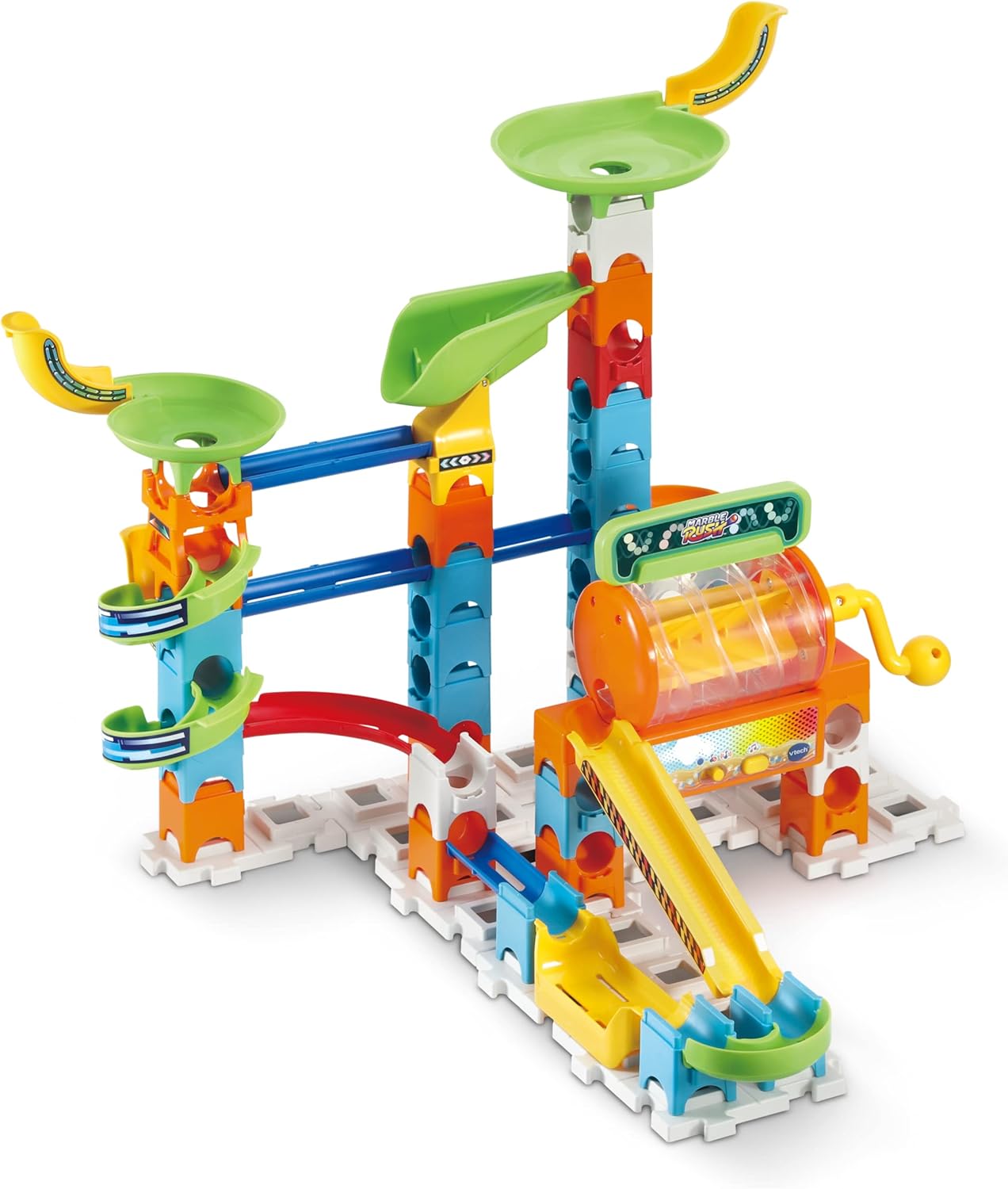
Figure 9: The funnel feature.

Figure 10: The marble lift component.
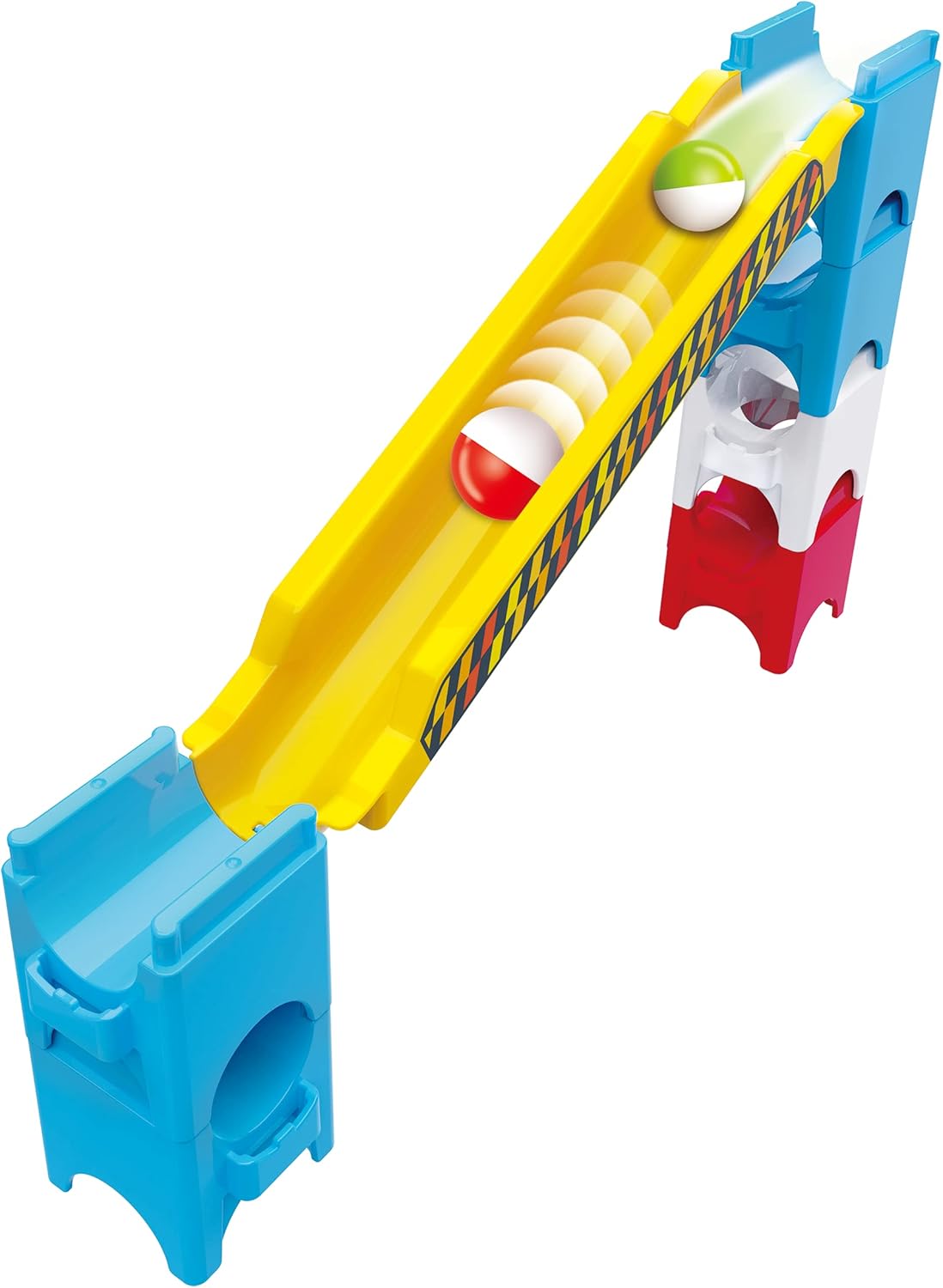
Figure 11: The slow-down track.
5.3 Creative Building
Beyond the guided builds, you are encouraged to use your imagination to create unique marble run designs. The modular pieces allow for endless combinations and compatibility with other VTech Marble Rush sets.

Figure 12: Child engaging with the marble run.

Figure 13: Collaborative play with the marble run.
6. Wartung
6.1 Reinigung
- To clean the Marble Rush components, wipe them with a slightly damp Tuch.
- Do not immerse electronic parts in water.
- Verwenden Sie keine aggressiven Chemikalien oder Scheuermittel.
- Vor der Lagerung oder dem Wiederzusammenbau muss sichergestellt sein, dass alle Teile vollständig trocken sind.
6.2 Speicherung
- Bewahren Sie das Set an einem kühlen, trockenen Ort und vor direkter Sonneneinstrahlung geschützt auf.
- Disassemble the set into its components for compact storage, if desired.
- Remove batteries from the electronic unit if storing for extended periods to prevent leakage.
7. Fehlerbehebung
| Problem | Mögliche Ursache | Lösung |
|---|---|---|
| Murmeln bleiben stecken oder bewegen sich nicht mehr. | Incorrect track alignment, loose connections, or an obstruction. | Check all track connections for proper alignment. Ensure no foreign objects are blocking the path. Reassemble sections if necessary. |
| Electronic corkscrew unit not working. | Dead batteries, incorrect battery installation, or unit not switched on. | Replace batteries with new ones. Check battery polarity. Ensure the unit's power switch (if present) is in the "ON" position. |
| Parts do not connect securely. | Fehlausrichtung oder Verunreinigungen in den Steckverbindern. | Ensure pieces are aligned correctly before pushing together. Check for and remove any debris from the connection points. |
8. Spezifikationen
| Besonderheit | Detail |
|---|---|
| Technische Daten | 19.69 x 25.98 x 16.14 Zoll |
| Artikelgewicht | 5.83 Pfund |
| Modellnummer | 80-519403 |
| Empfohlenes Alter | Ab 4 Jahren |
| Number of Marbles | 10 |
| Number of Building Pieces | 100+ |
| Batterien erforderlich | 3 x AA (for electronic corkscrew) |
| Hersteller | Vtech Electronics |
| Veröffentlichungsdatum | 23. Juli 2022 |
9. Garantie und Support
9.1 Garantieinformationen
VTech products are manufactured to high quality standards. For specific warranty details, please refer to the warranty card included with your product or visit the official VTech webBewahren Sie Ihren Kaufbeleg als Kaufnachweis auf.
9.2 Kundendienst
If you have any questions, require assistance with assembly, or encounter any issues not covered in this manual, please contact VTech Customer Support. Contact information can typically be found on the VTech official webauf der Website oder auf der Produktverpackung.
Für weitere Informationen und zur Produktregistrierung besuchen Sie bitte: www.vtechkids.com