
1. Produktüberschreitungview
The Fugetek FT-557-B is a versatile selfie stick featuring a patented 4-leg quadrapod design for enhanced stability. It includes an integrated light and a detachable Bluetooth remote control, making it suitable for various photography and videography needs.
- Quadrapod Design: Features a patented 4-leg base for superior stability compared to standard 3-leg selfie sticks.
- Integriertes Licht: An onboard light is located at the end of the selfie stick. It offers 3 color modes and 12 bright LEDs, rechargeable via USB cable.
- Abnehmbare Bluetooth-Fernbedienung: Equipped with a modern chip for easy pairing with iPhone and Android devices. The remote can be detached for flexible photo capture.
- Rotation in mehreren Winkeln: Allows for 270° neck rotation and 360° phone holder rotation, enabling both horizontal and vertical camera modes.

Image 1.1: The Fugetek FT-557-B Selfie Stick Quadrapod in its extended form with a smartphone, showcasing its 4-leg stability.
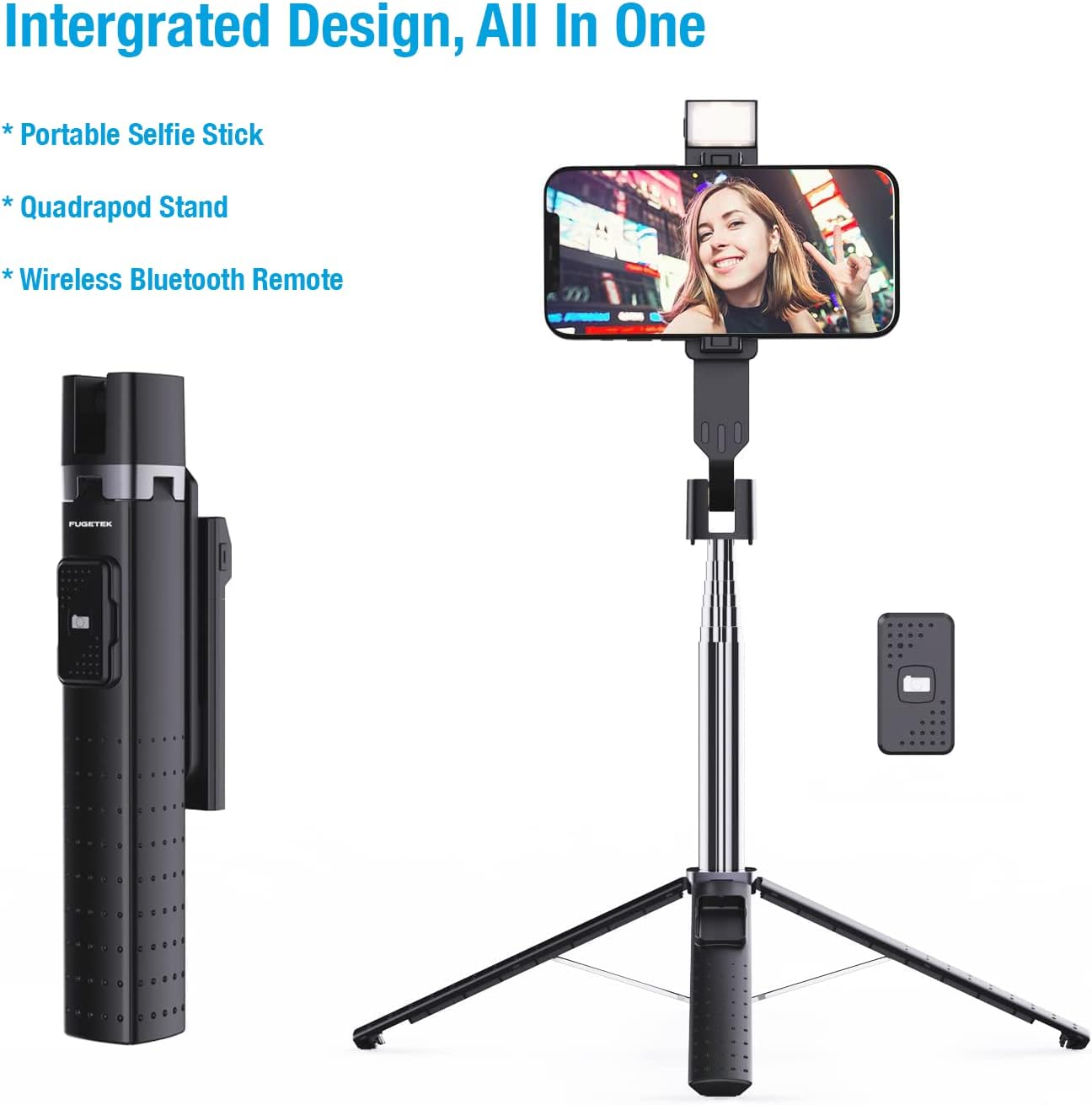
Image 1.2: Integrated design of the Fugetek FT-557-B, highlighting its components: portable selfie stick, quadrapod stand, and wireless Bluetooth remote.
2. Einrichtung
2.1 Charging the Onboard Light
- Locate the USB charging port on the side of the onboard light.
- Connect the provided USB cable to the charging port and a suitable USB power source (e.g., computer, wall adapter).
- The light will indicate charging status (e.g., an indicator light will turn on/off). Charge until fully powered.
2.2 Bluetooth-Fernbedienungskopplung

Image 2.1: The wireless Bluetooth remote control, illustrating its connectivity.
- Ensure the remote control has power. If it uses a replaceable battery, ensure it is correctly inserted.
- Schalten Sie die Fernbedienung ein (in der Regel durch Drücken und Halten einer Taste, bis eine Kontrollleuchte blinkt).
- On your smartphone (iPhone or Android), go to your Bluetooth settings.
- Suchen nach available devices. The remote should appear as "Fugetek" or a similar identifier.
- Select the remote to pair. Once paired, the indicator light on the remote will typically stop flashing or change color.
2.3 Montage Ihres Telefons

Image 2.2: The adjustable phone mount, demonstrating its compatibility with various smartphone sizes (2.56 to 3.62 inches).
- Gently pull apart the phone holder clamps at the top of the selfie stick.
- Carefully insert your smartphone between the clamps, ensuring it is securely held. The mount is adjustable to fit phones from 2.56 inches to 3.62 inches wide.
- Verify that your phone is stable and will not fall out.
3. Bedienungsanleitung
3.1 Extending and Folding the Selfie Stick

Image 3.1: The selfie stick in its folded (7.6 inches) and fully extended (40 inches) states.
- Zum Verlängern: Hold the base firmly and pull the phone holder upwards. The stick will extend telescopically. It can extend from 7.6 inches (folded) to 40 inches (fully extended).
- Falten: Push the phone holder downwards towards the base until it is fully collapsed.
3.2 Using the Quadrapod Stand
- With the stick folded or partially extended, gently spread the four legs at the base until they lock into position.
- Place the quadrapod on a flat, stable surface.
- Adjust the stick's height as needed.
3.3 Operating the Onboard Light

Image 3.2: The onboard selfie light with its three selectable color modes: White, Natural, and Warm.
- Press the power button on the light to turn it on.
- Press the button repeatedly to cycle through the 3 color modes (White, Natural, Warm) and 9 brightness levels.
- Um das Licht auszuschalten, halten Sie die Taste gedrückt.
3.4 Adjusting Phone Angle
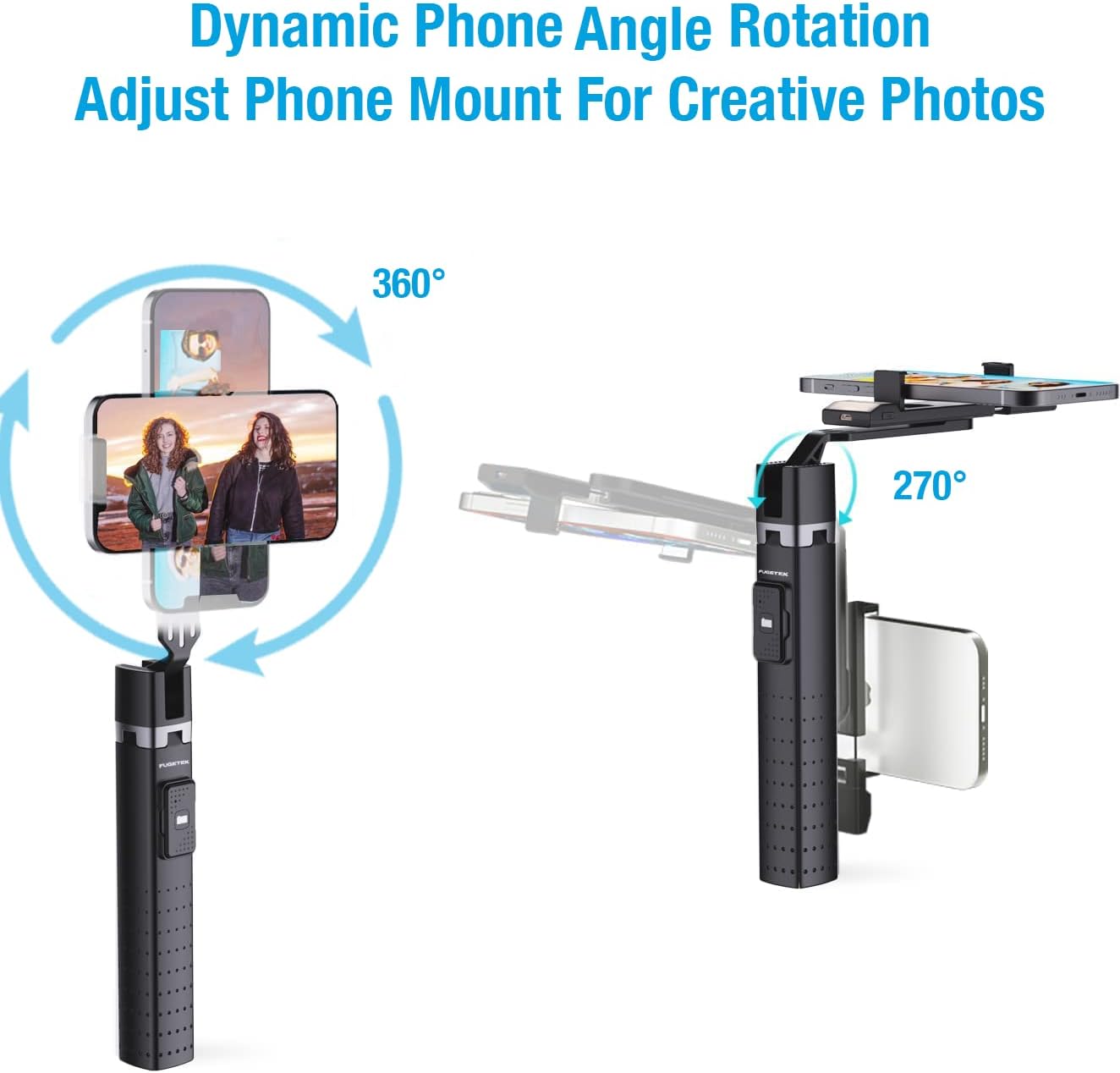
Image 3.3: Dynamic phone angle rotation, illustrating 360° phone holder rotation and 270° neck rotation for flexible shooting.
- The phone holder can rotate 360° to switch between horizontal and vertical camera modes.
- The neck of the phone holder can be adjusted up to 270° to achieve desired shooting angles.
- Ensure all adjustments are secure before taking photos or videos.
3.5 Verwenden der Bluetooth-Fernbedienung
Once paired, open your smartphone's camera application. Press the button on the Bluetooth remote to remotely trigger the camera shutter.
4. Wartung
- Reinigung: Wipe the selfie stick with a soft, dry cloth. Avoid using abrasive cleaners or solvents.
- Lagerung: Bewahren Sie das Gerät an einem kühlen, trockenen Ort fern von direkter Sonneneinstrahlung und extremen Temperaturen auf.
- Batteriepflege: For the onboard light, recharge regularly to maintain battery health. For the remote, replace the battery when performance degrades.
- Wasser vermeiden: Dieses Produkt ist nicht wasserdicht. Schützen Sie es vor Wasser und hoher Luftfeuchtigkeit.
5. Fehlerbehebung
- Fernbedienung lässt sich nicht koppeln:
- Ensure the remote is powered on and its battery is not depleted.
- Schalten Sie Bluetooth an Ihrem Telefon aus und wieder ein und versuchen Sie dann erneut, das Telefon zu koppeln.
- Ensure the remote is within range of your phone.
- Onboard Light Not Working:
- Check if the light is fully charged.
- Stellen Sie sicher, dass der Einschaltknopf richtig gedrückt ist.
- Phone Shaky on Stick:
- Ensure the phone is securely clamped im Halter.
- Avoid over-extending the stick, especially in windy conditions, to maintain stability.
6. Spezifikationen
| Besonderheit | Detail |
|---|---|
| Marke | Fugetek |
| Produktmodellnummer | FT-557-B |
| Konnektivität | Bluetooth |
| Farbe | Schwarz |
| Kompatible Geräte | Camera (Smartphones) |
| Maximale Höhe (ausgefahren) | 40 Zoll |
| Gefaltete Größe | 7.6 Zoll |
| Artikelgewicht | 7 Unzen (ca. 198.45 g) |
| Batterien im Lieferumfang enthalten | No (for remote, light is rechargeable) |
| UPC | 702735670496 |
7. Garantie und Support
Fugetek is dedicated to providing high-quality products. If you have any questions or require assistance with your FT-557-B Selfie Stick Quadrapod, please do not hesitate to contact our customer service team. Refer to your purchase documentation for specific warranty details.