
1. Einleitung
This manual provides essential information for the proper setup, operation, and maintenance of your Gigaset Confort 550HX cordless telephone. Please read these instructions carefully to ensure optimal performance and longevity of your device. The Gigaset Confort 550HX is designed for reliable communication within your home or office environment.

Figure 1: Gigaset Confort 550HX Handset and Charging Base
This image displays the Gigaset Confort 550HX cordless phone, featuring a black handset with a clear display and a numeric keypad, resting on its matching black charging base. The screen shows time, date, and call status.
2. Packungsinhalt
Upon unpacking your Gigaset Confort 550HX, please verify that all components are present:
- Gigaset Confort 550HX Handset
- Ladestation
- Netzteil für die Ladestation
- 2 x AAA-Akkus
- Batterieabdeckung
- Benutzerhandbuch (dieses Dokument)
3. Einrichtung
3.1 Einlegen der Batterie
- Entfernen Sie die Batterieabdeckung auf der Rückseite des Mobiltelefons.
- Legen Sie die beiden mitgelieferten AAA-Akkus unter Beachtung der richtigen Polarität (+/-) ein.
- Bringen Sie die Batterieabdeckung wieder an, bis sie einrastet.
3.2 Anschließen der Ladestation
- Connect the power adapter cable to the charging base.
- Stecken Sie das Netzteil in eine normale Steckdose.
- Place the handset onto the charging base. Ensure the display indicates charging.
3.3 Registrieren des Mobilteils
If your handset is not pre-registered to a base station, or if you are adding an additional handset, follow these steps:
- On the base station (if applicable, refer to your base station manual), press and hold the registration/paging button for approximately 3 seconds. The base station will enter registration mode.
- Navigieren Sie auf dem Mobiltelefon zum Menü „Einstellungen“, dann zu „Registrierung“ und wählen Sie „Mobiltelefon registrieren“.
- Geben Sie die System-PIN ein (Standardwert ist normalerweise 0000).
- The handset will search for and register with the base station. A confirmation message will appear on the handset display.
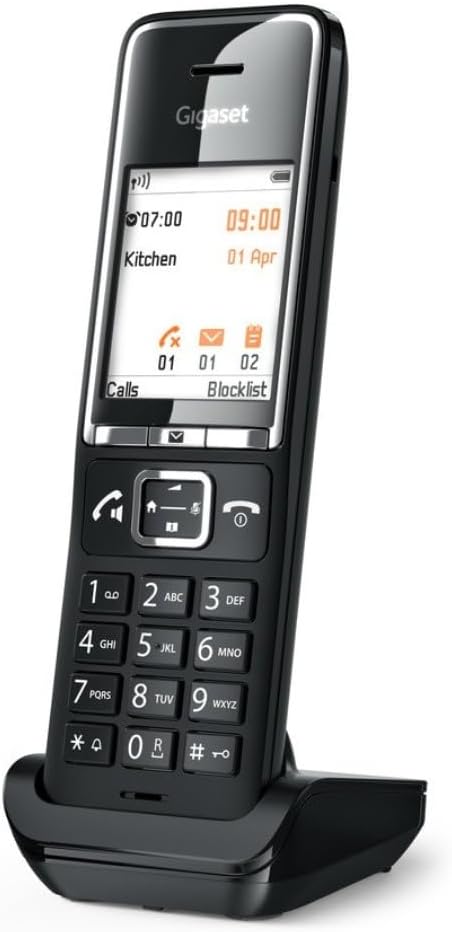
Figure 2: Handset on Charging Base
This image shows the Gigaset Confort 550HX handset positioned on its charging base from an angled perspective. The display is illuminated, showing call information and menu options, indicating it is ready for use or charging.
4. Bedienung des Mobilteils
4.1 Telefonate führen
- Geben Sie über die Tastatur die gewünschte Telefonnummer ein.
- Drücken Sie die Anruf button (green receiver icon) to initiate the call.
- Um einen Anruf zu beenden, drücken Sie die Anruf beenden Taste (rotes Empfängersymbol).
4.2 Anrufe entgegennehmen
Wenn das Telefon klingelt, drücken Sie die Taste Anruf button (green receiver icon) to answer the incoming call.
4.3 Menünavigation
The handset features an intuitive menu system:
- Drücken Sie die Speisekarte button (usually the center button below the display) to access the main menu.
- Use the navigation keys (up/down arrows) to scroll through menu options.
- Drücken Sie die OK or Wählen Schaltfläche zur Bestätigung der Auswahl.
- Drücken Sie die Zurück or Stornieren Taste zum Zurückkehren zum vorherigen Bildschirm oder zum Verlassen des Menüs.
4.4 Lautstärke anpassen
During a call, use the navigation keys (up/down arrows) to adjust the earpiece volume. Ringtone volume can be adjusted via the 'Settings' menu.

Figure 3: Handset Display in Operation
This image shows the Gigaset Confort 550HX handset on its charging base, with the display active. The screen indicates 'Direktruf aktiv' (Direct Call active) and shows a phone number, along with the current time and date, demonstrating its operational status.
5. Wartung
To ensure the longevity and proper functioning of your Gigaset Confort 550HX, follow these maintenance guidelines:
- Reinigung: Wipe the handset and charging base with a soft, damp Tuch. Keine Scheuer- oder Lösungsmittel verwenden.
- Batteriepflege: Use only the recommended rechargeable AAA batteries. If the phone will not be used for an extended period, remove the batteries to prevent leakage.
- Umfeld: Keep the phone away from extreme temperatures, direct sunlight, and moisture.
6. Fehlerbehebung
If you encounter issues with your Gigaset Confort 550HX, refer to the table below for common problems and solutions:
| Problem | Mögliche Ursache | Lösung |
|---|---|---|
| No display/Handset not turning on | Die Batterien sind leer oder falsch eingelegt. | Ensure batteries are correctly inserted and fully charged. Place handset on charging base. |
| Kein Wählton | Base station not connected or handset out of range. | Check base station power and phone line connection. Move closer to the base station. |
| Anrufe können nicht getätigt/empfangen werden. | Handset not registered to the base station. | Register the handset to the base station (refer to Section 3.3). |
| Schlechte Tonqualität | Interference or handset too far from base. | Move closer to the base station. Avoid placing the base near other electronic devices. |
7. Technische Daten
Key technical details for the Gigaset Confort 550HX:
| Besonderheit | Spezifikation |
|---|---|
| Marke | Gigaset |
| Modellnummer | S30852-H3051-R104 |
| Abmessungen (L x B x H) | 50 x 50 x 28 cm |
| Artikelgewicht | 115 Gramm |
| Batterien erforderlich | 2 wiederaufladbare AAA-Batterien |
| Farbe | Schwarz |
| Material | Metall |
| Telefontyp | Kabellos |
| Stromquelle | Batteriebetrieben |
| Typ des Anrufbeantworters | Digitales |
8. Garantie und Support
Your Gigaset Confort 550HX is covered by a manufacturer's warranty. For detailed information regarding warranty terms, conditions, and duration, please refer to the warranty card included with your product or visit the official Gigaset website. For technical support, troubleshooting assistance beyond this manual, or service inquiries, please contact Gigaset customer support through their official channels.


