
1. Einleitung
Vielen Dank für Ihren Einkauf.asing the KEPLUG Sunrise Alarm Clock. This device is designed to enhance your waking and sleeping experience with its unique features, including sunrise and sunset simulations, dual alarms, FM radio, and various natural sounds. Please read this manual carefully to ensure proper use and optimal performance.
Packungsinhalt:
- 1 x KEPLUG Sunrise Alarm Clock
- 1 x Micro-USB-Kabel
- 1 x Wandadapter
- 1 x Benutzerhandbuch
2. Produktüberschreitungview
Familiarize yourself with the main components and controls of your KEPLUG Sunrise Alarm Clock.

Bild 2.1: Front view of the KEPLUG Sunrise Alarm Clock, showing the digital time display and the illuminated light panel. The clock face is round with a white base.
Bedienelemente und Anschlüsse:
Refer to the diagram below for button identification (exact button layout may vary slightly by model, but functions are consistent).
- Zeiteinstellungstaste: Dient zum Aufrufen des Zeiteinstellungsmodus.
- Alarm-1-Taste: Used to set and activate Alarm 1.
- Alarm-2-Taste: Used to set and activate Alarm 2.
- FM-Radio-Taste: Activates and controls FM radio functions.
- Lichttaste: Controls the light brightness and color modes.
- Lautstärke +/- Tasten: Passt die Lautstärke an.
- Auf/Ab-Tasten: Navigiert durch Menüs und passt Werte an.
- Snooze/Sleep Aid Button: Activates snooze during an alarm or sleep aid function.
- USB Ladeanschluss: Zum Laden externer Geräte.
- Micro-USB-Stromanschluss: Wird mit dem Netzteil verbunden.
3. Einrichtung
3.1 Stromanschluss
- Connect the micro USB cable to the power input port on the back of the alarm clock.
- Stecken Sie den Netzadapter in eine normale Steckdose.
- Das Display leuchtet auf und zeigt damit an, dass das Gerät eingeschaltet ist.
The clock includes a built-in backup battery to retain settings during power outages or disconnections.
3.2 Uhrzeit einstellen
- Drücken Sie die Zeiteinstellungstaste (often represented by a clock icon). The hour display will start flashing.
- Verwenden Sie die Auf/Ab-Tasten um die Stunde einzustellen.
- Drücken Sie die Zeiteinstellungstaste again to confirm the hour and move to minute setting. The minute display will flash.
- Verwenden Sie die Auf/Ab-Tasten um die Minuten einzustellen.
- Drücken Sie die Zeiteinstellungstaste a third time to confirm the minutes.
- Um zwischen 12-Stunden- und 24-Stunden-Format umzuschalten, drücken Sie die Taste Auf/Ab-Tasten while the time is flashing during setup, or refer to the specific instructions in your manual for a dedicated time format button.
3.3 Time Display Brightness
The time display offers three brightness settings: High, Low, and Off. This can typically be adjusted by repeatedly pressing a dedicated display brightness button or by holding the Time Setting button. Refer to your specific model's instructions for exact control.
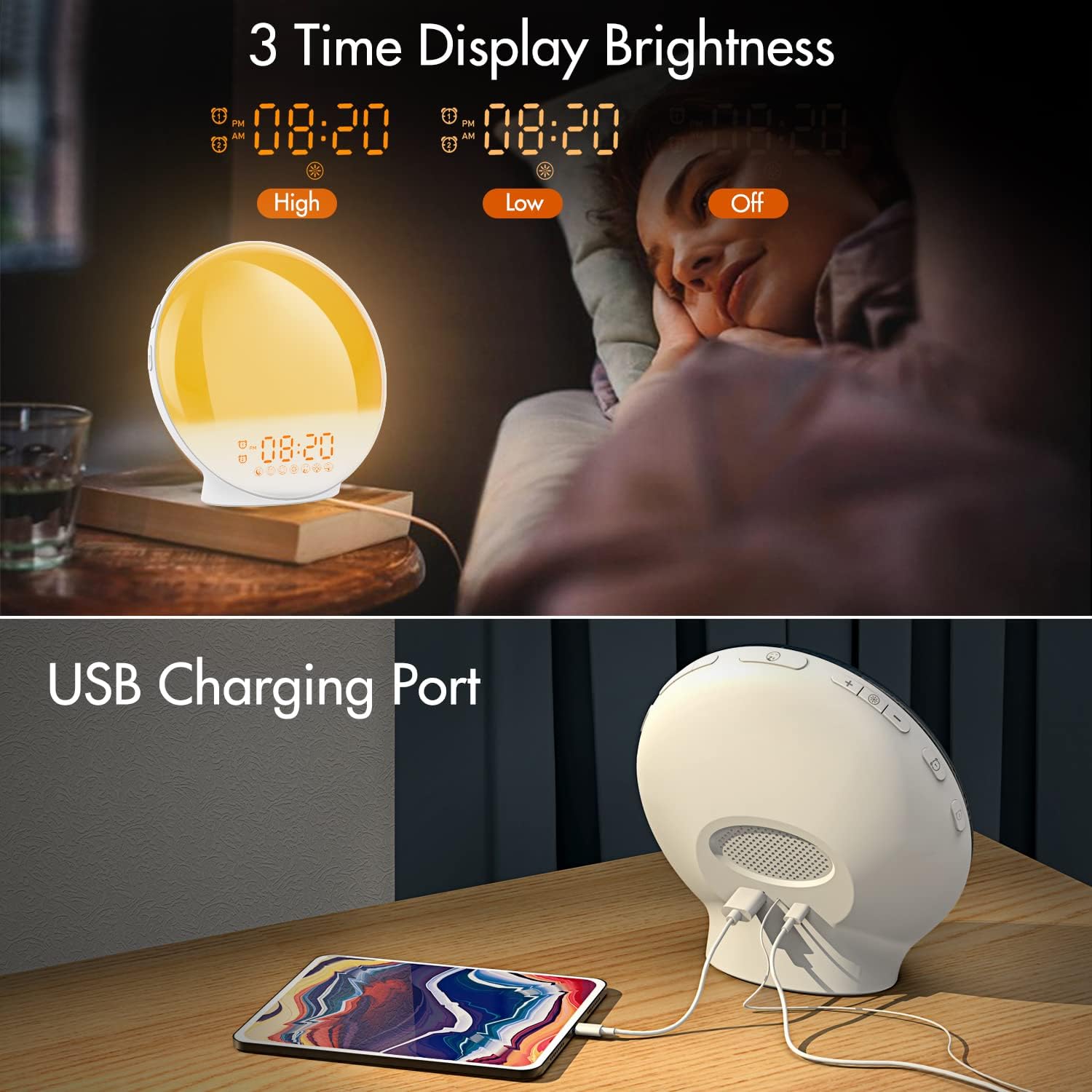
Bild 3.1: Illustration of the three time display brightness options: High, Low, and Off, allowing users to customize visibility for different times of day or night.
4. Bedienungsanleitung
4.1 Alarme einstellen (Alarm 1 & Alarm 2)
The clock features two independent alarms, allowing for separate wake-up times (e.g., weekday and weekend).

Bild 4.1: Depiction of the dual alarm functionality, allowing users to set different alarms for weekdays and weekends, along with the snooze feature.
- Drücken Sie die Alarm 1-Taste (oder Alarm 2-Taste) to activate and enter alarm setting mode. The alarm time will flash.
- Verwenden Sie die Auf/Ab-Tasten um die gewünschte Alarmstunde einzustellen.
- Drücken Sie die Alarmknopf again to confirm the hour and set the minutes.
- Verwenden Sie die Auf/Ab-Tasten die gewünschte Alarmzeit in Minuten einstellen.
- Drücken Sie die Alarmknopf again to select the wake-up sound. Use Auf/Ab-Tasten to cycle through 7 nature sounds or FM radio.
- Drücken Sie die Alarmknopf again to set the volume level (1-16) for the alarm sound. Use Auf/Ab-Tasten anpassen.
- Drücken Sie die Alarmknopf one last time to confirm all settings and activate the alarm. An alarm icon will appear on the display.
4.2 Schlummerfunktion
Wenn ein Alarm ertönt, tippen Sie auf die Schlummertaste (often the large button on top or front) to pause the alarm for 9 minutes. This can be repeated up to 5 times.
4.3 Sonnenaufgangssimulation
The sunrise simulation gradually brightens the light before your alarm time, mimicking a natural sunrise.

Bild 4.2: Visual representation of the sunrise simulation feature, where the light intensifies gradually over a set period before the alarm, designed for a gentle wake-up.
- When setting an alarm, after selecting the sound and volume, you will typically be prompted to set the sunrise duration.
- Verwenden Sie die Auf/Ab-Tasten to choose a duration between 10 to 60 minutes. The light will gradually increase from 0% to the set brightness level (0-20) during this period.
- The light color will transition from deep red to bright yellow, simulating a natural sunrise.
4.4 Sonnenuntergangssimulation / Einschlafhilfe
The sunset simulation gradually dims the light and can play soothing sounds to help you fall asleep.

Bild 4.3: Illustration of the sunset simulation, where the light gradually dims over a period of 10 to 120 minutes, accompanied by optional sleep sounds like rain, forest, river, or FM radio.
- Drücken Sie die Snooze/Sleep Aid Button (or a dedicated Sleep Aid button) to activate the sleep aid function.
- Verwenden Sie die Auf/Ab-Tasten to select a duration for the dimming process (10-120 minutes).
- You can also select a natural sound (Rain, Forest, River) or FM radio to play during this period.
- The light will gradually dim from 100% to 0% over the selected duration, and the sound will fade out.
4.5 UKW-Radio
The built-in FM radio allows you to listen to your favorite stations or use them as an alarm sound.

Bild 4.4: Überview of the 7 available alarm sounds and the FM radio option, providing diverse choices for waking up.
- Drücken Sie die FM-Optionsfeld zum Ein-/Ausschalten des Radios.
- Halten Sie die FM-Optionsfeld Automatisches Scannen und Speichern verfügbarer Sender.
- Verwenden Sie die Auf/Ab-Tasten to manually tune to a specific frequency or cycle through saved stations.
- Stellen Sie die Lautstärke mit den Lautstärke +/- Tasten.
4.6 Night Light / Color Light
The clock can function as a night light with various color options and adjustable brightness.

Bild 4.5: Display of the 7 color atmosphere light options and 20 brightness levels, highlighting the clock's versatility as a mood light or reading lamp.
- Drücken Sie die Lichttaste um das Licht einzuschalten.
- Drücken Sie die Lichttaste repeatedly to cycle through 7 static colors (e.g., Red, Green, Blue, Yellow, Indigo, Purple, White) or an automatic color-changing mode.
- Verwenden Sie die Auf/Ab-Tasten to adjust the brightness level (0-20) of the selected color or white light.
- Halten Sie die Lichttaste um das Licht auszuschalten.
4.7 USB-Ladeanschluss
A 5V/2.4A USB port is located on the back of the device, allowing you to charge your smartphone or other small electronic devices.
Bild 4.6: Hinteren view of the alarm clock showing the USB charging port in use, connected to a tablet for charging.
5. Wartung
- Reinigung: Reinigen Sie das Gerät mit einem weichen, trockenen Tuch. Verwenden Sie keine Scheuermittel oder Lösungsmittel.
- Lagerung: Bewahren Sie das Gerät an einem kühlen, trockenen Ort auf, wenn es längere Zeit nicht benutzt wird.
- Leistung: Always use the provided power adapter to prevent damage.
6. Fehlerbehebung
| Problem | Mögliche Ursache | Lösung |
|---|---|---|
| Die Uhr lässt sich nicht einschalten. | Netzteil nicht angeschlossen oder defekt. | Ensure the power adapter is securely connected to both the clock and a working power outlet. Try a different outlet. |
| Der Alarm ertönt nicht. | Alarm nicht aktiviert oder Lautstärke zu niedrig. | Prüfen Sie, ob das Alarmsymbol angezeigt wird. Stellen Sie den Alarm erneut ein und vergewissern Sie sich, dass die Lautstärke hörbar eingestellt ist. |
| Sonnenaufgangssimulation funktioniert nicht. | Die Sonnenaufgangsdauer wurde bei der Alarmeinstellung nicht festgelegt. | Ensure you have set a sunrise duration (10-60 minutes) when configuring the alarm. |
| FM-Radio: Rauschen oder schlechter Empfang. | Schwaches Signal oder ungünstige Antennenposition. | Extend the antenna wire fully. Reposition the clock to improve reception. Perform an auto-scan for stations. |
| USB-Ladefunktion funktioniert nicht. | Gerät nicht kompatibel oder Kabel defekt. | Ensure the device you are charging is compatible with 5V/2.4A USB charging. Try a different USB cable. |
7. Spezifikationen
- Marke: KEPLUG
- Modell: B09FRY71NH
- Produktabmessungen: 16 x 16 x 6.1 cm
- Artikelgewicht: 481 g
- Bandtage: 5 Volt
- Energiequelle: Batteriebetrieben (mit Netzteil)
- Anzeigetyp: Digitales
- Besondere Merkmale: Charging Port, Dimmable Light, Sunrise/Sunset Simulation, Dual Alarm, FM Radio, Nature Sounds
- Datum der Erstveröffentlichung: 12. November 2021
8. Garantie und Support
For warranty information or technical support, please refer to the contact details provided with your purchase documentation or visit the official KEPLUG webBewahren Sie Ihren Kaufbeleg als Kaufnachweis auf.