
Cecotec Conga 9090 Ai
Cecotec Conga 9090 IA Robot Vacuum Cleaner
Bedienungsanleitung
Einführung
Thank you for choosing the Cecotec Conga 9090 IA Robot Vacuum Cleaner. This advanced 4-in-1 robot is designed to vacuum, sweep, mop, and scrub simultaneously, providing comprehensive floor cleaning. Equipped with Artificial Intelligence and laser technology, it offers maximum cleaning precision by recognizing household objects and adapting its cleaning path. This manual provides essential information for the safe and efficient operation and maintenance of your robot vacuum cleaner.
Sicherheitshinweise
Bitte lesen Sie diese Sicherheitshinweise vor der Benutzung des Geräts sorgfältig durch und bewahren Sie sie zum späteren Nachschlagen auf. Die Nichtbeachtung dieser Hinweise kann zu Stromschlag, Brand oder schweren Verletzungen führen.
- Stellen Sie sicher, dass die Stromstärketage entspricht dem Volumentage, wie auf dem Typenschild des Geräts angegeben.
- Tauchen Sie das Gerät, das Netzkabel oder den Stecker nicht in Wasser oder andere Flüssigkeiten.
- Halten Sie das Gerät von Wärmequellen, direkter Sonneneinstrahlung, Feuchtigkeit und scharfen Kanten fern.
- Do not use the appliance on wet surfaces or in areas with standing water.
- Beaufsichtigen Sie Kinder, um sicherzustellen, dass sie nicht mit dem Gerät spielen.
- Vor der Reinigung oder Wartung muss das Gerät immer vom Stromnetz getrennt werden.
- Betreiben Sie das Gerät nicht, wenn das Netzkabel oder der Stecker beschädigt sind.
- Entfernen Sie vor Beginn der Reinigungsarbeiten lose Kabel, kleine Gegenstände oder zerbrechliche Dinge aus dem Reinigungsbereich, um ein Verheddern oder eine Beschädigung zu vermeiden.
Packungsinhalt
Prüfen Sie beim Auspacken, ob alle Komponenten vorhanden und in einwandfreiem Zustand sind.
- Cecotec Conga 9090 IA Robot Vacuum Cleaner
- Special Silicone Brush for pets
- Jalisco Brush
- Vibration Wash Basin (Water Tank)
- Solid Tank (Dust Bin)
- Fernbedienung
- 2 Mopps
- 2 Seitenbürsten
- 1 High-Efficiency Filter
- Self-Cleaning Brush
- Ladestation
- Netzteil

Image: The Conga 9090 IA robot vacuum cleaner along with its comprehensive set of accessories, including various brushes, remote control, and a mobile phone showing the companion app.
Produkt überview
The Conga 9090 IA features advanced components for intelligent and efficient cleaning.
- AI and Laser Technology: The robot uses a front camera and a three-dimensional sensor to recognize common household objects and adapt its cleaning path accordingly. It also identifies floors and rooms, automatically mapping them.
- Jalisco-Pinsel: A specialized brush designed for effective cleaning on various floor types.
- Twerking Scrub Tank: Provides three intelligent scrubbing levels for thorough mopping.
- Room Assist: Intelligent room management for customized cleaning.

Image: The robot vacuum intelligently detects and navigates around obstacles like shoes, thanks to its advanced AI and laser technology.

Image: The robot vacuum positioned on a floor, ready to clean various small debris, demonstrating its powerful suction.

Image: The robot vacuum near its charging base, illustrating its object detection capabilities for items such as socks and power cables.
Aufstellen
- Platzierung der Ladestation: Place the charging station against a wall in an open area, ensuring there are no obstacles within 1 meter to the sides and 2 meters in front. Connect the power adapter to the charging station and a power outlet.
- Grundgebühr: Place the robot on the charging station. Ensure the charging contacts on the robot align with those on the station. The robot will begin charging automatically. For first use, fully charge the robot (approximately 3-4 hours).
- Seitenbürsten installieren: Rasten Sie die linke (L) und rechte (R) Seitenbürste in die entsprechenden Schlitze an der Unterseite des Roboters ein, bis sie einrasten.
- Hauptbürste installieren: If not already installed, insert the Jalisco brush into its compartment on the underside of the robot.
- Download the Conga App: Suchen nach "Conga" in your smartphone's app store (iOS or Android) and download the official application.
- Mit WLAN verbinden: Follow the in-app instructions to connect your robot to your home Wi-Fi network. This will enable smart features, mapping, and remote control.
Bedienungsanleitung
Your Conga 9090 IA offers various cleaning modes and smart functionalities.
Reinigungsmodi
- Automatikmodus: The robot automatically plans the optimal cleaning path for your entire home.
- Edge-Modus: Reinigt entlang von Wänden und Möbelkanten.
- Spot-Modus: Konzentriert die Reinigung auf einen bestimmten verschmutzten Bereich.
- Scrubbing-Modus: Utilizes the vibration wash basin for deep mopping. You can select from three intelligent scrubbing levels via the app.
- Sperrgebiete: Use the app to define no-go zones or virtual walls to prevent the robot from entering specific areas.

Image: The robot vacuum demonstrating its ability to respect virtual boundaries, preventing it from entering designated areas like a play zone.
Intelligente Funktionen
- App-Steuerung: Use the Conga app to start/stop cleaning, select modes, schedule cleaning, view maps, and manage rooms.
- Sprachsteuerung: The robot is compatible with Amazon Echo and Google Home. You can control it using voice commands.

Image: The robot vacuum can be controlled via voice commands through smart home devices like Amazon Echo.
Wartung
Regelmäßige Wartung gewährleistet optimale Leistung und verlängert die Lebensdauer Ihres Saugroboters.
Reinigungsplan
- Nach jedem Gebrauch: Empty the dust bin and clean the main brush.
- Wöchentlich: Clean the side brushes, filters, and sensors.
- Monatlich: Clean the charging contacts and wheels. Replace filters and brushes as needed.
Detailed Cleaning Instructions
- Dust Bin and Filters: Open the robot's cover, remove the dust bin, and empty its contents. Tap the filter gently to remove dust. Do not wash the HEPA filter with water.
- Wassertank und Mopp: Remove the water tank and empty any remaining water. Detach and wash the mop pad with water. Allow it to air dry completely before reattaching.
- Hauptbürste (Jalisco-Bürste): Entfernen Sie die Hauptbürstenabdeckung und heben Sie die Bürste heraus. Verwenden Sie das mitgelieferte Reinigungswerkzeug, um Haare und Schmutz zu entfernen.
- Seitenbürsten: Pull the side brushes upwards to remove them. Clean any tangled hair or debris. If damaged, replace them.
- Sensoren und Ladekontakte: Use a clean, dry cloth to wipe the anti-drop sensors (on the bottom) and the charging contacts (on the robot and charging station).
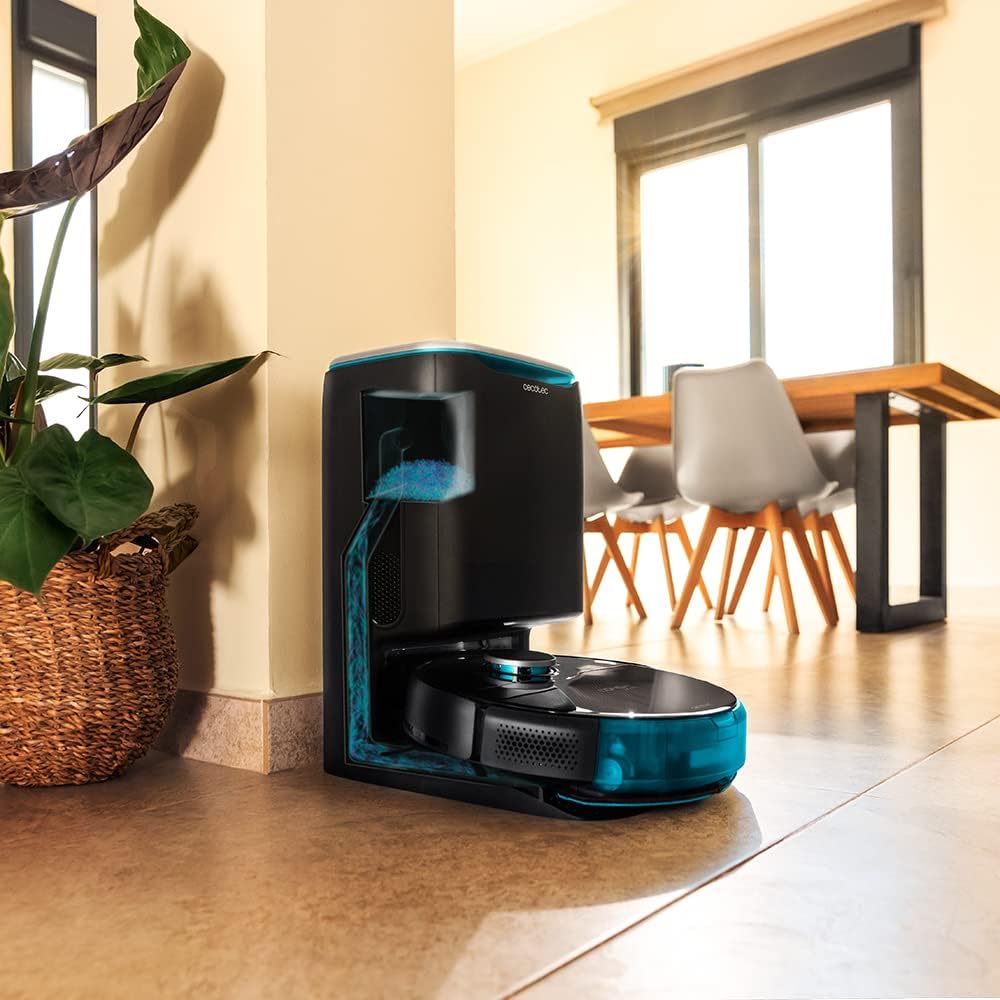
Image: The robot vacuum is compatible with the CongaHome 10.000 self-emptying station for convenient dust disposal.
Fehlerbehebung
Sollten Sie Probleme mit Ihrem Saugroboter haben, finden Sie in der folgenden Tabelle häufige Probleme und Lösungen.
| Problem | Mögliche Ursache | Lösung |
|---|---|---|
| Der Roboter lässt sich nicht einschalten und lädt nicht. | Niedriger Batteriestand; Ladekontakte verschmutzt; Netzteil nicht angeschlossen. | Place robot on charging station; clean charging contacts; ensure power adapter is securely connected. |
| Mangelhafte Reinigungsleistung. | Dust bin full; brushes tangled; filter clogged. | Empty dust bin; clean main and side brushes; clean or replace filter. |
| Der Roboter bleibt häufig stecken. | Zu viele Hindernisse; Sensoren verschmutzt. | Clear the cleaning area of loose cables and small objects; clean all sensors. |
| Probleme mit der App-Verbindung. | Falsches WLAN-Passwort; schwaches WLAN-Signal; Roboter befindet sich nicht im Kopplungsmodus. | Verify Wi-Fi password; ensure robot is within Wi-Fi range; reset robot and re-attempt pairing as per app instructions. |
| Der Roboter macht ungewöhnliche Geräusche. | Brush or wheel obstructed; foreign object inside. | Check and clean main brush, side brushes, and wheels for obstructions. |
Technische Daten
| Besonderheit | Detail |
|---|---|
| Marke | Cecotec |
| Modellname | Conga 9090 AI |
| Modellnummer | 05416 |
| Farbe | Schwarz |
| Technische Daten | 17.5 x 40 x 54.2 cm |
| Artikelgewicht | 4.1 Kilogramm |
| Kapazität (Müllbehälter) | 2.5 Liter |
| Geräuschpegel | 64 dB |
| Automatisches Herunterfahren | NEIN |
| Kompatible Geräte | Amazon Echo, Google Home |
| Besonderheit | Programmierbar |
Garantie und Support
Informationen zur Garantie, zum technischen Support oder zu Serviceanfragen finden Sie auf der Ihrem Produkt beiliegenden Garantiekarte oder auf der offiziellen Cecotec-Website. webBewahren Sie Ihren Kaufbeleg als Kaufnachweis für Garantieansprüche auf.
Besuchen Sie auch die Cecotec Store auf Amazon Für weitere Produktinformationen und Support-Ressourcen.
Ask a question about this manual
Ask about setup, troubleshooting, compatibility, parts, safety, or missing instructions. Manuals+ will review the question and use this page’s manual context to help answer it.