
1. Einleitung
Thank you for choosing the FLEXISPOT E9 Electric Standing Desk. This manual provides essential information for the safe and efficient assembly, operation, and maintenance of your new desk. Please read it thoroughly before use and keep it for future reference.
The FLEXISPOT E9 is designed for easy assembly with minimal parts, ensuring a smooth setup experience. It offers a wide height adjustment range from 73 cm to 123 cm, with a swift adjustment speed of 25mm/s for a stress-free transition between sitting and standing positions. Its robust design supports up to 50 kg, allowing you to safely adjust the desk height with your equipment in place.
The desk features a smart touch panel for intuitive one-touch operation, enabling you to effortlessly switch between sitting and standing postures to optimize your workspace for health and activity. The compact 60 cm x 120 cm tabletop provides ample workspace while harmonizing with various room aesthetics. Its minimalist design makes it suitable for home offices, studies, or even as a versatile dining or hobby table in your living room.

Image: The FLEXISPOT E9 Electric Standing Desk, highlighting its adjustable height from 73-123cm and 120cm width.
2. Aufbau und Montage
The FLEXISPOT E9 desk is designed for straightforward assembly. Follow these steps to set up your desk:
- Komponenten auspacken: Nehmen Sie alle Teile vorsichtig aus der Verpackung und überprüfen Sie sie anhand der Teileliste in der beiliegenden Bedienungsanleitung.
- Attach the Beam: The desk's beam is pre-attached to the tabletop. Simply rotate the support columns into place.
- Füße montieren: Securely attach the desk feet to the support columns using the provided screws and tools.
- Fernbedienung anschließen: Connect the remote control cable to the control box under the desk.
- Stromanschluss: Stecken Sie das Netzkabel in die Steuereinheit und anschließend in eine Wandsteckdose.
All necessary assembly tools are included in the package. Assembly typically requires one person and can be completed in approximately 15 minutes.
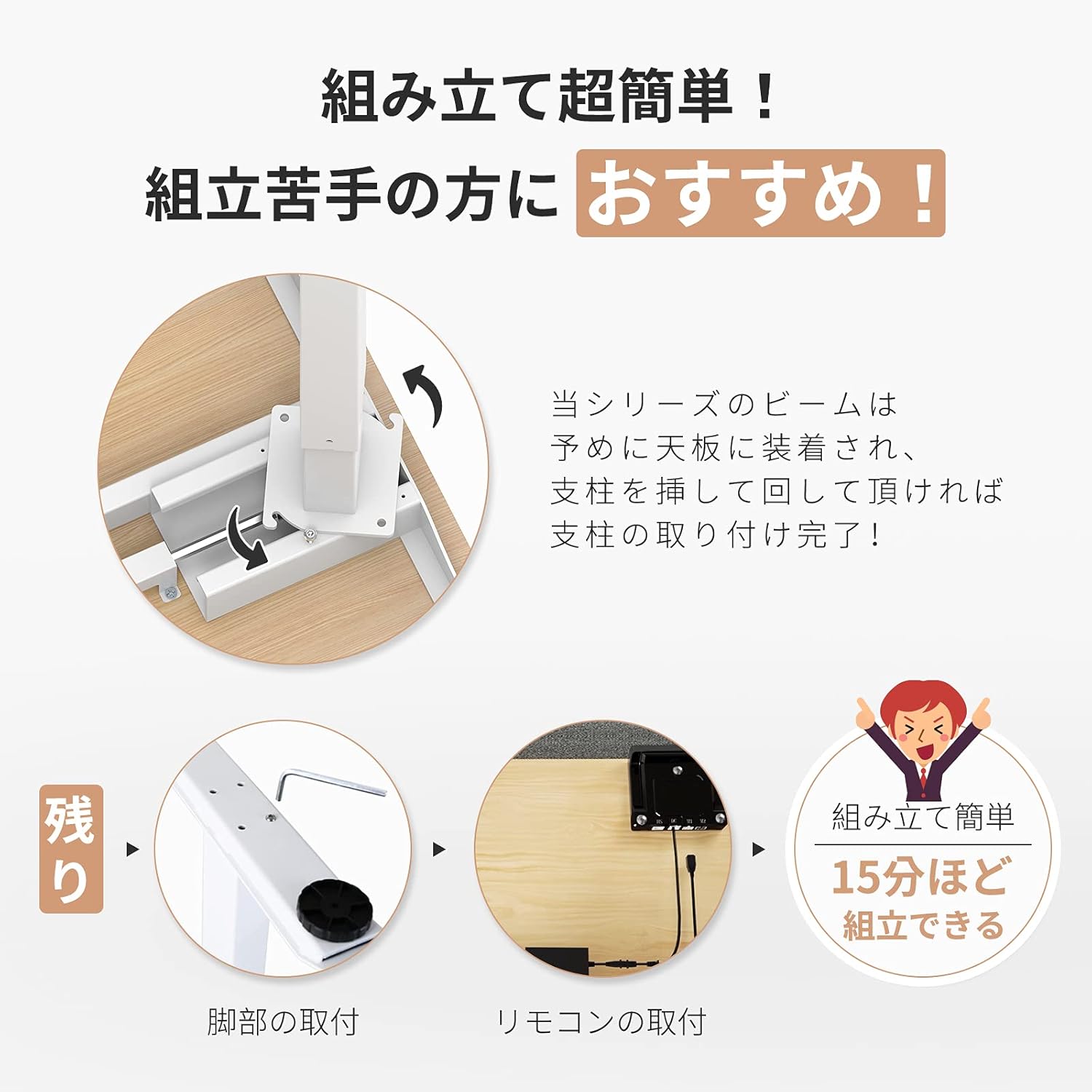
Image: Visual guide demonstrating the simple assembly process, including beam rotation, foot attachment, and remote control connection.
3. Bedienungsanleitung
The FLEXISPOT E9 features an intuitive control panel for easy height adjustment and memory functions.
3.1 Bedienfeld vorbeiview

Image: The control panel, indicating the LED panel, up button, down button, and four height memory preset buttons.
- LED-Panel: Zeigt die aktuelle Schreibtischhöhe an.
- Auf-/Ab-Tasten (▲ / ▼): Press and hold to adjust the desk height upwards or downwards. Release to stop at the desired height.
- Memory Preset Buttons (1, 2, 3, 4): Bevorzugte Höheneinstellungen speichern und abrufen.
3.2 Einstellen von Speichervoreinstellungen
- Stellen Sie den Schreibtisch mithilfe der Auf-/Ab-Tasten auf die gewünschte Höhe ein.
- Press and hold one of the memory preset buttons (1, 2, 3, or 4) until the LED panel flashes or beeps, indicating the height has been saved.
3.3 Abrufen von Speichervoreinstellungen
Simply press the desired memory preset button (1, 2, 3, or 4). The desk will automatically move to the saved height.
3.4 Safety Features (Anti-Collision)
The desk is equipped with a built-in sensor to detect obstacles during height adjustment. If an obstruction is encountered, the desk will automatically stop and reverse slightly to prevent damage or injury.
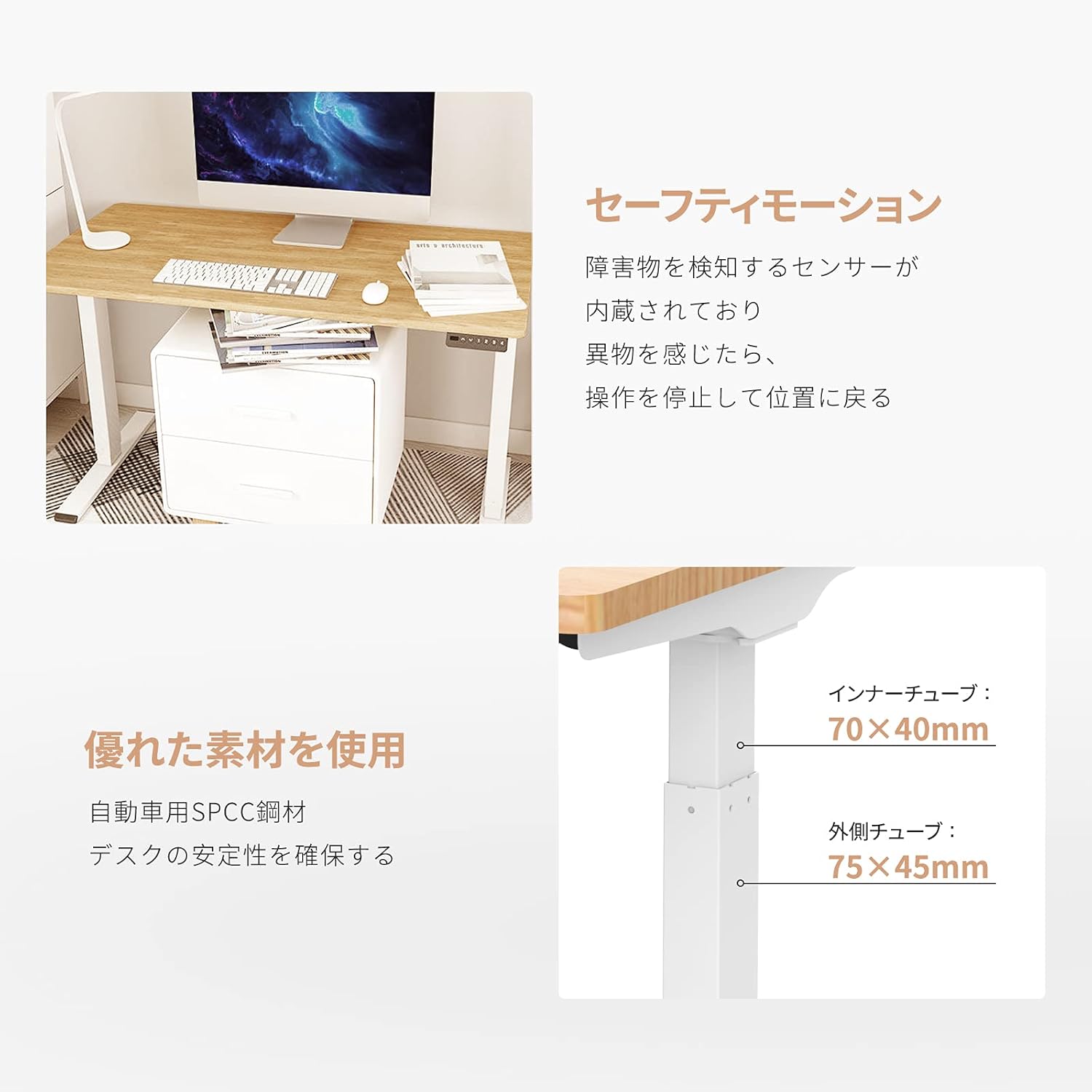
Image: Explanation of the safety motion feature, where the desk stops and reverses upon detecting an obstacle. Also shows inner tube (70x40mm) and outer tube (75x45mm) dimensions.
4. Wartung
To ensure the longevity and optimal performance of your FLEXISPOT E9 Electric Standing Desk, follow these maintenance guidelines:
- Regelmäßige Reinigung: Wischen Sie die Schreibtischoberfläche und die Beine mit einem weichen, fusselfreien Tuch ab.amp Verwenden Sie kein scheuerndes Reinigungsmittel oder aggressive Chemikalien, die die Oberfläche beschädigen könnten.
- Kabelmanagement: Ensure all cables are neatly organized and not tangled or pinched, especially during height adjustments. Use cable ties or management trays if necessary.
- Verbindungen prüfen: Periodically check that all screws and connections are secure. Tighten if any looseness is detected.
- Überladung vermeiden: Überschreiten Sie nicht die maximale Gewichtskapazität von 50 kg.
- Umgebungsbedingungen: Stellen Sie den Schreibtisch in eine trockene Umgebung und vermeiden Sie extreme Temperaturen oder direkte Sonneneinstrahlung.
5. Fehlerbehebung
If you encounter any issues with your FLEXISPOT E9 Electric Standing Desk, please refer to the following common troubleshooting steps:
- Schreibtisch bewegt sich nicht:
- Prüfen Sie, ob das Netzkabel sowohl am Schreibtisch als auch an der Wandsteckdose fest eingesteckt ist.
- Stellen Sie sicher, dass keine Hindernisse die Bewegung behindern.
- Versuchen Sie, den Schreibtisch zurückzusetzen, indem Sie ihn für 30 Sekunden vom Stromnetz trennen und ihn dann wieder anschließen.
- Ungleichmäßige Bewegung:
- Stellen Sie sicher, dass der Schreibtisch auf einer ebenen Fläche steht.
- Verify that the weight on the desk is evenly distributed.
- Fehlercodes auf dem LED-Display:
- Refer to the full product manual (if provided separately) for specific error code meanings and solutions.
- Often, an error can be cleared by resetting the desk (unplugging and replugging).
Sollten diese Schritte das Problem nicht beheben, wenden Sie sich bitte an den FLEXISPOT-Kundendienst, um weitere Unterstützung zu erhalten.
6. Spezifikationen
Detailed technical specifications for the FLEXISPOT E9 Electric Standing Desk:
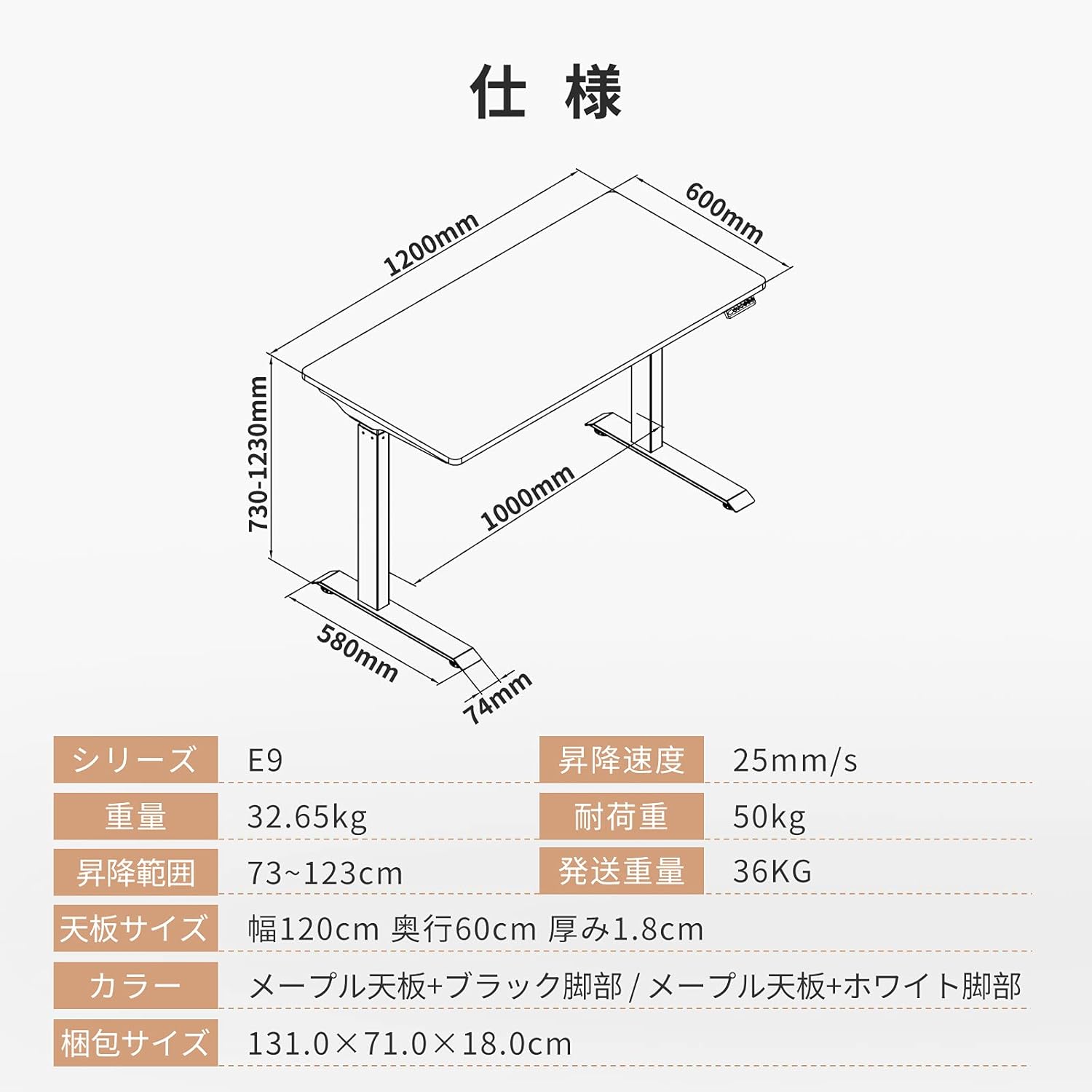
Image: Technical drawing with key dimensions: 1200mm width, 600mm depth, 730-1230mm height range, 1000mm base width, 580mm base depth, 74mm foot height.
| Besonderheit | Detail |
|---|---|
| Marke | FLEXISPOT |
| Modell | E9 |
| Schreibtischtyp | Computer Desk, Electric Standing Desk |
| Produktabmessungen (T x B x H) | 60 cm x 120 cm x 73-123 cm |
| Höhenverstellbereich | 73 cm bis 123 cm |
| Height Adjustment Speed | 25 mm/s |
| Maximum Recommended Weight Capacity | 50 kg |
| Tischplattengröße | 120 cm (Width) x 60 cm (Depth) x 1.8 cm (Thickness) |
| Tischplattenmaterial | Maple (Finish: Paint) |
| Grundmaterial | Wood (Legs: Black) |
| Montage erforderlich | Ja |
| Recommended Persons for Assembly | 1 |
| Besondere Merkmale | Height Adjustment Function, Anti-Collision Sensor |
| Artikelgewicht | 35.9 kg |
| Versandgewicht | 36 kg |
| GTIN / UPC | 810072794987 |
7. Garantie und Support
FLEXISPOT provides a free long-term manufacturer's warranty for the E9 Electric Standing Desk. This warranty includes unlimited support responses during the warranty period, offering complete peace of mind.
FLEXISPOT has established a dedicated support system in Japan, including a call center, to ensure excellent after-sales service for our customers. In the event that you require support, our team will assist you in Japanese, eliminating any language concerns.
For warranty claims, technical assistance, or any other inquiries, please contact FLEXISPOT customer service through the official webWebsite oder die Kontaktinformationen, die Sie bei Ihrem Kauf erhalten haben.