
1. Einleitung
Thank you for choosing the WellToBe WiFi Automatic Pet Feeder. This device is designed to provide convenient and reliable feeding for your pets, ensuring they receive their meals on schedule, whether you are home or away. With smart app control, flexible meal planning, and a dual power supply, this feeder simplifies pet care.

Image: The WellToBe WiFi Automatic Pet Feeder in white, shown with a smartphone displaying its control application. The feeder has two stainless steel bowls filled with dry pet food.
Hauptmerkmale:
- Smart Feeding Settings: Supports iOS and Android apps for remote control and meal planning.
- 4L Standard Capacity: Holds 1.6kg of dry food, suitable for small cats and dogs for 15-20 days.
- Flexible Meal Planning: Schedule up to 6 meals per day, with 1 to 48 portions (approx. 8 grams each) per meal.
- 10-Sekunden-Sprachrekorder: Nehmen Sie eine persönliche Nachricht auf, die Ihr Haustier zu den Fütterungszeiten ruft.
- Duale Stromversorgung: Operates via power adapter or 4 D-type batteries (not included) for uninterrupted feeding.
- Detachable and Washable Components: Easy to clean for hygiene.
- Movable Single and Double Basin: Includes a 2-way splitter to feed two pets simultaneously or can be used as a single feeder.
- Infrared Detection Technology: Helps prevent food from getting stuck or overflowing.
- Low Food Warning: Visual indicator when food levels are low.
2. Einrichtung
2.1 Auspacken und Komponenten
Nehmen Sie alle Komponenten vorsichtig aus der Verpackung. Stellen Sie sicher, dass Sie Folgendes haben:
- Hauptverteilereinheit
- Food Storage Container (4L)
- Deckel mit Trockenmittelfach
- Food Dispenser Base
- Schüsseln aus Edelstahl 2
- Schüsselhalter
- 2-Way Food Splitter (optional for two bowls)
- Netzteil
- Bedienungsanleitung

Bild: Ein überview of the feeder highlighting its key features such as app control, WiFi connectivity, voice recording, and dual power options.
2.2 Netzteil
The feeder supports a dual power supply system to ensure continuous operation.
- Adapterleistung: Schließen Sie den mitgelieferten Netzadapter an den Stromanschluss des Zuführers an und stecken Sie ihn in eine Wandsteckdose.
- Batterie-Backup: Für Notstromversorgung während eines Ausfallstages, insert 4 D-type batteries (not included) into the battery compartment at the bottom of the feeder. Ensure correct polarity.
When both power sources are connected, the feeder will primarily use adapter power. In case of a power interruption, it will automatically switch to battery power.

Bild: Eine detaillierte view of the feeder's dual power supply system, illustrating where to connect the power adapter and insert the D-type backup batteries.
2.3 Montage
Assemble the feeder components as follows:
- Stellen Sie die Hauptzuführungseinheit auf eine stabile, ebene Fläche.
- Attach the food dispenser base to the bottom of the main unit.
- If feeding two pets, insert the 2-way food splitter into the dispenser outlet. Otherwise, use it as a single feeder.
- Place the bowl holder in front of the dispenser. Insert the stainless steel bowls into the holder.
- Open the lid of the food storage container. If a desiccant pack is included, place it in the designated compartment in the lid to keep food fresh.
- Fill the food storage container with dry pet food. Ensure the food kibble size is between 5-12mm to prevent jamming.
- Den Deckel fest verschließen.

Image: The feeder demonstrating its flexibility to be used with a single bowl or with a two-way splitter for two bowls, along with product dimensions.
2.4 App-Installation und WLAN-Verbindung
To utilize the smart features, download the WellToBe app and connect the feeder to your home Wi-Fi network.
- Download the "WellToBe" app from the App Store (iOS) or Google Play Store (Android).
- Registrieren Sie ein Konto und melden Sie sich an.
- Ensure your smartphone is connected to a 2.4GHz Wi-Fi network. The feeder does not support 5GHz networks.
- Follow the in-app instructions to add your device. This typically involves pressing and holding a button on the feeder to enter pairing mode, then confirming the Wi-Fi network and password in the app.
- Once connected, the feeder's Wi-Fi indicator light will stabilize, and you can control it via the app.

Image: Screenshots of the WellToBe smartphone application, demonstrating its interface for controlling pet meals from various locations, emphasizing the need for a 2.4GHz network.
3. Bedienungsanleitung
3.1 Setting Meal Schedules
You can program up to 6 meals per day with customizable portion sizes.
- Open the WellToBe app and select your feeder.
- Navigate to the "Feeding Plan" or "Schedule" section.
- Set the desired time for each meal.
- Adjust the number of portions for each meal (1 portion is approximately 8 grams).
- Speichern Sie Ihre Einstellungen. Der Futterautomat gibt das Futter automatisch zu den festgelegten Zeiten aus.
- Manual scheduling is also possible directly on the feeder's control panel if app access is unavailable. Refer to the feeder's display and buttons for manual programming.

Image: A visual guide to setting up meal schedules, showing example times and key specifications like food capacity and kibble size recommendations. It also highlights the infrared detection system.
3.2 Sprachaufzeichnung
Record a 10-second voice message to call your pet when food is dispensed.
- In the WellToBe app, go to "Voice Message" or "Voice Recording" settings.
- Press the record button and speak your message (e.g., "Fido, time to eat!").
- You can choose to enable or disable this feature. When enabled, the message will play before each scheduled meal.

Image: The feeder with a cat, illustrating the 10-second voice recording function that allows owners to call their pets for meals.
3.3 Manuelle Fütterung
Um Futter unmittelbar außerhalb des Zeitplans auszugeben:
- Use the "Feed Now" button in the WellToBe app to dispense a single portion.
- Alternatively, press the manual feed button on the feeder's control panel to dispense one portion.
3.4 Low Food Warning
The feeder is equipped with a sensor that detects low food levels. A blue light indicator will flash when the food in the container is running low, signaling that it's time for a refill.
4. Wartung
4.1 Reinigung
Regelmäßige Reinigung gewährleistet Hygiene und einwandfreie Funktion des Futterautomaten.
- Ziehen Sie den Netzstecker des Futterautomaten und entfernen Sie alle Batterien.
- Disassemble the food storage container, lid, food dispenser base, splitter, bowl holder, and stainless steel bowls.
- Wash all detachable parts with mild soap and water. Rinse thoroughly.
- Wischen Sie das Hauptgerät mit adamp Tuch. Tauchen Sie das Hauptgerät nicht in Wasser.
- Stellen Sie sicher, dass alle Teile vollständig trocken sind, bevor Sie sie wieder zusammenbauen.
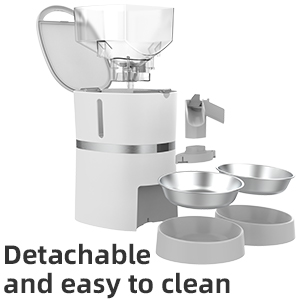
Image: The feeder disassembled into its main components, illustrating how easily it can be taken apart for thorough cleaning.
4.2 Trockenmittelersatz
The desiccant pack in the lid helps keep the pet food fresh. It is recommended to replace the desiccant pack every 15-30 days, depending on humidity levels, to maintain food quality.

Abbildung: Ein zusammengesetztes Bild zeigtasing various features of the feeder, including the desiccant compartment in the lid designed to keep food fresh.
5. Fehlerbehebung
- Futterautomat gibt kein Futter aus:
- Check if the power adapter is securely connected or if batteries are installed and have sufficient charge.
- Stellen Sie sicher, dass der Lebensmittelbehälter nicht leer ist.
- Verify that the kibble size is appropriate (5-12mm) to prevent blockages.
- Clean the dispenser mechanism to remove any stuck food.
- Check the app for any error messages or if the feeding schedule is correctly set.
- Probleme mit der Wi-Fi-Verbindung:
- Ensure your router is broadcasting a 2.4GHz Wi-Fi signal. The feeder does not support 5GHz.
- Bringen Sie den Futterspender näher an Ihren WLAN-Router.
- Starten Sie Ihren Router und die Zuleitung neu.
- Try re-pairing the feeder with the app.
- Sprachaufnahme wird nicht abgespielt:
- Ensure the voice recording feature is enabled in the app settings.
- Überprüfen Sie die Lautstärkeeinstellungen in der App.
- Food overflowing or not enough:
- Adjust the portion sizes in the app.
- Ensure the infrared sensor is clean and unobstructed.
6. Spezifikationen
| Besonderheit | Detail |
|---|---|
| Technische Daten | 25.5 x 19.8 x 36 cm |
| Produktgewicht | 2.4 kg |
| Modellnummer | WB S36D |
| Material | HAUSTIER |
| Lebensmittelkapazität | 4 Liter (ca. 1.6 kg Trockenfutter) |
| Empfohlene Krokettengröße | 5-12 mm |
| Maximale Anzahl Mahlzeiten pro Tag | 6 |
| Portionen pro Mahlzeit | 1-48 (ca. 8 g pro Portion) |
| Stromversorgung | AC Adapter, 4 x D-type Batteries (not included) |
| Konnektivität | 2.4 GHz WLAN |
| Besondere Merkmale | WiFi Connection, App Control, Timer, Sound Recording, Dual Power System |
7. Garantie und Support
7.1 Garantieinformationen
This product comes with a standard warranty. For details regarding warranty claims, returns, or defective products, please refer to the retailer's return policy or contact the manufacturer directly.
Note: If you wish to return a product within 30 days of receipt because you have changed your mind, please consult the retailer's help page. If you have received a defective or damaged product, please consult the retailer's help page. For specific information on purchases made on the Marketplace, please consult the retailer's help page.
7.2 Kundendienst
For any questions, technical assistance, or support regarding your WellToBe Automatic Pet Feeder, please contact our customer service team:
E-Mail: WellToBe@hotmail.com