
LIVLOV
LIVLOV V9 Herzfrequenz-Armband – Benutzerhandbuch
Modell: V9
Einführung
The LIVLOV V9 Heart Rate Monitor Armband is an advanced optical heart rate sensor designed to accurately track your heart rate during various physical activities. Utilizing both Bluetooth and ANT+ dual-mode technology, it provides seamless connectivity with a wide range of fitness devices and applications, helping you optimize your workouts and monitor your performance.
Produkt überview
Komponenten
- LIVLOV V9 Heart Rate Monitor Sensor
- Adjustable Armband Strap
- Magnetisches Ladekabel
Hauptmerkmale
- Hohe Genauigkeit: Built-in precision optical heart rate sensor for reliable monitoring.
- Dual-Mode-Konnektivität: Supports both Bluetooth 5.0 and ANT+ for broad compatibility.
- Lange Akkulaufzeit: Up to 60+ hours of workout time on a single charge.
- Langlebiges Design: IP67 waterproof rating, suitable for various indoor and outdoor fitness activities.
- LED-Anzeige: Provides clear status for connection and battery level.
Einrichtung und Aufladen
Initial Activation & Charging
Before first use, remove the protective film from the back of the sensor. Connect the magnetic charging cable to the sensor and a USB power source. Charge the device for at least one minute to activate it. A full charge takes approximately 1.5 hours.

Image: Close-up of the LIVLOV V9 sensor's back, highlighting the magnetic charging terminals and the optical heart rate sensor. Green lights indicate the sensor is active.
LED-Anzeigestatus
| Indikator | Status |
|---|---|
| Blaues Licht blinkt | Device On / Searching for Connection |
| Blaues Licht, durchgehend | Verbunden |
| Rotes Licht blinkt | Schwache Batterie |
| Green Light (during charging) | Ladevorgang abgeschlossen |
Tragen des Geräts
For optimal accuracy, wear the LIVLOV V9 armband on the upper portion of your forearm. Ensure the sensor is positioned on the inside or top of your forearm, making direct contact with your skin. The strap should be snug but comfortable, allowing for proper blood flow.

Image: A woman wearing the LIVLOV V9 Heart Rate Monitor armband on her forearm while exercising, demonstrating the recommended placement.
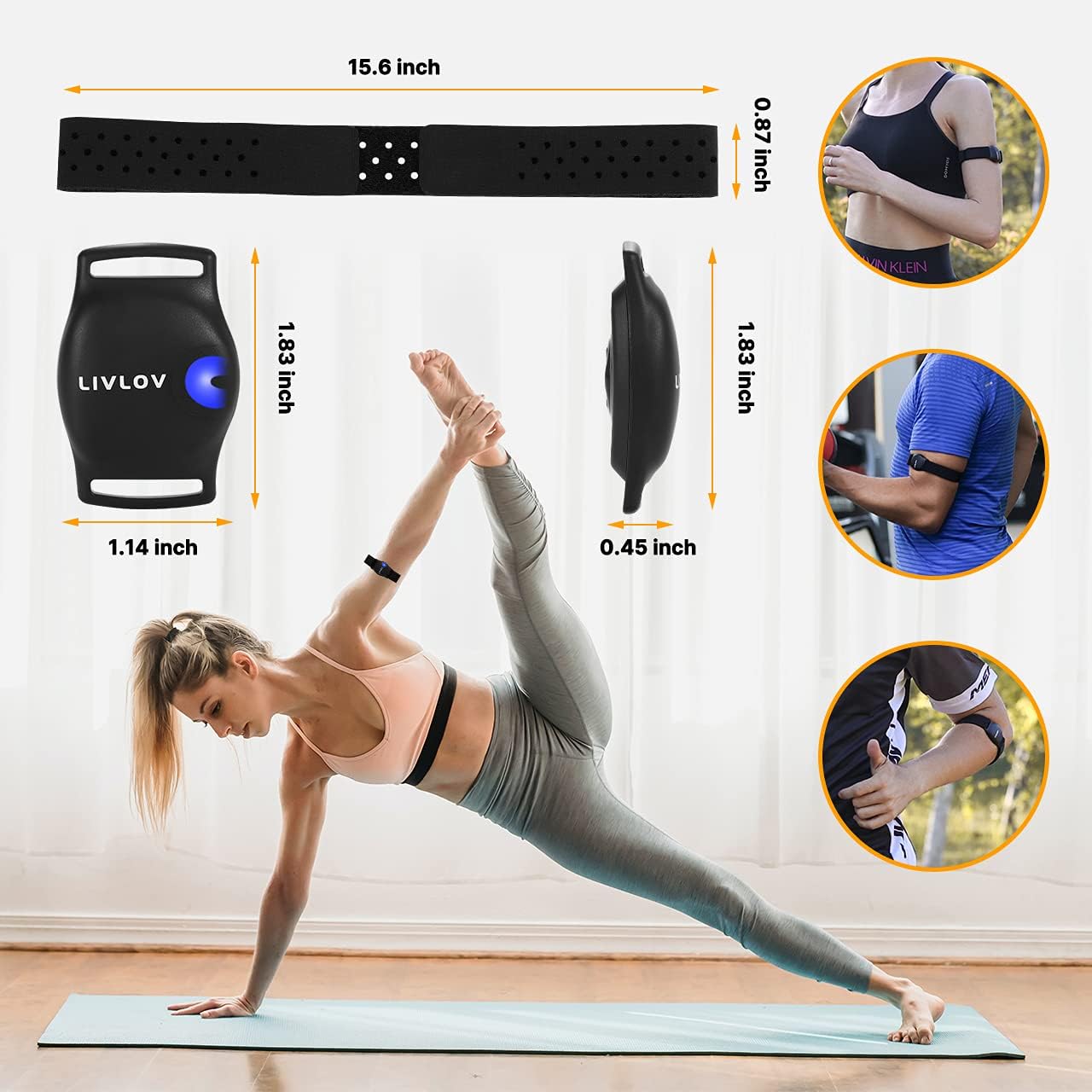
Image: A visual guide illustrating different acceptable wearing positions for the LIVLOV V9, including the forearm and bicep, along with product dimensions.
Betrieb
Ein-/Ausschalten
To turn the device on or off, press and hold the button located on the sensor until the LED indicator changes status (flashing blue for on, no light for off).
Connecting to Devices (Bluetooth & ANT+)
The LIVLOV V9 supports both Bluetooth and ANT+ connections. It can connect to smartphones, tablets, sports watches, and bike computers.
- Ensure the LIVLOV V9 is turned on and within range of your device.
- On your receiving device (smartphone, watch, etc.), enable Bluetooth or ANT+ as required.
- Open your preferred fitness application (e.g., Peloton, Strava, Wahoo Fitness).
- Navigate to the sensor or device pairing settings within the app.
- Select "LIVLOV V9-XXXXXX" (for Bluetooth) or the ANT+ ID (found on the back of the sensor) from the list of available devices.
- Confirm the connection. The LED on the V9 will turn solid blue once connected.

Image: A person cycling outdoors with the LIVLOV V9 armband connected to a bike computer via ANT+, demonstrating real-time data synchronization.
Product Video: LIVLOV V9 Overview
Video: Dieses Video bietet einen umfassenden Überblick überview of the LIVLOV V9 Heart Rate Monitor Armband, demonstrating its features, how to wear it, and its compatibility with various fitness applications and devices. It highlights the ease of setup and use for effective heart rate tracking during workouts.
App Compatibility & Usage
The LIVLOV V9 is compatible with most mainstream health and fitness applications. Popular compatible apps include:
- Polar Beat
- Wahoo Fitness
- DDP Yoga
- Endomondo
- Nike Run Club
- Runtastic Pro
- Zwift
- Strava
- Peloton
For iOS devices, compatibility requires iPhone 5 or later with iOS 11 or later. For Android devices, Bluetooth 5.0 capability and Android 5.0 or later are required.

Image: A woman running on a treadmill, with a smartphone displaying a fitness app interface showing heart rate data, indicating compatibility with popular fitness applications.
Peloton Connection Steps
- Wear the heart rate monitor on your arm and press the button to turn it on.
- Open your phone's Bluetooth settings and the Peloton App.
- Select a class you wish to start.
- After opening the class, press the "heart rate" button within the app.
- Select the LIVLOV device name from the available devices in the app to connect.
Strava Connection Steps
- Register and log in to the Strava App.
- Open the Strava App, go to the "Home" page, and click the "Record" button.
- Enter the exercise page and click the "heart rate" sign.
- Find your LIVLOV V9 device for connection.
Note: The heart rate sensor cannot directly connect to a mobile phone, iPad, or computer without a compatible application. The Bluetooth connection name is LIVLOV V9-XXXXXX. For ANT+ connection, refer to the ID number on the back of the sensor.
Pflege und Wartung
Wasserbeständigkeit
The LIVLOV V9 heart rate monitor has an IP67 waterproof rating, meaning it is protected from dust and can withstand immersion in water up to 1 meter for 30 minutes. It is suitable for daily indoor or outdoor fitness activities where it may encounter sweat or light rain. However, it is not recommended for swimming.

Image: The LIVLOV V9 armband covered in water droplets, illustrating its IP67 waterproof and sweatproof capabilities. A note indicates it's not recommended for swimming.
Reinigung
After each use, especially after sweating, gently wipe the sensor and armband with a damp cloth. Do not use abrasive cleaners or harsh chemicals. Ensure the device is completely dry before storing or charging.
Fehlerbehebung
| Problem | Mögliche Lösung |
|---|---|
| Gerät lässt sich nicht einschalten. | Ensure the device is charged. Remove the protective film from the sensor's back and charge for at least one minute to activate. |
| Cannot connect to app/device. | Ensure Bluetooth/ANT+ is enabled on your receiving device. Make sure the LIVLOV V9 is turned on and within range. Close and reopen the fitness app. Restart both the LIVLOV V9 and your receiving device. |
| Ungenaue Herzfrequenzmessungen. | Ensure the armband is worn snugly on the upper forearm, with the sensor making good skin contact. Avoid excessive movement of the armband during activity. Clean the sensor area if it's dirty. |
| Kurze Akkulaufzeit. | Ensure the device is fully charged. If the issue persists after a full charge, contact customer support. |
Technische Daten
| Besonderheit | Detail |
|---|---|
| Modell | V9 |
| Konnektivität | Bluetooth 5.0, ANT+ |
| Sensortyp | Optischer Herzfrequenzsensor |
| Wasserdichtigkeit | IP67 |
| Akkulaufzeit | Up to 60+ hours (typical use) |
| Ladezeit | Ca. 1.5 Stunden |
| Gewicht | 0.06 Kilogramm |
| Abmessungen (Sensor) | 1.83 x 1.14 x 0.45 Zoll (ca.) |
| Farbe | Schwarz |
| UPC | 789093779689 |
Garantie und Support
LIVLOV offers a 1-year warranty for the V9 Heart Rate Monitor Armband. This includes unlimited replacement of the adjustable armband strap if needed.
For any questions, concerns, or support inquiries, please contact LIVLOV customer service. They aim to reply to messages within 24 hours and provide a satisfactory solution.
You can find more information and contact details on the official LIVLOV webWebsite oder über Ihre Einkaufsplattform.