
Ctronics CTIPC-285C-Z4B
Benutzerhandbuch für die Ctronics 5X Optical Zoom WiFi Outdoor-Sicherheitskamera
Model: CTIPC-285C-Z4B
1. Einleitung
Thank you for choosing the Ctronics 5X Optical Zoom WiFi Outdoor Security Camera. This manual provides detailed instructions for the installation, operation, and maintenance of your camera. Please read this manual thoroughly before use to ensure proper functionality and safety. This camera is designed for outdoor surveillance, offering advanced features such as 5X optical zoom, human detection, auto-tracking, color night vision, and two-way audio.

Abbildung 1.1: Ctronics 5X Optical Zoom WiFi Outdoor Security Camera. This image shows the main unit of the camera with its dual antennas and lens array.
2. Sicherheitshinweise
Bitte beachten Sie die folgenden Sicherheitsvorkehrungen, um Schäden am Produkt oder Verletzungen bei Ihnen selbst und anderen zu vermeiden:
- Ensure the power supply is stable and matches the camera's voltage Anforderungen (12 Volt).
- Setzen Sie die Kamera keinen extremen Temperaturen oder Luftfeuchtigkeiten außerhalb ihres Betriebsbereichs aus.
- Vermeiden Sie die direkte Einwirkung starker Lichtquellen auf die Linse, da dies den Sensor beschädigen kann.
- Versuchen Sie nicht, die Kamera zu zerlegen oder zu verändern. Überlassen Sie alle Wartungsarbeiten qualifiziertem Fachpersonal.
- Bewahren Sie die Kamera und das Zubehör außerhalb der Reichweite von Kindern auf.
- Ensure proper mounting to prevent the camera from falling.
3. Packungsinhalt
Please check the package contents upon opening. If any items are missing or damaged, contact your retailer or Ctronics support.
- Ctronics 5X Optical Zoom WiFi Outdoor Security Camera
- Netzteil
- Befestigungsschrauben und Dübel
- Wasserdichter Kit für Netzwerkkabel (falls zutreffend)
- Kurzanleitung
4. Einrichtung
4.1 Physische Installation
- Wählen Sie einen Standort: Select a suitable outdoor location with a clear view of the area you wish to monitor. Ensure the location has access to a power outlet.
- Montage: Use the provided mounting template (if included) to mark drill holes on the wall or ceiling. Drill the holes, insert wall plugs, and secure the camera bracket using the screws.
- Stromanschluss: Connect the power adapter to the camera's power input and plug it into a power outlet.
4.2 Netzwerkverbindung
The camera supports 2.4GHz Wi-Fi networks.
- Laden Sie die App herunter: Download the "Ctronics" app from your smartphone's app store (iOS/Android). For PC users, download the HiP2P software for MAC/Windows.
- Ersteinrichtung: Folgen Sie den Anweisungen in der App, um Ihre Kamera hinzuzufügen. Dies erfordert in der Regel das Scannen eines QR-Codes auf der Kamera oder die manuelle Eingabe ihrer ID.
- Wi-Fi-Konfiguration: Verbinden Sie die Kamera über die App mit Ihrem 2.4-GHz-WLAN-Netzwerk.

Abbildung 4.1: Broad Compatibility. This image illustrates the camera's compatibility with various devices and operating systems, including iOS, Android, Windows, and Mac OS, through the Ctronics Pro app and HiP2P Client software.
4.3 Installation einer Micro-SD-Karte (optional)
The camera supports a micro SD card up to 64GB for local storage of recordings.
- Locate the SD card slot on the camera (refer to the camera diagram in the quick start guide).
- Carefully insert the micro SD card into the slot until it clicks into place.
- Format the SD card via the camera's settings in the Ctronics app for optimal performance.
5. Bedienung der Kamera
5.1 Schwenken, Neigen und Zoomen (PTZ)
The camera features motorized pan (355° horizontally) and tilt (90° vertically) functions, along with 5X optical zoom.
- Kontrolle: Use the Ctronics app to remotely control the camera's pan and tilt movements by swiping on the live view Bildschirm.
- Optischer Zoom: Pinch-to-Zoom im Live-Modus view to activate the 5X optical zoom. The camera will auto-focus for clear detailed images.
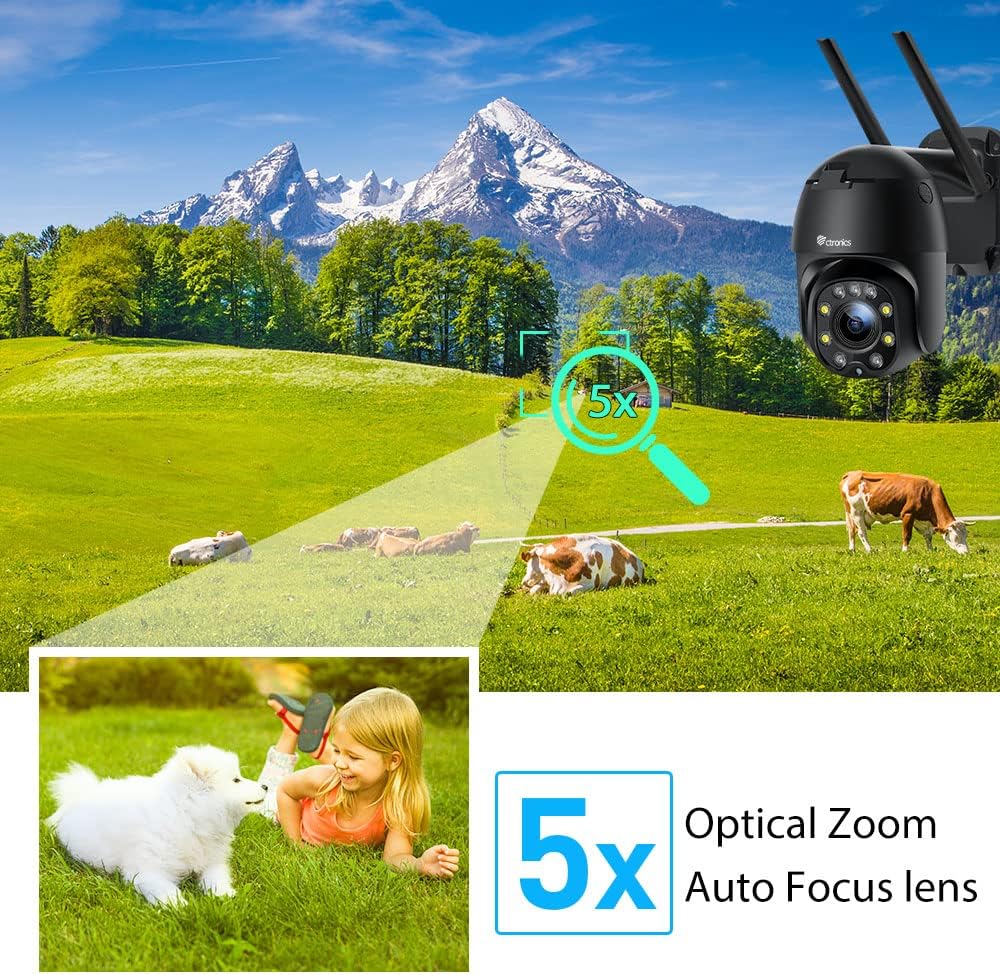
Abbildung 5.1: 5X Optical Zoom. This image demonstrates the camera's 5X optical zoom capability, allowing for detailed viewing of distant objects with auto-focus functionality.
5.2 Human Detection and Auto-Tracking
The camera utilizes AI algorithms to distinguish human movement from other triggers, reducing false alarms by up to 95%.
- Erkennung: Wenn eine Person erkannt wird, verfolgt die Kamera automatisch deren Bewegung innerhalb ihres Sichtfelds. view.
- Benachrichtigungen: You will receive instant notifications via the app, FTP, or email.
- Aufnahme: Detected events are recorded to the installed SD card.

Abbildung 5.2: Human Detection. This image illustrates how the camera's human detection feature accurately identifies people while ignoring non-human movements like pets, significantly reducing false alarms.

Abbildung 5.3: Auto Tracking. This image demonstrates the camera's auto-tracking capability, showing how it follows a detected subject's movement within its 355° horizontal and 90° vertical range.
5.3 HD 1080P & Night Vision
The camera provides 1920x1080P resolution for clear images and offers two night vision modes.
- Farbnachtsicht: With 4 spotlights and 5 infrared lights, the camera can display vivid color images in total darkness up to 25 meters.
- Infrarot Nachtsicht: Standard black and white infrared vision is also available.

Abbildung 5.4: Color Night Vision. This image illustrates the camera's ability to provide full-color video surveillance even in low-light or nighttime conditions.
5.4 Zwei-Wege-Audio
Kommunizieren Sie mit Besuchern oder schrecken Sie Eindringlinge mit dem eingebauten Mikrofon und Lautsprecher ab.
- Echtzeit-Konversation: Use the Ctronics app to engage in real-time conversations.
- Rauschunterdrückung: The camera features ambient noise reduction technology for clearer sound quality.

Abbildung 5.5: Two-Way Audio. This image depicts the camera's two-way audio functionality, allowing users to communicate with individuals near the camera via their smartphone.
5.5 Fernzugriff
View lebe footage and recordings from anywhere at any time using the Ctronics app or HiP2P software.
- Stellen Sie sicher, dass Ihre Kamera mit dem Internet verbunden ist.
- Log in to your Ctronics app or HiP2P software account to access your camera feed.
6. Wartung
Regelmäßige Wartung gewährleistet die Langlebigkeit und optimale Leistung Ihrer Kamera.
- Reinigung: Wischen Sie die Kameralinse und das Kameragehäuse vorsichtig mit einem weichen, fusselfreien Tuch ab.amp Tuch. Verwenden Sie keine scharfen Chemikalien oder Scheuermittel.
- Firmware-Updates: Check the Ctronics app periodically for available firmware updates. Keeping the firmware updated ensures you have the latest features and security enhancements.
- Aus- und Wiedereinschalten: If the camera experiences minor issues, try power cycling it by unplugging and replugging the power adapter.
7. Fehlerbehebung
In diesem Abschnitt werden häufig auftretende Probleme behandelt.
| Problem | Mögliche Ursache | Lösung |
|---|---|---|
| Kamera offline | Kein Strom; WLAN-Verbindung unterbrochen; Routerproblem | Check power connection; Reconnect Wi-Fi in app; Restart router |
| Schlechte Bildqualität | Dirty lens; Network bandwidth; Low light | Clean lens; Check internet speed; Ensure sufficient lighting or use night vision |
| Falscher Alarm | Sensitivity too high; Non-human movement | Adjust detection sensitivity in app; Ensure human detection is enabled |
| SD-Karte zeichnet nicht auf | SD card full/corrupted; Not formatted; Incorrect settings | Format SD card in app; Check recording settings; Replace SD card if faulty |
8. Spezifikationen
Detailed technical specifications for the Ctronics CTIPC-285C-Z4B camera:
| Besonderheit | Spezifikation |
|---|---|
| Modellnummer | CTIPC-285C-Z4B |
| Abmessungen (L x B x H) | 11 x 17 x 30 cm |
| Gewicht | 940 Gramm |
| Material | Acrylnitril-Butadien-Styrol (ABS) |
| Leistungstyp | Stromkabel |
| Bandtage | 12 Volt |
| Energieaufnahme | 6 Watt |
| Auflösung | 1920 x 1080 Pixel |
| Optischer Zoom | 5X |
| Schwenkbereich | 355° |
| Neigungsbereich | 90° |
| Nachtsichtentfernung | Ca. 25-Meter |
| Wasserdichtigkeit | IP66 |
| Speicherkartentyp | Micro SD |
| Maximale Speicherkapazität | 64 GB |
| Kompatible Geräte | Smartphone (iOS/Android), PC (MAC/Windows) |
9. Garantie und Support
Ctronics products come with a standard warranty. For specific warranty terms and conditions, please refer to the warranty card included with your product or visit the official Ctronics website. If you encounter any issues not covered in this manual or require further assistance, please contact Ctronics customer support:
- WebWebsite: www.ctronics.com
- E-Mail: Beachten Sie die Angaben auf Ihrer Produktverpackung oder webWebsite für Support-E-Mail.
- Telefon: Beachten Sie die Angaben auf Ihrer Produktverpackung oder webWebsite für Support-Telefonnummer.
Please have your model number (CTIPC-285C-Z4B) and purchase information ready when contacting support.
Ask a question about this manual
Ask about setup, troubleshooting, compatibility, parts, safety, or missing instructions. Manuals+ will review the question and use this page’s manual context to help answer it.