1. Einrichtung und Installation
1.1 Packungsinhalt
Vor der Installation prüfen Sie bitte, ob alle Komponenten im Paket vorhanden sind:
- CAMECHO Android 10.0 Autoradio
- Stromkabel
- USB-Kabel (2x)
- GPS-Antenne
- RCA-Eingangs-/Ausgangskabel
- Hinteren View Camera (Waterproof with 12 IR lights)
- Stents (Mounting Brackets)
- Bedienungsanleitung

Bild: Überview of included accessories such as USB cables, power cable, GPS antenna, camera input cable, RCA input/output cables, mounting stents, and the user manual.
1.2 Unit Dimensions and Installation
The main unit is a double DIN car stereo with a 9.7-inch vertical touchscreen. Ensure your vehicle's dashboard opening is compatible with the unit's dimensions.
- Geräteabmessungen: 21.8 (L) x 22.2 (H) x 5 (T) cm
- Bildschirmgröße: 9.7 Zoll

Image: Detailed diagram illustrating the physical dimensions of the car stereo unit and a visual comparison of horizontal versus vertical screen installation effects in a vehicle dashboard.
1.3 Schaltplan
Connect the power, speaker, and accessory wires according to the provided wiring diagram. Incorrect wiring can damage the unit or your vehicle's electrical system. Consult a professional if you are unsure about any connections.
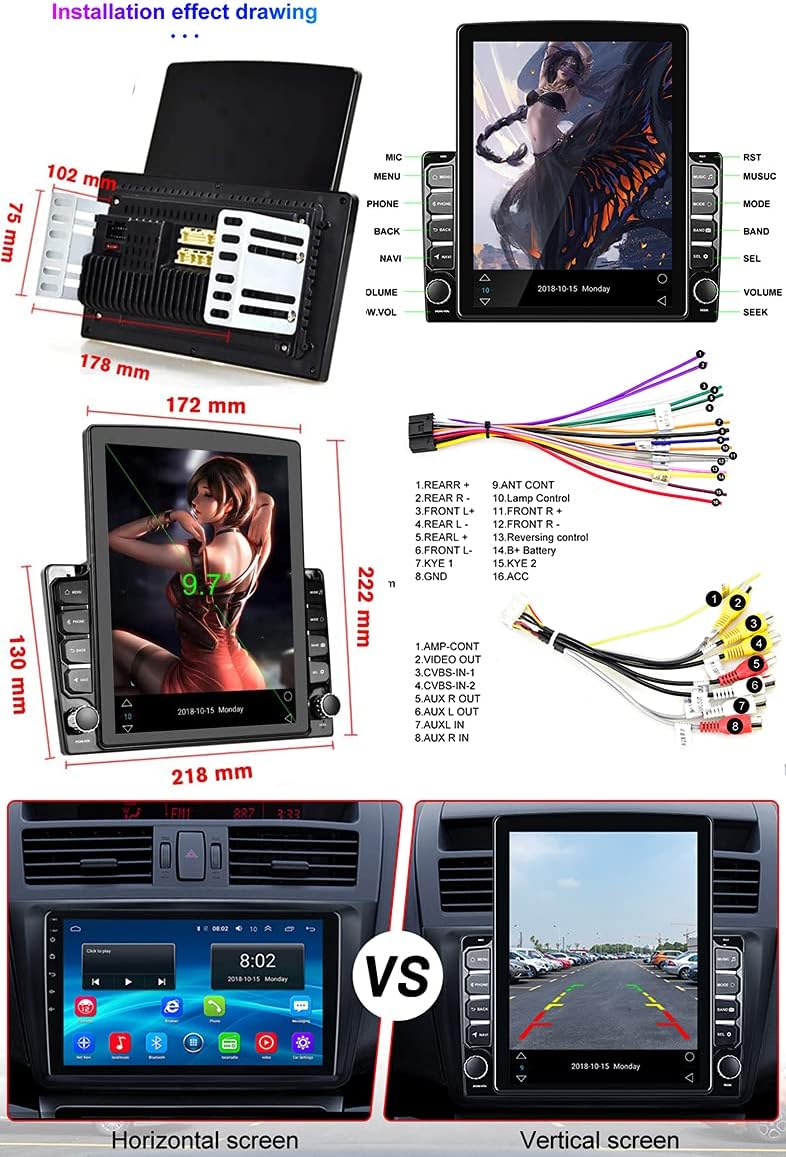
Image: Comprehensive wiring diagram indicating connections for power, speakers, camera input, USB, and other peripheral devices.
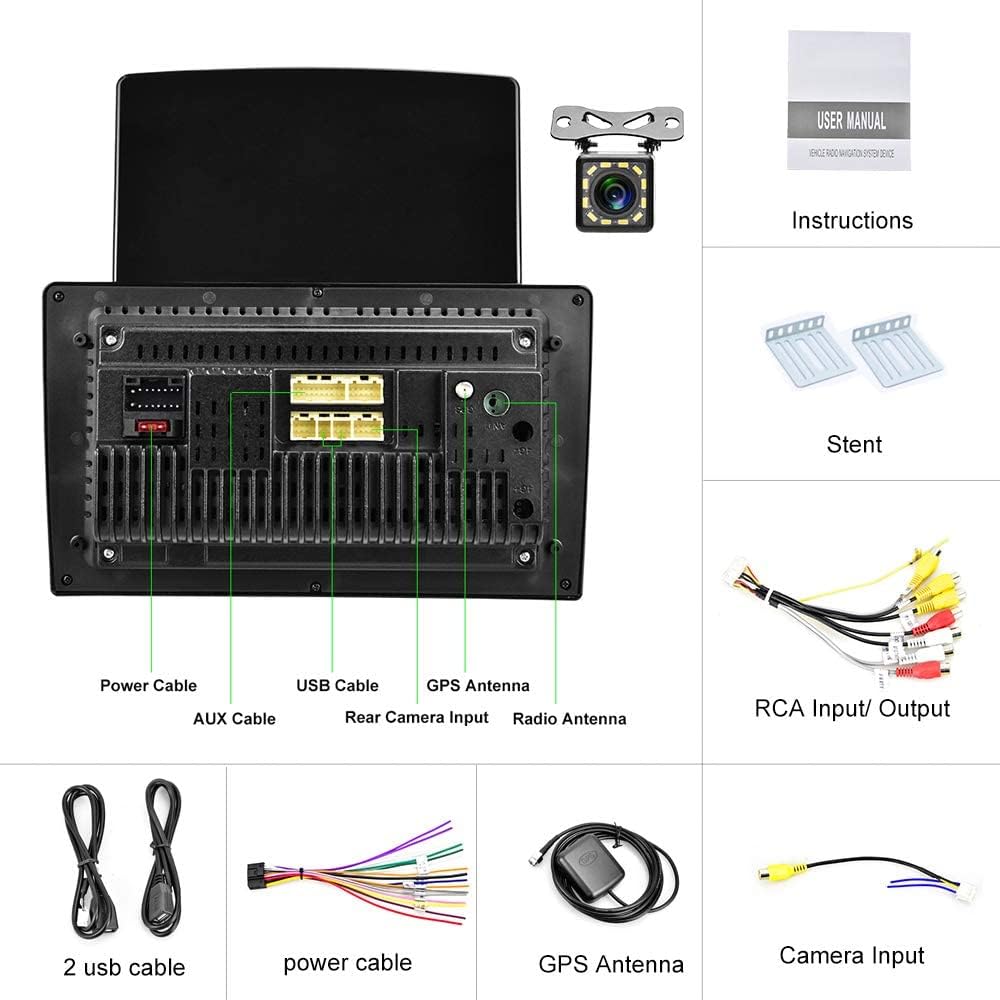
Bild: Rückseite view of the car stereo unit, highlighting the various input and output ports including power, USB, GPS antenna, and rear camera input.
2. Bedienungsanleitung
2.1 Grundlegende Bedienung
- Ein-/Ausschalten: Press and hold the power button (usually labeled 'VOL' or 'PWR') on the unit's front panel.
- Lautstärkeregelung: Use the physical volume knob on the unit or the touchscreen controls.
- Touch-Screen: Die Android-Benutzeroberfläche lässt sich durch Tippen, Wischen und Zusammenziehen auf dem 9.7-Zoll-kapazitiven Touchscreen bedienen.
2.2 Bluetooth-Funktionalität
The unit supports Bluetooth 4.0 for hands-free calling and A2DP for high-quality music streaming. Pair your smartphone to the car stereo to access these features.
- Paarung: Gehe zu den Bluetooth-Einstellungen am Autoradio und an deinem Handy. Suchen nach available devices and select 'CAMECHO' (or similar device name). Confirm the pairing code if prompted.
- Freisprechanrufe: Once paired, you can make and receive calls directly from the car stereo. The phone book can be synchronized automatically.
- Musikwiedergabe: Streamen Sie Audio von Ihrem Telefon über Bluetooth an das Autoradio.

Image: The car stereo's screen showing the Bluetooth interface, demonstrating hands-free calling and music streaming capabilities, alongside a smartphone displaying an active call.
2.3 GPS-Navigation
The unit comes with pre-installed navigation software. You can use online navigation via WiFi or download offline maps.
- Online-Navigation: Connect to a WiFi hotspot to use online mapping services.
- Offline-Karten: The unit includes a map APK named "Here wego". Download free maps manually for offline use. Older versions may have iGo/Sygic maps pre-installed.

Image: The car stereo's screen showing a detailed GPS navigation map, indicating its navigational capabilities.
2.4 WLAN-Konnektivität
Connect the car stereo to a WiFi network to access online features, download apps, and browse the internet.
- Mit WLAN verbinden: Gehen Sie zu Einstellungen > Netzwerk & Internet > WLAN. Wählen Sie das gewünschte Netzwerk aus und geben Sie das Passwort ein.
- App-Installation: Once connected, you can install various Android applications from the app store.

Image: The car stereo's screen showcasing a grid of application icons, demonstrating the unit's WiFi connectivity and ability to run various Android apps.
2.5 Mirror-Link-Funktion
Mirror Link allows you to display your smartphone's screen on the car stereo. This feature supports both iOS and Android devices.
- iOS-Geräte: Connect via WiFi for one-way projection (phone to stereo).
- Android-Geräte: Connect via WiFi or USB data cable for two-way connection (control phone from stereo, and vice-versa).

Image: The car stereo's screen mirroring content from a smartphone, illustrating the Mirror Link function with a video playing simultaneously on both devices.
2.6 FM / RDS Radio
Tune into your favorite radio stations. The RDS function provides additional information like station name, song title, and traffic announcements.
- Stimmung: Use the touchscreen interface to scan for stations or manually enter frequencies.
- RDS: Radio Data System automatically displays relevant information when available.

Image: The car stereo's screen showing the FM radio interface, including the current frequency and RDS (Radio Data System) information.
2.7 Rückseite View Kameraeingang
The included waterproof rear view Die Kamera zeigt automatisch das Rücklicht an. view on the stereo screen when the vehicle is put into reverse gear, assisting with parking.
- Installation: Connect the camera to the dedicated 'Rear Camera Input' port on the stereo unit and ensure proper power connection.
- Automatische Anzeige: Der Bildschirm schaltet automatisch auf die Kamera um. view wenn der Rückwärtsgang eingelegt ist.

Image: The car stereo's screen displaying the live feed from the rear view camera, complete with parking guidelines, as seen in a parking lot scenario.
2.8 Lenkradsteuerung
The unit supports steering wheel control, allowing you to manage audio and other functions without taking your hands off the wheel. This requires proper wiring and configuration.

Image: The car stereo's screen displaying the settings menu for configuring steering wheel controls, allowing users to map functions to their vehicle's steering wheel buttons.
2.9 Color Button Light
Passen Sie die Farbe der physischen Tasten des Geräts an die Innenbeleuchtung Ihres Fahrzeugs oder Ihre persönlichen Vorlieben an.

Image: The car stereo's screen displaying the interface for customizing the color of the physical buttons, featuring a color palette and adjustment sliders.
2.10 Videowiedergabe
The unit supports video playback. Ensure video files are in a compatible format. You can play videos from USB drives or through Mirror Link.
Video: A demonstration of the car stereo's multimedia capabilities, likely showing the user interface or a feature in action.
3. Wartung
3.1 Reinigung des Geräts
Um optimale Leistung und ein ansprechendes Erscheinungsbild zu gewährleisten:
- Verwenden Sie ein weiches, trockenes Tuch, um den Bildschirm und die Außenseite des Geräts abzuwischen.
- Bei hartnäckigen Flecken leicht dampDas Tuch mit Wasser oder einem für Bildschirme geeigneten Reiniger abwischen.
- Vermeiden Sie die Verwendung von Scheuermitteln, Lösungsmitteln oder aggressiven Chemikalien, da diese den Bildschirm und die Oberfläche beschädigen können.
3.2 Softwareaktualisierungen
Periodically check for software updates to ensure your unit has the latest features and bug fixes. Updates are typically available through the manufacturer's website or via an over-the-air (OTA) update if the unit is connected to WiFi.
4. Fehlerbehebung
Sollten Sie Probleme mit Ihrem CAMECHO-Autoradio haben, beachten Sie bitte die folgenden häufig auftretenden Probleme und Lösungen:
| Problem | Mögliche Ursache | Lösung |
|---|---|---|
| Kein Strom | Falsche Verkabelung, durchgebrannte Sicherung, Problem mit der Fahrzeugbatterie. | Check power connections (ACC, B+, GND). Verify vehicle fuses. Ensure battery is charged. |
| Kein Ton | Lautsprecherkabel nicht angeschlossen, Lautstärke zu niedrig, falsche Audioquelle. | Check speaker wiring. Increase volume. Select correct audio source (FM, Bluetooth, USB). |
| Probleme mit der Bluetooth-Verbindung | Telefon nicht auffindbar, falsche Kopplung, Störungen. | Stellen Sie sicher, dass Bluetooth auf beiden Geräten aktiviert ist. Löschen Sie vorherige Kopplungen und koppeln Sie die Geräte erneut. Gehen Sie näher an das Gerät heran. |
| GPS funktioniert nicht / ungenau | GPS-Antenne nicht angeschlossen, schlechtes Signal, veraltete Karten. | Stellen Sie sicher, dass die GPS-Antenne fest angeschlossen und an einem freien Ort platziert ist. Aktualisieren Sie gegebenenfalls die Karten. |
| Rückkamera zeigt kein Bild an | Camera wiring issue, reverse trigger wire not connected. | Verify camera video input and power connections. Ensure the reverse trigger wire is correctly connected to the vehicle's reverse light circuit. |
| Unit Unstable in Dash | Improper mounting, missing cage. | Ensure the provided brackets are securely fastened to the unit and the vehicle's dash. If a mounting cage is required for your vehicle, it may need to be purchased separately. |
Sollte das Problem nach Anwendung dieser Lösungsansätze weiterhin bestehen, wenden Sie sich bitte an den Kundendienst.
5. Spezifikationen
| Besonderheit | Detail |
|---|---|
| Marke | KAMECHO |
| Modellnummer | Pantalla 9,7 Pulgadas |
| Betriebssystem | Android 10.0 |
| Bildschirmgröße | 9.7 Zoll |
| Anzeigetyp | Capacitive Touchscreen, Vertical Display |
| Konnektivitätstechnologie | Bluetooth, WiFi, USB, FM Radio |
| Bluetooth-Version | 4.0 (mit A2DP) |
| GPS-Navigation | Supports online/offline maps (e.g., Here wego, iGo/Sygic) |
| Spiegellink | Supports iOS (one-way) and Android (two-way) |
| Radio-Tuner | FM with RDS |
| Hinterer Kameraeingang | Yes, includes waterproof camera with 12 IR lights |
| Audioausgabemodus | Stereo, Subwoofer output support |
| Anzahl der Kanäle | 4 |
| Ausgangsleistung | 45 Watt |
| Farbe | Schwarz |
| Produktabmessungen (L x B x H) | 25 x 4 x 14.5 cm |
| Artikelgewicht | 1.63 Kilogramm |
6. Garantie und Support
6.1 Herstellergarantie
This CAMECHO car stereo unit comes with a 1 Jahr HerstellergarantieDiese Garantie deckt Material- und Verarbeitungsfehler bei normalem Gebrauch ab. Bitte bewahren Sie Ihren Kaufbeleg für Garantieansprüche auf.
The availability of spare parts is currently unavailable. Software updates are not guaranteed beyond the initial release.
6.2 Kundendienst
For technical assistance, warranty claims, or further inquiries, please contact CAMECHO customer support through the retailer where the product was purchased or refer to the official CAMECHO webWebsite für Kontaktinformationen.
When contacting support, please have your product model number (Pantalla 9,7 Pulgadas) and purchase date ready.