
1. Wichtige Sicherheitshinweise
Bitte lesen Sie vor der Montage und Inbetriebnahme alle Anweisungen sorgfältig durch. Bewahren Sie diese Anleitung zum späteren Nachschlagen auf.
- Vor der Montage sicherstellen, dass alle Komponenten vorhanden und unbeschädigt sind.
- The desk is designed for indoor use only.
- Um Verletzungen zu vermeiden, sollten Kinder und Haustiere während des Betriebs vom Schreibtisch ferngehalten werden.
- Do not overload the desk. The maximum load capacity is 125 kg (excluding the tabletop).
- Ensure there are no obstacles in the desk's path during height adjustment to prevent damage or injury. The anti-collision function is designed to help prevent this, but user vigilance is still required.
- Use the parental lock feature to prevent unintended operation by children.
- Verwenden Sie ausschließlich das mit dem Schreibtisch gelieferte Netzteil.
- Die elektrischen Bauteile des Schreibtisches dürfen nicht demontiert oder verändert werden. Wenden Sie sich im Servicefall an den Kundendienst.
2. Produktüberschreitungview
The SANODESK E7 is an electric height-adjustable standing desk designed for ergonomic work. It features a robust steel frame, a quiet dual-motor lifting system, and a touch-screen control panel with memory presets and safety features. This model includes a 120x60cm maple tabletop and a grey frame.

Bild: Ein allgemeines view of the SANODESK E7 Electric Standing Desk. It features a light wood-colored tabletop and grey legs, showcasing sein modernes Design.

Image: Diagram illustrating the ergonomic benefits of standing versus sitting. It shows a person sitting at a desk with potential back pain and distraction, and a person standing at a desk with less back pain, less distraction, and improved blood circulation. Below, it shows various people of different heights using the adjustable desk.
3. Montageanleitung
The SANODESK E7 desk is shipped in two separate packages and requires assembly. All necessary tools are included. It is recommended that two people assemble the desk for ease and safety.
3.1 Auspacken und Vorbereitung
- Open both packages carefully and remove all components.
- Prüfen Sie, ob alle in der Packliste aufgeführten Teile vorhanden und unbeschädigt sind.
- Lay out all components on a clean, soft surface (e.g., a blanket or carpet) to prevent scratches.
3.2 Rahmenmontage
- Attach the feet to the lifting columns using the provided screws.
- Connect the telescopic crossbar to the lifting columns. Ensure the crossbar is expanded to the desired width for your tabletop (adjustable from 110cm to 190cm).
- Sichern Sie alle Verbindungen fest.

Image: Illustration of the telescopic crossbar, showing its adjustable range from 110cm to 190cm, accommodating desktop depths from 60cm to 80cm and widths from 120cm to 210cm.
3.3 Tischplattenaufsatz
- Carefully place the tabletop (120x60cm) upside down on the soft surface.
- Position the assembled frame onto the tabletop, aligning the pre-drilled holes (if any) or ensuring even placement.
- Attach the tabletop to the frame using the provided screws.
3.4 Control Panel and Cable Management
- Mount the control panel to the underside of the tabletop in a convenient location.
- Connect all motor cables and the power cable to the control box according to the diagram in the separate assembly guide.
- Use the included cable ties or management clips to organize cables neatly under the desk.
The entire assembly process typically takes approximately 45 minutes.
4. Bedienungsanleitung
The SANODESK E7 features a user-friendly touch-screen control panel for height adjustment and memory functions.
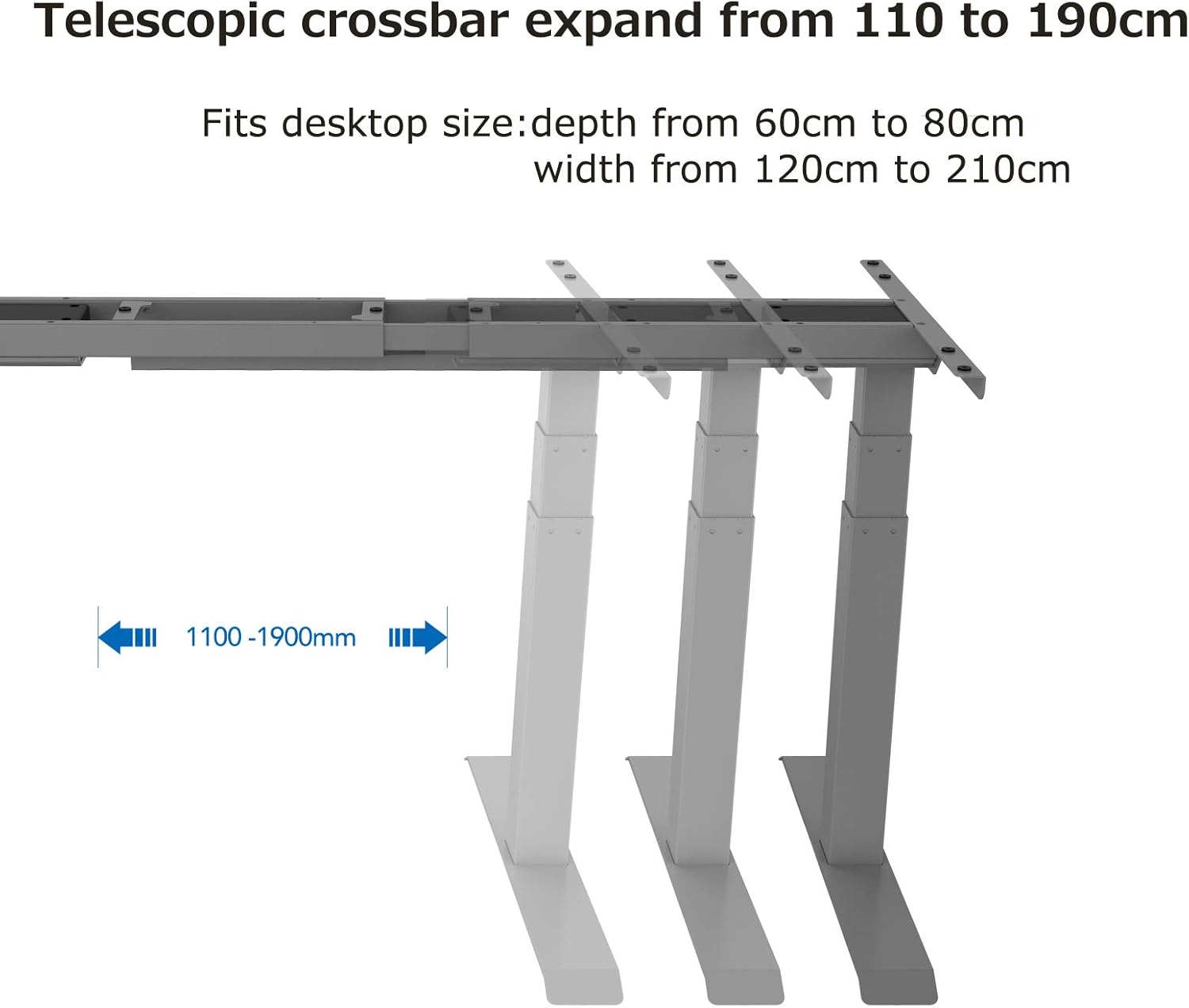
Image: Close-up of the advanced all-in-one touch-screen control panel. It features Up/Down arrows, an 'M' button for Memory & Lock, an LED display, and four preset buttons (1, 2, 3, 4) for remembered standing and sitting heights. The image highlights the 'Set Height' and 'Memory & Lock' functions.
4.1 Erste Einrichtung und Kalibrierung
- Schließen Sie den Schreibtisch an eine Steckdose an. Die LED-Anzeige am Bedienfeld sollte aufleuchten.
- Halten Sie die Runter button until the desk reaches its lowest position and slightly rebounds. This calibrates the desk.
4.2 Höhenverstellung
- Verwenden Sie die Up Pfeiltaste zum Anheben des Schreibtisches.
- Verwenden Sie die Runter Pfeiltaste zum Absenken des Schreibtisches.
- The desk height can be adjusted smoothly between 60 cm and 125 cm at a maximum speed of 38 mm/s.

Image: Diagram showing the desk's height adjustment range. The desk can move from a minimum height of 580mm (58cm) to a maximum height of 1230mm (123cm).
4.3 Einstellen von Speichervoreinstellungen
Über das Bedienfeld können Sie bis zu vier bevorzugte Höheneinstellungen speichern.
- Stellen Sie den Schreibtisch auf die gewünschte Höhe ein.
- Drücken Sie die 'M' Drücken Sie diese Taste. Im Display erscheint „S-“.
- Drücken Sie innerhalb von 3 Sekunden eine der voreingestellten Tasten (1, 2, 3 oder 4Die aktuelle Höhe wird in dieser Schaltfläche gespeichert.
- To recall a saved height, simply press the corresponding preset button. The desk will automatically move to that position.
4.4 Parental Lock Function
To activate the parental lock, press and hold the 'M' button for 5 seconds until 'LOC' appears on the display. To unlock, press and hold the 'M' erneut 5 Sekunden lang drücken.
4.5 Antikollisionsfunktion
The desk is equipped with an anti-collision system. If the desk encounters an obstacle during height adjustment, it will automatically stop and reverse slightly to prevent damage. This feature helps protect both the desk and surrounding objects.
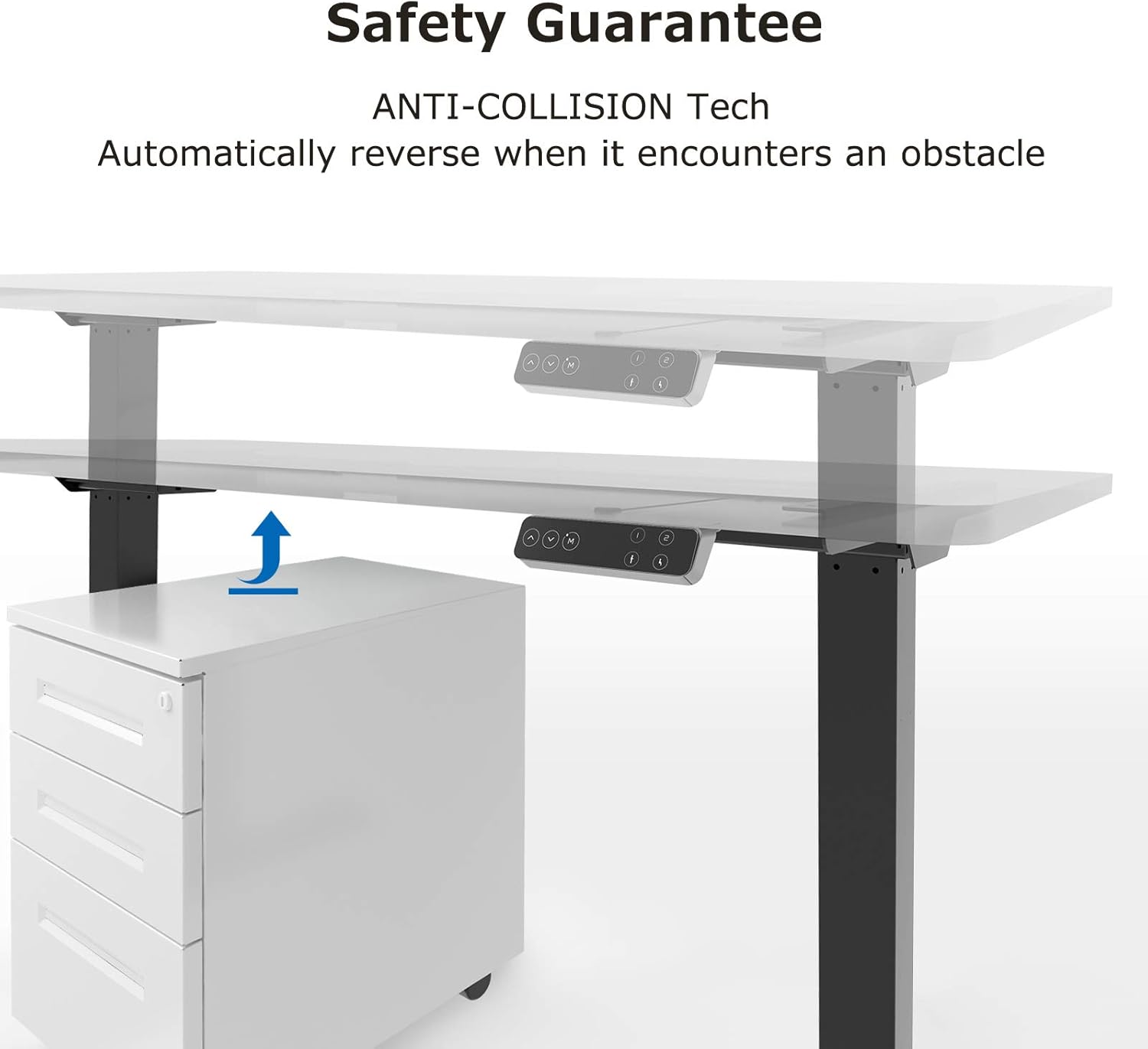
Image: Diagram illustrating the anti-collision technology. The desk is shown lowering and automatically reversing its movement when it detects an obstacle (a cabinet) underneath.
5. Wartung
Regular maintenance ensures the longevity and optimal performance of your SANODESK E7.
- Reinigung: Wischen Sie die Schreibtischoberfläche und den Rahmen mit einem weichen, fusselfreien Tuch ab.amp Tuch. Vermeiden Sie Scheuermittel oder aggressive Chemikalien.
- Kabelmanagement: Überprüfen Sie regelmäßig, ob alle Kabel fest angeschlossen und nicht eingeklemmt oder verheddert sind.
- Befestigungsmaterial: Überprüfen Sie gelegentlich alle Schrauben und Bolzen auf festen Sitz. Ziehen Sie sie gegebenenfalls nach.
- Schmierung: The lifting columns are designed to be maintenance-free and do not require lubrication.
6. Fehlerbehebung
If you encounter any issues with your SANODESK E7, please refer to the following troubleshooting guide.
| Problem | Mögliche Ursache | Lösung |
|---|---|---|
| Schreibtisch lässt sich nicht bewegen / Kein Strom | Power cable disconnected, power outlet issue, control box issue. |
|
| Der Schreibtisch bewegt sich ungleichmäßig oder macht ungewöhnliche Geräusche | Ungleichmäßige Belastung, lose Verbindungen, Verstopfung. |
|
| Error code on display (e.g., E01, E02) | Overload, motor fault, sensor issue. |
|
| Parental lock activated ('LOC' on display) | Lock function engaged. |
|
6.1 Reset-Vorgang
If the desk is not functioning correctly, a reset may resolve the issue:
- Ziehen Sie das Netzkabel aus der Steckdose.
- Warten Sie mindestens 10 Sekunden.
- Stecken Sie das Netzkabel wieder ein.
- Halten Sie die Runter button until the desk reaches its lowest position, slightly rebounds, and stops. This indicates a successful reset.
7. Spezifikationen
| Marke | SANODESK |
| Modell | E7 |
| Typ | Electric Height-Adjustable Standing Desk |
| Abmessungen der Tischplatte | 120 x 60 cm |
| Höhenverstellbereich | 60 cm bis 125 cm |
| Hebemechanismus | Dual Motor, 3-stage telescopic columns |
| Maximale Hubgeschwindigkeit | 38 mm/s |
| Max. Ladekapazität | 125 kg (excluding tabletop) |
| Bedienfeld | Touch screen with 4 memory presets, parental lock |
| Sicherheitsfunktionen | Anti-collision system, parental lock |
| Rahmenmaterial | Edelstahl |
| Tischplattenmaterial | Ahornholz |
| Color (Frame + Top) | Grey Frame + Maple Top |
| Montage erforderlich | Yes (2 persons recommended, tools included) |
| Artikelgewicht | 28 Kilogramm |

Bild: Detailliert view of the desk's three-stage lifting column design, showing inner (60x60mm), medium (65x65mm), and outer (70x70mm) tube dimensions for excellent stability. Also shown is an adjuster attached horizontally to the foot.
8. Kundendienst
For any questions, technical assistance, or warranty claims, please contact SANODESK customer support. Refer to your purchase documentation for specific contact details or visit the official SANODESK webWebsite.
SANODESK is committed to providing specialized customer support to ensure your satisfaction.