
Treedix TRX2-0151
Treedix LCR-TC1 Multifunktionstester – Benutzerhandbuch
Modell: TRX2-0151
1. Einleitung
The Treedix LCR-TC1 is a versatile multi-function tester designed for electronic component analysis. It features a 1.8-inch TFT graphic display and is capable of automatically identifying and measuring various components, including transistors, diodes, resistors, capacitors, and inductors. This manual provides essential information for the safe and effective use of your device.
2. Sicherheitshinweise
Bitte lesen und verstehen Sie die folgenden Sicherheitsvorkehrungen, bevor Sie das Gerät in Betrieb nehmen:
- The device contains a built-in Li-ion battery. Do not immerse the tester in water or expose it to high heat sources.
- Always discharge capacitors before connecting them to the tester. Failure to do so can damage the device and pose a safety risk.
- It is not recommended to use this tester to measure batteries directly. If measuring a battery, ensure its voltage is less than 4.5V to prevent damage to the tester.
- Do not attempt to test components while they are still connected in a live circuit.
- Handle the test leads and components with care to avoid damage to the device or injury.
3. Packungsinhalt
Überprüfen Sie, ob alle Artikel im Paket vorhanden sind:
- 1 x Treedix LCR-TC1 Graphical Tester
- 1 x Set of Electronic Components (for testing/calibration)
- 3 x Testhaken
- 1 x USB-Ladekabel

Image 3.1: Included accessories for the Treedix LCR-TC1 Multi-Function Tester. This includes three test hooks, a USB charging cable, and a small set of electronic components for initial testing or calibration.
4. Produktüberschreitungview
4.1 Hauptmerkmale
- 1.8-inch TFT Color Graphic Display
- Automatic detection and measurement of NPN/PNP transistors, N/P-channel MOSFETs, diodes (including dual diodes), Zener diodes, thyristors, resistors, capacitors, and inductors.
- Automatic identification of component pinout.
- Ein-Knopf-Bedienung für einfache Handhabung.
- Automatic shutdown function to conserve battery.
- Infrared waveform detection.
- Integrierte wiederaufladbare Lithium-Batterie.
4.2 Gerätekomponenten

Bild 4.1: Vorderseite view of the Treedix LCR-TC1 Multi-Function Tester. Visible features include the 1.8-inch TFT display, the ZIF (Zero Insertion Force) socket for component insertion, the 'Start' button, and the IR sensor. Test clips are shown connected to the test points.

Abbildung 4.2: Rückseite view of the Treedix LCR-TC1 Multi-Function Tester. This image shows the plain back casing with four rubber feet for stability during use.
5. Einrichtung
5.1 Erstaufladung
Before first use, fully charge the internal lithium battery using the provided USB cable. Connect the cable to the micro-USB port on the side of the tester and to a standard USB power source (e.g., computer USB port, USB wall adapter).
5.2 Connecting Test Hooks
The three test hooks can be connected to the corresponding test points (1, 2, 3) on the ZIF socket for easier testing of larger components or components not suitable for direct insertion into the ZIF socket.
5.3 Kalibrierung
The LCR-TC1 features an automatic calibration function. To perform calibration:
- Ensure no components are inserted into the ZIF socket or connected to the test points.
- Short-circuit all three test points (1, 2, 3) together using a wire or by connecting the three test hooks together.
- Press and hold the 'Start' button. The device will prompt for calibration.
- Follow the on-screen instructions. The device will guide you through removing the short circuit when prompted.
- Calibration is complete when the device returns to the main measurement screen.
6. Bedienungsanleitung
6.1 Grundlegende Komponentenprüfung
So testen Sie eine Komponente:
- Ensure the component is discharged (especially capacitors) and not connected to any live circuit.
- Insert the component's leads into the ZIF socket (pins 1, 2, 3) or connect them using the test hooks to the corresponding test points. The order of pins does not typically matter as the tester automatically identifies them.
- Close the ZIF socket lever if using the socket.
- Drücken Sie die Taste „Start“.
- The tester will automatically detect the component type and display its parameters on the TFT screen.

Image 6.1: The Treedix LCR-TC1 Multi-Function Tester in the process of testing a component. The screen displays "Testing..." along with battery voltage and pin connections.
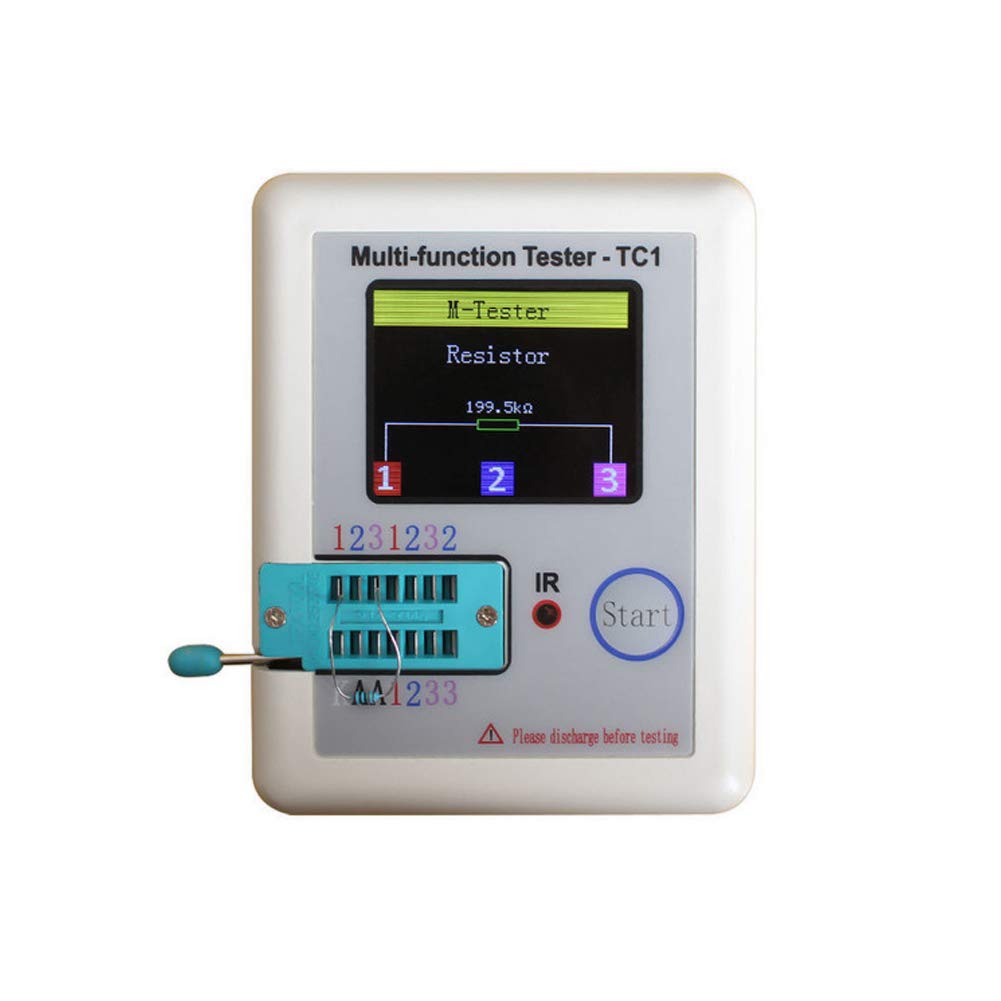
Image 6.2: A measurement result displayed on the Treedix LCR-TC1 screen. The tester has identified a resistor and shows its value as 199.5 kΩ, along with the connected pins (1, 2, 3).
6.2 Supported Component Types and Ranges
- Transistoren: NPN, PNP, N-channel MOSFET, P-channel MOSFET. Detects gain (hFE), V_f, and pinout.
- Dioden: Single diodes, dual diodes. Measures forward voltage fallen.
- Zenerdioden: Detection range 0.01V - 30V.
- Thyristors/TRIACs: IGT < 6mA.
- Widerstände: 0.01 Ω - 50 MΩ.
- Kondensatoren: 25 pF - 100 mF. Measures capacitance and ESR (Equivalent Series Resistance).
- Induktoren: 0.01 mH - 20 H.
- Batterien: Bandtage measurement range 0.1V - 4.5V (for measurement, not power source).
6.3 Infrared (IR) Decoding
The tester can detect infrared waveforms. Point an IR remote control towards the IR sensor on the device and press a button. The tester will display the decoded IR signal data.
6.4 Automatische Abschaltung
The device will automatically shut down after a period of inactivity to conserve battery power. To manually shut down the device, press and hold the 'Start' button.
7. Wartung
- Reinigung: Reinigen Sie das Gerät mit einem weichen, trockenen Tuch. Verwenden Sie keine Scheuer- oder Lösungsmittel.
- Lagerung: Bewahren Sie den Tester an einem kühlen, trockenen Ort fern von direkter Sonneneinstrahlung und extremen Temperaturen auf.
- Batteriepflege: Laden Sie den Akku regelmäßig auf, auch wenn das Gerät nicht häufig benutzt wird, um seine Lebensdauer zu erhalten. Vermeiden Sie es, den Akku über längere Zeiträume vollständig zu entladen.
- Messleitungen: Inspect test hooks and cables periodically for any signs of wear or damage. Replace if necessary.
8. Fehlerbehebung
| Problem | Mögliche Ursache | Lösung |
|---|---|---|
| Gerät lässt sich nicht einschalten. | Niedriger oder leerer Akku. | Laden Sie das Gerät mit dem USB-Kabel auf. |
| Incorrect or no measurement displayed. | Component not properly connected; Component damaged; Capacitor not discharged; Device needs calibration. | Ensure leads are firmly connected. Check component for damage. Discharge capacitors before testing. Kalibrierung durchführen (Abschnitt 5.3). |
| "Unknown or damaged part" message. | Component is outside measurement range; Component is faulty; Component is still in-circuit. | Verify component type and expected values. Ensure component is isolated from any circuit. |
| Der Bildschirm ist dunkel oder flackert. | Schwache Batterie. | Laden Sie das Gerät auf. |
9. Spezifikationen
| Parameter | Wert |
|---|---|
| Anzeige | 1.8 Zoll TFT-Farbbildschirm |
| Diodenbereich | < 4.5 V |
| Transistor Detect Area | 0.01 - 4.5 V |
| Zener Diode Detect Area | 0.01 - 30 V |
| Triac Range | IGT < 6mA |
| Kapazitätsmessung | 25 pF - 100 mF |
| Widerstandsmessung | 0.01 Ω - 50 MΩ |
| Induktivitätsmessung | 0.01 mH - 20 H |
| Batteriemessbereich | 0.1 - 4.5 V |
| Power-Modus | Wiederaufladbare Lithiumbatterie (im Lieferumfang enthalten) |
| Abmessungen (L x B x H) | Ca. 90 x 50 x 25 mm (3.54 x 1.96 x 0.98 Zoll) |
| Artikelgewicht | Ca. 0.1 kg (3.52 Unzen) |
| Modellnummer | TRX2-0151 |
| UPC | 765756508568 |
10. Garantieinformationen
Specific warranty details for the Treedix LCR-TC1 Multi-Function Tester are not provided in this manual. Please refer to the product packaging or the official Treedix webDie aktuellsten Garantiebestimmungen finden Sie auf der entsprechenden Webseite.
11. Kundendienst
For technical assistance, troubleshooting beyond this manual, or inquiries regarding your Treedix LCR-TC1 Multi-Function Tester, please visit the official Treedix website or contact their customer support channels. Contact information can typically be found on the product packaging or the brand's online store.
Ask a question about this manual
Ask about setup, troubleshooting, compatibility, parts, safety, or missing instructions. Manuals+ will review the question and use this page’s manual context to help answer it.