
Einführung
Welcome to your new Gembird GHS-U-5.1-01 USB 5.1 Surround Headset. This manual provides essential information for setup, operation, and maintenance to ensure optimal performance and an immersive audio experience.
Packungsinhalt
Das Paket sollte folgende Artikel enthalten:
- Gembird GHS-U-5.1-01 USB 5.1 Surround Headset

Image: Retail packaging for the Gembird GHS-U-5.1-01 USB 5.1 Surround Headset, showing the headset inside a clear window.
Produkt überview
The Gembird GHS-U-5.1-01 is a USB headset designed for immersive audio experiences with 5.1 surround sound. It features an adjustable microphone, built-in volume control, comfortable ear pads, and an adjustable headband for extended use.
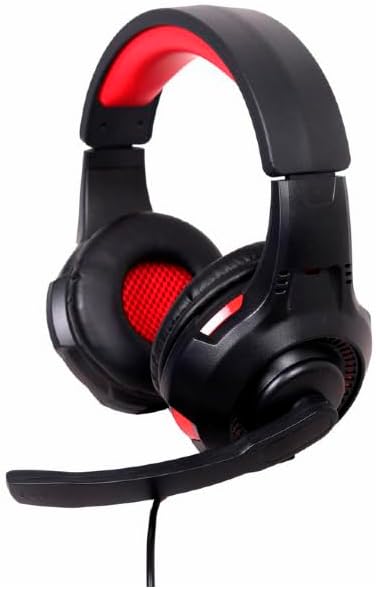
Bild: Abgewinkelt view of the Gembird GHS-U-5.1-01 USB 5.1 Surround Headset, showcasing its black and red design with the microphone boom extended.

Bild: Vorderseite view of the Gembird GHS-U-5.1-01 USB 5.1 Surround Headset, highlighting the adjustable headband and earcups.

Image: Close-up of the in-line control unit for the Gembird GHS-U-5.1-01 headset, showing volume up/down and microphone mute buttons.
Aufstellen
Anschließen des Headsets
The Gembird GHS-U-5.1-01 headset connects via a standard USB port.
- Suchen Sie einen verfügbaren USB-Anschluss an Ihrem Computer.
- Stecken Sie den USB-Stecker des Headsets in den USB-Anschluss.
- Ihr Betriebssystem sollte die benötigten Treiber automatisch erkennen und installieren. Dieser Vorgang kann einige Augenblicke dauern.
- Once installed, the headset will be ready for use as an audio input and output device.
Audio Settings Configuration
For optimal 5.1 surround sound experience, you may need to configure your computer's audio settings.
- Windows: Go to "Sound Settings" (right-click speaker icon in taskbar) > "Sound Control Panel" > "Playback" tab. Select the Gembird headset, click "Configure," and choose "5.1 Surround."
- macOS: Go to "System Preferences" > "Sound" > "Output" tab. Select the Gembird headset.
Bedienungsanleitung
Lautstärkeregelung
The headset features an in-line remote control for easy volume adjustment.
- Verwenden Sie die "+" Taste, um die Lautstärke zu erhöhen.
- Verwenden Sie die "-" Taste, um die Lautstärke zu verringern.
Mikrofonnutzung
The adjustable microphone boom allows for precise positioning.
- Position the microphone approximately 1-2 inches from your mouth for clear voice capture.
- Use the microphone mute button on the in-line remote to toggle the microphone on or off.
Komforteinstellung
Adjust the headband to fit comfortably on your head. The ear pads are designed for extended use.
Wartung
To ensure the longevity and performance of your headset, follow these maintenance guidelines:
- Reinigung: Use a soft, dry cloth to wipe the headset. Do not use harsh chemicals or abrasive cleaners.
- Lagerung: Store the headset in a clean, dry place away from extreme temperatures.
- Kabelpflege: Um Beschädigungen zu vermeiden, sollten Sie das USB-Kabel nicht scharf biegen oder übermäßig daran ziehen.
Fehlerbehebung
No Sound or Microphone Not Working
- USB-Verbindung prüfen: Stellen Sie sicher, dass der USB-Stecker vollständig im Anschluss steckt. Versuchen Sie es mit einem anderen USB-Anschluss.
- Check Volume Levels: Verify that the volume on the in-line control, your computer's system volume, and application-specific volumes are not muted or set too low.
- Audioeinstellungen prüfen: Confirm that the Gembird headset is selected as the default playback and recording device in your computer's sound settings.
- Starte den Computer neu: Sometimes a simple restart can resolve driver or software conflicts.
Probleme mit der Tonqualität
- Treiber-Update: Stellen Sie sicher, dass Ihre Betriebssystemtreiber auf dem neuesten Stand sind.
- Quellqualität: Poor audio quality may stem from the audio source itself. Test with different audio files oder Anwendungen.
Technische Daten
| Modellname | GHS-U-5.1-01 |
| Konnektivität | Kabelgebundenes USB |
| Formfaktor | Am Ohr |
| Farbe | Schwarz |
| Material | Aluminium (Gehäuse) |
| Gewicht | 0.4 Kilogramm |
| Zusätzliche Merkmale | Adjustable microphone boom, Built-in volume control, Comfortable ear pads, Adjustable headband |
Garantieinformationen
This Gembird headset comes with a 24 Month Manufacturer Guarantee. Please retain your proof of purchase for warranty claims. For detailed warranty terms and conditions, refer to the documentation provided with your product or contact Gembird customer support.
Unterstützung
If you encounter issues not covered in this manual or require further assistance, please visit the official Gembird website or contact their customer support for technical assistance.