
1. Einleitung
Thank you for choosing the BolyGuard MG984G-36M Trail Camera. This manual provides detailed instructions for the setup, operation, and maintenance of your camera. Designed for outdoor surveillance, this camera captures high-resolution images and videos, offering 4G connectivity for cloud services and remote management via a dedicated application.
Bitte lesen Sie diese Bedienungsanleitung vor der ersten Benutzung der Kamera sorgfältig durch, um eine optimale Leistung und lange Lebensdauer zu gewährleisten.
2. Produktüberschreitungview
The BolyGuard MG984G-36M is a robust trail camera featuring a camouflage design for discreet outdoor placement. It is equipped with a high-resolution sensor, infrared LEDs for night vision, and an external antenna for reliable 4G communication.
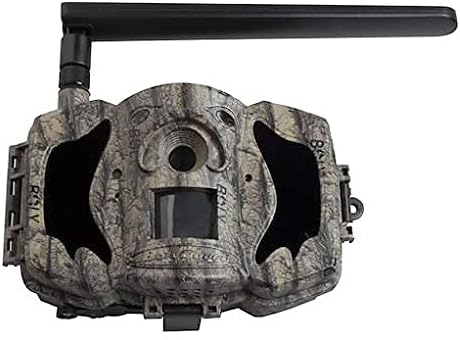
Abbildung 1: Vorderseite view of the BolyGuard MG984G-36M trail camera. This image displays the front view of the BolyGuard MG984G-36M trail camera. It features a camouflage pattern casing, a prominent external antenna on the top left, and the main lens and sensor area visible on the front. The camera is designed for outdoor use and blends with natural environments.
Schlüsselkomponenten:
- Hauptobjektiv: Nimmt Bilder und Videos auf.
- PIR-Sensor: Erkennt Bewegungen, um die Aufnahme auszulösen.
- Infrarot-LEDs: Sorgt für Beleuchtung bei Nachtsicht.
- Externe Antenne: Ensures stable 4G network connectivity.
- LCD Bildschirm: For menu navigation and settings adjustment (located inside the camera).
- Batteriefach: Holds required batteries (not included).
- SD-Kartensteckplatz: Zur Speicherung der aufgezeichneten Medien.
- SIM-Kartensteckplatz: For 4G network access.
3. Einrichtung
3.1 Einlegen der Batterie
- Öffnen Sie die Kamera casing-Verschlüsse.
- Suchen Sie das Batteriefach.
- Insert the required batteries (e.g., AA batteries, not included) according to the polarity indicators (+/-). Ensure all batteries are new and of the same type.
- Verschließen Sie das Batteriefach fest.
3.2 Installation der SIM-Karte und SD-Karte
- With the camera powered off, locate the SIM card slot. Insert a activated 4G SIM card into the slot until it clicks into place.
- Locate the SD card slot. Insert a compatible SD card (up to 32GB, Class 10 recommended, not included) into the slot until it clicks.
- Attach the external antenna to the designated port on the camera.
3.3 Initial Power-On and App Setup
- Switch the camera to the 'SETUP' mode. The internal LCD screen will power on.
- Follow the on-screen prompts to set the date, time, and other basic settings.
- Download the official BolyGuard app from your smartphone's app store.
- Register an account and add your camera to the app by following the in-app instructions, typically involving scanning a QR code or entering the camera's serial number.
- Ensure the camera has a stable 4G signal, indicated on the LCD screen.
4. Bedienungsanleitung
4.1 Grundlegende Betriebsarten
- AUS: Die Kamera ist ausgeschaltet.
- KONFIGURATION: Allows access to the camera's menu for configuration and viewing aufgezeichnete Medien.
- AUF: Camera is in active surveillance mode, detecting motion and capturing media according to settings.
4.2 Konfigurationseinstellungen
In 'SETUP' mode, use the navigation buttons to access and modify settings:
- Modus: Wählen Sie Foto, Video oder Foto+Video.
- Bildgröße: Set photo resolution (e.g., 36MP, 24MP).
- Videogröße: Videoauflösung einstellen (z. B. 1080P, 720P).
- PIR-Empfindlichkeit: Adjust motion detection sensitivity (High, Normal, Low).
- Auslöseintervall: Stelle die Verzögerung zwischen aufeinanderfolgenden Auslösern ein.
- Zeitraffer: Configure time-lapse photography settings.
- Sendemodus: Configure how media is sent via 4G (e.g., instant, daily report).
- Cloud-Dienst: Enable or disable cloud storage and app connectivity.
4.3 Fernverwaltung per App
Once connected to the BolyGuard app, you can:
- Receive real-time notifications of detected activity.
- View captured photos and videos remotely.
- Change camera settings from your smartphone.
- Monitor camera status (battery level, signal strength, SD card capacity).
5. Wartung
- Reinigung: Regularly clean the camera lens and PIR sensor window with a soft, dry cloth. Avoid abrasive materials or harsh chemicals.
- Batteriewechsel: Replace all batteries when the low battery indicator appears or when performance degrades. Always use fresh batteries of the same type.
- SD-Kartenverwaltung: Periodically format the SD card in the camera's menu to maintain optimal performance and prevent data corruption. Back up important files vor der Formatierung.
- Firmware-Updates: Check the BolyGuard official website for any available firmware updates. Follow the provided instructions carefully for installation.
- Lagerung: Bei längerer Nichtbenutzung die Batterien entfernen und die Kamera an einem kühlen, trockenen Ort ohne direkte Sonneneinstrahlung aufbewahren.
6. Fehlerbehebung
- Kamera lässt sich nicht einschalten: Ensure batteries are correctly inserted with correct polarity and are fully charged. Check if the power switch is in the 'SETUP' or 'ON' position.
- Kein 4G-Signal: Verify the SIM card is active and correctly inserted. Ensure the external antenna is securely attached. Move the camera to an area with better network coverage.
- Keine Bilder/Videos aufgenommen: Check if the SD card is inserted and has sufficient free space. Verify PIR sensitivity settings and ensure the camera is in 'ON' mode.
- Schlechte Bild-/Videoqualität: Clean the camera lens. Ensure the camera is securely mounted and not subject to excessive vibration. Check resolution settings.
- Probleme mit der App-Konnektivität: Ensure the camera has a stable 4G connection. Verify your smartphone has internet access. Re-add the camera to the app if necessary.
7. Spezifikationen
| Besonderheit | Detail |
|---|---|
| Modellnummer | MG984G-36M |
| Bildauflösung | Bis zu 36 Megapixel |
| Videoauflösung | Full HD (1080P) |
| Konnektivitätstechnologie | Kabellos (4G) |
| Technische Daten | 50 x 50 x 28 cm |
| Artikelgewicht | 5.66 kg |
| Batterien | Erforderlich (nicht enthalten) |
| ASIN | B087V4SWGH |
| Datum der ersten Verfügbarkeit | 7. Juli 2020 |
8. Garantie und Support
For warranty information and technical support, please refer to the official BolyGuard webBesuchen Sie unsere Website oder wenden Sie sich an Ihren autorisierten Händler. Bewahren Sie Ihren Kaufbeleg als Kaufnachweis für Garantieansprüche auf.
Online resources, including FAQs and additional troubleshooting guides, may be available on the manufacturer's support pages.