
Apple MWVF2LL/A
Apple Watch Series 5 (GPS, 44 mm) Benutzerhandbuch
Model: MWVF2LL/A
1. Produktüberschreitungview
The Apple Watch Series 5 (GPS, 44MM) is designed to keep you connected, healthy, and safe. It features a 44mm curved watch face with an LTPO OLED always-on Retina display, allowing for quick glances at information without needing to raise your wrist. The device integrates seamlessly with watchOS, providing access to various features and applications. Key functionalities include a digital crown with haptic feedback for navigation and a heart rate monitor capable of recording an ECG.
Hauptmerkmale:
- Geographisches Positionierungs System: Integrated Global Positioning System for location tracking.
- Always-On Retina Display: Display remains visible at low brightness, activating full brightness upon wrist raise.
- 30% Larger Screen: Erweitert viewing area compared to previous models.
- Swimproof: Designed to withstand water exposure during swimming and other water activities.
- EKG-App: Capable of generating an electrocardiogram similar to a single-lead ECG.
- Electrical and Optical Heart Sensors: Advanced heart rate monitoring capabilities.
- Eingebauter Kompass: Bietet Orientierungshilfe in der Richtung.
- Elevation: Tracks changes in altitude.
- Notfall SOS: Feature to quickly call emergency services.
- Sturzerkennung: Automatically detects hard falls and can initiate emergency calls.
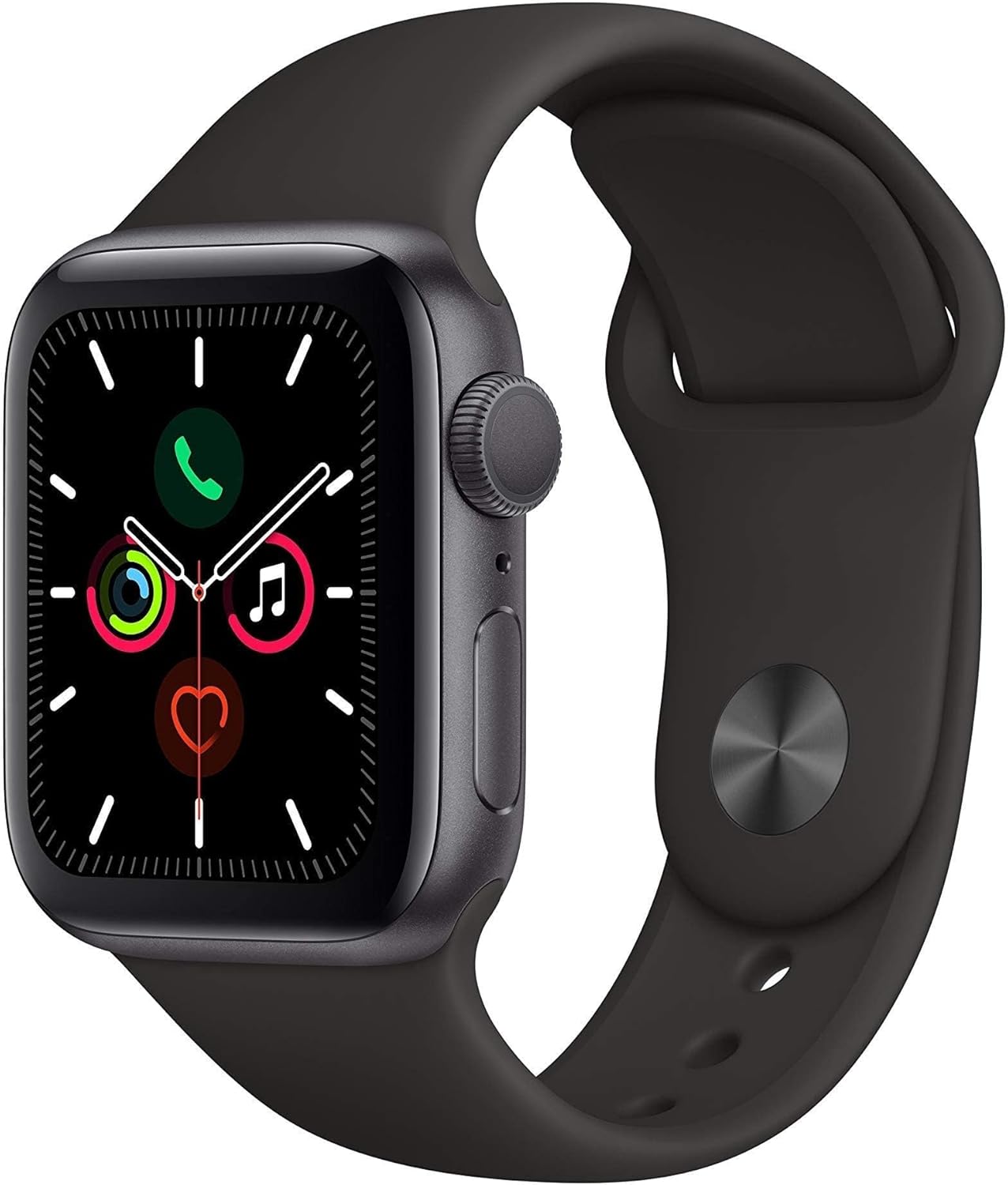
Figure 1: Apple Watch Series 5 (GPS, 44MM) in Space Gray Aluminum with Black Sport Band. This image shows the front view of the smartwatch, highlighting its display and the digital crown on the side.
2. Einrichtung
2.1. Erstes Aufladen
Before first use, ensure your Apple Watch Series 5 is fully charged. Connect the magnetic charging cable to the back of the watch and plug the USB end into a power adapter. A charging indicator will appear on the screen. A full charge typically takes approximately 2.5 hours.
2.2. Koppeln mit dem iPhone
- Stellen Sie sicher, dass Ihr iPhone auf die neueste iOS-Version aktualisiert ist und Bluetooth sowie WLAN aktiviert sind.
- Schalten Sie Ihre Apple Watch ein, indem Sie die Seitentaste gedrückt halten, bis das Apple-Logo erscheint.
- Place your Apple Watch near your iPhone. A pairing screen will appear on your iPhone. Tap "Continue".
- Positionieren Sie Ihr iPhone so, dass die Apple Watch im Bild erscheint. viewTippen Sie auf „Finder“ auf dem Bildschirm Ihres iPhones. Dadurch werden die Geräte gekoppelt.
- Follow the on-screen instructions on both devices to complete the setup, including setting up a passcode, Apple ID, and preferred settings.

Figure 2: The Apple Watch display showing a typical watch face with complications for phone, activity rings, and music. This illustrates the user interface after successful setup.
3. Bedienungsanleitung
3.1. Navigation
- Digitale Krone: Drehen Sie die Uhr, um zu scrollen, zu zoomen oder Werte anzupassen. Einmaliges Drücken öffnet das Zifferblatt oder die App-Liste. Zweimaliges Drücken wechselt zwischen den letzten beiden Apps. Gedrückt halten, um Siri zu aktivieren.
- Seitentaste: Press once to open the Dock (recently used apps). Double-press for Apple Pay. Press and hold for Emergency SOS or to power off the watch.
- Touch-Screen: Tap to select, swipe to navigate, force touch for additional options (context-sensitive).
3.2. Kommunikation
With the GPS model, you can make and receive calls and send texts when your iPhone is nearby or connected to Wi-Fi. The watch acts as an extension of your iPhone, allowing you to manage notifications and respond directly from your wrist.

Figure 3: The Apple Watch display showing an incoming call. This demonstrates the communication capabilities of the device, allowing users to answer or decline calls directly from their wrist.
3.3. Gesundheits- und Fitness-Tracking
The Apple Watch Series 5 offers comprehensive health and fitness tracking. It monitors your heart rate continuously and can perform an ECG. The Activity app tracks your daily movement, exercise, and standing goals. Various workout types can be tracked, providing real-time metrics and post-workout summaries.

Figure 4: The Apple Watch display showing an ECG reading. This illustrates the device's ability to perform an electrocardiogram, providing valuable heart health data.

Figure 5: The Apple Watch display showing detailed workout metrics. This includes elapsed time, heart rate, elevation gain, and distance, providing comprehensive data for fitness enthusiasts.
4. Wartung
4.1. Reinigung Ihrer Apple Watch
Reinigen Sie Ihre Apple Watch mit einem weichen, fusselfreien Tuch. Falls nötig, tupfen Sie sie leicht ab.ampen the cloth with fresh water. Avoid using soaps, cleaning products, abrasive materials, or compressed air. The watch is swimproof, but it is recommended to rinse it with fresh water after exposure to chlorinated or salt water, and then dry it thoroughly.
4.2. Batteriepflege
The Apple Watch Series 5 contains a Lithium Ion battery. To maximize battery lifespan, avoid extreme temperatures and keep the software updated. For optimal performance, charge the watch regularly and avoid fully draining the battery frequently. The typical battery capacity is 80 Amp Std.
5. Fehlerbehebung
5.1. Häufige Probleme und Lösungen
- Uhr schaltet sich nicht ein: Stellen Sie sicher, dass die Uhr aufgeladen ist. Verbinden Sie sie mit dem magnetischen Ladekabel und lassen Sie sie mindestens 30 Minuten lang aufladen.
- Kopplungsprobleme: Ensure Bluetooth is enabled on your iPhone and both devices are in close proximity. Restart both the Apple Watch and iPhone.
- Bildschirm reagiert nicht: Force restart the watch by holding both the Digital Crown and the side button for at least 10 seconds until you see the Apple logo.
- Ungenaue Herzfrequenzmessungen: Ensure the watch is snug on your wrist, but not too tight. Clean the back of the watch where the sensors are located.
- Batterie entlädt sich schnell: Check for background app refresh settings and disable unnecessary notifications. Reduce screen brightness.
Für detailliertere Informationen zur Fehlerbehebung oder bei anhaltenden Problemen konsultieren Sie bitte den offiziellen Apple Support. webWebsite oder wenden Sie sich an den Apple-Kundendienst.
6. Spezifikationen
| Attribut | Detail |
|---|---|
| Marke | Apfel |
| Modellnummer | MWVF2LL/A |
| Technische Daten | 5 x 4 x 7 Zoll |
| Artikelgewicht | 4.2 Unzen |
| ASIN | B083M8DP6X |
| Batterien | 1 Lithium-Ionen-Akku erforderlich (im Lieferumfang enthalten) |
| Betriebssystem | Apple Watch-Betriebssystem |
| Speicherkapazität | 16 GB |
| Anzeigegröße des Standbildschirms | 44 Millimeter |
| Konnektivitätstechnologie | Kabellos |
| GPS | Eingebautes GPS |
| Hersteller | Apple Computer |
7. Garantie und Support
This Apple Watch Series 5 is a renewed product. Renewed products typically come with a limited warranty provided by the seller or refurbisher. Please refer to your purchase documentation for specific warranty details. For this product, a 90-day refund/replacement policy is generally offered by the seller.
For product support, software updates, and additional resources, please visit the official Apple Support webWebsite. Sie können auch einen Kauf in Betracht ziehen.asing extended protection plans for additional coverage, if available from your retailer.
Ask a question about this manual
Ask about setup, troubleshooting, compatibility, parts, safety, or missing instructions. Manuals+ will review the question and use this page’s manual context to help answer it.