
Einführung
The LogiLink UA0356 is a compact USB-C to 3.5mm TRRS audio adapter designed to provide high-fidelity audio output and microphone input for devices lacking a dedicated 3.5mm jack or requiring an audio upgrade. It features an integrated Digital-to-Analog Converter (DAC) to ensure clear and high-quality sound. This manual provides essential information for the proper setup, operation, and maintenance of your UA0356 sound card.
Sicherheitshinweise
- Halten Sie das Gerät trocken. Setzen Sie es weder Feuchtigkeit noch extremen Temperaturen aus.
- Versuchen Sie nicht, das Gerät zu zerlegen oder zu verändern. Dies kann zum Erlöschen der Garantie und zu Schäden führen.
- Lassen Sie das Gerät nicht fallen und setzen Sie es keinen starken Stößen aus.
- Außerhalb der Reichweite von Kindern aufbewahren.
- Entsorgen Sie das Gerät gemäß den örtlichen Vorschriften für Elektronikschrott.
Packungsinhalt
- 1 x LogiLink UA0356 USB-C Sound Card
Produkt überview
The LogiLink UA0356 is a compact adapter with a USB-C male connector on one end and a 3.5mm TRRS female jack on the other. It integrates a Digital-to-Analog Converter (DAC) for enhanced audio performance.

Abbildung 1: Vorderseite view of the LogiLink UA0356, highlighting the 3.5mm TRRS audio jack.

Abbildung 2: Rückseite view of the LogiLink UA0356, showing the USB-C male connector.
Installationsanweisungen
- USB-C-Anschluss identifizieren: Locate an available USB-C port on your smartphone, tablet, laptop, or other compatible device.
- Connect UA0356: Insert the USB-C male connector of the LogiLink UA0356 into the USB-C port of your device. Ensure it is fully seated.
- Headset anschließen: Plug your 3.5mm TRRS headset (with or without an integrated microphone) into the 3.5mm female jack of the UA0356.
- Automatische Erkennung: The device is plug-and-play and typically requires no additional drivers. Your operating system should automatically recognize the new audio device.
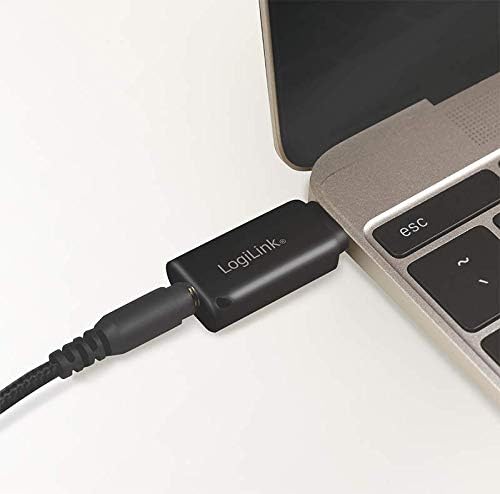
Figure 3: The UA0356 connected to a laptop, ready for use with a headset.
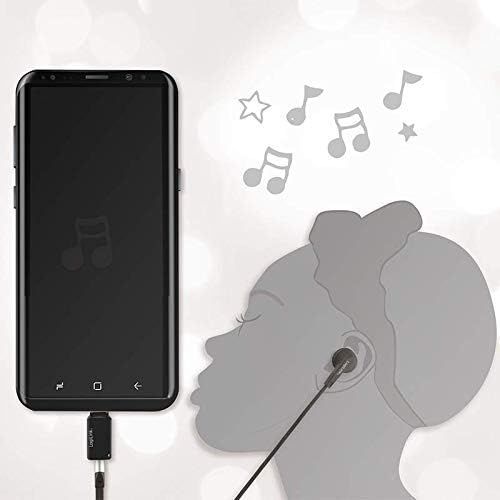
Figure 4: The UA0356 connected to a smartphone, enabling audio output to a headset.
Bedienungsanleitung
Once connected, the LogiLink UA0356 functions as your device's primary audio output and input. You can control volume and other audio settings directly from your connected device.
- Audiowiedergabe: Play any audio content (music, videos, calls) on your device. Sound will be routed through the UA0356 to your connected 3.5mm headset.
- Mikrofoneingang: If your headset has a built-in microphone, it will be enabled for voice calls, recordings, or voice commands through the UA0356. Ensure your device's audio settings recognize the external microphone.
- DAC Functionality: The integrated DAC processes digital audio signals from your device into high-quality analog sound for your headset, improving the overall audio experience.

Figure 5: Illustrates the connection of a 3.5mm TRRS headset to the UA0356.

Figure 6: The UA0356's integrated Digital-to-Analog Converter (DAC) enhances audio quality.
Wartung
- Reinigung: Reinigen Sie die Außenseite des Geräts mit einem weichen, trockenen Tuch. Verwenden Sie keine flüssigen Reinigungsmittel oder Scheuermittel.
- Lagerung: Store the UA0356 in a cool, dry place when not in use.
- Handhabung: Avoid bending or twisting the connectors excessively to prevent internal damage.
Fehlerbehebung
| Problem | Mögliche Ursache | Lösung |
|---|---|---|
| Keine Tonausgabe |
|
|
| Mikrofon funktioniert nicht |
|
|
| Schlechte Audioqualität |
|
|
Technische Daten
| Besonderheit | Detail |
|---|---|
| Marke | LogiLink |
| Modellname | UA0356 |
| Hardware-Schnittstelle | USB-C (männlich) |
| Audioausgang | 3.5 mm TRRS (weiblich) |
| Audioausgabemodus | Digitales |
| Kompatible Geräte | Headsets, Smartphones, Tablets, Laptops with USB-C |
| Surround Sound-Kanalkonfiguration | 2.0 |
| Maximum S.ampPreis | 44.1 kHz |
| Signal-Rausch-Verhältnis (SNR) | 120 dB |
| Farbe | Schwarz |
Garantie und Support
LogiLink products are designed for reliability and performance. This product is covered by a manufacturer's warranty. For specific warranty terms, technical support, or service inquiries, please refer to the warranty card included with your purchase or visit the official LogiLink webWebsite.
Bitte bewahren Sie Ihren Kaufbeleg für Garantieansprüche auf.