
Einführung
The Aula S6 Multi-Mode Wireless Gaming Headset is designed to provide a versatile audio experience for gaming and multimedia. This headset features three connection options: 2.4GHz wireless, Bluetooth 5.3, and a traditional 3.5mm wired connection. Its ultra-lightweight design, weighing only 180 grams, ensures comfort during extended use. The integrated microphone with smart noise reduction technology delivers clear communication, and the headset offers up to 22 hours of battery life.
Packungsinhalt
Bitte kreuzen Sie das Kästchen für die folgenden Elemente an:
- 1 x Aula S6 Multi-Mode Wireless Gaming Headset
- 1 x 2.4GHz Wireless Connection Dongle
- 1 x Type-C to 3.5mm Audio Connection Cable (1.5 meters)
- 1 x USB Type-C-Ladekabel
- 1 x Benutzerhandbuch
Produkt überview
Machen Sie sich mit den Komponenten und Bedienelementen des Headsets vertraut.
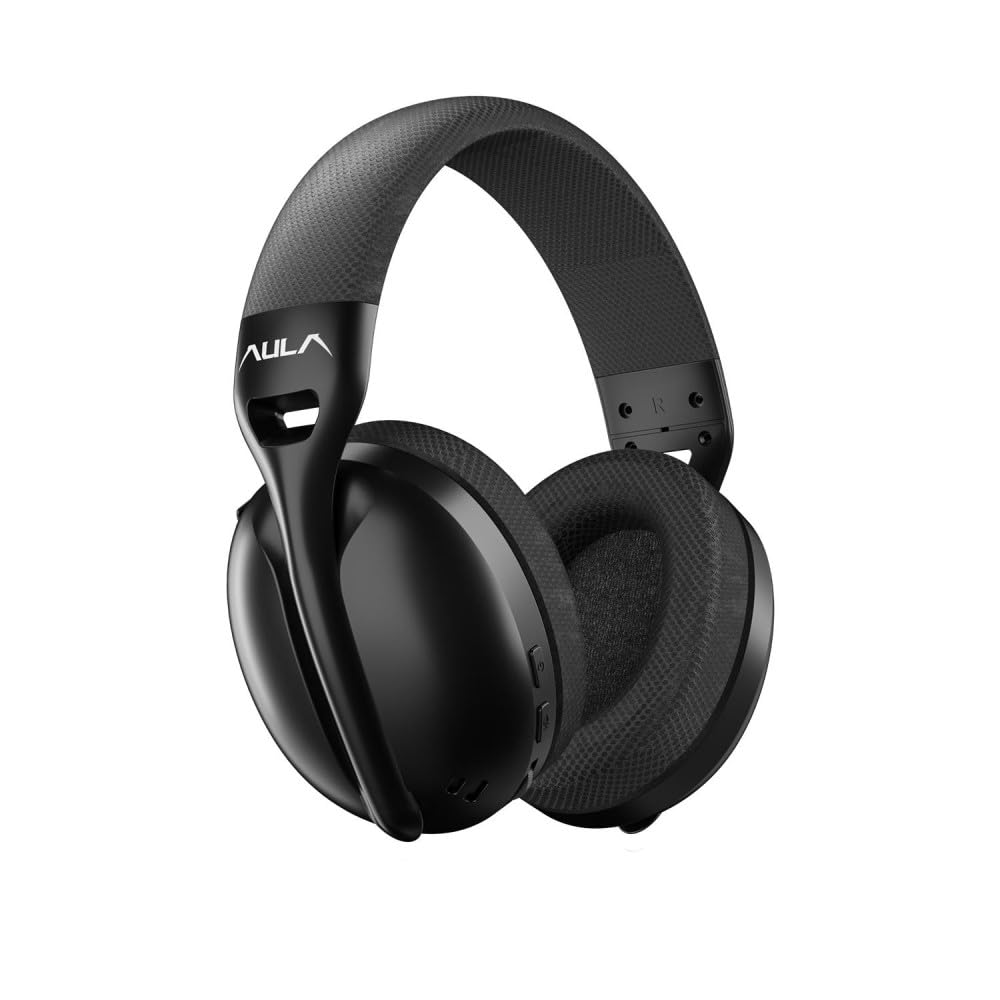
Bild: Front view of the Aula S6 Multi-Mode Wireless Gaming Headset. This image displays the overall design of the headset, highlighting its earcups and headband.
Kontrollen und Häfen

Bild: Unten view of the Aula S6 headset. This image illustrates the location of the Type-C charging port, 3.5mm audio jack, volume wheel, and other control buttons on the earcups.
- Netzschalter: Used to power the headset on/off and for pairing.
- Modusschalter-Taste: Toggles between Game Mode and Music Mode for optimized audio profiles.
- Lautstärkerad: Regelt die Lautstärke.
- Multifunktionstasten: For call management (accept/reject) and switching between Bluetooth and 2.4GHz connections.
- Einziehbares Mikrofon: Mute by retracting into the earcup, unmute by extending.
- Typ C-Anschluss: Zum Aufladen des Headsets.
- 3.5-mm-Audiobuchse: For wired connection using the provided Type-C to 3.5mm cable.
Aufstellen
Aufladen des Headsets
Before first use, fully charge the headset. Connect the provided USB Type-C charging cable to the headset's Type-C port and the other end to a USB power source (e.g., computer, wall adapter). The LED indicator will show charging status and turn off when fully charged.
Anschließen des Headsets
The Aula S6 offers three connection methods:
1. 2.4GHz Wireless Connection (via Dongle)
- Insert the 2.4GHz wireless dongle into a USB port on your computer or compatible device.
- Schalten Sie das Headset ein, indem Sie die Ein-/Aus-Taste gedrückt halten.
- The headset should automatically connect to the dongle. The LED indicator will confirm a successful connection.
2. Bluetooth 5.3-Verbindung
- Schalten Sie das Headset ein.
- Halten Sie die Ein-/Aus-Taste gedrückt, bis die LED-Anzeige schnell blinkt. Dies signalisiert den Kopplungsmodus.
- Aktivieren Sie auf Ihrem Gerät (Smartphone, Tablet, Laptop) Bluetooth und suchen Sie nach verfügbaren Geräten.
- Select "Aula S6" from the list of devices to pair. The LED indicator will show a solid light upon successful connection.
3. Kabelgebundener 3.5-mm-Anschluss
- Connect the Type-C end of the provided audio cable to the headset's Type-C port.
- Connect the 3.5mm end of the cable to the audio jack of your device.
- Das Headset wird im kabelgebundenen Modus betrieben, die drahtlosen Funktionen werden dabei umgangen.
Bedienungsanleitung
Ein-/Ausschalten
- So schalten Sie das Gerät ein: Halten Sie den Ein-/Ausschalter etwa 3 Sekunden lang gedrückt, bis die LED-Anzeige aufleuchtet.
- So schalten Sie das Gerät aus: Halten Sie den Netzschalter etwa 5 Sekunden lang gedrückt, bis die LED-Anzeige erlischt.
Mode Switching (Game/Music)
Press the Mode Switch button to toggle between Game Mode and Music Mode. Each mode optimizes audio settings for its intended use.
Mikrofonnutzung

Bild: Abgewinkelt view of the Aula S6 headset with its retractable microphone extended. This shows the microphone in its active position for communication.
- So heben Sie die Stummschaltung auf: Extend the microphone from the earcup.
- Stumm schalten: Retract the microphone fully into the earcup.
The smart noise reduction technology helps minimize ambient noise for clearer voice transmission.
Anruf-Management
When connected via Bluetooth or 2.4GHz wireless, use the multi-function buttons on the headset to manage calls:
- Anruf annehmen: Drücken Sie einmal die Multifunktionstaste.
- Anruf ablehnen: Halten Sie die Multifunktionstaste 2 Sekunden lang gedrückt.
- Anruf beenden: Drücken Sie während eines Anrufs einmal die Multifunktionstaste.
Lautstärkeregelung
Rotate the Volume Wheel up or down to precisely adjust the audio output level.
Verbindung mit mehreren Geräten
The headset supports simultaneous wireless connection to two different devices. Use the multi-function buttons to switch between the connected devices as needed.
Wartung
To ensure the longevity and optimal performance of your Aula S6 headset, follow these maintenance guidelines:
- Reinigung: Reinigen Sie das Headset mit einem weichen, trockenen Tuch. Vermeiden Sie die Verwendung von scharfen Chemikalien oder scheuernden Materialien.
- Lagerung: Bewahren Sie das Headset an einem kühlen, trockenen Ort fern von direkter Sonneneinstrahlung und extremen Temperaturen auf.
- Feuchtigkeit vermeiden: Das Headset ist nicht wasserdicht. Schützen Sie es vor Wasser und hoher Luftfeuchtigkeit.
- Kabelpflege: Behandeln Sie die Kabel vorsichtig. Vermeiden Sie scharfe Knicke und starkes Ziehen, um Beschädigungen zu verhindern.
Fehlerbehebung
If you encounter issues with your Aula S6 headset, refer to the following common solutions:
- Kein Ton/Geringe Lautstärke:
- Überprüfen Sie die Lautstärke sowohl am Headset als auch an Ihrem angeschlossenen Gerät.
- Stellen Sie sicher, dass das Headset ordnungsgemäß angeschlossen ist (kabelgebunden, per Bluetooth oder 2.4-GHz-Dongle).
- Vergewissern Sie sich, dass in den Toneinstellungen Ihres Geräts das richtige Audioausgabegerät ausgewählt ist.
- Mikrofon funktioniert nicht:
- Stellen Sie sicher, dass das Mikrofon ausgezogen und nicht stummgeschaltet ist.
- Überprüfen Sie die Mikrofoneingangseinstellungen Ihres angeschlossenen Geräts.
- Testen Sie das Mikrofon mit einer anderen Anwendung oder einem anderen Gerät.
- Verbindungsprobleme:
- Für Bluetooth: Ensure the headset is in pairing mode and within range. Forget the device on your phone and re-pair.
- Für 2.4 GHz: Ensure the dongle is securely plugged in and the headset is powered on. Try a different USB port.
- Für Wired: Stellen Sie sicher, dass das 3.5-mm-Kabel sowohl in das Headset als auch in das Gerät vollständig eingesteckt ist.
- Headset lässt sich nicht einschalten:
- Laden Sie das Headset mindestens 30 Minuten lang auf.
- Versuchen Sie es mit einem anderen Ladekabel und einer anderen Stromquelle.
Technische Daten
| Marke | AULA |
| Modell | S6 |
| Konnektivität | Bluetooth 5.3, 2.4GHz Wireless, 3.5mm Wired |
| Treibergröße | 40 mm |
| Impedanz | 120 Ohm |
| Kopfhörerempfindlichkeit | 120 dB |
| Mikrofonempfindlichkeit | -38 ± 2dB |
| Frequenzgang | 20 Hz – 20 kHz |
| Gewicht | 180 Gramm |
| Akkulaufzeit | Bis zu 22 Stunden |
| Material | Breathable Fabric and ABS Plastic |
| Kompatible Geräte | Mobile Phone, Laptop, Desktop Computer, Game Console, Tablet, Television |
Garantie und Support
The Aula S6 Multi-Mode Wireless Gaming Headset comes with a 2-Year Aula Turkey Warranty.
For warranty claims, technical support, or further assistance, please contact your local Aula authorized dealer or visit the official Aula webWebsite für Support-Kontaktinformationen.