
1. Einleitung
This manual provides essential information for the safe operation, setup, and maintenance of your SYMA S39 RC Helicopter. The S39 features a 3.5-channel control system, a built-in gyro stabilizer for enhanced flight stability, and a durable alloy construction. It operates on 2.4GHz spread spectrum technology, allowing for multiple aircraft to fly simultaneously without interference.
Please read this manual thoroughly before operating the helicopter to ensure proper function and to prevent damage or injury.
2. Lieferumfang
Überprüfen Sie, ob alle unten aufgeführten Komponenten in Ihrem Paket enthalten sind:
- SYMA S39 RC Helicopter
- Fernbedienungssender
- USB-Ladekabel
- Bedienungsanleitung
- Schraubendreher
- Spare Tail Rotor Blade (Spoiler)

3. Komponenten vorbeiview
3.1. SYMA S39 Helicopter

The S39 helicopter is constructed with a high-strength plastic body and an alloy frame for durability and resistance to impacts. It features flexible blades designed to withstand minor crashes.

3.2. Fernbedienungssender
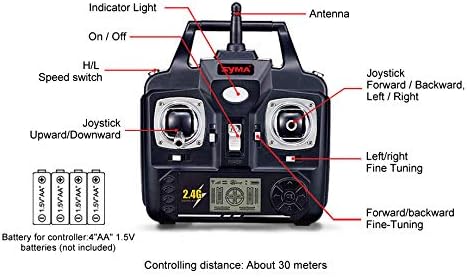
Die Fernbedienung verfügt über:
- Kontrollleuchte: Zeigt den Stromstatus an.
- Antenne: Zur Signalübertragung.
- Ein-/Ausschalter: Versorgt die Fernbedienung mit Strom.
- H/L Speed Switch: Toggles between High and Low-speed flight modes.
- Left Joystick (Upward/Downward): Controls throttle (ascend/descend) and yaw (turn left/right).
- Right Joystick (Forward/Backward, Left/Right): Controls pitch (forward/backward) and roll (sideways movement).
- Left/Right Fine-Tuning: Adjusts yaw trim for stable hovering.
- Forward/Backward Fine-Tuning: Adjusts pitch trim for stable hovering.
4. Einrichtung
4.1. Installation der Fernbedienungsbatterie
- Suchen Sie das Batteriefach auf der Rückseite der Fernbedienung.
- Öffnen Sie die Batterieabdeckung.
- Insert four (4) 1.5V AA batteries (not included), ensuring correct polarity (+/-).
- Schließen Sie die Batterieabdeckung fest.
4.2. Laden des Hubschrauberakkus
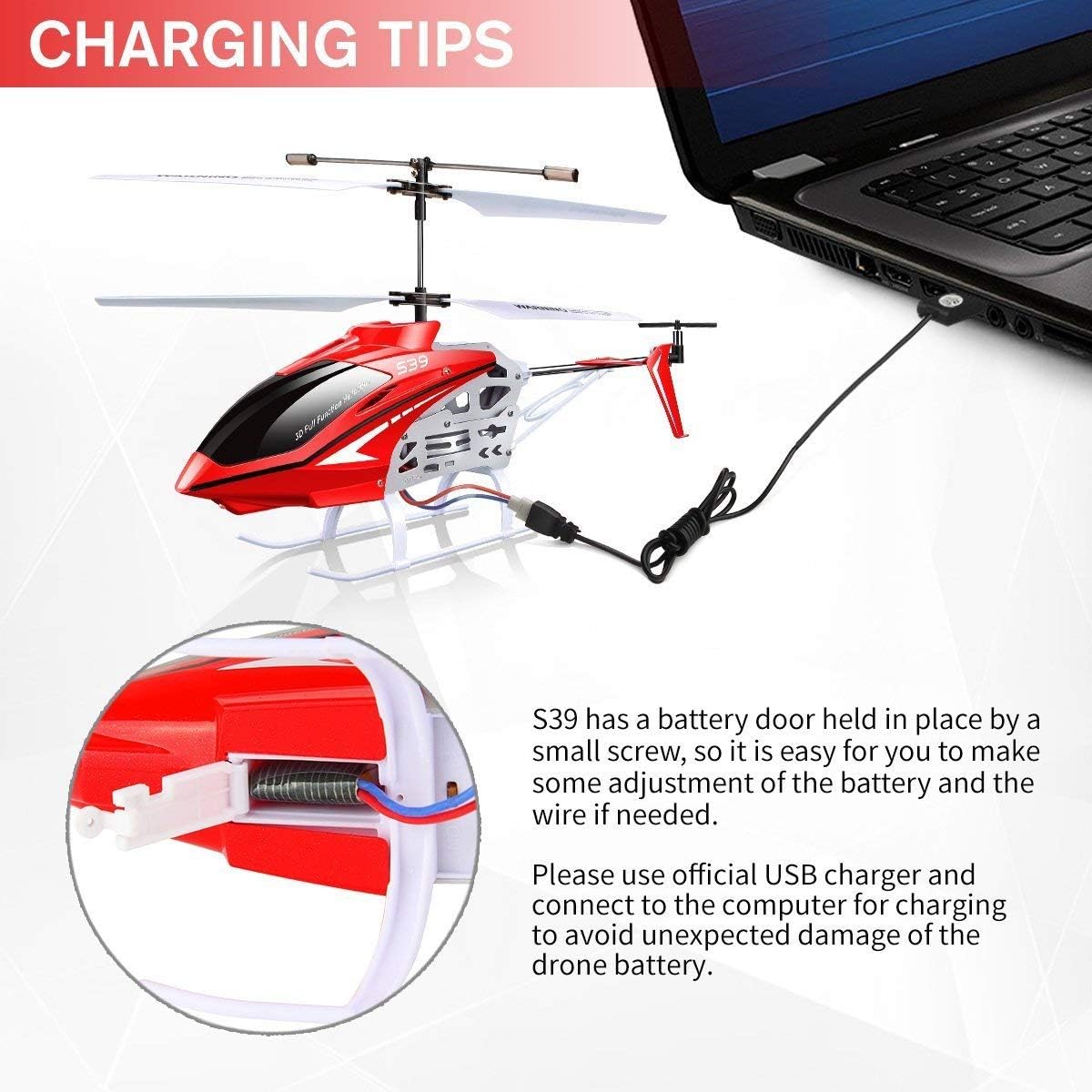
The S39 helicopter uses an internal rechargeable battery. To charge:
- Stellen Sie sicher, dass sich der Netzschalter des Hubschraubers in der Position AUS befindet.
- Locate the battery door on the helicopter, typically secured by a small screw. Use the provided screwdriver to open it.
- Connect the helicopter's internal battery wire to the charging port inside the helicopter. This is a critical step for charging.
- Schließen Sie das USB-Ladekabel an den Ladeanschluss des Hubschraubers an.
- Plug the other end of the USB charging cable into a computer's USB port or a suitable USB power adapter.
- The indicator light on the USB cable will typically illuminate during charging and turn off or change color when fully charged.
- Once charging is complete, disconnect the USB cable, and ensure the internal battery wire is securely connected for flight. Close the battery door.
Notiz: Use only the official USB charger provided to prevent damage to the helicopter's battery. Do not attempt to charge the battery if it is damaged or swollen.
5. Bedienungsanleitung
5.1. Pairing the Helicopter and Remote
- Ensure both the helicopter and remote control have fresh batteries.
- Stellen Sie den Hubschrauber auf eine ebene, waagerechte Fläche.
- Schalten Sie den Hubschrauber ein. Die Kontrollleuchte des Hubschraubers blinkt.
- Schalten Sie den Netzschalter der Fernbedienung ein.
- Push the left joystick (throttle) all the way up, then pull it all the way down. The indicator lights on both the helicopter and remote control should become solid, indicating successful pairing.
5.2. Grundlegende Flugsteuerung

- Auf-/Abstieg: Drücken Sie den linken Joystick nach oben, um aufzusteigen, ziehen Sie ihn nach unten, um abzusteigen.
- Vorwärts rückwärts: Push the right joystick up to move forward, pull down to move backward.
- Links/Rechts drehen (Gieren): Push the left joystick left to turn the helicopter counter-clockwise, push right to turn clockwise.
- Fine-Tuning (Trimming): If the helicopter drifts or rotates unintentionally during hover, use the fine-tuning buttons on the remote control to adjust its stability. For example, if it rotates clockwise, press the left fine-tuning button until it stabilizes.
5.3. Geschwindigkeitsmodi
The H/L Speed switch on the remote control allows you to select between two flight speeds:
- Niedrige Geschwindigkeit (L): Recommended for beginners and indoor flight, offering more stable and controlled movements.
- Hohe Geschwindigkeit (H): Provides faster and more agile flight, suitable for experienced pilots.
5.4. Flugumgebung
The SYMA S39 helicopter is primarily designed for indoor use to achieve the best flight experience. Ensure you have a clear, open space free from obstacles, people, and pets.
6. Sicherheitshinweise
- Aufsicht durch Erwachsene: Der Hubschrauber darf nur unter Aufsicht von Erwachsenen betrieben werden, insbesondere jüngere Benutzer.
- Freier Bereich: Fly in an open area free from obstacles, people, and animals to prevent collisions and injuries.
- Wasser vermeiden: Do not operate the helicopter near water or in wet conditions.
- Batteriesicherheit: Do not short-circuit, disassemble, or expose batteries to extreme temperatures. Dispose of used batteries responsibly.
- Rotorblätter: Keep hands, face, and hair away from rotating blades. Do not touch the helicopter while the blades are spinning.
- Ausschalten: Schalten Sie den Hubschrauber und die Fernbedienung nach Gebrauch immer aus.
- Auswirkungen: After any significant impact, inspect the helicopter for damage before flying again.
7. Wartung
- Reinigung: Reinigen Sie Hubschrauber und Fernbedienung mit einem weichen, trockenen Tuch. Vermeiden Sie die Verwendung von Lösungsmitteln oder aggressiven Chemikalien.
- Klingeninspektion: Regularly check rotor blades for cracks, bends, or damage. Replace damaged blades immediately using the provided screwdriver and spare parts.
- Batteriepflege: Store the helicopter with a partially charged battery if not used for extended periods. Do not leave batteries fully discharged or fully charged for long durations.
- Lagerung: Bewahren Sie den Hubschrauber und die Fernbedienung an einem kühlen, trockenen Ort ohne direkte Sonneneinstrahlung auf.
8. Fehlerbehebung
| Problem | Mögliche Ursache | Lösung |
|---|---|---|
| Der Hubschrauber reagiert nicht auf die Fernbedienung. | Low battery in helicopter or remote; Not paired; Power switches off. | Charge helicopter battery; Replace remote batteries; Ensure both are powered on and paired correctly. |
| Kurze Flugzeit. | Batterie nicht vollständig geladen; alte oder beschädigte Batterie. | Ensure battery is fully charged; Consider replacing the battery if it's old or shows signs of damage. |
| Helicopter drifts or spins during hover. | Needs fine-tuning; Damaged rotor blades. | Use the fine-tuning buttons on the remote; Inspect and replace damaged blades. |
| Weak control signal. | Out of range; Interference; Obstacles between remote and helicopter. | Operate within the specified range (approx. 30 meters); Ensure clear line of sight; Avoid areas with strong electronic interference. |
| Helicopter does not charge. | Internal battery wire not connected; Faulty USB cable or power source. | Ensure the internal battery wire is connected to the charging port inside the helicopter (refer to Section 4.2); Try a different USB port or power adapter; Check USB cable for damage. |
9. Spezifikationen
| Besonderheit | Detail |
|---|---|
| Modellnummer | Staffel 39 |
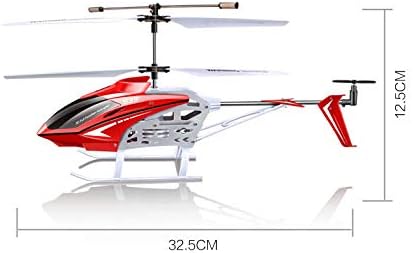
| Technische Daten | 14.25 x 2.24 x 6.1 Zoll (36.2 x 5.7 x 15.5 cm) |
| Artikelgewicht | 15.2 Unzen (430 Gramm) |
| Kontrollkanäle | 3.5 Channels (Up/Down, Forward/Backward, Left/Right Turn) |
| Stabilisierung | Built-in Gyro Stabilizer |
| Material | Alloy Frame, High-strength Plastic Body |
| Fernbedienungsfrequenz | 2.4 GHz |
| Batterien für Fernbedienungen | 4 x AA 1.5V Batterien (nicht im Lieferumfang enthalten) |
| Vom Hersteller empfohlenes Alter | Ab 8 Jahren |

10. Garantie und Support
For warranty information and customer support, please contact the retailer where you purchased the SYMA S39 RC Helicopter or refer to the official SYMA webBewahren Sie Ihren Kaufbeleg für eventuelle Garantieansprüche auf.