
1. Einleitung
This manual provides essential information for the setup, operation, and maintenance of your Xtrfy K4 RGB Mechanical Gaming Keyboard. Please read these instructions carefully to ensure optimal performance and longevity of your device. The Xtrfy K4 RGB is designed for high-performance gaming and typing, featuring durable mechanical switches and customizable RGB illumination.
2. Packungsinhalt
Überprüfen Sie, ob alle Artikel in Ihrem Paket vorhanden sind:
- Xtrfy K4 RGB Mechanical Gaming Keyboard
- USB-Kabel (fest angeschlossen)
- Benutzerhandbuch (dieses Dokument)
3. Einrichtung
Follow these steps to set up your Xtrfy K4 RGB keyboard:
- Auspacken der Tastatur: Nehmen Sie die Tastatur vorsichtig aus der Verpackung.
- Mit Computer verbinden: Plug the attached USB-A cable from the keyboard into an available USB port on your computer. The keyboard is plug-and-play and does not require additional drivers for basic functionality.
- Platzierung: Position the keyboard comfortably on your desk. Ensure stable placement for optimal use.
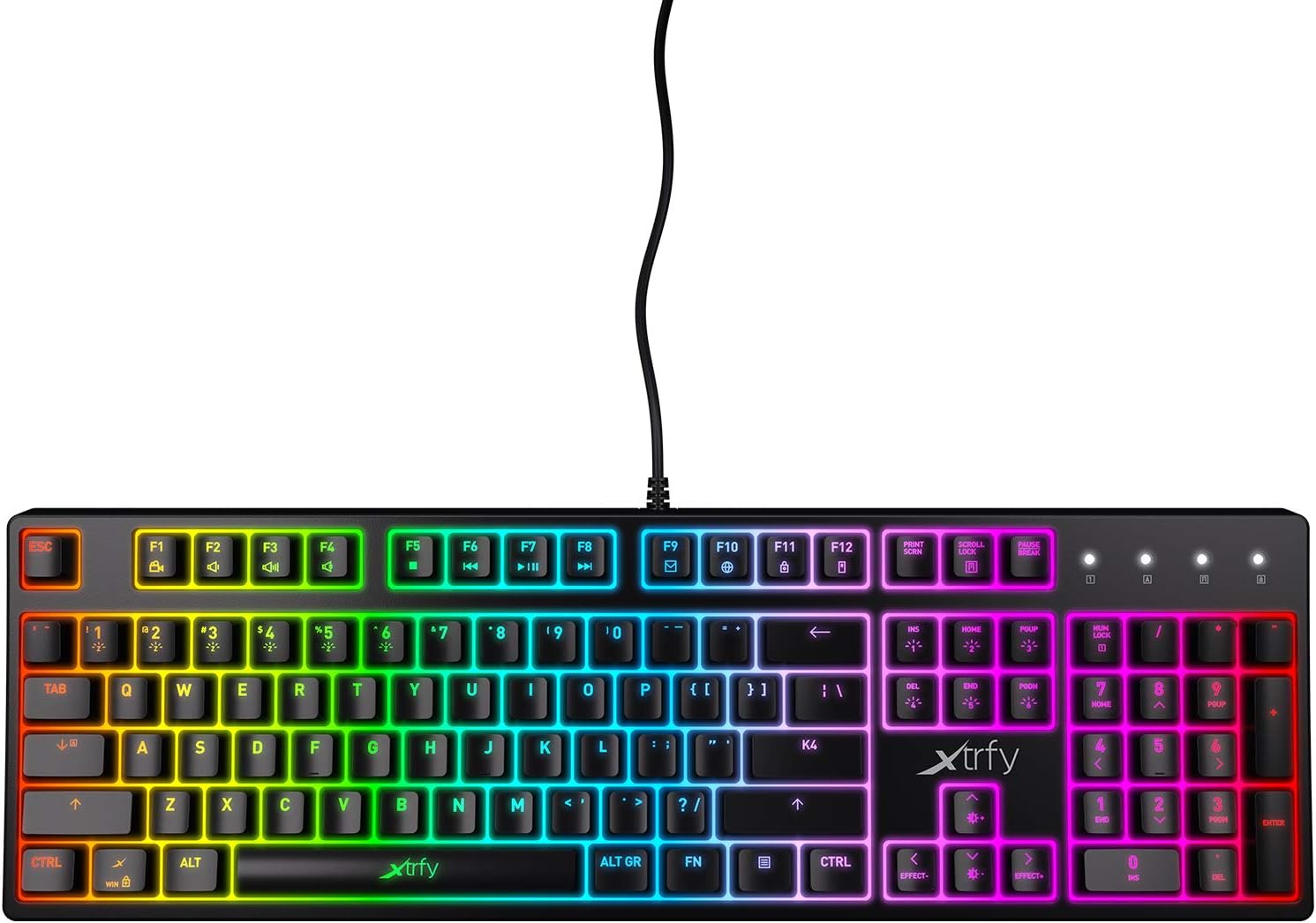
Abbildung 3.1: Draufsicht view of the Xtrfy K4 RGB keyboard, showing key layout and attached USB cable.
4. Bedienungsanleitung
4.1 Grundlegende Tastaturfunktionen
The Xtrfy K4 RGB functions as a standard mechanical keyboard. All keys are pre-programmed for their respective characters and functions. It features full N-key rollover and a 1000 Hz polling rate for precise and responsive input.
4.2 RGB Illumination Control
The keyboard features customizable RGB illumination. Use the Function (FN) key in combination with specific keys to adjust lighting effects, brightness, and colors. Refer to the keycap legends for specific lighting controls.
- FN + F1-F12: These keys often control media functions or system shortcuts. Specific functions are indicated by icons on the keycaps.
- FN + Pfeiltasten: Typically used to adjust brightness or change lighting directions/patterns.
- FN + Insert/Home/Page Up/Delete/End/Page Down: These keys are commonly used to cycle through different RGB lighting modes and effects.

Figure 4.1: The Xtrfy K4 RGB keyboard showcasing its customizable RGB lighting.
5. Wartung
Durch sachgemäße Wartung werden die Langlebigkeit und Leistungsfähigkeit Ihrer Tastatur gewährleistet:
- Reinigung: Wischen Sie die Tastaturoberfläche mit einem weichen, trockenen Tuch ab. Für eine gründlichere Reinigung verwenden Sie Druckluft, um Staub und Schmutz zwischen den Tastenkappen zu entfernen. Vermeiden Sie die Verwendung von scharfen Chemikalien oder Scheuermitteln.
- Tastenkappenentfernung (Fortgeschritten): Bei Bedarf können die Tastenkappen vorsichtig mit einem Tastenkappenabzieher entfernt werden, um sie gründlich zu reinigen. Gehen Sie dabei vorsichtig vor, um die Schalter nicht zu beschädigen.
- Lagerung: Bewahren Sie die Tastatur bei Nichtgebrauch an einem sauberen, trockenen Ort fern von direkter Sonneneinstrahlung und extremen Temperaturen auf.
6. Fehlerbehebung
If you encounter issues with your Xtrfy K4 RGB keyboard, refer to the following common solutions:
- Tastatur reagiert nicht:
- Stellen Sie sicher, dass das USB-Kabel sowohl an die Tastatur als auch an den Computer fest angeschlossen ist.
- Versuchen Sie, die Tastatur an einen anderen USB-Anschluss anzuschließen.
- Starten Sie Ihren Computer neu.
- RGB-Beleuchtung funktioniert nicht/ist fehlerhaft:
- Check if the lighting is turned off or set to a very low brightness using the FN key combinations.
- Ensure no software conflicts are present if you are using third-party lighting control applications.
- Schlüssel werden nicht registriert:
- Reinigen Sie den betroffenen Tastenbereich, um eventuell vorhandene Verunreinigungen zu entfernen, die den Schalter blockieren könnten.
- If the issue persists, contact Xtrfy support.
7. Spezifikationen
| Besonderheit | Detail |
|---|---|
| Marke | xtrfy |
| Modellnummer | XG-K4-RGB-R-US |
| Serie | K4 RGB |
| Tastaturbeschreibung | Mechanisch |
| Schlüsselschalter | Mechanical key switches (e.g., Kailh Red, depending on variant) |
| Beleuchtung | Anpassbare RGB-Beleuchtung |
| Abfragerate | 1000 Hz |
| N-Key-Rollover | Full N-key rollover |
| Konnektivität | USB-A (Kabelgebundenes Elektrogerät) |
| Kompatible Geräte | PC/Mac |
| Artikelgewicht | 2.2 Pfund (ca. 1 kg) |
| Produktabmessungen (L x B x H) | 17.44" x 17.44" x 1.54" (ca. 44.3 x 44.3 x 3.9 cm) |
| Farbe | Schwarz |
8. Garantie und Support
Xtrfy products are manufactured to high standards and come with a limited warranty. For specific warranty terms and conditions, please refer to the official Xtrfy webWebsite oder wenden Sie sich an den Kundendienst.
For technical assistance, troubleshooting beyond this manual, or warranty claims, please visit the official Xtrfy support page or contact their customer service directly. Keep your purchase receipt as proof of purchase.
Online-Hilfe: www.xtrfy.com/support