
Einführung
Thank you for choosing the Boxis Nanoshred 10-Sheet Nanocut Paper Shredder. This manual provides essential information for the safe and efficient operation, maintenance, and troubleshooting of your shredder. The Nanocut technology ensures a high level of security by reducing documents into over 3,000 micro-particles per letter-sized sheet, making information virtually impossible to reconstruct.

Abbildung 1: Vorderseite view of the Boxis Nanoshred 10-Sheet Nanocut Paper Shredder.
Wichtige Sicherheitsinformationen
To ensure safe operation and prevent injury or damage, please read and follow all safety instructions:
- Keep fingers, loose clothing, jewelry, and hair away from the paper entry slot.
- Halten Sie Kinder und Haustiere jederzeit vom Aktenvernichter fern.
- Do not insert more than the maximum sheet capacity (10 sheets of paper or 1 credit card) to avoid jamming and motor strain.
- Do not shred adhesive labels, continuous forms, transparencies, newspaper, or plastic other than credit cards.
- Stellen Sie sicher, dass der Aktenvernichter auf einer stabilen, ebenen Fläche steht.
- Ziehen Sie vor dem Umstellen, Reinigen oder Entleeren des Abfallbehälters den Netzstecker des Aktenvernichters.
- Betreiben Sie den Aktenvernichter nicht, wenn das Netzkabel beschädigt ist.
- Überhitzungsschutz: Exceeding the 2-minute continuous run time may cause the shredder to overheat. If this occurs, the shredder will automatically shut off. Allow a 30-minute cool-down period before resuming operation.
Aufstellen
- Den Aktenvernichter auspacken: Nehmen Sie den Aktenvernichter vorsichtig aus der Verpackung. Bewahren Sie die Verpackung für späteren Transport oder Lagerung auf.
- Positionieren Sie den Aktenvernichter: Place the shredder on a flat, stable surface. The unit is equipped with 4 casters for easier mobility. Ensure the front locking brakes are engaged once positioned.
- Abfalleimer einsetzen: Ensure the 3.5-gallon removable waste bin is correctly inserted into the shredder housing. The shredder will not operate if the bin is not properly seated.
- Strom anschließen: Stecken Sie das Netzkabel in eine normale Steckdose.

Abbildung 2: Seite view illustrating the removable waste bin.
Bedienungsanleitung
The Boxis Nanoshred features automatic start/stop functionality and manual reverse/forward controls.
- Einschalten: Locate the power switch, typically on the top or back of the unit, and set it to the 'Auto' position. The shredder is now ready for use.
- Papiervernichtung: Insert up to 10 sheets of paper into the paper entry slot. The shredder will automatically start and stop once the paper has passed through.
- Kreditkarten vernichten: Insert one credit card at a time into the designated credit card slot. The shredder will process the card and stop automatically.
- Manual Reverse/Forward: In case of a paper jam, use the 'Reverse' function to clear the jam. The 'Forward' function can be used to manually feed paper.
- Indikatoren: The shredder includes indicators for 'Bin Open', 'Overload', and 'Overheat' to alert you to operational status or issues.
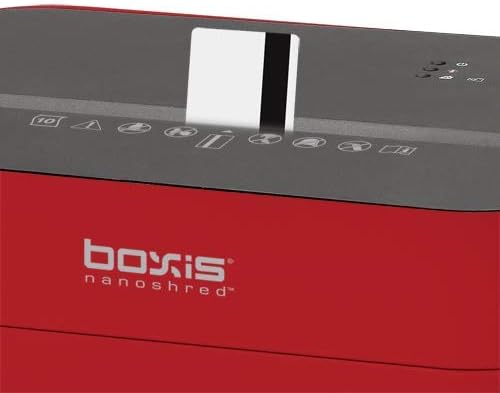
Figure 3: Inserting a credit card into the shredder slot.
Video 1: An official product video demonstrating the Boxis Nanoshred's features and shredding capabilities.
Wartung
Regelmäßige Wartung gewährleistet optimale Leistung und verlängert die Lebensdauer Ihres Aktenvernichters.
- Entleeren des Abfallbehälters: The large see-through window allows you to monitor the shredded paper level. When full, slide out the waste bin and dispose of the contents. The Nanocut particles are very compact, allowing for more shredding before emptying.
- Schmierung: Use Shredcare lubricant sheets regularly to maintain the cutting blades. Feed one or two lubricant sheets directly into the shredder throat. This helps reduce paper dust accumulation and keeps the shredder running smoothly and quietly.
- Reinigung: Unplug the shredder. Use a soft, dry cloth to clean the exterior. Do not use abrasive cleaners or solvents.

Abbildung 4: Bspample of Nanocut shredded paper particles.
Fehlerbehebung
Sollten Sie Probleme mit Ihrem Aktenvernichter haben, beachten Sie bitte die folgenden häufigen Probleme und Lösungen:
- Shredder Does Not Turn On:
- Prüfen Sie, ob das Netzkabel fest eingesteckt ist.
- Ensure the waste bin is correctly inserted and the 'Bin Open' indicator is off.
- If the shredder was recently used for an extended period, it might be in overheat protection mode. Allow 30 minutes for it to cool down.
- Papierstau:
- Press the 'Reverse' button to attempt to clear the paper.
- If the jam persists, unplug the shredder and carefully remove any visible paper from the entry slot.
- Reduced Performance/Increased Noise:
- The cutting blades may require lubrication. Use a Shredcare lubricant sheet as described in the Maintenance section.
Technische Daten
| Besonderheit | Spezifikation |
|---|---|
| Schnittart | Nano-cut |
| Shred-Größe | 0.08" x 0.39" (2 x 10 mm) |
| Zerkleinerte Materialien | Papier, Kreditkarten |
| Blattkapazität | 10 Blatt |
| Geschwindigkeit | 6.6 Fuß pro Minute |
| Throat Entry Width | 8.66" (220 mm) |
| Kapazität des Abfallbehälters | 3.5 gallons (13.3 liters), approx. 350 shredded sheets |
| Auto Start / Stopp | Ja |
| Manual Reverse/Forward | Ja |
| Bin Open Indicator | Ja |
| Überlastungsanzeige | Ja |
| Überhitzungsanzeige | Ja |
| Anzeige „Behälter voll“. | NEIN |
| Geräuschpegel | 70 dB |
| Abmessungen (L x B x H) | 12.8" x 8.5" x 16.9" (325 x 215 x 428 mm) |
| Stückgewicht | 13.2 kg |

Figure 5: Nanocut Assurance graphic demonstrating particle size comparison.
Garantie
This Boxis Nanoshred Paper Shredder is backed by a 1 Jahre eingeschränkte Produktgarantie. For details regarding warranty coverage and claims, please refer to the contact information in the Support section.
Unterstützung
For any questions, technical assistance, or warranty inquiries, please contact Boxis Professional Technical Support:
- Gebührenfreie Telefonnummer: 1-866-707-1854 (Monday – Friday, 8am – 5pm PST)
- You may also contact the seller directly through the platform where you purchased the product.