
1. Einleitung
This manual provides essential information for the installation, operation, maintenance, and troubleshooting of your Chieftec Polaris 650W 80Plus Certified Power Supply Unit (PSU). Please read this manual thoroughly before installing and using the product to ensure proper function and safety. The Chieftec Polaris 650W PSU is designed to provide stable and efficient power to your personal computer system.
2. Sicherheitshinweise
Beachten Sie stets die folgenden Sicherheitsvorkehrungen, um Verletzungen oder Schäden an Ihrer Ausrüstung zu vermeiden:
- Nicht Öffnen Sie das Netzteil.asing. Hohes Volumentages inside can cause electric shock. There are no user-serviceable parts inside.
- Nicht insert any objects into the PSU's ventilation openings.
- Nicht expose the PSU to water, moisture, or high humidity.
- Ensure the PSU is installed in a well-ventilated area, free from obstructions to airflow.
- Always disconnect the AC power cord from the wall outlet before installing, removing, or cleaning the PSU.
- Use only the modular cables provided with your Chieftec Polaris 650W PSU. Using incompatible cables may damage the PSU or connected components.
- Ensure all cable connections are secure before powering on the system.
3. Packungsinhalt
Überprüfen Sie, ob alle Artikel in Ihrem Paket vorhanden sind:
- Chieftec Polaris 650W Power Supply Unit
- Modular Cable Set (e.g., 24-pin ATX, 8-pin EPS/CPU, PCIe, SATA, Molex)
- Netzkabel
- Befestigungsschrauben
- Benutzerhandbuch (dieses Dokument)
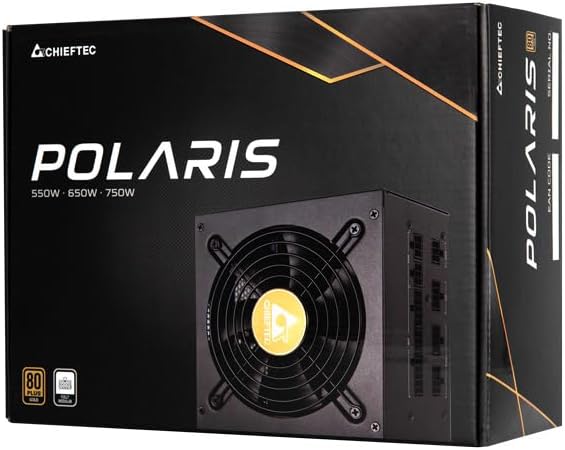
Image: The Chieftec Polaris 650W Power Supply Unit and its retail packaging.
4. Einrichtung und Installation
Follow these steps to install your Chieftec Polaris 650W PSU into your personal computer system:
- Bereiten Sie Ihr System vor: Ensure your computer is completely powered off and unplugged from the wall outlet. Open your computer case to access the PSU mounting area.
- Altes Netzteil entfernen (falls zutreffend): If replacing an existing PSU, disconnect all cables from the components and motherboard, then unscrew and remove the old PSU.
- Das neue Netzteil einbauen: Carefully slide the Chieftec Polaris 650W PSU into the designated PSU bay in your computer case. Ensure the fan faces the correct direction (typically downwards for bottom-mounted PSUs, or as per case design for optimal airflow). Secure the PSU with the provided mounting screws.
- Modulare Kabel anschließen: Identify the necessary modular cables for your system components (motherboard, CPU, graphics card, storage drives). Connect these cables to the corresponding ports on the back of the PSU. Refer to the image below for connector identification.
- Komponenten verbinden: Connect the other end of the modular cables to your motherboard (24-pin ATX and 8-pin EPS/CPU), graphics card(s) (PCIe), and storage devices (SATA/Molex). Ensure all connections are firm and fully seated.
- Kabelmanagement: Verlegen Sie die Kabel ordentlich, um die Luftzirkulation und die Optik im Gehäuse zu verbessern.
- Letzte Kontrollen: Double-check all connections. Ensure no loose cables are obstructing fans. Close your computer case.
- Wechselstrom anschließen: Plug the AC power cord into the PSU's power inlet and then into a wall outlet.

Bild: Rückseite view of the Chieftec Polaris 650W PSU showing modular cable connection ports for M/B, SATA, PCIe, and CPU.

Image: The Chieftec Polaris 650W Power Supply Unit with its modular cables connected, ready for installation.
5. Bedienungsanleitung
Once the Chieftec Polaris 650W PSU is correctly installed and all connections are secure:
- Einschalten: Locate the power switch on the back of the PSU (next to the AC power inlet). Ensure it is in the 'I' (On) position.
- Systemstart: Press the power button on your computer case. The system should power on, and the PSU fan will begin to spin, indicating normal operation.
- Lüfterbetrieb: The PSU features an air cooling method. The fan will operate to dissipate heat generated by the power supply components. Its speed may vary depending on the load and temperature to maintain optimal cooling and noise levels.
- Ausschalten: To shut down your system, use the operating system's shutdown procedure. For a complete power cut, switch the PSU's power switch to the 'O' (Off) position and unplug the AC power cord.
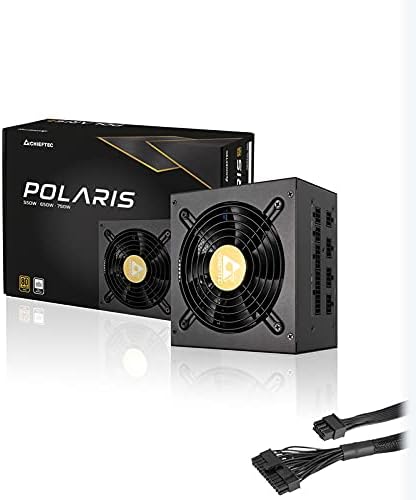
Bild: Draufsicht view of the Chieftec Polaris 650W Power Supply, highlighting the cooling fan and protective grille.
6. Wartung
Proper maintenance ensures the longevity and optimal performance of your PSU:
- Staubreinigung: Periodically (e.g., every 3-6 months), power off your computer, unplug the AC cord, and open the case. Use compressed air to gently blow dust out of the PSU's fan and ventilation grilles. Nicht use a vacuum cleaner directly on the PSU as it can generate static electricity.
- Umgebungsbedingungen: Ensure the computer operates in a clean, dry, and well-ventilated environment. Avoid extreme temperatures and direct sunlight.
- Kabelintegrität: Occasionally check that all modular cables are securely connected and not frayed or damaged.
7. Fehlerbehebung
If you encounter issues with your Chieftec Polaris 650W PSU, consider the following troubleshooting steps:
- Kein Strom:
- Ensure the AC power cord is securely plugged into both the PSU and the wall outlet.
- Check that the PSU's power switch on the back is in the 'I' (On) position.
- Überprüfen Sie die Funktionsfähigkeit der Wandsteckdose, indem Sie ein anderes Gerät anschließen.
- Confirm all internal power cables (24-pin ATX, 8-pin EPS/CPU) are firmly connected to the motherboard.
- Systeminstabilität/Zufällige Abschaltungen:
- Ensure the PSU is adequately ventilated and not overheating.
- Check all power connections to components (graphics card, storage) for looseness.
- If possible, test the PSU with a different set of components or in another system to rule out other hardware issues.
- Ungewöhnliche Geräusche:
- A rattling or grinding noise may indicate a fan issue. Power off the system and inspect the PSU fan for obstructions (e.g., loose cables).
- If the noise persists and is not due to an obstruction, contact support.
Sollten diese Schritte das Problem nicht beheben, konsultieren Sie bitte den Abschnitt Garantie und Support.
8. Spezifikationen
| Besonderheit | Spezifikation |
|---|---|
| Marke | Chieftec |
| Modellname | Polaris |
| Artikelmodellnummer | IN-ACT-ZDLCHFOBU0087 |
| Ausgang Wattage | 650 Watt |
| Formfaktor | ATX |
| Kühlmethode | Luft |
| Steckertyp | ATX |
| Kompatible Geräte | Personalcomputer |
| Produktabmessungen (L x B x H) | 8.66 x 3.15 x 1.18 Zoll (22 x 8 x 3 cm) |
| Artikelgewicht | 4.4 Pfund (2 Kilogramm) |
| Zertifizierung | 80Plus-zertifiziert |
9. Garantie und Support
Chieftec products are manufactured to high-quality standards. For specific warranty terms and conditions, please refer to the warranty card included with your product or visit the official Chieftec webDie Garantiebedingungen und -fristen können je nach Region und Produkt variieren.
For technical support, product inquiries, or warranty claims, please contact Chieftec customer service through their official website or the contact information provided in your product documentation. When contacting support, please have your product model number (IN-ACT-ZDLCHFOBU0087) and proof of purchase readily available.