
Smartwatches P80
P80 Smartwatch Benutzerhandbuch
Modell: P80
1. Produktüberschreitungview
The P80 Smart Watch is a versatile fitness tracker and smartwatch designed to monitor various health metrics and provide smart notifications. It features a 1.3-inch IPS color screen, heart rate and blood pressure monitoring, and multiple sports modes. This manual provides essential information for setting up, operating, and maintaining your P80 Smart Watch.

Abbildung 1: Vorderseite view of the P80 Smart Watch displaying time and a vibrant digital wallpaper.
2. Lieferumfang
Upon unboxing your P80 Smart Watch, please verify that all components are present:
- 1 x P80 Smart Watch
- 1 x Charging Cable (magnetic interface)
- 1 x Benutzerhandbuch (dieses Dokument)
- 1 x Original Retail Box
3. Installationsanleitung
3.1 Aufladen des Geräts
Before initial use, fully charge your P80 Smart Watch. Connect the magnetic charging cable to the charging contacts on the back of the watch and plug the USB end into a compatible USB power adapter (not included) or a computer's USB port.

Figure 2: The P80 Smart Watch displaying a "Charging completed" message, with indicators for 200mAh battery capacity, 5-7 days working hours, and 15 days standby time.
A full charge typically takes approximately 2 hours. The watch has a 200 mAh Lithium polymer battery, providing 5-7 days of normal use and 10-15 days of standby time.
3.2 App-Installation und -Kopplung
To unlock the full functionality of your P80 Smart Watch, you need to install the companion application, Da Fit, on your mobile phone.
- Lade die Da Fit App herunter: Suchen nach "Da Fit" in your mobile phone's app store (Google Play Store for Android or Apple App Store for iOS) and install it.
- Systemanforderungen: Ensure your mobile phone meets the minimum system requirements: Android 4.4 or above, or Apple iOS 9.0 or above.
- Bluetooth aktivieren: On your mobile phone, go to settings and enable Bluetooth.
- Öffne die Da Fit App: Launch the Da Fit application. Follow the on-screen prompts to create an account or log in.
- Gerät koppeln: Within the Da Fit app, navigate to the device pairing section (usually indicated by a device icon or "Add Device"). The app will search for nearby Bluetooth devices. Select "P80" or a similar identifier from the list to connect.
- Kopplung bestätigen: A pairing request may appear on your watch or phone. Confirm the pairing on both devices if prompted.
Once successfully paired, the watch will synchronize time and data with your phone, and you can configure various settings through the app.
4. Bedienungsanleitung
4.1 Grundlegende Navigation
The P80 Smart Watch features a 1.3-inch IPS color touch screen for navigation. It operates primarily via a single touch panel.
- Klopfen: Um ein Element auszuwählen oder eine Aktion zu bestätigen.
- Nach oben/unten wischen: Zum Durchblättern von Menüs oder Benachrichtigungen.
- Nach links/rechts wischen: To switch between different function screens (e.g., heart rate, steps, weather).
- Lange drücken: May activate certain functions or change watch faces (refer to app for customization).

Figure 3: The P80 Smart Watch interface displaying icons for blood pressure monitoring, heart rate monitoring, movement recording, sedentary reminder, calorie burning, IP68 waterproof rating, multi-motion mode, and durable endurance. The image also highlights the 1.3-inch color touch screen and its ability to display 50 words on a single screen.
4.2 Gesundheitsüberwachung
The P80 Smart Watch is equipped with sensors for continuous health monitoring.
- Herzfrequenz-Überwachung: The watch supports real-time heart rate measurement and all-day heart rate monitoring. To view your current heart rate, navigate to the heart rate screen on the watch. For detailed historical data and analysis, refer to the Da Fit app.
- Blutdruckmessung: The watch can measure blood pressure. For accurate readings, ensure the watch is worn snugly on your wrist. Consult the Da Fit app for instructions on initiating a measurement and viewErgebnisse.
- Schlafüberwachung: Wear the watch while sleeping to track your sleep patterns, including deep sleep, light sleep, and awake times. Data is synchronized and analyzed in the Da Fit app.

Figure 4: The P80 Smart Watch on a wrist, displaying a heart rate monitoring graph with real-time motion heart rate, 24-hour real-time heart rate, and section heart rate recording. This illustrates the watch's capability to keep track of your heart health.
4.3 Aktivitätsverfolgung
Track your daily activities and workouts with the P80 Smart Watch.
- Schrittzähler: Automatically records your daily steps, exercise time, exercise mileage, and calorie consumption.
- Multi-Sport-Modus: The watch supports 8 kinds of sports modes, including walking, running, badminton, and football. Select the appropriate mode before starting your activity for more accurate tracking.
4.4 Intelligente Erinnerungen und Benachrichtigungen
Once paired with your phone, the P80 Smart Watch can provide various smart reminders and notifications.
- Anruferinnerung: Notifies you of incoming calls. You can configure the watch to refuse to answer calls directly from the device.
- Information Push Reminder: Receive notifications from SMS, QQ, WeChat, Skype, Facebook, Twitter, Line, and WhatsApp directly on your watch screen.
- Benutzerdefinierte Alarmerinnerung: Set alarms through the Da Fit app, and the watch will vibrate to alert you.
- Sitzende Erinnerung: The watch can remind you to move if you have been inactive for a prolonged period.
- Intelligent Vibration Reminder: All sit-in, call, SMS, and APP notifications are accompanied by intelligent vibration, designed not to disturb others.

Figure 5: The P80 Smart Watch screen showing an incoming WeChat message notification, demonstrating its intelligent vibration reminder feature for various alerts.
4.5 Weitere Funktionen
- Dial Selection: Passe dein Zifferblatt über die Da Fit App individuell an.
- Wrist Display: The screen automatically lights up when you raise your wrist.
- Wetteranzeige: View current weather information (requires app synchronization).
- Zeitanzeige: Zeigt die aktuelle Uhrzeit und das aktuelle Datum an.
- Remote-Fotografie: Nutzen Sie die Uhr als Fernauslöser für die Kamera Ihres Telefons.
- Remote-Musiksteuerung: Steuern Sie die Musikwiedergabe auf Ihrem Telefon von der Uhr aus.
- „Nicht stören“-Modus: Set periods when you do not wish to receive notifications.
- Armband finden: Use the Da Fit app to locate your watch if it's within Bluetooth range.
- WeChat Sport: Integration with WeChat for sports data sharing.
- APP Air Upgrade: Supports over-the-air firmware updates via the Da Fit app.
5. Wartung und Pflege
Proper maintenance ensures the longevity and optimal performance of your P80 Smart Watch.
- Reinigung: Reinigen Sie das Uhrendisplay und das Armband regelmäßig mit einem weichen, trockenen Tuch. Verwenden Sie bei Bedarf ein leicht öliges Tuch.amp Mit einem Tuch abwischen und anschließend gründlich trocknen lassen. Scharfe Chemikalien und scheuernde Materialien vermeiden.
- Wasserbeständigkeit: The watch has an IP68 waterproof rating, meaning it is resistant to dust and can withstand immersion in water up to 1.5 meters for 30 minutes. However, it is not recommended for hot showers, saunas, or diving. Avoid prolonged exposure to water.
- Ladekontakte: Keep the magnetic charging contacts on the back of the watch clean and dry to ensure efficient charging.
- Lagerung: Bei längerer Nichtbenutzung sollte die Uhr an einem kühlen, trockenen Ort aufbewahrt werden.
- Riemenpflege: The watch comes with a silicone strap. Clean it regularly to prevent skin irritation.
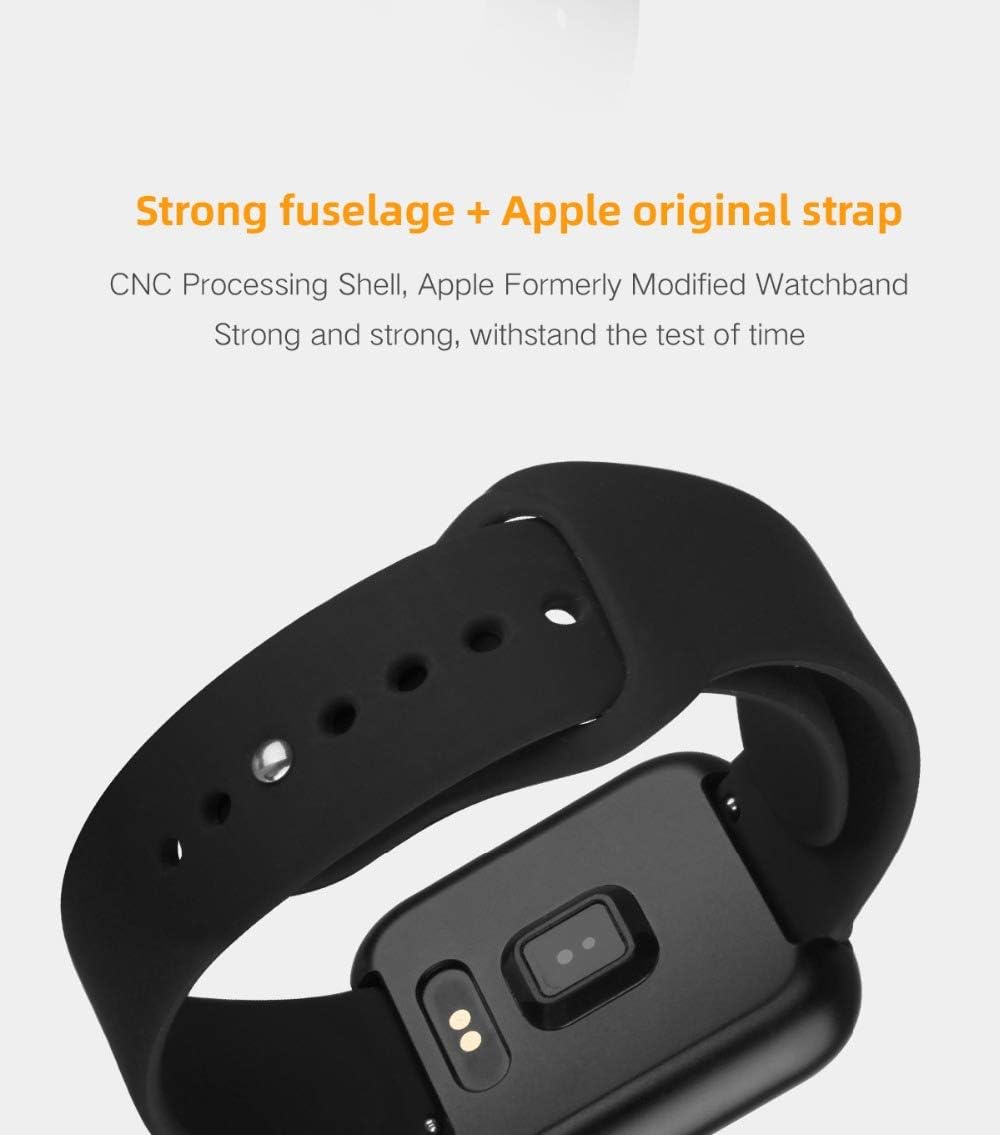
Figure 6: The back of the P80 Smart Watch, highlighting the charging contacts and optical sensors for health monitoring. This view also shows the durable strap attachment.
6. Fehlerbehebung
If you encounter issues with your P80 Smart Watch, try the following troubleshooting steps:
- Uhr schaltet sich nicht ein: Stellen Sie sicher, dass die Uhr vollständig aufgeladen ist. Schließen Sie sie für mindestens 30 Minuten an das Ladekabel und eine Stromquelle an.
- Uhr lässt sich nicht mit dem Telefon koppeln:
- Stellen Sie sicher, dass Bluetooth auf Ihrem Telefon aktiviert ist.
- Stellen Sie sicher, dass sich die Uhr in Bluetooth-Reichweite befindet (typischerweise 10 Meter).
- Starten Sie sowohl Ihr Telefon als auch die Uhr neu.
- Löschen Sie gegebenenfalls den Bluetooth-Cache Ihres Telefons.
- Versuchen Sie, das Gerät über die Da Fit App zu entkoppeln und anschließend wieder zu koppeln.
- Ungenaue Gesundheitsdaten:
- Achten Sie darauf, dass die Uhr eng am Handgelenk sitzt, nicht zu locker und nicht zu eng.
- Reinigen Sie den Sensor auf der Rückseite der Uhr.
- Vermeiden Sie übermäßige Bewegungen während der Messungen.
- Benachrichtigungen werden nicht angezeigt:
- Überprüfen Sie die Benachrichtigungsberechtigungen für die Da Fit-App auf Ihrem Telefon.
- Stellen Sie sicher, dass die Da Fit App im Hintergrund läuft.
- Vergewissern Sie sich, dass der „Nicht stören“-Modus auf der Uhr oder dem Telefon nicht aktiviert ist.
- Kurze Akkulaufzeit:
- Reduzieren Sie die Bildschirmhelligkeit.
- Limit frequent screen wake-ups (e.g., wrist raise to wake).
- Deaktivieren Sie unnötige Funktionen zur kontinuierlichen Überwachung, falls diese nicht benötigt werden.
- Stellen Sie sicher, dass die Uhr jedes Mal vollständig aufgeladen ist.
If the issue persists, refer to the Da Fit app's help section or contact customer support.
7. Spezifikationen
Detailed technical specifications for the P80 Smart Watch:
| Komponente | Spezifikation |
|---|---|
| Modellnummer | P80 |
| CPU | NRF52832 QFAA |
| Beschleunigungssensor | BOSCH BMA 421 |
| Anzeige | 1.3 inch IPS color screen, 240*240 resolution |
| Tastenmodus | Single touch panel |
| Akku-Typ | Lithium-Polymer-Akku, 200 mAh |
| Lademethode | Magnetic interface in-line charging |
| Standby-Stromverbrauch | Standby 10-15 days, Normal use 6-8 days |
| Bluetooth-Typ | Bluetooth 4.0 |
| Unterstützte APP | Da Fit |
| Anforderungen an mobile Systeme | Android 4.4 and above, Apple iOS 9.0 or above |
| Abmessungen (ca.) | 42.0*36.0*10.25 mm |
| Wasserbeständigkeit | IP68 |

Figure 7: A detailed table outlining the specifications of the P80 Smart Watch, including its dimensions, available shell and band colors, main chip, display specifications, battery type, charging mode, standby power consumption, Bluetooth type, and mobile system requirements.
8. Garantie und Support
Informationen zur Produktgarantie und zum Kundendienst finden Sie in der Regel in Ihren Kaufunterlagen oder auf der offiziellen Website des Herstellers. webBitte bewahren Sie Ihren Kaufbeleg für eventuelle Garantieansprüche auf.
For technical support or inquiries not covered in this manual, please refer to the Da Fit app's help section or contact the retailer where you purchased the product.