
1. Einleitung
Thank you for choosing the FOREVER Setty MP3 Player. This manual provides essential information for the safe and efficient use of your device. Please read it carefully before operating the MP3 player and keep it for future reference.
This compact digital media player is designed for portable audio playback, supporting MP3 files and featuring an FM radio. It includes a clear LCD screen for navigation, a clip for secure attachment, and comes with headphones for immediate use.
2. Produktüberschreitungview
The FOREVER Setty MP3 Player is a lightweight and portable device for enjoying your favorite music and radio stations on the go. It features a simple interface with an LCD screen and intuitive controls.

Bild 2.1: Front view of the FOREVER Setty MP3 Player, showing the LCD screen and circular control panel with play/pause, skip, and volume buttons.
Hauptmerkmale:
- MP3 file Formatunterstützung
- MicroSD card slot (up to 32 GB) for expanded storage
- Built-in FM radio function
- Clear LCD display for easy navigation
- Integrated clip for secure attachment
- Includes wired headphones
3. Einrichtung
3.1. Aufladen des Geräts
Before first use, fully charge the MP3 player. Connect the device to a USB power source (e.g., computer USB port or a USB wall adapter) using a compatible USB cable. The charging indicator on the screen will show the charging status.

Bild 3.1: Seite view of the MP3 player, highlighting the USB port for charging and data transfer.
3.2. Einlegen einer microSD-Karte
The MP3 player requires a MicroSD card (not included) to store music files. Locate the MicroSD card slot on the side of the device. Gently insert the MicroSD card with the gold contacts facing down until it clicks into place. To remove, push the card in slightly until it springs out.
3.3. Kopfhörer anschließen
Plug the included wired headphones into the 3.5mm audio jack on the MP3 player. Ensure the plug is fully inserted for proper audio output.

Bild 3.2: The MP3 player shown alongside its detachable clip and the included wired headphones.
3.4. Musik übertragen Files
- Verbinden Sie den MP3-Player über ein USB-Kabel mit Ihrem Computer.
- The device will appear as a removable disk drive on your computer (compatible with Windows and OS X).
- Ziehen Sie Ihre MP3-Audiodatei per Drag & Drop in die Datei. files directly into the device's storage or the MicroSD card folder.
- Trennen Sie das Gerät sicher vom Computer, bevor Sie das USB-Kabel abziehen.
4. Bedienungsanleitung
4.1. Ein-/Ausschalten
To power on the device, press and hold the Power button (usually located on the side or top) until the LCD screen illuminates. To power off, press and hold the Power button again until the screen turns off.
4.2. Grundlegende Navigation
Use the circular control panel to navigate through menus and control playback:
- M (Menü)-Taste: Press to enter the main menu or go back to the previous menu.
- Wiedergabe-/Pause-Taste (Mitte): Press to play or pause music. In menus, it often acts as a selection button.
- Skip/Fast Forward/Rewind Buttons (Left/Right): Press briefly to skip tracks. Press and hold to fast forward or rewind within a track. In menus, these buttons navigate left/right or up/down.
- VOL (Volume) Buttons (Up/Down): Press to adjust the playback volume.

Bild 4.1: Detaillierte view of the MP3 player's front panel, showing the LCD screen and the circular control layout for navigation and playback.
4.3. Musik abspielen
- From the main menu, select the 'Music' or 'MP3' option.
- Navigieren Sie durch Ihre Ordner und files using the skip buttons.
- Press the Play/Pause button to select and start playback of a track.
4.4. Nutzung des FM-Radios
- From the main menu, select the 'Radio' or 'FM' option.
- The headphones act as the antenna for the FM radio, so ensure they are connected.
- Verwenden Sie die Navigationstasten, um nach Sendern zu suchen oder einen voreingestellten Sender auszuwählen.
4.5. Using the Clip
The integrated clip allows you to securely attach the MP3 player to clothing, a bag, or other items, making it ideal for activities like running, gym workouts, or walking.
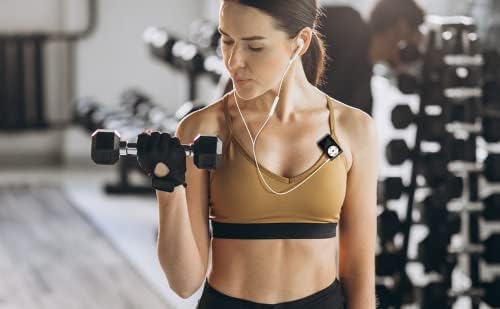
Bild 4.2: A user demonstrating the MP3 player clipped to clothing during a workout, highlighting its portability.
5. Wartung
5.1. Reinigung
Wischen Sie das Gerät mit einem weichen, trockenen Tuch ab. Verwenden Sie keine flüssigen Reiniger oder Lösungsmittel, da diese die Oberfläche oder die internen Bauteile beschädigen können.
5.2. Speicherung
Store the MP3 player in a cool, dry place away from direct sunlight and extreme temperatures. Avoid storing it in dusty or humid environments.
5.3. Batteriepflege
Um die Akkulaufzeit zu verlängern, vermeiden Sie häufiges vollständiges Entladen des Akkus. Laden Sie das Gerät regelmäßig auf, auch wenn es längere Zeit nicht benutzt wird.
6. Fehlerbehebung
- Gerät schaltet sich nicht ein: Stellen Sie sicher, dass der Akku geladen ist. Schließen Sie den Player an eine Stromquelle an und versuchen Sie es erneut.
- Kein Ton über Kopfhörer: Check if the headphones are properly plugged in. Verify the volume level is not set to zero or muted. Test with another pair of headphones if available.
- Übertragung nicht möglich files zum Gerät: Ensure the USB cable is securely connected to both the player and the computer. Try a different USB port or cable. Make sure the device is recognized by your computer's operating system.
- MicroSD-Karte nicht erkannt: Ensure the MicroSD card is inserted correctly and fully. Try reinserting it. Check if the card is formatted correctly (FAT32 is commonly supported).
- Der Radioempfang ist schlecht: Ensure headphones are connected, as they act as the antenna. Try moving to an area with better signal reception.
7. Spezifikationen
| Besonderheit | Spezifikation |
|---|---|
| Marke | FÜR IMMER |
| Modell | Setty |
| Speicherkapazität | Bis zu 32 GB (über MicroSD-Karte) |
| Unterstützte Audioformate | MP3 |
| Display-Technologie | LCD |
| Bildschirmgröße | 2 Zentimeter |
| Durchschnittliche Akkulaufzeit | Ungefähr 8 Stunden |
| Konnektivität | USB (for data transfer and charging), 3.5mm Audio Jack |
| Kompatible Geräte | Personal Computer, Headphones |
| Technische Daten | 11.5 x 3 x 5 cm |
| Gewicht | 50 g |
| Farbe | Schwarz |
8. Garantie und Support
This product is covered by a manufacturer's warranty. For detailed warranty terms and conditions, please refer to the documentation provided with your purchase or contact FOREVER customer support. Keep your proof of purchase for warranty claims.
For technical support or further assistance, please visit the official FOREVER webBesuchen Sie die Website oder wenden Sie sich an den Kundendienst. Die Kontaktinformationen finden Sie in der Regel auf der Produktverpackung oder der offiziellen Website der Marke. webWebsite.

