
Einführung
This manual provides detailed instructions for the setup, operation, and maintenance of your DIGIQUEST Universal Easy Plus Remote Control. Designed for simplicity and ease of use, this remote features large, intuitive buttons, making it suitable for all users, including those in hotel or hospital environments. Please read this manual carefully before using the product.
Produkteigenschaften
- einfache Konfiguration
- Large, Intuitive Buttons for enhanced visibility
- Bright LED indicator
- Dedicated Teletext Button
- Equipped exclusively with main functions to avoid complexity
- Compatible with all TV brands
Packungsinhalt
- 1 x DIGIQUEST Universal Easy Plus Remote Control
- 1 x Benutzerhandbuch (dieses Dokument)
Aufstellen
1. Einlegen der Batterie
The DIGIQUEST Universal Easy Plus remote control requires 2 x 1.5V LR03 - AAA batteries (not included).
- Suchen Sie das Batteriefach auf der Rückseite der Fernbedienung.
- Schieben Sie die Batterieabdeckung auf.
- Legen Sie zwei AAA-Batterien ein und achten Sie dabei auf die richtige Polarität (+ und -), wie im Batteriefach angegeben.
- Schließen Sie die Batterieabdeckung fest.
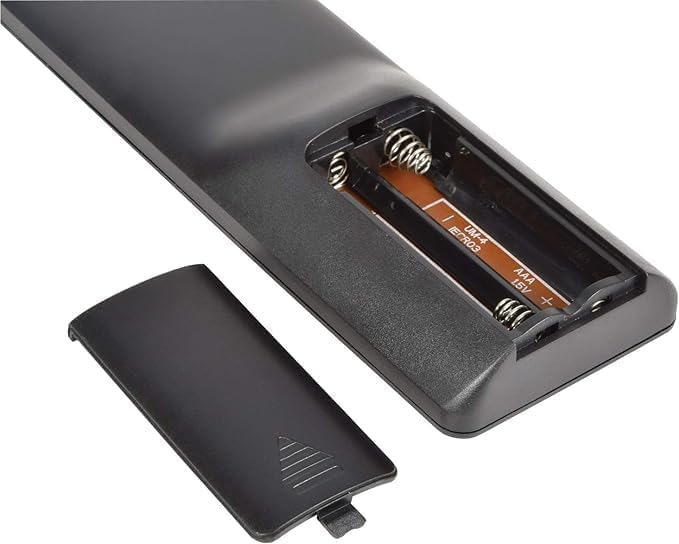
Image: The open battery compartment of the remote control, showing slots for two AAA batteries.
2. Programmieren der Fernbedienung
The remote offers four simple methods to configure it quickly with your TV. Choose the method that best suits your needs.
- Direkte Codeeingabe:
Enter the corresponding code for your TV brand directly. A list of over 10,000 available codes is typically provided in the included code booklet (if applicable) or can be found online on the DIGIQUEST support webWebsite.
- Automatische Suche:
The remote can automatically search for the correct code for your TV. Follow the instructions in the code booklet for initiating an automatic search. This process typically involves holding down a specific button until the TV responds.
- Manuelle Suche:
If automatic search is unsuccessful, you can perform a manual search. This involves cycling through codes one by one until your TV responds. Refer to the code booklet for detailed steps.
- Learning Function (from original remote):
If you have your original TV remote control, the Easy Plus remote can learn functions directly from it. This method allows you to customize button assignments. Place the two remotes face-to-face and follow the learning procedure outlined in the code booklet.

Bild: Vorderseite view of the DIGIQUEST Universal Easy Plus remote control, showcasing its large buttons.
Bedienungsanleitung
Once programmed, the remote control is ready for use. Below is a description of the main buttons and their functions:

Bild: Eine Nahaufnahme view of the large, clearly labeled buttons on the remote control.
| Taste | Funktion |
|---|---|
| Ein-/Ausschalter (roter Knopf) | Schaltet den Fernseher ein oder aus. |
| TV | Wählt die TV-Eingangsquelle aus. |
| Stummschalten (Lautsprecher mit X) | Schaltet den Fernsehton stumm oder hebt die Stummschaltung auf. |
| TEXT | Activates or deactivates Teletext mode. |
| Lauter (+) | Increases the TV volume. |
| Lautstärke runter (-) | Decreases the TV volume. |
| Channel Up (P^) | Änderungen zum nächsten Kanal. |
| Channel Down (Pv) | Wechselt zum vorherigen Kanal. |
| Zifferntasten (0-9) | Direkte Auswahl der Fernsehkanäle. |
| INFO | Displays program information (if available). |
| AV | Switches between available audio/video input sources. |
Wartung
Reinigung
To clean the remote control, use a soft, dry cloth. Do not use abrasive cleaners, solvents, or alcohol, as these may damage the surface or internal components.
Batteriewechsel
Tauschen Sie die Batterien aus, sobald die Fernbedienung nur noch langsam reagiert oder gar nicht mehr funktioniert. Ersetzen Sie immer beide Batterien gleichzeitig durch neue AAA-Batterien. Verwenden Sie keine alten und neuen Batterien zusammen oder unterschiedliche Batterietypen.
Fehlerbehebung
- Fernbedienung funktioniert nicht:
- Prüfen Sie, ob die Batterien korrekt und mit der richtigen Polarität eingelegt sind.
- Ersetzen Sie alte Batterien durch neue.
- Stellen Sie sicher, dass sich keine Hindernisse zwischen der Fernbedienung und dem Infrarotempfänger des Fernsehers befinden.
- Re-program the remote control using one of the methods described in the "Programming the Remote Control" section.
- Einige Tasten funktionieren nicht:
- The remote might not be fully compatible with all functions of your specific TV model. Try the learning function if available.
- Ensure the remote is correctly programmed for your TV. Try re-programming with a different code if available for your TV brand.
- Die Reichweite ist gering:
- Ersetzen Sie die Batterien.
- Ensure you are within the maximum operating range (up to 10 meters) and have a clear line of sight to the TV.
Technische Daten
| Besonderheit | Detail |
|---|---|
| Marke | DIGIQUEST |
| Modellname | Einfach Plus |
| Farbe | Schwarz |
| Konnektivitätstechnologie | Infrarot |
| Besonderheit | Universelle Kompatibilität |
| Kompatible Geräte | Fernsehen |
| Maximum Number of Supported Devices | 1 |
| Controllertyp | Tastensteuerung |
| Maximale Reichweite | 10 Meter |
| Stromquelle | 2 x AAA 1.5V Batterien (nicht im Lieferumfang enthalten) |
| Hersteller | DIGIQUEST |
| Ursprungsland | China |

Abbildung: Seite view of the remote control, illustrating its dimensions and ergonomic design.
Garantie und Support
Information regarding product warranty and customer support is not available in the provided product details. Please refer to the product packaging or the official DIGIQUEST webWebsite für die aktuellsten Garantieinformationen und Supportkontakte.
Weitere Unterstützung finden Sie unter DIGIQUEST Brand Store.