
Einführung
Thank you for choosing the Angetube Streaming 1080P HD Webcam 967. This manual provides essential information for setting up, operating, and maintaining your webcam to ensure optimal performance for streaming, video conferencing, and content creation.
Lieferumfang
- 1080p WebKamera x 1
- Benutzerhandbuch x 1
Produkteigenschaften
- Adjustable Ring Fill Light: Der webcam features an integrated ring light with three adjustable brightness levels to meet various lighting requirements for video chatting or streaming. This helps reduce visual noise and enhances detail in low-light environments.
- Professional WebWebcam für Streaming: Designed for compatibility with live streaming software such as OBS, Xsplit, and Mixer. It supports background replacement powered by Chromacam, allowing for customized backgrounds during games or presentations.
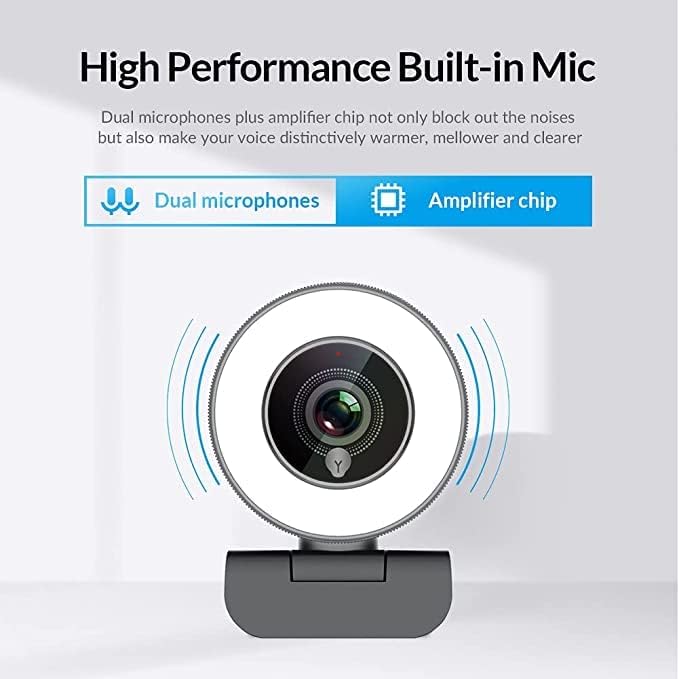
- Dual Noise-Canceling Microphones with AmpLifier-Chip: Equipped with superior microphones and an amplifier chip to enhance speech quality, providing clear audio. Background noise is filtered out, ensuring your voice is heard distinctly. The microphone can pick up sound from up to 3 meters away.
- Fast and Accurate Autofocus: The autofocus function eliminates the need for manual adjustments, keeping you consistently in focus during video calls or streams.
- High Quality, Low Bandwidth (H.264 Compression): Utilizes H.264 compression encoding for clearer and smoother video recording, video conferencing, and live broadcasts, optimizing bandwidth usage.
Aufstellen
- Auspacken WebNocken: Entfernen Sie vorsichtig die webKamera und Zubehör aus der Verpackung.
- Montage der WebNocken: Der webcam features a versatile clip that can be securely attached to the top of your monitor or laptop screen. Adjust the clip to ensure a stable fit. Alternatively, the base includes a standard tripod thread for mounting on a tripod (not included).
- Mit Computer verbinden: Schließen Sie das USB-Kabel an das webSchließen Sie die Kamera an einen freien USB-Anschluss Ihres Computers an. webcam is plug-and-play, meaning it should be automatically recognized by most operating systems (Windows 7/8/10 or above, Mac OS 10.6 or above, Android V5.0 or above, Chrome OS 29.0.1547.70 or above, Ubuntu 2.6.24 or above) without requiring additional drivers.
- Softwareerkennung: Open your preferred video conferencing or streaming application (e.g., Zoom, Skype, OBS, YouTube Live, Google Meet). Select the Angetube 967 WebWählen Sie in den Anwendungseinstellungen Ihre Kamera als Video- und Audioeingabegerät aus.
Bedienungsanleitung
Adjusting the Ring Light
The Angetube 967 Webcam includes an integrated ring light to provide optimal illumination. To adjust the brightness:
- Locate the touch-sensitive button on the front of the webcam, just below the lens.
- Tap the button to cycle through three brightness levels: Low Light, Medium Light, and High Light.
- Tap a fourth time to turn the ring light off.

Autofokus-Funktionalität
Der webcam features automatic autofocus. This means the camera will continuously adjust its focus to keep your face clear and sharp without manual intervention. This is particularly useful for dynamic presentations or active streaming sessions.

Mikrofonnutzung
The integrated dual noise-canceling microphones are designed to capture clear audio while minimizing background distractions. Ensure the webcam is positioned appropriately to optimize sound pickup, ideally within 3 meters for best results.
Kompatibilität
The Angetube 967 Webcam is widely compatible with various operating systems and applications, including:
- Betriebssysteme: Windows 7/8/10 or above, Mac OS 10.6 or above, Android V5.0 or above, Chrome OS 29.0.1547.70 or above, Ubuntu 2.6.24 or above.
- Anwendungen: OBS, Xsplit, Mixer, Zoom, Skype, Google Meet, YouTube Live, Facebook Live, and other video conferencing/streaming platforms.

Wartung
- Reinigung der Linse: Use a soft, dry, lint-free cloth to gently wipe the webKameraobjektiv. Vermeiden Sie die Verwendung aggressiver Chemikalien oder scheuernder Materialien, die das Objektiv zerkratzen könnten.
- Lagerung: Bewahren Sie die . bei Nichtgebrauch auf webDie Kamera sollte an einem sauberen, trockenen Ort, fern von extremen Temperaturen und direkter Sonneneinstrahlung, aufbewahrt werden.
- Kabelpflege: Um Beschädigungen zu vermeiden, sollte das USB-Kabel nicht übermäßig gebogen oder verdreht werden.
Fehlerbehebung
- WebKamera nicht erkannt:
- Stellen Sie sicher, dass das USB-Kabel fest mit beiden Geräten verbunden ist. webKamera und Ihr Computer.
- Versuchen Sie, die webcam in einen anderen USB-Port.
- Starten Sie Ihren Computer neu.
- Überprüfen Sie den Geräte-Manager Ihres Betriebssystems, um festzustellen, ob webcam is listed and recognized.
- Kein Video/Schwarzer Bildschirm:
- Stellen Sie sicher, dass webcam is selected as the primary video input device in your application's settings.
- Check if any privacy settings on your operating system are blocking webcam access for the application.
- Schließen Sie die Anwendung und öffnen Sie sie erneut.
- Kein Ton/Schlechte Tonqualität:
- Verify that the Angetube 967 WebDas Mikrofon der Kamera ist in den Einstellungen Ihrer Anwendung als Audioeingabegerät ausgewählt.
- Überprüfen Sie die Soundeinstellungen Ihres Computers, um sicherzustellen, dass das Mikrofon aktiviert und nicht stummgeschaltet ist.
- Stellen Sie sicher, dass webcam is positioned within optimal range (up to 3 meters) for sound pickup.
- Ring Light Not Working:
- Gently tap the touch-sensitive button below the lens to cycle through brightness levels.
- Stellen Sie sicher, dass webcam is properly connected via USB, as the light draws power from the connection.
Technische Daten
| Technische Daten | 5.3 x 6.6 x 7.6 Zoll |
| Artikelgewicht | 5.3 Unzen |
| Artikelmodellnummer | 967 |
| Fotosensor-Technologie | CMOS |
| Auflösung der Videoaufnahme | 1080p |
| Maximale Brennweite | 3 |
| Maximale Blendenöffnung | 2.1 f |
| Videoaufnahmeformat | MP4 |
| Unterstütztes Audioformat | AAC, MP3 |
| Konnektivitätstechnologie | USB |
| Datum der ersten Verfügbarkeit | 22. Mai 2019 |
Garantie und Support
- Kundendienst: Angetube offers lifetime technical customer support for this product.
- Ansprechzeit: Expect a quick response to inquiries, typically within 24 hours.
- Rückgabe/Umtausch: Returns for an exchange or refund are accepted within 30 days of purchase.
- Hersteller: XZC
- Verkäufer: Angetube Store