
1. Einleitung
Vielen Dank für Ihren Einkauf.asing the DACOM GF7 TWS V4.2 Bluetooth Earbuds. This manual provides detailed instructions on how to set up, operate, and maintain your earbuds to ensure optimal performance and longevity. Please read this manual thoroughly before using the product and retain it for future reference.
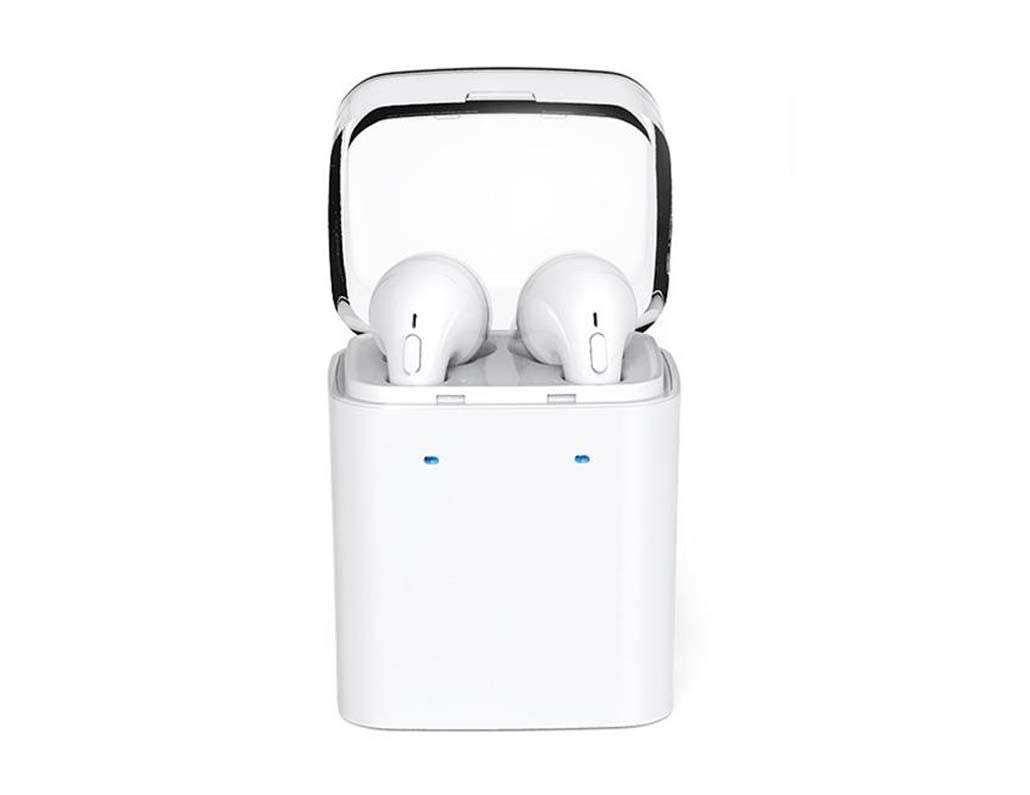
Image 1.1: DACOM GF7 TWS V4.2 Bluetooth Earbuds in their charging case.
2. Packungsinhalt
Bitte überprüfen Sie den Packungsinhalt nach dem Auspacken. Sollten Artikel fehlen oder beschädigt sein, wenden Sie sich bitte an Ihren Händler.
- DACOM GF7 TWS V4.2 Bluetooth Earbuds (Left and Right)
- Tragbares Ladeetui
- USB-Ladekabel
- Ohrpolster (verschiedene Größen)
- Benutzerhandbuch (dieses Dokument)
3. Produktüberschreitungview
Familiarize yourself with the components of your DACOM GF7 TWS V4.2 Earbuds and charging case.

Image 3.1: Detailed diagram showing the Multifunction Button (MFB), Indicator Light, Microphone (Mic), Air Gate, DC5V Charge Jack Cover, Headphone Charging Indicator Light, USB Charging Input Port, and the Charging Indicator Light of the bottom on the DACOM GF7 TWS V4.2 Earbuds and Charging Case.
- Multifunktionstaste (MFB): Used for power, playback, call management, and voice assistant activation.
- Kontrollleuchte: Displays pairing status, charging status, and power status.
- Mikrofon: Eingebautes Mikrofon für Anrufe und Sprachbefehle.
- Lufttor: Acoustic vent for sound performance.
- DC5V Charge Jack Cover: Protects the charging port on the earbuds.
- Headphone Charging Indicator Light: Shows charging status of individual earbuds within the case.
- USB Charging Input Port: For charging the portable charging case.
- Charging Indicator Light of the bottom: Zeigt den Ladestatus des Gehäuses an.
4. Einrichtung
4.1. Aufladen der Ohrhörer und des Ladecase
- Aufladen des Gehäuses: Connect the USB charging cable to the USB Charging Input Port on the charging case and the other end to a 5V USB power adapter (not included). The Charging Indicator Light at the bottom of the case will illuminate to indicate charging. Once fully charged, the indicator light may change color or turn off.
- Aufladen der Ohrhörer: Place the earbuds into their respective slots in the charging case. Ensure the earbuds are properly seated. The Headphone Charging Indicator Light on the case will show the charging status of the earbuds. The earbuds' indicator lights will also show charging status (e.g., red while charging, off when fully charged).
- Vor der ersten Verwendung müssen sowohl die Ohrhörer als auch das Ladecase vollständig aufgeladen werden.
4.2. Bluetooth-Kopplung
- Einschalten: Take both earbuds out of the charging case. They will automatically power on and attempt to pair with each other. You will hear an audible prompt indicating they are connected to each other.
- Verbindungsmodus: Once the earbuds are paired with each other, one earbud's indicator light will flash red and blue alternately, indicating it is in pairing mode and ready to connect to your device.
- Mit Gerät verbinden: On your smartphone or Bluetooth-enabled device, go to the Bluetooth settings and search for available devices. Select "DACOM GF7 TWS" (or similar name) from the list.
- Erfolgreiche Verbindung: Once connected, the earbud's indicator light will stop flashing, and you will hear a confirmation sound.
- Automatische Wiederverbindung: Nach der ersten Kopplung verbinden sich die Ohrhörer beim Herausnehmen aus dem Ladecase automatisch mit dem zuletzt gekoppelten Gerät, vorausgesetzt, Bluetooth ist auf Ihrem Gerät aktiviert.
5. Bedienungsanleitung
The DACOM GF7 TWS V4.2 Earbuds feature a Multifunction Button (MFB) for various controls.
5.1. Ein-/Ausschalten
- Einschalten: Take the earbuds out of the charging case. They will power on automatically. Alternatively, press and hold the MFB on both earbuds for approximately 3 seconds until you hear a power-on prompt.
- Ausschalten: Place the earbuds back into the charging case. They will power off automatically. Alternatively, press and hold the MFB on both earbuds for approximately 5 seconds until you hear a power-off prompt.
5.2. Musikwiedergabe
- Abspielen/Pause: Single press the MFB on either earbud.
- Nächster Titel: Double press the MFB on the right earbud.
- Vorheriges Lied: Double press the MFB on the left earbud.
5.3. Anrufverwaltung
- Anruf annehmen/beenden: Single press the MFB on either earbud.
- Anruf ablehnen: Press and hold the MFB on either earbud for approximately 2 seconds.
5.4. Sprachassistent
- Sprachassistenten aktivieren: Triple press the MFB on either earbud to activate your device's voice assistant (e.g., Siri, Google Assistant).
5.5. Geräuschunterdrückung
- The DACOM GF7 TWS V4.2 features active noise cancellation. Specific activation methods may vary. Refer to the product's quick start guide or manufacturer's website for precise instructions if not detailed here. Typically, a long press or specific tap sequence on an MFB or dedicated button activates/deactivates ANC.
6. Wartung
Durch sachgemäße Pflege werden die Langlebigkeit und Leistungsfähigkeit Ihrer Ohrhörer sichergestellt.
- Reinigung: Reinigen Sie die Ohrhörer und das Ladecase regelmäßig mit einem weichen, trockenen und fusselfreien Tuch. Verwenden Sie keine scharfen Chemikalien oder Scheuermittel.
- Ohrtipps: Entfernen und reinigen Sie die Ohrstöpsel regelmäßig mit einem Tuch.amp Mit einem Tuch und milder Seife reinigen, anschließend gründlich ausspülen und trocknen lassen, bevor Sie es wieder anbringen.
- Lagerung: Bewahren Sie die Ohrhörer bei Nichtgebrauch im Ladecase auf, um sie vor Staub und Beschädigungen zu schützen.
- Feuchtigkeit vermeiden: Keep the earbuds and charging case away from water, excessive humidity, and extreme temperatures.
7. Fehlerbehebung
If you encounter issues with your earbuds, refer to the following common problems and solutions.
| Problem | Lösung |
|---|---|
| Die Ohrhörer verbinden sich nicht miteinander. |
|
| Die Ohrhörer verbinden sich nicht mit dem Gerät. |
|
| Kein Ton aus den Ohrhörern. |
|
| Ladecase oder Ohrhörer laden nicht. |
|
8. Spezifikationen
| Markenname | DACOM |
| Modellname | GF7 TWS |
| Modellnummer | 7TWS |
| Farbe | Weiß |
| Kopfhörer-Formfaktor | In-Ear |
| Lärmschutz | Aktive Geräuschunterdrückung |
| Konnektivitätstechnologie | Kabellos (Bluetooth) |
| Drahtlose Kommunikationstechnologie | Bluetooth V4.2 (inferred from title) |
| Im Lieferumfang enthaltene Komponenten | Ohrpolster |
| Besondere Merkmale | Geräuschunterdrückung, Mikrofon inklusive |
| Kontrollmethode | Berühren |
| Kompatible Geräte | Alle Geräte |
| Material | PU Metal Eraser (likely referring to ear tip material or casing finish) |
9. Sicherheitshinweise
Please read and follow these safety guidelines to prevent injury or damage to your device.
- Das Produkt darf nicht zerlegt, repariert oder verändert werden. Dies kann zu Brand, Stromschlag oder zur vollständigen Zerstörung des Produkts führen.
- Keep the product away from extreme temperatures (hot or cold), direct sunlight, and sources of heat.
- Vermeiden Sie es, das Produkt Wasser oder anderen Flüssigkeiten auszusetzen.
- Um Gehörschäden zu vermeiden, verwenden Sie das Produkt nicht über längere Zeiträume bei hoher Lautstärke.
- Verwenden Sie nur die mitgelieferten oder empfohlenen Ladekabel und Adapter.
- Außerhalb der Reichweite von Kindern und Haustieren aufbewahren. Kleinteile können verschluckt werden und Erstickungsgefahr darstellen.
- Be aware of your surroundings when using the earbuds, especially in traffic or other potentially dangerous situations.
10. Garantie und Support
DACOM products are designed and manufactured to the highest quality standards. For detailed warranty information, please refer to the warranty card included with your purchase or visit the official DACOM webWebsite.
For technical support, troubleshooting assistance, or to inquire about replacement parts, please contact DACOM customer service through their official webWebsite oder die Kontaktinformationen, die auf Ihrer Produktverpackung angegeben sind.
- Online-Hilfe: Visit the official DACOM webWebsite mit FAQs, Hilfeartikeln und Kontaktformularen.
- E-Mail-Support: Refer to your product packaging for customer service email addresses.