
Einführung
This manual provides detailed instructions for the proper setup, operation, and maintenance of your CakCity Boys Camouflage LED Sports Kids Watch. Please read this manual thoroughly to ensure optimal performance and longevity of your watch.
The CakCity Sports Watch is designed for active children, featuring multiple functions including time display, alarm, stopwatch, calendar, and EL backlight. It is built with a durable silicone band and a 50M water resistance rating, making it suitable for various sports and daily activities.
Erste Schritte
1. Ersteinrichtung
Before first use, ensure you remove the protective film from the watch face. This film is applied during manufacturing to prevent scratches and should be peeled off for clear visibility.

Schutzfolienentfernung: Gently peel off the transparent protective film from the watch display for optimal clarity.
2. Batterieinformationen
The watch comes with one CR2 battery pre-installed. No immediate battery installation is required. For future battery replacement, please refer to the 'Care and Maintenance' section.
Bedienungsanleitung
Die Uhr verfügt über vier Hauptknöpfe: LICHT, MODUS, ADJ, Und SET/START / RESET/STOP. These buttons are used to navigate through modes and adjust settings.

Behütenview: The main display shows time, and buttons are labeled for easy identification.
Tastenfunktionen:
- LICHT: Activates the EL backlight for viewbei schlechten Lichtverhältnissen.
- MODUS: Cycles through the watch's different modes: Time Display, Chronograph (Stopwatch), and Alarm Setting.
- ADJ: Used to select items for adjustment within a setting mode.
- SET/START (Top Right): In setting modes, this button is typically used to increase values or move forward. In Chronograph mode, it starts and stops the timer.
- RESET/STOP (Bottom Right): In setting modes, this button is typically used to reset values or confirm settings. In Chronograph mode, it resets the timer.
1. Uhrzeit- und Datumseinstellung
- Drücken Sie im normalen Zeitdisplay die Taste MODUS Drücken Sie die Taste dreimal, um in den Zeiteinstellungsmodus zu gelangen. Die Sekundenanzeige beginnt zu blinken.
- Drücken Sie die ADJ Taste zum Durchblättern der Einstellungen: Sekunden → Stunde → Minute → Monat → Datum → Wochentag.
- While the desired value is flashing, use the SET/START Taste, um den Wert anzupassen.
- Sobald alle Einstellungen korrekt sind, drücken Sie die Taste MODUS Taste zum Verlassen des Zeiteinstellungsmodus und zur Rückkehr zur normalen Zeitanzeige.
2. Alarmeinstellung
- Drücken Sie im normalen Zeitdisplay die Taste MODUS button twice to enter Alarm Setting mode. The hour digits will begin to flash.
- Drücken Sie die ADJ button to select between Hour and Minute settings.
- Verwenden Sie die SET/START Taste zum Einstellen des blinkenden Stunden- oder Minutenwerts.
- Sobald die gewünschte Alarmzeit eingestellt ist, drücken Sie die Taste MODUS Taste zum Verlassen des Alarmeinstellungsmodus.
- Zum Ein-/Ausschalten des Alarms die Taste gedrückt halten SET/START und drücken Sie dann die ZURÜCKSETZEN/STOPP button simultaneously in normal time display mode. An alarm icon will appear/disappear.
3. Stopwatch Function (Chronograph)
- Drücken Sie im normalen Zeitdisplay die Taste MODUS button once to enter Chronograph mode. The display will show '00:00:00'.
- Drücken Sie die SET/START Knopf zum Starten der Stoppuhr.
- Drücken Sie die SET/START Drücken Sie erneut, um die Stoppuhr anzuhalten.
- Drücken Sie die ZURÜCKSETZEN/STOPP Taste zum Zurücksetzen der Stoppuhr auf '00:00:00'.
- To exit Chronograph mode, press the MODUS Taste.

Multifunktionsdisplay: Icons illustrating the watch's various features including time, backlight, water resistance, alarm, and timer.
4. EL Hintergrundbeleuchtung
Drücken Sie die LICHT button (top left) to illuminate the display. The backlight will remain on for a few seconds, allowing you to read the time in the dark.

LED-Hintergrundbeleuchtung: The watch display illuminates for easy reading in low-light conditions.
Pflege und Wartung
1. Water Resistance (50M / 164 Ft)
This watch is designed with 50 meters (164 feet) of water resistance, making it suitable for swimming and bathing in cold water. However, it is crucial to observe the following precautions:
- NICHT press any buttons while the watch is underwater. Pressing buttons underwater can compromise the waterproof seals.
- Keep the watch away from steam and hot water. High temperatures and steam can damage the waterproof ring and internal components.

50M Wasserdichtigkeit: Suitable for daily water exposure like hand washing, rain, and swimming in cold water.
2. Reinigung
Um Ihre Uhr zu reinigen, wischen Sie sie mit einem weichen, feuchten Tuch ab.amp Reinigen Sie die Uhr mit einem Tuch. Vermeiden Sie die Verwendung von scharfen Chemikalien oder Scheuermitteln, da diese die Oberfläche oder die Bauteile der Uhr beschädigen können.
3. Batteriewechsel
The watch uses one CR2 battery. When the display becomes dim or the watch stops functioning, it may be time to replace the battery. It is recommended to have battery replacement performed by a qualified technician to ensure the waterproof seal is maintained.
Fehlerbehebung
- Uhr funktioniert nicht: Check if the protective film has been removed. If the display is blank or dim, the battery may need replacement.
- Wasser in der Uhr: If water or condensation appears inside the watch, stop using it immediately and seek professional service. This usually indicates a compromised waterproof seal, often due to pressing buttons underwater or exposure to hot water/steam.
- Falsche Zeitanzeige: Follow the 'Time and Date Setting' instructions to reset the time.
If you encounter issues not covered in this manual, please contact CakCity customer service for assistance.
Produktspezifikationen

Basic Information and Dimensions: Key measurements and material details for the watch.
| Besonderheit | Detail |
|---|---|
| Marke | CakCity |
| Modellnummer | 8541772058 |
| Name des Elementtyps | Sportuhr |
| Material | Rubber, Acrylic |
| Verschlussart | Dornschließe |
| Wasserbeständigkeit | 50M (164 Fuß) |
| Funktionen | Light, Stopwatch, Waterproof, Shockproof, Calendar, EL Backlight, Alarm Clock |
| Akku-Typ | 1 CR2-Batterie (im Lieferumfang enthalten) |
| Verpackungsabmessungen | 3.19 x 3.11 x 2.72 Zoll |
| Gewicht | 2.4 Unzen |
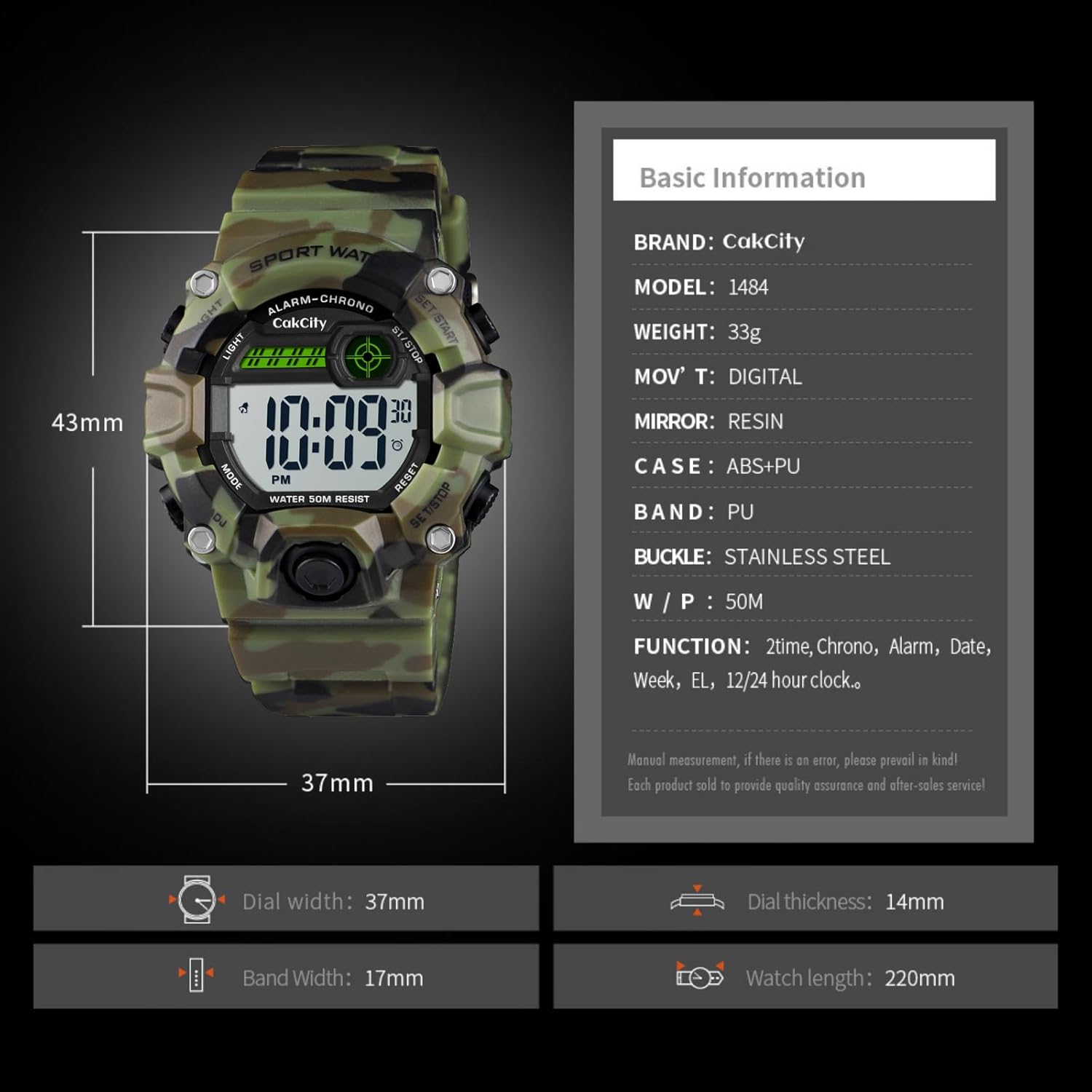
Physikalische Spezifikationen: Details on watch band perimeter, buckle type, band material, and case construction.
Garantie und Support
CakCity is committed to providing quality products and customer satisfaction. While specific warranty details are not provided in this manual, we offer friendly customer services to assist with any product-related inquiries or issues.
For support, please refer to the contact information provided with your purchase or visit the official CakCity webWebsite.