
1. Einleitung
This manual provides essential information for the safe and effective use of your Sigma 60-600mm F4.5-6.3 DG OS HSM Camera Lens. Please read this manual thoroughly before using the lens and keep it for future reference. This lens is designed to offer a versatile focal range from 60mm to 600mm, suitable for various photographic applications, including wildlife, sports, and landscapes.
2. Produktüberschreitungview
The Sigma 60-600mm F4.5-6.3 DG OS HSM is a high-performance super-telephoto zoom lens. It features a robust construction, optical stabilization, and advanced optical elements to deliver high image quality across its extensive zoom range.

Figure 2.1: Sigma 60-600mm F4.5-6.3 DG OS HSM Camera Lens with lens hood.
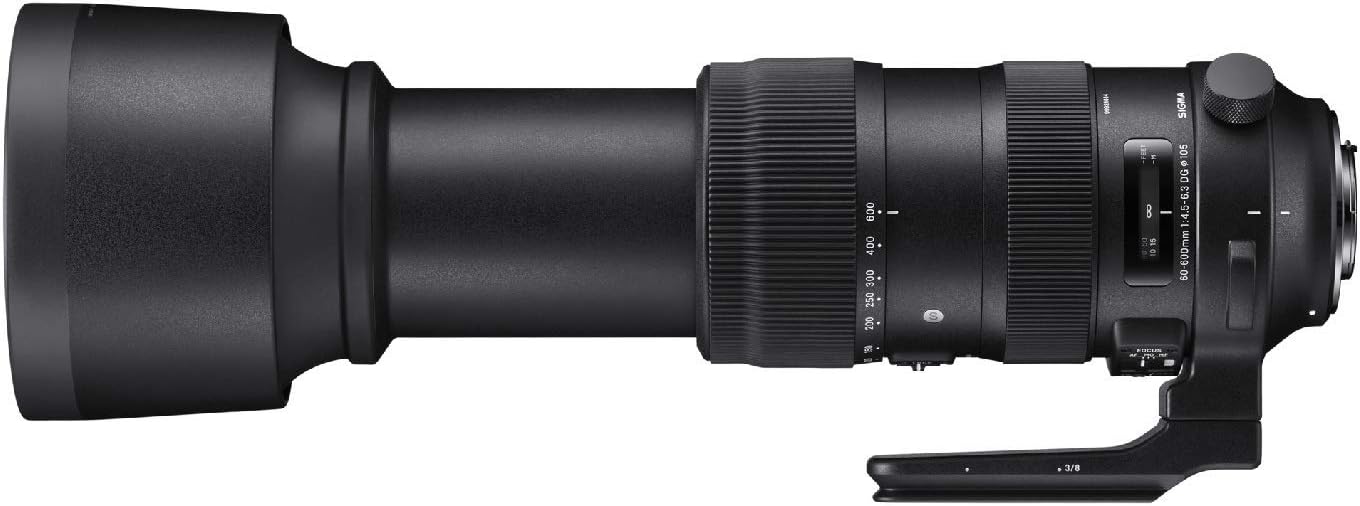
Abbildung 2.2: Seite view of the lens highlighting control switches.

Figure 2.3: Detached lens hood.
3. Einrichtung und Installation
3.1 Anbringen des Objektivs an der Kamera
- Align the lens mount index mark with the corresponding mark on your camera body.
- Rotate the lens clockwise (for Canon EF mount) until it clicks into place. Ensure it is securely locked.
- To detach, press the lens release button on the camera body and rotate the lens counter-clockwise.
3.2 Anbringen der Gegenlichtblende
- Richten Sie den roten Punkt auf der Gegenlichtblende mit dem roten Punkt auf der Vorderseite des Objektivs aus.
- Twist the lens hood clockwise until it locks into position.
- Zum Entfernen gegen den Uhrzeigersinn drehen.
3.3 Verwendung der Stativschelle
The lens includes a tripod collar for stable mounting on a tripod or monopod, especially recommended due to the lens's weight. The collar allows for rotation of the camera without detaching the lens, facilitating quick changes between horizontal and vertical orientations.
4. Bedienung des Objektivs
4.1 Zoomen
Rotate the zoom ring to adjust the focal length between 60mm and 600mm. The lens also supports push-pull zooming for rapid focal length changes.
4.2 Fokussierung
- Autofokus (AF): Set the FOCUS mode switch to 'AF'. The lens will automatically focus when the camera's shutter button is half-pressed.
- Manueller Fokus (MF): Set the FOCUS mode switch to 'MF'. Rotate the focus ring to manually adjust focus.
- Manual Override (MO): This mode allows for manual focus adjustment even when the lens is set to autofocus, providing fine-tuning capability.
4.3 Focus Limiter
The focus limiter switch allows you to restrict the autofocus range, which can improve autofocus speed when shooting subjects within a specific distance. Options typically include FULL (full range), 6m - ∞ (6 meters to infinity), and 6m - 2.6m (6 meters to 2.6 meters).
4.4 Optische Stabilisierung (OS)
The Intelligent OS system minimizes camera shake, providing up to 4 stops of stabilization. Set the OS switch to 'ON' for handheld shooting. Different OS modes may be available for various shooting scenarios (e.g., Mode 1 for general use, Mode 2 for panning shots).
4.5 Zoom-Sperrschalter
Use the zoom lock switch to secure the lens at a desired focal length, preventing zoom creep during transport or when shooting at a fixed focal length.
5. Wartung und Pflege
- Keep the lens caps on when not in use to protect the front and rear elements.
- Clean lens surfaces with a soft, lint-free cloth and a specialized lens cleaning solution. Avoid harsh chemicals.
- Bewahren Sie das Objektiv an einem kühlen, trockenen Ort, fern von direkter Sonneneinstrahlung und extremen Temperaturen auf.
- The lens features a dust and splash-proof construction, but it is not fully waterproof. Avoid exposing it to heavy rain or submersion.
6. Fehlerbehebung
- Linse fokussiert nicht: Ensure the camera is set to the correct focus mode (AF/MF) and the lens's focus mode switch matches. Check the focus limiter setting.
- Unscharfe Bilder: Verify that the optical stabilization (OS) is enabled for handheld shots. Check shutter speed and aperture settings. Ensure the lens and camera are clean.
- Zoom ring stiff: Ensure the zoom lock switch is disengaged. If the issue persists, contact customer support.
7. Spezifikationen
| Besonderheit | Spezifikation |
|---|---|
| Marke | Sigma |
| Modellname | 730954 |
| Objektivtyp | Superzoom |
| Kompatible Halterungen | Canon E.F |
| Minimale Brennweite | 60 Millimeter |
| Maximale Brennweite | 600 Millimeter |
| Maximale Blendenöffnung | f/22 |
| Minimale Blende | f/32 |
| Fokustyp | Autofokus |
| Bildstabilisierung | Optisch |
| Photo Filter Size | 105 Millimeter |
| Artikelgewicht | 4 Pfund |
| Wasserbeständigkeit | Wasserfest |
| Hersteller | Sigma Corporation of America |
8. Garantie und Support
This product is covered by a manufacturer's warranty. For detailed warranty information, please refer to the documentation included with your purchase or visit the official Sigma website. For technical support, service, or inquiries, please contact Sigma Corporation of America customer service.