
BOXIS AF60
Boxis Autoshred AF60 Micro-Cut Papiervernichter – Benutzerhandbuch
Modell: AF60
1. Einleitung
Vielen Dank für Ihren Einkauf.asing the Boxis Autoshred AF60 Micro-Cut Paper Shredder. This manual provides important information regarding the setup, operation, maintenance, and troubleshooting of your new shredder. Please read this manual thoroughly before using the shredder to ensure safe and efficient operation.
The Boxis Autoshred AF60 is designed for secure destruction of sensitive documents, transforming them into tiny micro-cut particles. Its auto-feed feature allows for convenient shredding of multiple sheets, making it ideal for home or small office use.
2. Sicherheitshinweise
WARNUNG: Die Nichtbeachtung dieser Sicherheitshinweise kann zu Verletzungen oder Schäden am Aktenvernichter führen.
- Keep hands, hair, loose clothing, ties, and jewelry away from the paper feed opening.
- Finger oder andere Körperteile dürfen nicht in die Öffnung des Aktenvernichters eingeführt werden.
- Halten Sie Kinder und Haustiere jederzeit vom Aktenvernichter fern.
- Unplug the shredder from the power outlet when not in use or before moving, cleaning, or emptying the waste bin.
- Do not shred metal objects, large paper clips, or adhesive labels (unless specifically designed for shredding).
- Do not spray any flammable aerosols or lubricants into or around the shredder.
- Do not shred wet or damp paper, as this can cause jams and damage the shredder.
- Betreiben Sie den Aktenvernichter auf einer ebenen, stabilen Fläche.
- Betreiben Sie den Aktenvernichter nicht, wenn das Netzkabel beschädigt ist.
3. Packungsinhalt
Bitte kreuzen Sie das Kästchen für die folgenden Elemente an:
- Boxis AF60 Paper Shredder Unit
- Bedienungsanleitung
4. Einrichtung
- Den Aktenvernichter auspacken: Nehmen Sie den Aktenvernichter vorsichtig aus der Verpackung.
- Positionieren Sie den Aktenvernichter: Place the shredder on a flat, stable surface. Ensure there is adequate space around the unit for ventilation and access to the waste bin. The shredder is equipped with casters for easy movement.
- Strom anschließen: Stecken Sie das Netzkabel in eine normale Steckdose.
- Abfalleimer: Stellen Sie sicher, dass der herausziehbare Abfallbehälter korrekt in den Aktenvernichter eingesetzt ist. Der Aktenvernichter funktioniert nicht, wenn der Behälter nicht richtig sitzt.

Figure 4.1: Boxis Autoshred AF60 Paper Shredder with shredded paper in the waste bin.

Abbildung 4.2: Seite view of the shredder showing the pull-out waste bin.
5. Bedienungsanleitung
5.1 Systemsteuerung
The control panel typically features an Auto/On setting, an Off setting, and a Reverse setting. Indicators for Overload and Overheat may also be present.
5.2 Auto-Feed Operation
The auto-feed tray allows for convenient shredding of up to 60 sheets of paper at once.
- Ensure the shredder is plugged in and the power switch is set to 'Auto' or 'On'.
- Lift the auto-feed tray cover.
- Place up to 60 sheets of paper neatly into the auto-feed tray. Ensure the paper is flat and aligned.
- Close the auto-feed tray cover. The shredder will automatically detect the paper and begin shredding.

Figure 5.1: Auto-feed tray for up to 60 sheets.
5.3 Manual Feed Operation
For smaller quantities of paper or credit cards, use the manual feed slot.
- Ensure the shredder is plugged in and the power switch is set to 'Auto' or 'On'.
- Für Papier: Insert up to 6 sheets of paper into the manual feed slot. The shredder will start automatically.
- Für Kreditkarten: Insert one credit card at a time into the designated credit card slot (usually within the manual feed opening).
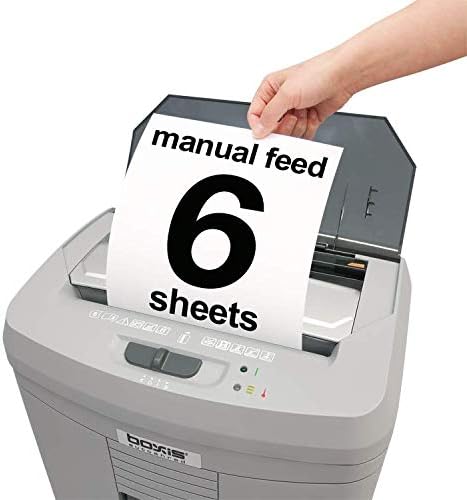
Figure 5.2: Manual feed slot for up to 6 sheets.
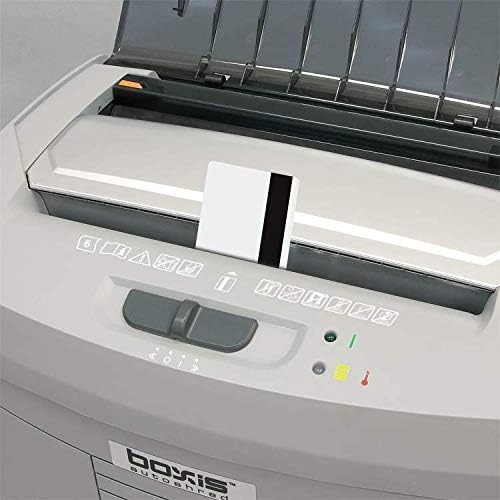
Figure 5.3: Shredding a credit card through the manual feed slot.
5.4 Überlast- und Überhitzungsschutz
Der Aktenvernichter ist mit Sicherheitsfunktionen ausgestattet, um Beschädigungen zu verhindern:
- Überlastschutz: If too many sheets are inserted, the shredder may stop. Use the 'Reverse' function to clear the jam, then reduce the number of sheets.
- Überhitzungsschutz: For continuous shredding tasks, the motor may overheat. An indicator light will illuminate, and the shredder will automatically shut off. Allow the shredder to cool down for approximately 20-30 minutes before resuming operation.
6. Wartung
6.1 Abfallbehälter leeren
The Boxis Autoshred AF60 has a 3.6-gallon pull-out waste bin with a window to monitor the shredded material level. Empty the bin regularly to prevent jams and ensure optimal performance.
- Ziehen Sie den Stecker des Aktenvernichters aus der Steckdose.
- Ziehen Sie den Abfallbehälter an der Vorderseite des Aktenvernichters heraus.
- Das geschredderte Material entsorgen.
- Slide the waste bin back into the shredder until it is securely in place.
6.2 Ölen des Schredders
Regular oiling of the shredder blades is recommended, especially for micro-cut shredders, to maintain performance and extend the life of the unit. Use shredder-specific oil (not aerosol lubricants).
- Tragen Sie einen dünnen Streifen Aktenvernichteröl auf den Papiereinzugsschlitz auf.
- Run the shredder in 'Reverse' for 5-10 seconds to distribute the oil.
- Repeat this process after every 30 minutes of continuous shredding or at least once a month with regular use.
6.3 Reinigung
Clean the exterior of the shredder with a soft, dry cloth. Do not use abrasive cleaners or solvents.
7. Fehlerbehebung
| Problem | Mögliche Ursache | Lösung |
|---|---|---|
| Der Aktenvernichter lässt sich nicht einschalten. | No power; Waste bin not properly inserted; Overheat protection active. | Check power connection; Ensure waste bin is fully seated; Allow shredder to cool down. |
| Papierstau. | Too many sheets inserted; Paper not inserted straight; Staples/paper clips. | Switch to 'Reverse' to clear; Remove excess paper; Remove staples/clips before shredding. |
| Der Aktenvernichter stoppt während des Betriebs. | Überhitzungsschutz aktiviert; Abfallbehälter voll. | Den Aktenvernichter abkühlen lassen; den Abfallbehälter leeren. |
| Der Aktenvernichter läuft ununterbrochen. | Paper sensor obstructed or faulty. | Turn off the shredder, unplug, and check for any paper debris in the feed slot. Clean if necessary. |
8. Spezifikationen
| Besonderheit | Spezifikation |
|---|---|
| Marke | BOXIS |
| Modell | AF60 |
| Schnittart | Mikroschnitt |
| Shred-Größe | 0.16" x 0.39" (4 x 10 mm) |
| Sicherheitsstufe | DIN P-4 |
| Automatische Zufuhrkapazität | 60 Blatt (20 lb Bondpapier) |
| Manuelle Zuführungskapazität | 6 Blatt (20 lb Bondpapier) |
| Shred-Geschwindigkeit | Up to 11 feet per minute |
| Kapazität des Abfallbehälters | 3.6 Gallonen |
| Kontinuierliche Laufzeit | 20 Мinuten |
| Abklingzeit | Ca. 20-30 Minuten |
| Geräuschpegel | 65 dB |
| Abmessungen (L x B x H) | 32.77 x 22.61 x 46.48 cm (12.9 x 8.9 x 18.3 Zoll) |
| Gewicht | 7.26 kg |
| Material | Kunststoff, Metall |
| Besondere Merkmale | Auto feed, Anti-jam, Auto start/stop, Pull-out bin with window, Overload & Overheat indicator, Casters |
9. Garantie und Support
Warranty information for your Boxis Autoshred AF60 shredder is typically included with the product packaging or can be found on the manufacturer's official website. Please refer to these resources for details on warranty coverage and terms.
For technical support, service, or replacement parts, please contact Boxis customer service through the contact information provided in your product documentation or on the official Boxis webWebsite.