
1. Einleitung
This manual provides detailed instructions for the safe and effective use of your FeiyuTech Vimble 2S 3-Axis Smartphone Gimbal Stabilizer. Please read this manual thoroughly before operation and retain it for future reference.
2. Produktüberschreitungview
The FeiyuTech Vimble 2S is a versatile 3-axis smartphone gimbal stabilizer designed to capture smooth, professional-looking video footage and stable photos. It features an extendable pole, object tracking, time-lapse capabilities, and broad compatibility with various smartphone models.

Figure 2.1: FeiyuTech Vimble 2S Gimbal Stabilizer and included accessories.
Hauptmerkmale:
- 3-Achsen-Stabilisierung: Sorgt für einen reibungslosen und gleichmäßigen Speiseplantage by compensating for unwanted movements.
- 18cm Extendable Pole: Allows for wider shots, group photos, and unique angles, functioning like a selfie stick.
- Quick Horizontal/Vertical Switching: Easily switch between landscape and portrait modes for diverse shooting scenarios.
- Objektverfolgung: Utilizes the Feiyu ON app to automatically follow a selected subject.
- Time-Lapse & Panorama: Advanced shooting modes for creative content creation.
- Built-in Camera Compatibility: Supports direct control of your smartphone's native camera app.
- Lange Akkulaufzeit: Up to 10 hours of working time (including dormancy).
3. Einrichtung und erste Verwendung
3.1 Auspacken und Komponenten
Packen Sie alle Artikel vorsichtig aus dem Karton aus. Stellen Sie sicher, dass Sie folgende Komponenten haben:
- FeiyuTech Vimble 2S Gimbal Stabilizer
- Mini-Stativ
- USB-Ladekabel
- Smartphone Charging Cables (Micro USB, Type-C, Lightning)
- Handschlaufe
- Bedienungsanleitung

Figure 3.1: Included accessories: Gimbal, mini tripod, wrist strap, charging cables, and documentation.
3.2 Aufladen des Gimbals
Before first use, fully charge the gimbal. Connect the USB charging cable to the gimbal's charging port and a USB power adapter (not included). The indicator light will show charging status.

Figure 3.2: The gimbal can also charge your smartphone during use, acting as a power bank.
3.3 Montage und Ausbalancieren Ihres Smartphones
Important: Always mount and balance your smartphone BEFORE powering on the gimbal to prevent motor damage and ensure proper operation.
- Unlock Motors: The Vimble 2S has motor locks on the tilt and roll axes for storage. Unlock these before mounting your smartphone.
- Telefon montieren: Place your smartphone securely in the phone holder. Ensure it is centered and snug. The gimbal supports phones with width no more than 84mm, length no more than 6 inches, and weight within 200g. Large smartphones (e.g., iPhone 11 Pro Max 226g, HUAWEI MATE20X 232g) are beyond the max payload and cannot be balanced.
- Balance Phone: Adjust the phone's position in the holder until it is roughly balanced horizontally and vertically. The gimbal should remain stable even when powered off.

Figure 3.3: The gimbal allows for quick switching between horizontal and vertical shooting orientations.
3.4 App-Installation und Bluetooth-Verbindung
For full functionality, download the "Feiyu ON" app from your smartphone's app store (iOS 11.0+ or Android 5.0+). You will need to connect the app or your native camera to control your phone or use certain gimbal functions.
- Lade App herunter: Suchen nach "Feiyu ON" in the App Store or Google Play Store.
- Gimbal einschalten: Press and hold the power button until the gimbal powers on.
- Bluetooth verbinden: Open the Feiyu ON app, navigate to the connection interface, and select your Vimble 2S from the list of available devices.

Figure 3.4: The gimbal supports recording using your smartphone's built-in camera, as well as third-party apps.
4. Bedienung des Gimbals
4.1 Kontrollen überview
Familiarize yourself with the main controls on the gimbal handle:
- Joysticks: Steuert Schwenk- und Neigebewegungen.
- Shutter Button (Works with App):
- Single tap: photography/video recording
- Double-tap: switch between photo/video mode
- Dreifach tippen: Vordere und hintere Kamera wechseln
- Long press: start video recording under photo mode
- Quintuple tap: Initializing the gimbal to get correct attitude parameters when it is not level or in abnormal state.
- Funktionstaste: Customizable via app, typically for power on/off and mode switching.
- Zoom-Schieberegler: Controls digital zoom in/out. Pull up for Zoom In, pull down for Zoom Out.
- Trigger Button (Rear): Long press for quick lock, release to return to previous working mode.

Figure 4.1: The new trigger button offers quick setting functions like Pan Mode, Follow Mode, and Lock Mode.

Figure 4.2: The zoom slider allows for high-precision focus changes and creative shots.
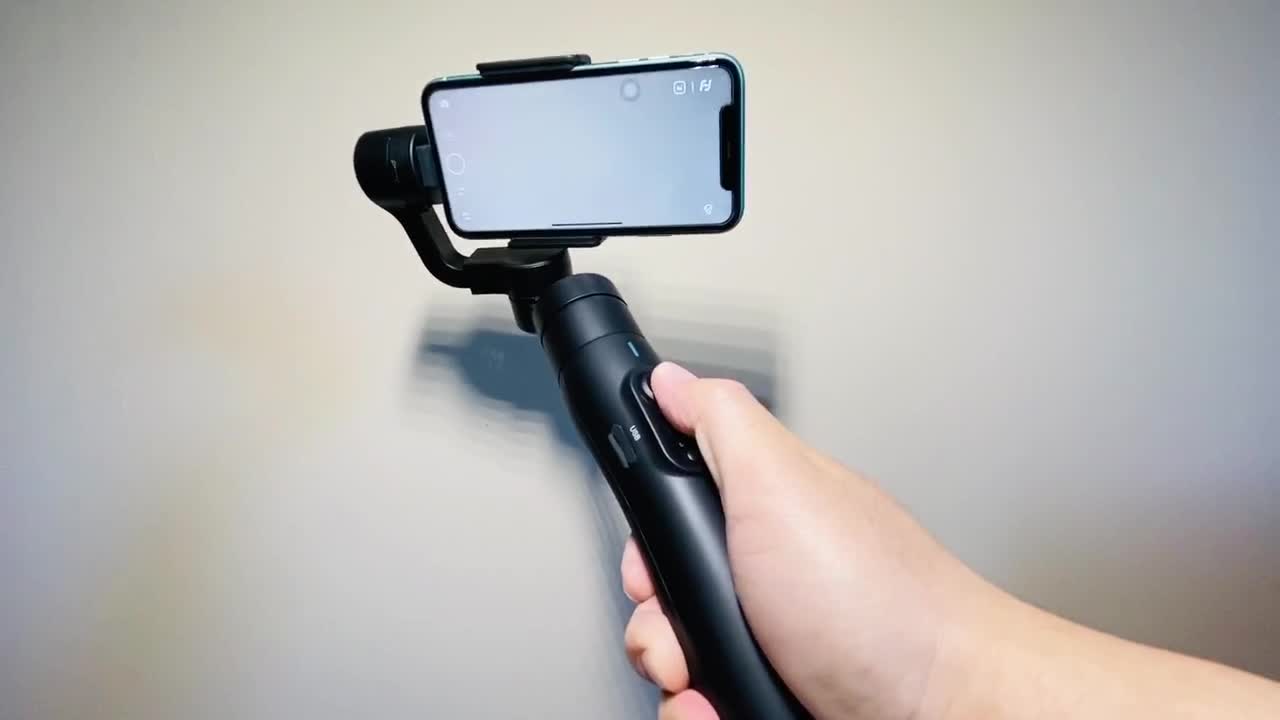
Abbildung 4.3: Überview of gimbal controls including Bluetooth connection, zooming button, and one-key photo.
4.2 Gimbal-Modi
The Vimble 2S offers several operating modes for different shooting scenarios:
- Pan Mode (Default): Die Kamera schwenkt nach links/rechts entsprechend Ihren Handbewegungen, während die Neigungs- und Rollachsen fixiert sind.
- Folgemodus: The camera follows your pan and tilt movements smoothly.
- Sperrmodus: Alle drei Achsen sind gesperrt, sodass die Kamera unabhängig von der Gimbal-Bewegung in eine feste Richtung zeigt.
- All Follow Mode (3-axis): All three axes follow your hand movements.
- POV-Modus: Provides a "Space Vision" experience, allowing for 320-degree rotation on all three axes for dynamic shots.

Figure 4.4: Ultimate POV mode allows for 320-degree rotation on all axes, enabling dynamic and immersive footage.
4.3 Verwendung der ausziehbaren Stange
The Vimble 2S features an integrated 18cm extendable pole for expanded shooting possibilities.
- Verlängern: Gently pull the top section of the gimbal handle upwards to extend the pole.
- Einfahren: Push the extended section back into the handle until it locks securely.

Figure 4.5: The 18cm extendable pole provides greater freedom for filming, especially for selfies and group photos.
5. Wartung und Pflege
- Halten Sie den Gimbal sauber und frei von Staub und Schmutz. Verwenden Sie zum Reinigen ein weiches, trockenes Tuch.
- Vermeiden Sie es, den Gimbal über längere Zeiträume extremen Temperaturen, Feuchtigkeit oder direkter Sonneneinstrahlung auszusetzen.
- Um Beschädigungen zu vermeiden, bewahren Sie den Gimbal bei Nichtgebrauch in seiner Schutzhülle auf.
- Versuchen Sie nicht, den Gimbal selbst zu zerlegen oder zu reparieren. Wenden Sie sich an den Kundendienst.
6. Fehlerbehebung
| Problem | Mögliche Ursache | Lösung |
|---|---|---|
| Gimbal vibrates or shuts down automatically. | Smartphone not properly mounted or balanced; motor locks not disengaged; phone weight exceeds 200g. | Ensure smartphone is securely mounted and balanced before powering on. Disengage all motor locks. Verify phone weight is within 200g. |
| Face tracking not working. | Portrait orientation is enabled on the phone. | Turn off portrait orientation on your smartphone. |
| Cannot connect to Feiyu ON app or control phone. | Bluetooth is off; app not updated; gimbal not powered on; app not connected to gimbal. | Ensure Bluetooth is enabled on your phone. Update the Feiyu ON app. Power on the gimbal. Connect the app to the gimbal. |
| Roll axis captured in wide-angle footage. | Using wide-angle lenses on large smartphones (e.g., iPhone 11 Pro Max, iPhone 11, HUAWEI P30). | Use a normal lens when filming with wide-angle lenses on larger smartphones to avoid the roll axis appearing in footage. |
| Gimbal not level or in abnormal state. | Kalibrierung erforderlich. | Quintuple tap the shutter button to initialize the gimbal and get correct attitude parameters. |
7. Spezifikationen
| Besonderheit | Detail |
|---|---|
| Technische Daten | 13.78 x 6.69 x 2.44 Zoll |
| Artikelgewicht | 15.1 Unzen (0.43 Kilogramm) |
| Modellnummer | vimble 2S |
| Kompatible Geräte | Cellphone, Camera |
| Maximale Nutzlast | 200 g (0.2 Kilogramm) |
| Compatible Phone Dimensions | Width no more than 84mm, Length no more than 6 inches |
| Akkulaufzeit | Up to 10 hours (including dormancy), 5 hours in running status. |
| Ladezeit | 2 hours (with 5V/2A adapter) |
| Extendable Pole Length | 18 cm |
| Drehwinkel | Approx. 320 degrees for each axis |
| UPC | 727542064528 |
8. Garantie und Support
FeiyuTech products typically come with a limited warranty. For detailed warranty information, product registration, or technical support, please visit the official FeiyuTech webWebsite oder wenden Sie sich direkt an den Kundendienst.
Offizieller FeiyuTech-Shop: FeiyuTech Amazon Store