
PROTEAR E8830
PROTEAR AM FM Radio Headphones
Model: E8830 | Brand: PROTEAR
1. Einleitung
The PROTEAR AM FM Radio Headphones are designed to provide effective hearing protection while allowing users to listen to their favorite radio stations or external audio sources. Featuring a Noise Reduction Rating (NRR) of 25dB, these earmuffs help safeguard your hearing in noisy environments. The integrated digital AM/FM radio includes an LCD display, preset memory, and a powerful antenna for clear reception. Its comfortable, adjustable design ensures suitability for extended wear across various activities.

Image: PROTEAR AM FM Radio Headphones, black, with antenna extended and digital display showing time.
2. Sicherheitshinweise
Always prioritize your safety when using hearing protection devices. Adhere to the following guidelines:
- Rauschunterdrückungsbewertung (NRR): These earmuffs provide an NRR of 25dB, certified by ANSI S3.19. This rating indicates the average amount of noise reduction provided when worn correctly.
- Richtige Passform: Ensure the earmuffs fit snugly over your ears to achieve the stated noise reduction. Any gaps can significantly reduce effectiveness.
- Batteriesicherheit: Use only the specified battery type (2 AA batteries, not included). Do not mix old and new batteries, or different types of batteries. Dispose of used batteries responsibly.
- Umweltnutzung: While designed for noisy environments, these earmuffs should not be used in situations where the inability to hear critical sounds (e.g., alarms, warning shouts) could pose a danger.

Image: Chart illustrating typical noise levels for different activities and how the 25dB NRR of the headphones helps reduce harmful noise.
3. Packungsinhalt
Überprüfen Sie, ob alle Artikel in Ihrem Paket vorhanden sind:
- PROTEAR AM FM Radio Headphones (1 unit)
- 3.5mm AUX Audio Cable (1 unit)
Video: Ein überview of the PROTEAR AM/FM/MP3 Ear Muffs Hearing Protection Headphones, demonstrating the product and its included accessories.
4. Einrichtung
4.1 Einlegen der Batterie
The headphones require two (2) AA batteries for operation (not included).
- Locate the battery compartment on the side of the right earcup.
- Öffnen Sie vorsichtig den Deckel des Batteriefachs.
- Legen Sie zwei AA-Batterien ein und achten Sie dabei auf die richtige Polarität (+/-), wie im Batteriefach angegeben.
- Schließen Sie den Batteriefachdeckel fest.

Bild: Detailliert view of the right earcup, highlighting the battery compartment and the 3.5mm auxiliary input port.
4.2 Passgenauigkeit anpassen
For optimal comfort and noise reduction, adjust the headphones to fit your head properly.
- Kopfbandeinstellung: Hold the earcups and slide the headband up or down to extend or retract the arms until the earcups comfortably cover your ears.
- Drehung der Ohrmuschel: The earcups can rotate to conform to the shape of your head, ensuring a snug seal around your ears.

Image: Diagram showing the adjustable headband mechanism and the rotatable earcups, with dimensions for proper fit.
5. Bedienungsanleitung
5.1 Ein-/Ausschalten
To power the headphones on or off, use the dedicated switch located on the right earcup.
- Einschalten: Slide the ON/OFF switch to the 'ON' position. The LCD display will illuminate.
- Ausschalten: Slide the ON/OFF switch to the 'OFF' position. The LCD display will turn off.
5.2 Radio Tuning and Presets
The headphones feature digital AM/FM radio tuning with preset memory.
- Bandwechsel: Press the 'AM/FM' button to toggle between AM and FM radio bands.
- Manuelle Abstimmung: Use the 'TUNE' knob to manually adjust the frequency.
- Automatischer Scan: Press and hold the 'TUNE' button to automatically scan for the next available station.
- Voreinstellungen festlegen: To save a station, tune to the desired frequency, then press and hold the 'SET' button until the preset number flashes. Use the 'TUNE' knob to select a preset number (1-8 for both AM and FM), then press 'SET' again to confirm.
- Voreinstellungen abrufen: Briefly press the 'SET' button to cycle through your saved preset stations.

Image: Close-up of the earcup controls, showing the LCD digital display, AM/FM button, SET button, TUNE knob, and the large volume knob for easy operation.
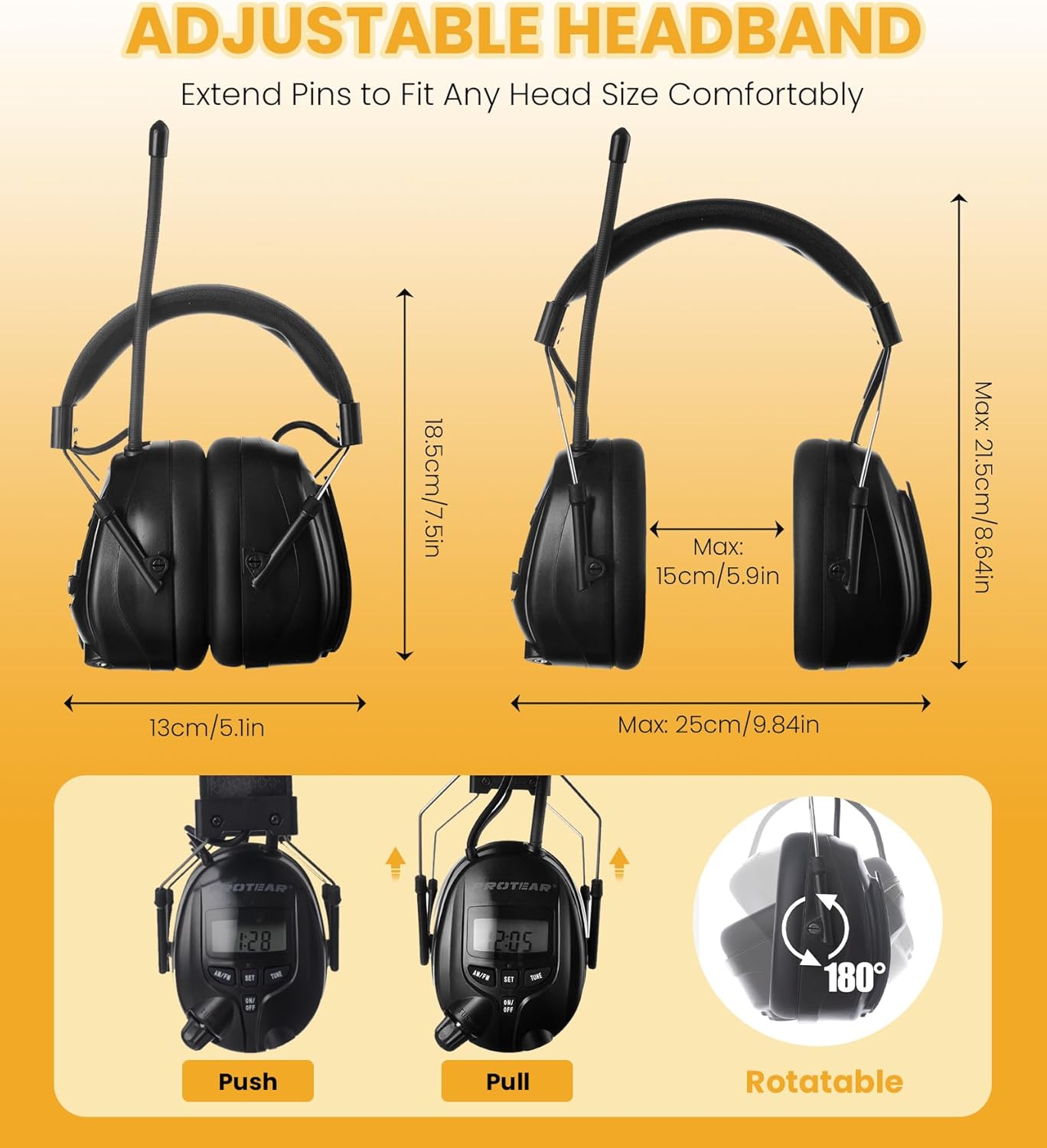
Image: Infographic highlighting key features such as AM (520-1710KHz) and FM (87.5-108MHz) frequency ranges, stereo sound, and a built-in microphone for hands-free calling.
5.3 Lautstärkeregelung
Adjust the audio volume using the large volume knob located on the right earcup.
- Drehen Sie den Lautstärkeregler im Uhrzeigersinn, um die Lautstärke zu erhöhen.
- Rotate the volume knob counter-clockwise to decrease volume.
5.4 Hilfseingang
Connect external audio devices (e.g., MP3 players, smartphones) using the included 3.5mm AUX cable.
- Plug one end of the 3.5mm AUX cable into the auxiliary input port on the right earcup.
- Plug the other end of the AUX cable into the headphone jack of your external audio device.
- Adjust the volume using the volume knob on the headphones and/or the volume controls on your external device.
6. Wartung
Proper care will extend the life and performance of your PROTEAR headphones.
- Reinigung: Wischen Sie die Außenflächen mit einem weichen, damp Tuch. Verwenden Sie keine scharfen Chemikalien oder Scheuermittel.
- Lagerung: Store the headphones in a cool, dry place when not in use. Avoid exposing them to extreme temperatures or direct sunlight.
- Feuchtigkeit: Avoid water and moisture. These headphones are not waterproof.
- Austausch des Ohrpolsters: The snap-in design of the ear cushions allows for easy maintenance and replacement if needed.
7. Fehlerbehebung
Sollten Sie Probleme mit Ihren Kopfhörern haben, beachten Sie bitte die folgenden häufigen Probleme und Lösungen:
| Problem | Mögliche Ursache | Lösung |
|---|---|---|
| Kein Strom/Display aus | Die Batterien sind leer oder falsch eingelegt. | Ersetzen Sie die Batterien durch neue AA-Batterien und achten Sie dabei auf die richtige Polarität. |
| Schlechter Radioempfang | Schwaches Signal oder ungünstige Antennenposition. | Extend the antenna fully and adjust its position. Try moving to an area with better signal. |
| No audio from AUX input | Cable not fully inserted or external device volume too low. | Ensure the AUX cable is securely connected to both devices. Increase volume on both the headphones and the external device. |
| Klangverzerrung | Volume too high or weak radio signal. | Decrease volume. For radio, try tuning to a stronger station or adjusting antenna. |
8. Spezifikationen
| Besonderheit | Detail |
|---|---|
| Modell | E8830 |
| Geräuschreduzierungsbewertung (NRR) | 25 dB (ANSI S3.19-zertifiziert) |
| Radiobänder | AM/FM Digitaltuning |
| Stromquelle | 2 x AA-Batterien (nicht im Lieferumfang enthalten) |
| Zusatzeingang | 3.5-mm-Buchse |
| Hersteller | SCHUTZ |
| Abmessungen (Paket) | 7.52 x 5.79 x 4.21 Zoll |
| Gewicht | 14.11 Unzen |
| Stoffart | ABS |
9. Garantie und Support
PROTEAR stands behind the quality of its products.
- Garantie: This product comes with a one-year warranty against manufacturing defects. Please retain your proof of purchase.
- Kundendienst: For any questions, concerns, or support needs, please contact PROTEAR customer service. They aim to answer your questions within 24 hours.

Image: Certifications (CE, RoHS, ANSI) and details on the one-year warranty and responsive after-sales service provided by PROTEAR.