
DIXELL XR70CX-4N0F3
DIXELL XR70CX-4N0F3 Digitalregler – Benutzerhandbuch
Medium & Low Temperature Commercial Thermostat
1. Einleitung
This manual provides comprehensive instructions for the installation, operation, and maintenance of the DIXELL XR70CX-4N0F3 Digital Controller. This device is designed for precise temperature control in medium and low temperature commercial refrigeration applications. Please read this manual thoroughly before installation and operation to ensure proper use and to prevent damage.
2. Sicherheitshinweise
Beachten Sie stets die folgenden Sicherheitsvorkehrungen, um Verletzungen oder Schäden am Gerät zu vermeiden:
- Stellen Sie sicher, dass das Netzteil den Anforderungen des Geräts entspricht (110 Volt).
- Installation und Wartung dürfen nur von qualifiziertem Personal durchgeführt werden.
- Vor jeglichen Verkabelungs- oder Wartungsarbeiten die Stromzufuhr unterbrechen.
- Do not expose the device to water or excessive humidity, as it has an IP65 front protection rating but is not fully waterproof.
- Vor dem Einschalten der Stromversorgung prüfen Sie, ob alle Verbindungen sicher und korrekt sind.
- Versuchen Sie nicht, das Gerät selbst zu reparieren. Wenden Sie sich an qualifiziertes Servicepersonal.
3. Produktüberschreitungview
The DIXELL XR70CX-4N0F3 is a digital controller featuring a red LED display and intuitive button controls. It is designed for wall mounting and offers programmable features for various temperature control needs.
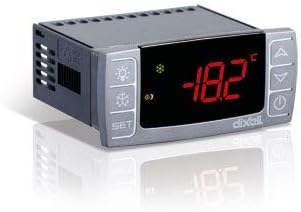
Abbildung 3.1: Vorderseite view of the DIXELL XR70CX-4N0F3 Digital Controller. The display shows a temperature reading, and control buttons are visible on both sides.
Hauptmerkmale:
- Anzeige: 3-digit red LED display (13mm high) with icons.
- Steuerungstyp: Push Button, Touch Control.
- Stromversorgung: 110 Volts AC.
- Probe Inputs: NTC / PTC for Thermostat, Defrost, and Condenser (on HOT KEY).
- Digitale Eingänge: Configurable for Alarm, AUX, start defrost, door switch, pressure switch, probe.
- Relaisausgänge: Compressor (8A, 16A optional), Defrost (8A, 16A*), Fans (5A, 16A*), Light or alarm (8A, 16A*).
- Andere Ausgaben: Hot Key output, optional X-REP remote display output, TTL serial output.
- Schutz: IP65 front protection.
- Datenspeicherung: EEPROM memory.
4. Installation und Einrichtung
The XR70CX-4N0F3 is designed for wall mounting. Ensure proper ventilation and avoid locations with excessive vibration or direct heat sources.
4.1 Kabelverbindungen:
All connections are made via screw-terminal blocks, suitable for wires up to 2.5mm². Refer to the wiring diagram provided with your unit for specific terminal assignments. Ensure all connections are secure.
- Stromversorgung: Schließen Sie das 110V-Wechselstromnetzteil an die dafür vorgesehenen Klemmen an.
- Probe Inputs: Connect the NTC/PTC temperature probes for thermostat, defrost, and condenser as required by your application.
- Digitale Eingänge: Connect external devices such as door switches, pressure switches, or alarm contacts to the configurable digital inputs.
- Relaisausgänge: Connect the compressor, defrost heaters, fans, and alarm/light circuits to their respective relay outputs. Observe current ratings.
- Serielle Ausgabe: The TTL serial output can be used for communication with other devices.
4.2 Erstes Einschalten:
After completing all wiring, apply power to the unit. The display will illuminate, and the controller will perform a self-test. The current temperature reading from the thermostat probe will be displayed.
5. Bedienungsanleitung
The XR70CX-4N0F3 features a user-friendly interface with push buttons for navigation and parameter adjustment.
5.1 Display and Basic Operation:
- The main display shows the current temperature measured by the thermostat probe.
- Verwenden Sie die SATZ Taste, um view or modify the setpoint temperature.
- Verwenden Sie die UP Und RUNTER arrow buttons to navigate menus and adjust values.
- Der EIN/AUS button controls the power to the unit.
- Specific icons on the display indicate operational status, such as compressor activity, defrost cycle, or alarms.
5.2 Parameter Programming:
The controller is programmable, allowing customization of various operational parameters. Accessing and modifying parameters typically involves a sequence of button presses (e.g., holding SET for a few seconds) to enter programming mode. Refer to the detailed programming manual (often supplied separately or available from DIXELL) for a complete list of parameters and their functions, including:
- Setpoint adjustment range.
- Differential (hysteresis).
- Defrost parameters (type, interval, duration).
- Alarm thresholds and delays.
- Probe calibration.
6. Wartung
Regular maintenance ensures the longevity and optimal performance of your DIXELL XR70CX-4N0F3 controller.
- Reinigung: Reinigen Sie die Frontplatte regelmäßig mit einem weichen, fusselfreien Tuch.amp Tuch. Keine Scheuer- oder Lösungsmittel verwenden.
- Verbindungen: Überprüfen Sie jährlich alle elektrischen Verbindungen auf festen Sitz und Anzeichen von Korrosion.
- Sonden: Ensure temperature probes are clean and securely mounted in their intended locations.
- Belüftung: Ensure the area around the controller is free from obstructions to allow for proper heat dissipation.
For any internal maintenance or repair, contact a qualified technician.
7. Fehlerbehebung
Dieser Abschnitt enthält grundlegende Schritte zur Fehlerbehebung bei häufig auftretenden Problemen. Bei komplexeren Problemen wenden Sie sich bitte an den technischen Support.
| Problem | Mögliche Ursache | Lösung |
|---|---|---|
| Anzeige ist aus | No power, loose connection, internal fuse. | Check power supply. Verify wiring. Consult technician for fuse replacement. |
| Falsche Temperaturanzeige | Faulty probe, incorrect probe type setting, probe not properly installed. | Check probe connection and placement. Verify probe type in parameters. Replace faulty probe. |
| Compressor not activating | Setpoint issue, high temperature alarm, faulty relay, wiring issue. | Check setpoint and differential. Verify alarm status. Inspect wiring. |
| Controller displays an error code | Specific system fault (e.g., probe error, memory error). | Refer to the detailed programming manual for error code definitions and solutions. |
8. Spezifikationen
| Besonderheit | Detail |
|---|---|
| Marke | DIXELL |
| Modellnummer | XR70CX-4N0F3 |
| Controllertyp | Druckknopf |
| Besonderheit | Programmierbar |
| Farbe | Schwarz |
| Spezifische Verwendungen | Commercial refrigeration (110 Volt applications) |
| Temperaturregelungstyp | Digitales |
| Konnektivitätstechnologie | Verdrahtet |
| Im Lieferumfang enthaltene Komponenten | Cable/wire for connectivity |
| Stromquelle | Kabelgebundene Elektrik |
| Bandtage | 110 Volt |
| Anzeigetyp | LED (Red, 13mm high) |
| Kontrollmethode | Touch-, Tastensteuerung |
| Konnektivitätsprotokoll | TTL |
| Montagetyp | Wandhalterung |
| Hintergrundbeleuchtung | Ja |
| Hersteller | DIXELL Italy |
| Gehäuse | Self extinguishing ABS |
| Frontschutz | IP65 |
| Betriebstemperatur | 0 °C bis 60 °C (32 °F bis 140 °F) |
| Lagertemperatur | -25 °C bis 60 °C (-13 °F bis 140 °F) |
| Relative Luftfeuchtigkeit | 20 % bis 85 % (nicht kondensierend) |
| Auflösung | 0.1 °C oder 1 °F |
| Verbindung | Screw-terminal block <2.5mm² |
9. Garantie und Support
Specific warranty details for the DIXELL XR70CX-4N0F3 are typically provided at the point of purchase or within the product packaging. Please retain your proof of purchase for warranty claims.
For technical support, service, or to inquire about replacement parts, please contact your DIXELL distributor or the manufacturer directly. Provide your product model number (XR70CX-4N0F3) and serial number (if applicable) when seeking assistance.
You may also find additional resources and updated documentation on the official DIXELL webWebsite.
Ask a question about this manual
Ask about setup, troubleshooting, compatibility, parts, safety, or missing instructions. Manuals+ will review the question and use this page’s manual context to help answer it.