
1. Produktüberschreitungview
The Xiaomi Mi Bluetooth Speaker Mini (Model: XMYX02YM) is a compact and portable wireless speaker designed for high-quality audio playback. It features Bluetooth connectivity for seamless pairing with various devices and a durable, waterproof design for versatile use.
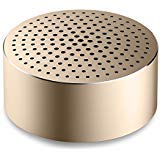
Image: The Xiaomi Mi Bluetooth Speaker Mini, a small, cylindrical black speaker with a mesh grille, showcasing dank seines kompakten Designs.
2. Einrichtung
2.1 Auspacken
Carefully remove all components from the packaging. The box should contain the Mi Bluetooth Speaker Mini.
2.2 Aufladen des Lautsprechers
The speaker is powered by an internal battery. Before first use, ensure the speaker is fully charged. Connect the appropriate charging cable (not included) to the speaker's charging port and to a compatible USB power source. The charging indicator light will provide status updates.
2.3 Bluetooth-Kopplung
- Einschalten: Press and hold the power button on the speaker until you hear an audible prompt or see the indicator light flash, indicating it is in pairing mode.
- Bluetooth aktivieren: On your device (smartphone, tablet, laptop, MP3 player), enable Bluetooth.
- Sprecher auswählen: In your device's Bluetooth settings, search for available devices. Select "Mi Bluetooth Speaker Mini" from the list.
- Verbindung bestätigen: Once paired, the speaker will provide an audible confirmation, and the indicator light will change to a steady state.
The speaker is now ready for audio playback.
3. Bedienungsanleitung
3.1 Ein-/Ausschalten
- So schalten Sie das Gerät ein: Den Ein-/Ausschalter etwa 2-3 Sekunden lang gedrückt halten.
- So schalten Sie das Gerät aus: Press and hold the power button for approximately 3-4 seconds until the speaker powers down.
3.2 Audiowiedergabe
After successful Bluetooth pairing, play audio from your connected device. The sound will be transmitted wirelessly to the Mi Bluetooth Speaker Mini. The speaker supports stereo audio output.
3.3 Berührungssteuerung
The speaker features touch controls for basic functions. Refer to the specific touch areas on your speaker for volume adjustment, play/pause, and track navigation. (Specific touch control details may vary; consult product packaging or quick start guide for exact touch gestures).
3.4 Hilfseingang
While primarily a Bluetooth speaker, the device may support an auxiliary audio input. If available, connect an audio cable (not included) from your device's audio output to the speaker's auxiliary input port for wired audio playback.
4. Wartung
4.1 Reinigung
To clean the speaker, use a soft, dry, lint-free cloth. Do not use abrasive cleaners, solvents, or strong chemicals, as these can damage the speaker's surface or internal components.
4.2 Wasserbeständigkeit
The Xiaomi Mi Bluetooth Speaker Mini is waterproof. While it can withstand splashes and light exposure to water, it is not designed for prolonged submersion. Ensure all ports are securely closed before exposure to water. After exposure, dry the speaker thoroughly before charging or using it again.
4.3 Speicherung
When not in use for extended periods, store the speaker in a cool, dry place away from direct sunlight and extreme temperatures. It is recommended to charge the speaker periodically to maintain battery health.
5. Fehlerbehebung
- Der Lautsprecher lässt sich nicht einschalten: Stellen Sie sicher, dass der Akku geladen ist. Schließen Sie den Lautsprecher an eine Stromquelle an und versuchen Sie es erneut.
- Kopplung mit dem Gerät nicht möglich:
- Stellen Sie sicher, dass sich der Lautsprecher im Kopplungsmodus befindet (Kontrollleuchte blinkt).
- Schalten Sie Bluetooth auf Ihrem Gerät aus und wieder ein.
- Bringen Sie den Lautsprecher näher an Ihr Gerät heran.
- Löschen Sie die vorherigen Bluetooth-Verbindungen auf Ihrem Gerät und versuchen Sie es erneut mit einer Kopplung.
- Kein Ton während der Wiedergabe:
- Überprüfen Sie die Lautstärke sowohl am Lautsprecher als auch an Ihrem angeschlossenen Gerät.
- Stellen Sie sicher, dass der Lautsprecher erfolgreich mit Ihrem Gerät gekoppelt und verbunden ist.
- Versuchen Sie, die Audiowiedergabe über eine andere Anwendung oder ein anderes Gerät zu starten.
- Schlechte Audioqualität:
- Stellen Sie sicher, dass sich keine Hindernisse zwischen dem Lautsprecher und Ihrem Gerät befinden.
- Halten Sie sich von Störquellen fern (z. B. WLAN-Routern, anderen Bluetooth-Geräten).
- Überprüfen Sie die Qualität der Audioquelle.
6. Spezifikationen
| Besonderheit | Detail |
|---|---|
| Modell | XMYX02YM |
| Marke | XIAOMI |
| Lautsprechertyp | Bücherregal (tragbar) |
| Konnektivitätstechnologie | Bluetooth, kabellos |
| Drahtlose Kommunikationstechnologie | Bluetooth |
| Kompatible Geräte | Laptop, MP3-Player, Smartphone, Tablet |
| Stromquelle | Batteriebetrieben |
| Kontrollmethode | Berühren |
| Audioausgabemodus | Stereo |
| Audiotreibertyp | Dynamischer Treiber |
| Surround Sound-Kanalkonfiguration | 2.1 |
| Artikelgewicht | 59 g |
| Produktabmessungen (L x B x H) | 0.43 x 0.43 x 0.2 cm (4 x 4 x 2 Millimeter) |
| Farbe | Schwarz |
| Wasserdicht | Ja |
| Batterien erforderlich | Yes (Internal, rechargeable) |
| Im Lieferumfang enthaltene Komponenten | Mi Bluetooth Speaker Mini |
| Hersteller | Xiaomi Technology Inc. |
7. Garantie und Support
Informationen zur Garantie finden Sie in der Ihrer Bestellung beiliegenden Dokumentation oder auf der offiziellen Xiaomi-Website. webFür technischen Support oder Serviceanfragen wenden Sie sich bitte über die offiziellen Kanäle an den Xiaomi-Kundendienst.