
Einführung
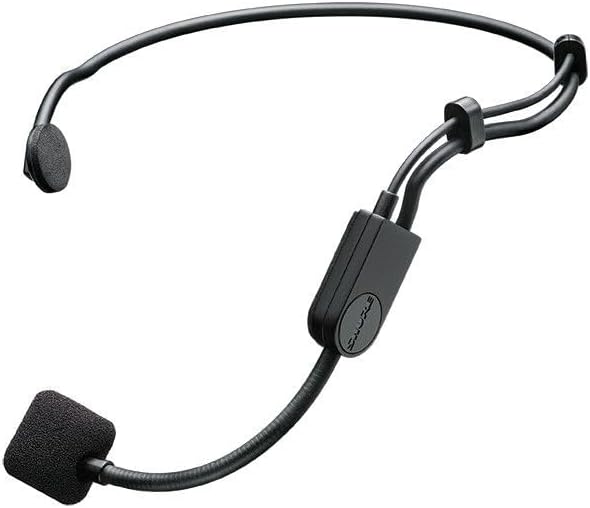
The Shure BLX14/P31 is a wireless headset audio system designed for reliable performance in various applications, including presentations, instruction, and live performances. This system operates on the H10 UHF frequency band (542–572 MHz) and provides hands-free audio capture with a comfortable headset microphone.
The system includes a BLX4 single-channel receiver, a BLX1 bodypack transmitter, and a PGA31 cardioid headset microphone. It offers a wireless range of up to 300 ft (100 m) line-of-sight and the bodypack transmitter provides up to 14 hours of operation on two AA batteries.

Für einen allgemeinen Overview of the Shure BLX Wireless Systems, please watch the video below:
Video: Shure BLX Wireless Systems - Overview. This video provides a general introduction to the BLX wireless microphone systems.
Aufstellen
Auspacken und Komponenten
Before setting up your system, ensure all components are present:
- BLX4 Single-Channel Receiver
- BLX1 Taschensender
- PGA31 Cardioid Headset Microphone with windscreen and clothing clip
- Stromversorgung
- 2 AA-Batterien
- Benutzerhandbuch

BLX4 Receiver Setup
1. Strom anschließen: Securely connect the included power supply to the BLX4 receiver's power input and plug it into an AC outlet.

2. Audioausgang anschließen: Connect the receiver's XLR or 1/4-inch output to your mixer or ampEingang des Reglers.
For detailed instructions on setting up the receiver, please refer to the video below:
Video: Shure BLX Wireless Systems - How to Setup a Receiver. This video guides you through the process of connecting and powering on your BLX receiver.
BLX1 Bodypack Transmitter and PGA31 Headset Setup
1. Batterien installieren: Open the battery compartment on the BLX1 bodypack and insert the two supplied AA batteries, observing correct polarity.

2. Headset-Mikrofon anschließen: Plug the 4-pin mini-XLR connector of the PGA31 headset microphone into the input jack on the top of the BLX1 bodypack transmitter.

For detailed instructions on setting up the transmitter, please refer to the video below:
Video: Shure BLX Wireless Systems - How to Setup a Transmitter. This video demonstrates how to install batteries and connect a microphone to your BLX transmitter.
Bedienungsanleitung
Powering On and Channel Selection
1. Empfänger einschalten: Press the power button on the BLX4 receiver. The display will illuminate.

2. Sender einschalten: Slide the power switch on the BLX1 bodypack transmitter to the ON position. The LED indicator will light up.

3. Scan for Best Channel: On the BLX4 receiver, press the Group button to initiate a group scan. The receiver will automatically select the clearest available group and channel. Once a group is selected, press the Channel button to scan for the best channel within that group.
4. Sync Transmitter: With the BLX1 bodypack transmitter powered on and its battery compartment open, press and hold the Group button on the transmitter until the IR LED flashes. Align the IR windows of the receiver and transmitter (located on the front of the receiver and inside the bodypack's battery compartment) until the transmitter's LED changes from flashing to solid green, indicating a successful sync.
For guidance on choosing the best channel, watch this video:
Video: Shure BLX Wireless Systems - How to Choose the Best Channel. This video explains how to scan for and select the optimal frequency channel for your system.
To add additional receivers to your system, refer to this video:
Video: Shure BLX Wireless Systems - How to Add a Receiver. This video demonstrates the steps to integrate additional BLX receivers into your existing setup.
Durchführung eines Soundchecks
1. Sprechen Sie ins Mikrofon: With both the receiver and transmitter powered on and synced, speak or sing into the PGA31 headset microphone at your typical performance volume.
2. Monitor Audio LED: Observe the Audio LED on the BLX4 receiver. It should illuminate green for normal audio levels. If the LED is consistently red, the input signal is too strong, and you may need to adjust the transmitter gain.
3. Adjust Transmitter Gain (if necessary): If the Audio LED is consistently red, locate the gain adjustment switch inside the BLX1 bodypack transmitter's battery compartment. Use a small screwdriver or pick to adjust the gain to a lower setting until the Audio LED on the receiver primarily shows green with occasional red peaks.
For a visual guide on performing a soundcheck, see the video below:
Video: Shure BLX Wireless Systems - How to Perform a Soundcheck. This video demonstrates how to check audio levels and adjust transmitter gain for optimal sound.
Frequency Band Information
This system operates on the H10 band (542-572 MHz). Ensure this frequency band is authorized for use in your region. Refer to the Shure website for a frequency finder and local compliance information.

Wartung
To ensure the longevity and optimal performance of your Shure BLX14/P31 system, follow these maintenance guidelines:
- Reinigung: Use a soft, dry cloth to clean the exterior surfaces of the receiver and transmitter. Do not use abrasive cleaners or solvents. For the PGA31 headset microphone, gently wipe the boom and earpieces. Replace the foam windscreen if it becomes worn or dirty.
- Batteriepflege: Always remove AA batteries from the BLX1 bodypack transmitter if the system will not be used for an extended period to prevent leakage and damage.
- Lagerung: Store the system components in a cool, dry place, away from direct sunlight and extreme temperatures.
- Kabelinspektion: Überprüfen Sie regelmäßig alle Kabel auf Abnutzungserscheinungen, Ausfransungen oder Beschädigungen. Ersetzen Sie beschädigte Kabel umgehend.
Fehlerbehebung
If you encounter issues with your Shure BLX14/P31 system, try the following troubleshooting steps:
- Kein Ton:
- Stellen Sie sicher, dass sowohl der Empfänger als auch der Sender eingeschaltet sind.
- Verify that the receiver's 'Ready' LED is illuminated green, indicating a strong RF signal.
- Check that the transmitter and receiver are synced to the same group and channel. Re-sync if necessary.
- Confirm that the audio output cable from the receiver is securely connected to your mixer/amplifier and that the input channel is active and unmuted.
- Check the batteries in the BLX1 bodypack transmitter. Replace if low or depleted.
- Störungen/Ausfälle:
- Perform a fresh channel scan on the receiver to find a clearer frequency.
- Ensure the receiver antennas are unobstructed and positioned for optimal line-of-sight with the transmitter.
- Move the receiver away from other wireless devices, Wi-Fi routers, or large metal objects that could cause interference.
- Ensure you are within the specified operating range (up to 300 ft line-of-sight).
- Verzerrter Ton:
- Check the Audio LED on the receiver. If it's consistently red, the transmitter gain is too high. Adjust the gain switch inside the BLX1 bodypack's battery compartment to a lower setting.
- Verify that the input gain on your mixer/amplifier is not set too high.
- Kurze Akkulaufzeit:
- Ensure you are using fresh, high-quality AA alkaline batteries.
- Battery life can vary based on usage and battery type.
Technische Daten
| Besonderheit | Spezifikation |
|---|---|
| Modellnummer | BLX14/P31-H10 |
| Frequenzband | H10 (542–572 MHz) |
| Drahtlose Reichweite | Bis zu 100 m (300 Fuß) Sichtlinie |
| Battery Life (BLX1) | Bis zu 14 Stunden (mit 2 AA-Batterien) |
| Compatible Systems per Band | Bis zu 12 |
| Mikrofontyp | PGA31 Cardioid Headset Condenser |
| Empfängerausgangsanschlüsse | XLR, 1/4-inch (6.3 mm) |
| Transmitter Input Connector | 4-poliger Mini-XLR |
| Stromquelle | Batteriebetrieben (2 AA-Batterien im Lieferumfang enthalten) |
| Signal-Rausch-Verhältnis | 76 dB |
| Artikelgewicht | 2.8 Pfund |
| Artikelabmessungen | 13.5 x 12 x 4 Zoll |
Garantieinformationen
The Shure BLX14/P31 Headset Audio System is covered by a 2 Jahr eingeschränkte Garantie from the date of purchase. This warranty covers defects in materials and workmanship under normal use. For full details regarding warranty terms, conditions, and how to make a claim, please refer to the official warranty document provided with your product or visit the Shure webWebsite.
Unterstützung
For further assistance, technical support, or additional product information, please utilize the following resources:
- Offizielles Benutzerhandbuch (PDF): Eine ausführliche PDF-Version des Benutzerhandbuchs steht zum Download bereit. Benutzerhandbuch herunterladen
- Shure WebWebsite: Visit the official Shure website for product registration, FAQs, software downloads, and contact information for customer support. www.shure.com
- Online-Hilfe: Many common questions and troubleshooting tips can be found on the Shure support pages.