
Einführung
This manual provides comprehensive instructions for the setup, operation, and maintenance of your VTech CS6829-2 2-Handset Cordless Phone with Answering System. This system is designed for home use, offering features such as caller ID, a digital answering machine, backlit keypad, and a full duplex speakerphone for enhanced communication.
Lieferumfang
Prüfen Sie, ob alle Artikel in Ihrem Paket enthalten sind:
- Basiseinheit
- 2 schnurlose Mobilteile
- Ladegerät
- 2 Adapter
- 2-Akkus
- Telefonkabel
- Wandhalterung
- Kurzanleitung
Aufstellen
Follow these steps to set up your VTech CS6829-2 phone system:
- Schließen Sie die Basiseinheit an:
Plug one end of the telephone line cord into the TEL LINE jack on the back of the base unit. Plug the other end into a telephone wall jack. Plug the small end of the power adapter into the POWER jack on the back of the base unit. Plug the large end of the power adapter into a wall outlet not controlled by a wall switch.
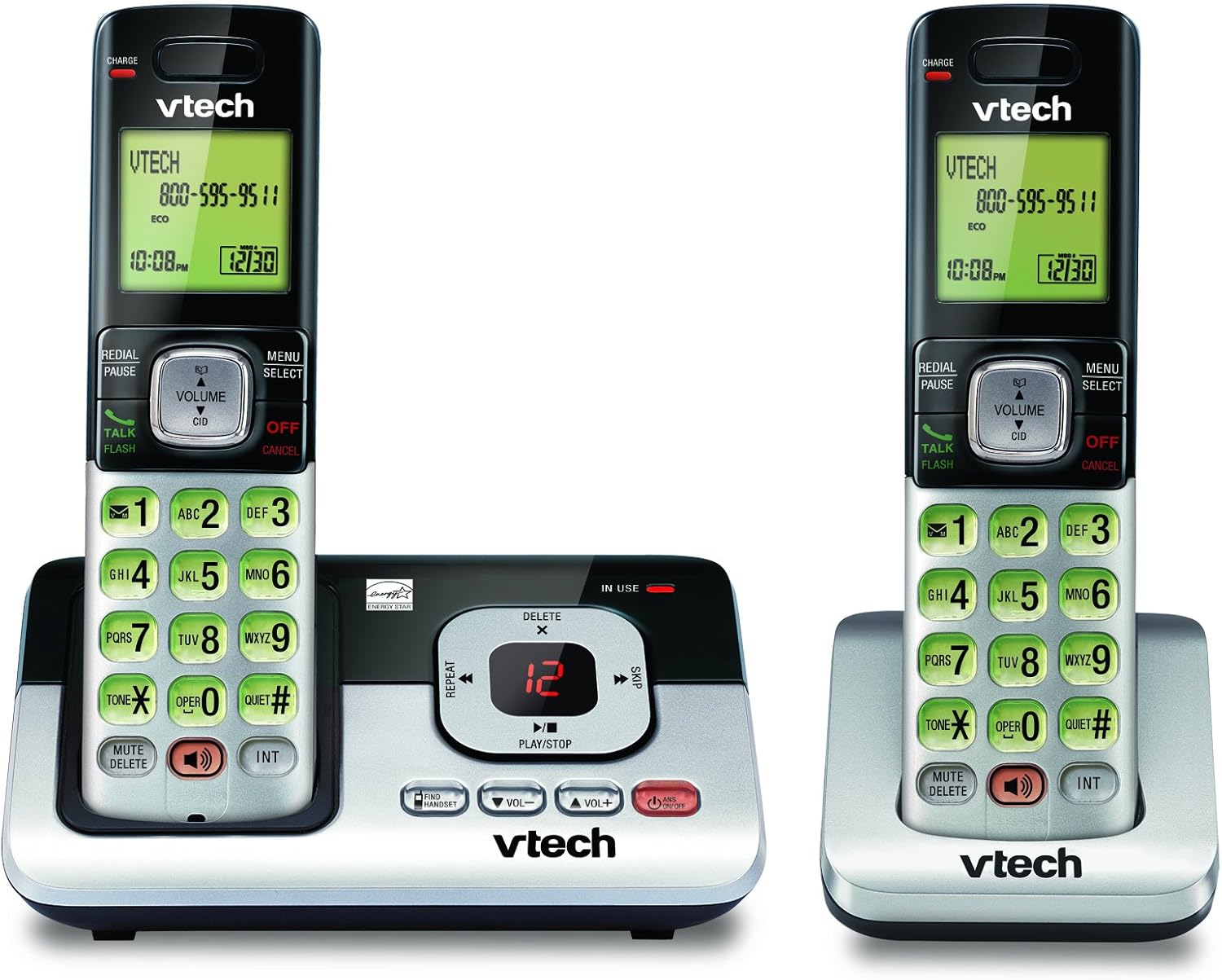
Image: The VTech CS6829-2 base unit with one handset docked, and a second handset with its charging cradle. This illustrates the main components of the phone system.
- Einlegen der Mobilteilbatterien:
Open the battery compartment cover on the back of each handset. Connect the battery pack connector securely into the jack inside the compartment. Place the battery pack with the label facing up and tuck the wires inside the compartment. Close the battery compartment cover.
- Ladehandgeräte:
Place each handset in the base unit or charger with the display facing up. The CHARGE light on the handset will illuminate, indicating proper charging. Allow the handsets to charge for at least 16 hours before initial use for optimal battery performance.

Bild: Ein schräger view of the VTech CS6829-2 base unit with one handset docked, and the second handset in its separate charging cradle. This shows how the handsets are placed for charging.
- Datum und Uhrzeit einstellen:
After the handsets are charged, follow the on-screen prompts or refer to the quick start guide to set the date and time. This is important for accurate caller ID and answering system timestamps.
Bedienungsanleitung
Anrufe tätigen und annehmen
- Anrufen: Drücken SPRECHEN/BLITZ or any dialing key to get a dial tone, then dial the phone number.
- So beantworten Sie einen Anruf: Wenn das Telefon klingelt, drücken Sie SPRECHEN/BLITZ oder eine beliebige Wähltaste.
- So beenden Sie einen Anruf: Drücken AUS/ABBRECHEN or place the handset back in the base unit/charger.
Digitaler Anrufbeantworter
- Nachrichten werden abgespielt: Drücken Sie an der Basisstation Wiedergabe/Stopp. On a handset, press MENÜ/AUSWÄHLEN, scroll to "Answering System", then select "Play Messages".
- Aufnahme einer ausgehenden Ansage: On the base unit or handset, navigate to the answering system menu and select "Record OGM" (Outgoing Message).
- Nachrichten löschen: While a message is playing, press LÖSCHEN auf der Basisstation oder dem Mobilteil.
Freisprechfunktion
- To Use Speakerphone: Drücken Sie während eines Anrufs die Taste LAUTSPRECHER button on the handset. Press it again to switch back to the handset earpiece.
Hauptmerkmale
- Digital Answering System with LED Indicator and Volume Control: This system records up to 14 minutes of messages, announcements, and memos. An LED indicator notifies you of new messages. Volume control keys on the base allow easy adjustment of message playback volume.
- Caller ID / Call Waiting — Stores up to 50 Calls: Displays the name, number, time, and date of incoming calls, helping you identify callers before answering.
- Vollduplex-Freisprecheinrichtung: The handset features a full duplex speakerphone, enabling natural two-way conversations where both parties can speak and be heard simultaneously.
- Tastatur und Display mit Hintergrundbeleuchtung: The entire keypad and LCD screen on the handset illuminate, ensuring clear visibility and easy dialing even in low-light conditions.
- ECO Mode Power-Conserving Technology: This technology optimizes power consumption for extended battery performance and energy efficiency.
- Leiser Modus: Allows you to silence the ringer on both the handset and base unit immediately or for a set period, providing peace and quiet when needed.
Wartung
- Reinigung: Reinigen Sie Telefon und Basisstation mit einem weichen, fusselfreien Tuch.amp Tuch. Keine Reinigungssprays oder flüssige Reinigungsmittel verwenden.
- Batteriepflege: Replace batteries when they no longer hold a charge. Use only the specified battery type. Dispose of old batteries responsibly according to local regulations.
- Umgebungsbedingungen: Vermeiden Sie es, das Telefon direkter Sonneneinstrahlung, der Nähe von Wärmequellen oder übermäßiger Feuchtigkeit auszusetzen.
Fehlerbehebung
If you experience issues with your phone, try the following solutions:
| Problem | Lösung |
|---|---|
| Kein Freizeichen. | Ensure the telephone line cord is securely plugged into both the base unit and the wall jack. Check that the power adapter is plugged into a working electrical outlet. |
| Das Handy lädt nicht. | Ensure the handset is properly seated in the base unit or charger. Clean the charging contacts on both the handset and base/charger with a dry cloth. Verify the power adapter is connected. |
| Schlechte Tonqualität / Rauschen. | Move the handset closer to the base unit. Avoid placing the phone near other electronic devices (e.g., microwaves, computers) that may cause interference. Check the telephone line cord for damage. |
| Anrufbeantworter zeichnet keine Nachrichten auf. | Stellen Sie sicher, dass der Anrufbeantworter eingeschaltet ist. Prüfen Sie, ob der Speicher voll ist; löschen Sie gegebenenfalls alte Nachrichten. |
Technische Daten
| Besonderheit | Detail |
|---|---|
| Modellnummer | CS6829-2 |
| Technische Daten | 5.77 x 3.41 x 6.77 Zoll |
| Artikelgewicht | 1.41 Pfund |
| Batterien | 2 produktspezifische Batterien erforderlich (im Lieferumfang enthalten) |
| Typ des Anrufbeantworters | Digitales |
| Anrufer-ID-Speicher | Up to 50 calls |
| Aufnahmezeit des Anrufbeantworters | Bis zu 14 Minuten |
| Farbe | Schwarz/Silber |
| Telefontyp | Kabellos |
Garantie und Support
Informationen zur Garantie und zum technischen Support finden Sie auf der Ihrem Produkt beiliegenden Garantiekarte oder auf der offiziellen VTech-Website. webBewahren Sie Ihren Kaufbeleg als Kaufnachweis für Garantieansprüche auf.
Besuchen Sie auch die VTech Store auf Amazon Für weitere Produktinformationen und Supportressourcen.