
Einführung
This manual provides detailed instructions for the installation, operation, and maintenance of your VTech VTCS6619 DECT 6.0 Expandable Speakerphone with Caller ID. Please read this manual thoroughly before using your new telephone system to ensure proper functionality and to take full advantage seiner Funktionen.
Packungsinhalt
Überprüfen Sie, ob Ihr Paket die folgenden Artikel enthält:
- Cordless Phone with Caller ID/Call Waiting
- Telefonbasisstation
- Netzteil
- Telefonkabel
- Rechargeable Battery for Handset
- Handyhülle
Aufstellen
Follow these steps to set up your VTech VTCS6619 telephone system.
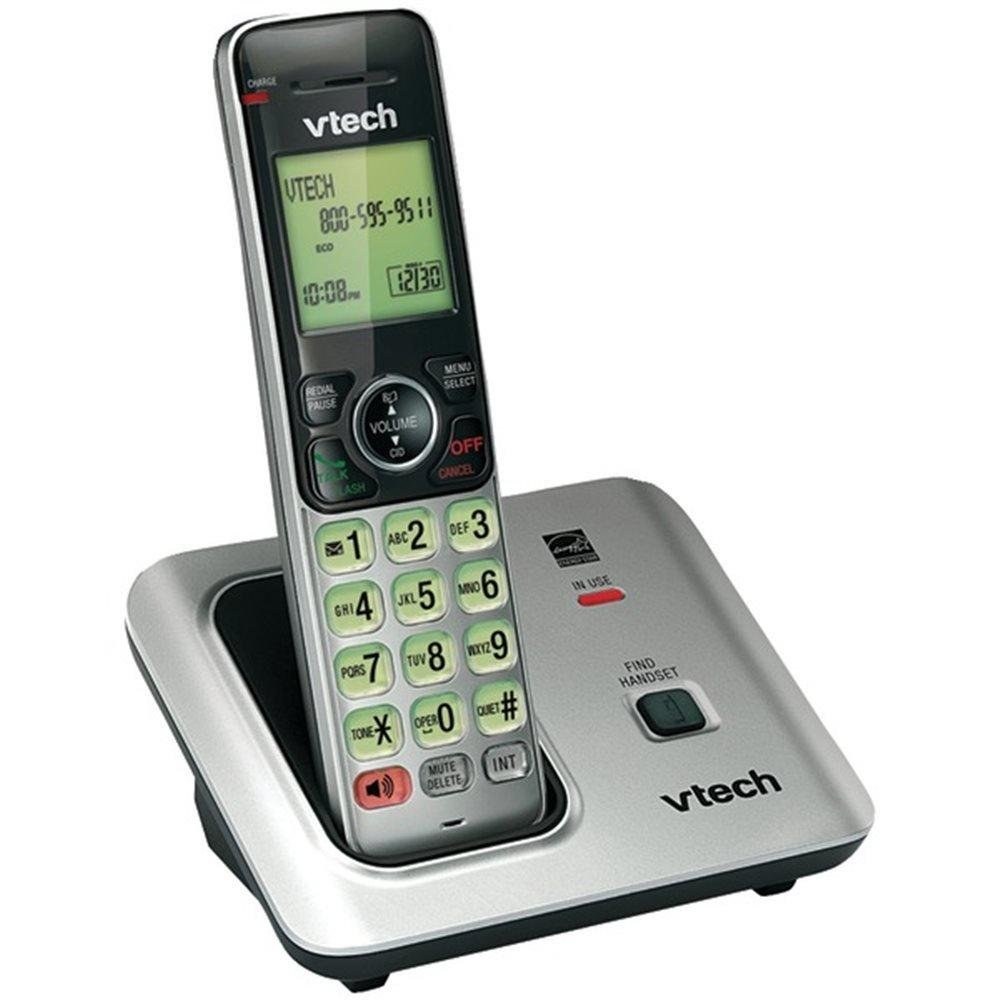
Image: The VTech VTCS6619 DECT 6.0 Cordless Speakerphone with Caller ID, showing the black handset and base unit.
1. Einlegen der Batterie
- Öffnen Sie die Abdeckung des Batteriefachs auf der Rückseite des Mobilteils.
- Stecken Sie den Stecker des Akkus fest in die Buchse im Inneren des Fachs.
- Platzieren Sie den Akku mit der Beschriftung „OBEN“ und verstauen Sie die Kabel ordentlich im Fach.
- Schließen Sie den Batteriefachdeckel.
2. Anschluss der Basiseinheit
- Stecken Sie das kleine Ende des Netzteils in die Netzbuchse auf der Rückseite der Telefonbasis.
- Stecken Sie das große Ende des Netzadapters in eine Wandsteckdose, die nicht über einen Wandschalter gesteuert wird.
- Stecken Sie ein Ende des Telefonkabels in die TEL LINE-Buchse auf der Rückseite der Telefonbasis.
- Stecken Sie das andere Ende des Telefonkabels in eine Telefonwandbuchse.
3. Aufladen des Mobilteils
Once the battery is installed and the base unit is connected, place the handset on the telephone base. The CHARGE light on the handset will illuminate, indicating that the battery is charging. Allow the handset to charge for at least 10 hours before initial use.
Bedienungsanleitung
This section details the basic functions and features of your VTech VTCS6619 phone.
Anrufe tätigen und empfangen
- Anrufen: Drücken SPRECHEN/BLITZ or LAUTSPRECHERWählen Sie dann die Telefonnummer.
- So beantworten Sie einen Anruf: Wenn das Telefon klingelt, drücken Sie SPRECHEN/BLITZ or LAUTSPRECHER.
- So beenden Sie einen Anruf: Drücken AUS/LÖSCHEN or place the handset back on the telephone base.
Freisprechfunktion
Um die Freisprechfunktion während eines Anrufs zu aktivieren, drücken Sie die Taste LAUTSPRECHER Drücken Sie diese Taste erneut, um wieder auf den Hörer des Mobilteils umzuschalten.
Anrufer-ID und Anklopfen
The phone displays the caller's name and number (if available) before you answer. If you subscribe to Call Waiting service, the phone will alert you to an incoming call while you are on another call. Press BLITZ um zwischen Anrufen zu wechseln.
Telefonkonferenzen
The VTech VTCS6619 supports 3-way conference calls. While on a call, you can add a third party by pressing the BLITZ button, dialing the new number, and then pressing BLITZ again to connect all parties.
Digitaler Anrufbeantworter
The integrated digital answering system records incoming messages when you are unavailable. Access messages by pressing the Wiedergabe/Stopp button on the base or through the handset menu. Refer to the full user guide for detailed instructions on setting up your outgoing message and managing messages.
Wartung
Proper care ensures the longevity of your telephone system.
Reinigung
Clean the telephone and base unit with a soft, damp cloth. Do not use cleaning sprays or liquid cleaners, as they may damage the finish or electrical components.
Batteriepflege
To maintain optimal battery performance, avoid exposing the handset to extreme temperatures. If the phone will not be used for an extended period, remove the battery to prevent leakage.
Fehlerbehebung
If you experience any issues with your phone, refer to the following common problems and solutions:
| Problem | Lösung |
|---|---|
| Kein Wählton | Ensure the telephone line cord is securely plugged into both the base unit and the wall jack. Check if the AC power adapter is properly connected. |
| Schlechte Tonqualität | Move the handset closer to the base unit. Check for interference from other electronic devices. Ensure the battery is fully charged. |
| Handy lädt nicht | Verify the handset is correctly placed on the base unit. Clean the charging contacts on both the handset and base with a dry cloth. Check the power connection to the base unit. |
| Anrufer-ID wird nicht angezeigt | Ensure you have subscribed to Caller ID service from your telephone service provider. The feature may not work if the caller has blocked their number. |
Technische Daten
- Marke: VTech
- Modell: VTCS6619
- Telefontyp: Kabellos
- Farbe: Schwarz
- Anzahl Batterien: 1 AAA-Batterien erforderlich (im Lieferumfang enthalten)
- Material: Plastik
- Energiequelle: Batteriebetrieben
- Dialer-Typ: Ton
- Artikelabmessungen (L x B x H): 6.9 x 5.2 x 6.7 Zoll
- Typ des Anrufbeantworters: Digitales
- Artikelgewicht: 1 Pfund
- Kompatible Geräte: VTech CS6619 handsets, basic answering machines
- Konferenzgesprächsfunktion: 3-Wege
- Mehrzeiliger Betrieb: Single-Line-Betrieb
- Telefon-Standby-Zeit: 7200 Мinuten
- Anrufer-ID: Ja
Garantie und Support
Your VTech VTCS6619 telephone system is covered by a 1 Jahr eingeschränkte Garantie from the date of purchase. This warranty covers defects in material and workmanship under normal use. For warranty service or technical support, please refer to the contact information provided in your product packaging or visit the official VTech webWebsite für Kundendienstinformationen.
Bitte bewahren Sie Ihren Kaufbeleg als Kaufnachweis für Garantieansprüche auf.