
1. Einleitung
Thank you for choosing the BW Deluxe Wireless Baby Monitor. This device is designed to provide reliable monitoring of your baby, offering peace of mind with its advanced features. This manual will guide you through the setup, operation, and maintenance of your baby monitor system.

Image 1.1: The BW Deluxe Wireless Baby Monitor system, featuring the camera unit on the left and the handheld monitor unit on the right. The monitor displays a sleeping baby.
2. Packungsinhalt
Bitte überprüfen Sie den Packungsinhalt, um sicherzustellen, dass alle Artikel vorhanden sind:
- BW Deluxe Wireless Baby Monitor Camera Unit
- BW Deluxe Wireless Baby Monitor Handheld Unit (with 2.3-inch LCD)
- Power Adapter (x2) for Camera and Monitor
- Antenne (für Kamera)
- AV-Kabel
- Kopfhörer
- Benutzerhandbuch (dieses Dokument)
- Free Travel Adapter (may vary by region)

Image 2.1: All components included in the BW Deluxe Wireless Baby Monitor package. This includes the camera, monitor, two power adapters, a user manual, an antenna, an earphone, an AV cable, and a free travel adapter.
3. Produktüberschreitungview
3.1 Kameraeinheit
The camera unit features a dome-shaped design with a pan and tilt mechanism, infrared LEDs for night vision, and a built-in microphone.
- Linse: Erfasst Videostream.
- Infrarot-LEDs: Sorgt für Beleuchtung zur Verbesserung der Nachtsicht.
- Mikrofon: Detects audio from the baby's room.
- Antennenanschluss: For connecting the wireless antenna.
- Leistungsaufnahme: Zum Anschließen des Netzteils.
- Schwenk-/Neigemechanismus: Ermöglicht die Fernsteuerung der Kamera view.
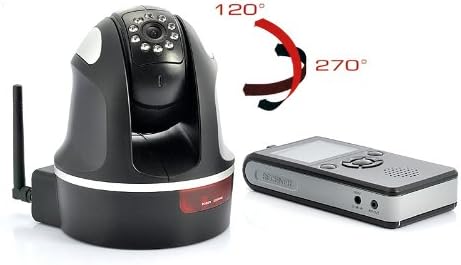
Image 3.1: The camera unit of the BW Deluxe Wireless Baby Monitor, illustrating its 270-degree pan and 120-degree tilt movement capabilities.
3.2 Handheld Monitor Unit
The handheld monitor unit features a 2.3-inch color LCD screen, speaker, control buttons, and a built-in rechargeable battery.
- 2.3-Zoll-Farb-LCD-Bildschirm: Displays real-time video feed.
- Lautsprecher: Outputs audio from the camera.
- Bedientasten: For navigation, zoom, pan/tilt, and menu access.
- Netzschalter: Schaltet den Monitor ein/aus.
- AV Output Port: Zum Anschluss an ein externes Display (z. B. Fernseher).
- Kopfhörerbuchse: Zum privaten Hören.
- Leistungsaufnahme: Zum Anschließen des Netzteils.
- Antenne: Zum Empfang drahtloser Signale.

Abbildung 3.2: Seite view of the handheld monitor unit, highlighting the AV output port, earphone jack, and power input port.
4. Einrichtung
4.1 Kameraplatzierung
- Place the camera unit in your baby's room, ensuring it has a clear, unobstructed view of the crib or play area.
- Für optimale viewing, consider wall mounting the camera. Ensure it is out of reach of children.
- Position the camera at least 1 meter (3 feet) away from the baby to avoid potential entanglement with cords.
4.2 Einschalten
- Kameraeinheit: Connect one of the provided power adapters to the camera unit's power input port and then plug it into a standard electrical outlet. The camera will power on automatically.
- Monitoreinheit: Connect the second power adapter to the monitor unit's power input port and plug it into an electrical outlet. Press and hold the Power button on the monitor until the screen illuminates.
- Allow a few seconds for the camera and monitor to establish a wireless connection. The video feed from the camera should appear on the monitor screen.
4.3 Erste Paarung (falls erforderlich)
In most cases, the camera and monitor are pre-paired. If the monitor does not display a video feed after powering on, you may need to manually pair them:
- Access the menu on the handheld monitor unit.
- Navigate to the "Pairing" or "Add Camera" option.
- Follow the on-screen instructions to initiate the pairing process. This usually involves pressing a pairing button on the camera unit within a specific timeframe.
- Once successfully paired, the video feed will appear.
5. Bedienungsanleitung
5.1 Viewing the Live Feed
Once powered on and paired, the monitor will automatically display the live video feed from the camera. The 2.3-inch color LCD provides a clear view of your baby's room.
5.2 Schwenken, Neigen und Zoomen (PTZ)
Use the control buttons on the handheld monitor to adjust the camera's viewing winkel:
- Pfanne: Use the directional buttons (left/right) to rotate the camera horizontally up to 270 degrees.
- Neigung: Use the directional buttons (up/down) to move the camera vertically up to 120 degrees.
- Zoom: Press the dedicated "Zoom" button to digitally zoom in on the image (2x digital zoom). Press again to zoom out.
5.3 Nachtsicht
The camera is equipped with automatic infrared (IR) night vision. In low-light conditions, the camera will automatically activate its 10 IR LEDs, providing a clear black-and-white image on the monitor, allowing you to see your baby even in complete darkness.
5.4 Audioüberwachung
The camera's built-in microphone transmits audio to the monitor's speaker. You can adjust the volume on the monitor unit using the designated volume controls.
5.5 AV Output Connection
The monitor unit features an AV output port, allowing you to connect it to a larger display, such as a television or DVR, using the provided AV cable. This enables viewing the baby monitor feed on a bigger screen.
- Connect one end of the AV cable to the AV OUT port on the monitor unit.
- Connect the other end of the AV cable to the corresponding AV input ports on your television or DVR.
- Select the correct AV input source on your television to view das Futter.
6. Wartung
- Reinigung: Reinigen Sie das Kameraobjektiv und den Monitorbildschirm mit einem weichen, trockenen Tuch. Verwenden Sie keine Scheuermittel oder Lösungsmittel.
- Netzteile: Ensure power adapters are kept dry and away from water.
- Lagerung: If storing the unit for an extended period, ensure it is clean, dry, and stored in a cool, dry place.
- Batteriepflege (Überwachung): To prolong the life of the monitor's rechargeable battery, avoid extreme temperatures and fully charge it before long periods of non-use.
7. Fehlerbehebung
7.1 Kein Video/Audio am Monitor
- Ensure both the camera and monitor units are powered on and properly connected to their respective power adapters.
- Check if the camera and monitor are within range (up to 100 meters line of sight). Walls and other obstructions can reduce range.
- Try re-pairing the camera and monitor (refer to Section 4.3).
- Ensure there are no other 2.4 GHz wireless devices causing interference nearby.
7.2 Schlechte Videoqualität
- Move the camera and/or monitor closer to each other to improve signal strength.
- Stellen Sie sicher, dass die Kameralinse sauber und frei von Staub und Fingerabdrücken ist.
- Check for sources of interference (e.g., Wi-Fi routers, microwaves, cordless phones).
7.3 Night Vision Not Working
- Ensure the room is sufficiently dark for the automatic night vision to activate.
- Check if the infrared LEDs on the camera are visibly glowing faintly red in a dark environment.
8. Spezifikationen
| Anzeige | 2.3-Zoll-Farb-LCD |
| Videokomprimierung | H.264 |
| Kameraschwenkwinkel | 270 Grad |
| Kamera-Neigungswinkel | 120 Grad |
| Digital Zoom | 2x |
| Nachtsicht | Automatic Infrared (10 IR LEDs) |
| Audio | Built-in Microphone (Camera), Speaker (Monitor) |
| Drahtlose Reichweite | Bis zu 100 Meter (Sichtlinie) |
| Konnektivität | Drahtlos (2.4 GHz) |
| Stromquelle | Netzteil (x2) |
| AV-Ausgang | Ja |
| Montagetyp | Wall Mount (Camera) |
| Farbe | Schwarz |
| IP-Schutzart | IP54 (Kamera) |
| Modellnummer | B0098OFDYW |
| UPC | 609528914891 |
9. Garantie und Support
BW products are manufactured to high-quality standards. For information regarding warranty coverage, technical support, or service inquiries, please refer to the warranty card included in your package or visit the official BW webBitte bewahren Sie Ihren Kaufbeleg für Garantieansprüche auf.
For further assistance, you may contact BW customer support through the contact information provided on the product packaging or the official brand webWebsite.