
Einführung
Vielen Dank für Ihren Einkauf.asing the RCA 32LB45RQ 32-Inch Full 1080p 60Hz LCD HDTV. This manual provides essential information for the safe and efficient operation of your television. Please read it thoroughly before using the product and retain it for future reference.
Sicherheitshinweise
Beachten Sie die folgenden Sicherheitsvorkehrungen, um Schäden zu vermeiden und einen sicheren Betrieb zu gewährleisten:
- Energiequelle: Schließen Sie den Fernseher nur an das dafür vorgesehene Netzteil an.
- Belüftung: Sorgen Sie für ausreichende Belüftung um den Fernseher herum. Blockieren Sie keine Lüftungsöffnungen.
- Flüssigkeiten: Keep the TV away from water and moisture. Do not place liquid-filled objects on the TV.
- Reinigung: Vor der Reinigung den Fernseher vom Stromnetz trennen. Ein weiches, trockenes Tuch verwenden. Flüssige Reinigungsmittel vermeiden.
- Platzierung: Stellen Sie den Fernseher auf eine stabile, ebene Fläche oder montieren Sie ihn sicher an einer Wand.
- Wartung: Versuchen Sie nicht, den Fernseher selbst zu reparieren. Überlassen Sie alle Reparaturen qualifiziertem Fachpersonal.
Lieferumfang
Prüfen Sie, ob alle Komponenten vorhanden sind:
- RCA 32LB45RQ 32-Inch LCD HDTV
- Stand
- Fernbedienung
- 2 AA-Batterien
- Netzkabel
- Benutzerhandbuch (dieses Dokument)
Aufstellen
Anbringen des Ständers
To attach the included stand, carefully place the TV screen-down on a soft, clean surface to prevent scratches. Align the stand with the mounting holes on the bottom of the TV and secure it using the provided screws. Ensure the stand is firmly attached before placing the TV upright.

Front view of the RCA 32LB45RQ HDTV with its stand attached.
Wandmontage
The RCA 32LB45RQ is wall mountable. A VESA-compatible wall mount kit (sold separately) is required. Refer to the wall mount kit's instructions for proper installation. Ensure the wall can support the weight of the TV and the mount.
Anschließen von Peripheriegeräten
Your TV offers various input ports for connecting external devices:
- HDMI: Connect Blu-ray players, game consoles, cable/satellite boxes, and other HD devices. The TV has 3 HDMI ports.
- USB: Schließen Sie USB-Speichergeräte zur Medienwiedergabe an. Der Fernseher verfügt über 1 USB-Anschluss.
- Komponente (YPbPr): Connect older video devices using component video and stereo audio cables. The TV has 1 component input.
- VGA: Connect a computer. The TV has 1 VGA input.
- Antenne/Kabel: Schließen Sie eine Antenne für terrestrische Sendungen oder einen Kabelfernsehanschluss an.

Hinteren view of the RCA 32LB45RQ HDTV, highlighting the various input ports for external devices.
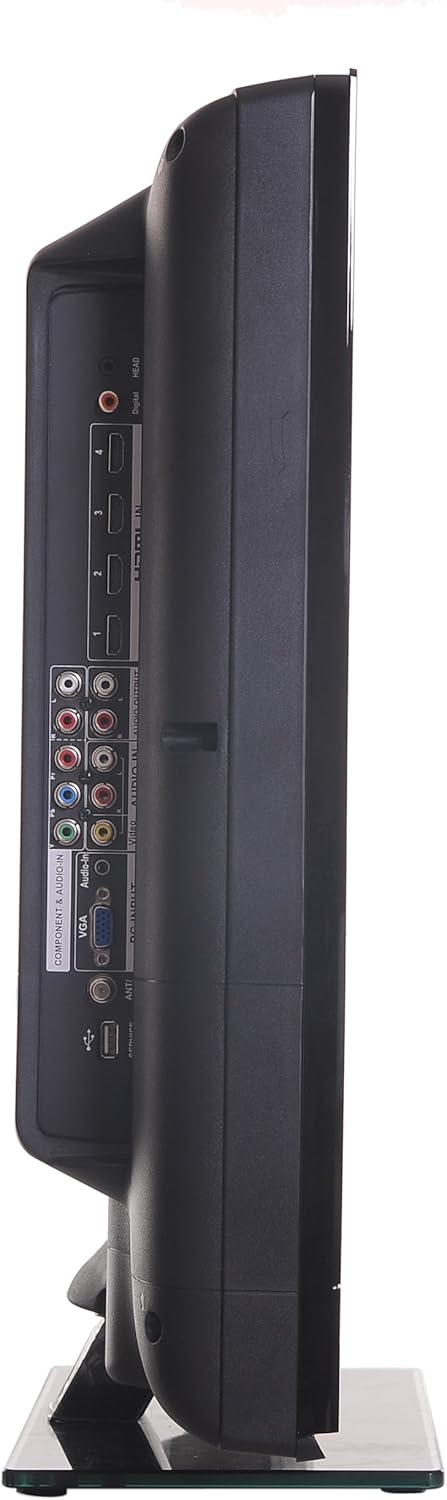
Seite view of the RCA 32LB45RQ HDTV, showing additional input ports for convenient access.
Einschalten und Ersteinrichtung
After connecting all desired devices and the power cord, press the power button on the TV or remote control. Follow the on-screen prompts for initial setup, including language selection, time zone, and channel scanning for over-the-air or cable channels.
Betrieb
Fernbedienung überview
The included remote control allows you to access all TV functions. Insert the two AA batteries (included) into the remote control, observing polarity.
Grundfunktionen
- Leistung: Drücken Sie diese Taste, um das Fernsehgerät ein- oder auszuschalten.
- Lautstärke erhöhen/verringern: Passen Sie den Audiopegel an.
- Kanal hoch/runter: Fernsehkanäle wechseln.
- Stumm: Silence the TV audio.
- Eingang: Cycle through available input sources (HDMI 1, HDMI 2, Component, VGA, TV).
Menünavigation
Press the 'Menu' button on your remote to access the TV's settings. Use the arrow keys to navigate and 'OK' or 'Enter' to select options.
- Bildeinstellungen: Adjust brightness, contrast, color, tint, sharpness, and select picture modes (e.g., Standard, Dynamic, Movie).
- Toneinstellungen: Stellen Sie Bass, Höhen und Balance ein und wählen Sie Klangmodi (z. B. Standard, Musik, Film).
- Settings/Setup: Access general TV settings such as language, time, parental controls (V-Chip), and software updates.
Internetdienste
The TV supports a built-in browser for basic internet access. Use the remote control to navigate web Seiten.
Wartung
Reinigen des Bildschirms
Wischen Sie den Bildschirm vorsichtig mit einem weichen, fusselfreien Tuch ab. Bei hartnäckigen Flecken leicht andrücken.ampen the cloth with water or a specialized screen cleaner (ensure it is safe for LCD screens) and wipe gently. Do not spray liquid directly onto the screen.
Allgemeine Pflege
- Setzen Sie den Fernseher weder direkter Sonneneinstrahlung noch extremen Temperaturen aus.
- Stellen Sie keine schweren Gegenstände auf den Fernseher.
- Ziehen Sie den Netzstecker des Fernsehers bei Gewittern oder wenn er längere Zeit nicht benutzt wird.
Fehlerbehebung
If you encounter issues with your TV, refer to the following table for common problems and solutions:
| Problem | Mögliche Ursache/Lösung |
|---|---|
| Kein Strom | Ensure the power cord is securely plugged into the TV and a working electrical outlet. Check the power indicator light. |
| Kein Bild, aber Ton ist vorhanden | Überprüfen Sie die Eingangsquellenauswahl. Stellen Sie sicher, dass das angeschlossene Gerät eingeschaltet ist und ein Signal sendet. |
| Kein Ton, aber ein Bild ist vorhanden. | Prüfen Sie die Lautstärke und stellen Sie sicher, dass der Fernseher nicht stummgeschaltet ist. Überprüfen Sie die Audiokabelverbindungen externer Geräte. |
| Schlechte Bildqualität | Adjust picture settings (brightness, contrast, sharpness). Check antenna or cable connections. Ensure the input source is providing a high-quality signal. |
| Fernbedienung funktioniert nicht | Batterien prüfen und gegebenenfalls austauschen. Sicherstellen, dass sich keine Hindernisse zwischen Fernbedienung und Infrarotsensor des Fernsehers befinden. |
Technische Daten
Detailed technical specifications for the RCA 32LB45RQ HDTV:
| Besonderheit | Spezifikation |
|---|---|
| Modellname | 32LB45RQ |
| Bildschirmgröße | 32 Zoll |
| Display-Technologie | LCD |
| Auflösung | 1080p (1920x1080) |
| Bildwiederholrate | 60 Hz |
| Seitenverhältnis | 16:9 |
| Kontrastverhältnis | 5000:1 |
| Ansprechzeit | 8 Millisekunden |
| Tunertyp | ATSC, NTSC |
| Gesamtzahl der HDMI-Anschlüsse | 3 |
| Anzahl USB-Anschlüsse | 1 |
| Component Inputs | 1 |
| VGA-Eingänge | 1 |
| Konnektivitätstechnologie | HDMI, USB |
| Unterstützte Internetdienste | Browser |
| Montagetyp | Wandhalterung |
| Farbe | Schwarz |
| Artikelgewicht | 17.4 Pfund |
| Im Lieferumfang enthaltene Komponenten | Ständer, Fernseher |
| Parental Control Technology | V-Chip |
| Modelljahr | 2017 |

Energy Guide label for the RCA 32LB45RQ HDTV, showing estimated yearly energy cost.
Garantie und Support
Garantieinformationen
This RCA 32LB45RQ HDTV comes with a Limited 1 year parts and labor warranty. Please retain your proof of purchase for warranty claims. For specific terms and conditions, refer to the warranty card included with your product or contact RCA customer support.
Kundenservice
For technical assistance, troubleshooting beyond this manual, or warranty service, please contact RCA customer support. Contact information can typically be found on the RCA official webauf der Website oder auf der Produktverpackung.