Produkt überview
The BW 7-inch TFT Color LCD Car Rear View Camera Monitor is designed to enhance your driving safety and convenience. It features a high-resolution display and two AV inputs, allowing connection to a rear view camera, car DVD, VCR, or other video equipment. The monitor supports automatic activation for rear view cameras and offers adjustable screen settings for optimal viewing.

Image: The BW 7-inch TFT Color LCD Car Rear View Camera Monitor, shown with its adjustable stand and included remote control. The screen displays a car on a scenic road.
Lieferumfang
Bitte überprüfen Sie, ob alle unten aufgeführten Komponenten in Ihrem Paket enthalten sind:
- 1 x 7-Zoll-Automonitor
- 1 x Halterung
- 1 x Video & Power Cable
- 1 x Fernbedienung
- 1 x Benutzerhandbuch
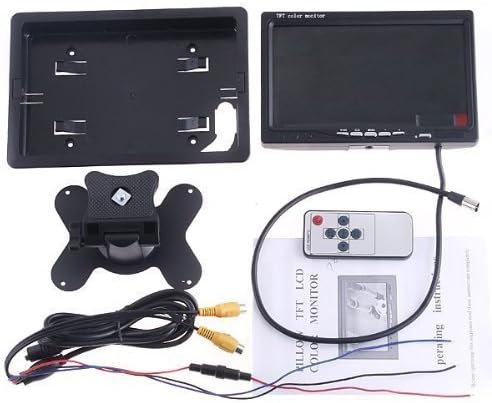
Image: All components included in the product package, neatly arranged. This includes the monitor, bracket, cables, remote control, and user manual.
Setup und Installation
The monitor offers flexible installation options, either standing on a flat surface or mounting using the provided bracket.
Montieren des Monitors
- Attach the monitor to the provided bracket. The bracket allows for adjustment of the viewing-Winkel.
- Secure the bracket to a suitable surface in your vehicle. Ensure the mounting location does not obstruct your view oder den Fahrzeugbetrieb beeinträchtigen.

Abbildung: Rückseite view of the monitor, showing the connection points and the design of the back casing, which attaches to the mounting bracket.

Image: The monitor with its back casing detached, illustrating how the monitor can be separated from its housing for custom installations or maintenance.
Verdrahtungsanweisungen
Connect the monitor using the provided video and power cable. Refer to the diagram below for proper connections:
- Stromanschluss: Connect the red wire to a positive 12V DC power source and the black wire to a negative/ground point.
- AV-Eingänge: The monitor has two AV inputs (AV1 and AV2).
- AV1: Typically used for car DVD, VCR, or other general video equipment.
- AV2: Dedicated for connection to a car backup camera.
- Reverse Priority (Blue Wire): Connect the blue wire to the positive wire of your vehicle's reverse light. This enables the monitor to automatically display the rear view camera feed when the vehicle is put into reverse. If the blue wire is not connected, you will need to manually switch to the AV2 input.

Image: A detailed wiring diagram illustrating the connections for power (red and black wires), AV inputs (yellow RCA connectors for AV1 and AV2), and the blue wire for automatic reverse camera activation.

Bild: Eine Nahaufnahme view of the monitor's control buttons (V1/V2, Menu, etc.) and the multi-pin input connector for the video and power cable.
Bedienungsanleitung
The monitor can be operated using the buttons on the front panel or the included IR remote controller.
Grundlegende Bedienung
- Ein-/Ausschalten: The monitor will automatically power on when a video signal is detected or when the vehicle is put into reverse (if the blue wire is connected). It will power off automatically after backing. You can also use the power button on the monitor or remote.
- Eingangsumschaltung: Press the "V1/V2" button on the monitor or remote to switch between AV1 and AV2 inputs.
- Menüführung: Use the "MENU" button to access display settings. Navigate options using the arrow buttons on the remote or corresponding buttons on the monitor.
Anzeigeeinstellungen
Within the menu, you can adjust the following display parameters:
- Helligkeit: Passen Sie die Gesamthelligkeit des Bildschirms an.
- Kontrast: Verändern Sie den Unterschied zwischen hellen und dunklen Bereichen.
- Farbe: Passen Sie die Farbintensität an.
- Bildschirmverhältnis: Switch between 16:9 (widescreen) and 4:3 (standard) aspect ratios to match your video source.

Image: A composite image showing the monitor displaying various content, including a car scene and a soccer game, demonstrating its versatility for different video inputs.
Technische Daten
Detailed technical specifications for the BW 7-inch Car Monitor:
| Besonderheit | Spezifikation |
|---|---|
| Bildschirmgröße | 7 Zoll |
| Anzeigekomponente | Farb-TFT-LCD |
| Auflösung | 800 x 480 Pixel |
| Kontrastverhältnis | 100:1 |
| Video Frequency | PAL/NTSC |
| Videoeingang | Two way video input (AV1, AV2) |
| Stromversorgung | Gleichstrom 12 V |
| Gehäusematerial | ABS |
| Arbeitstemperatur | 0 bis 80 Grad C |
| Lagertemperatur | -10 bis 80 Grad C |
| Produktabmessungen (L x B x T) | 193 x 135 x 25M (7.6 x 5.3 x 1.0 Zoll) |
| Nettogewicht des Produkts | 381 g (0.84 Pfund) |
| Modellnummer | BW7MY |
| Kontrollmethode | Remote, Buttons |
| Audio | No Audio input or Output |
Fehlerbehebung
- Der Monitor schaltet sich nicht ein:
- Ensure the power cable is securely connected to a 12V DC power source.
- Prüfen Sie die Stromversorgung auf korrekte Spannung.tage und aktuell.
- Kein Bild angezeigt:
- Verify that the video input cables (AV1 or AV2) are correctly connected to your video source (e.g., camera, DVD player).
- Ensure the correct AV input is selected on the monitor (use the V1/V2 button).
- Bei Verwendung eines hinteren view camera, confirm the camera is powered on and functioning.
- Hinteren view camera does not activate automatically:
- Ensure the blue wire from the monitor's power cable is correctly connected to the positive wire of your vehicle's reverse light.
- If the blue wire is not connected, you must manually switch to the AV2 input when backing up.
- Poor image quality (blurry, distorted):
- Check the video cable connections for looseness or damage.
- Adjust the Brightness, Contrast, and Color settings in the monitor's menu.
- Ensure the video source (camera, DVD) is outputting a clear signal.
- Fernbedienung funktioniert nicht:
- Stellen Sie sicher, dass sich keine Hindernisse zwischen der Fernbedienung und dem Infrarotempfänger des Monitors befinden.
- Check and replace the battery in the remote control if necessary (1 CR123A battery required).
Wartung und Pflege
To ensure the longevity and optimal performance of your BW monitor, follow these maintenance guidelines:
- Reinigung: Use a soft, dry cloth to clean the monitor screen and housing. For stubborn smudges, slightly dampen the cloth with water. Avoid using harsh chemicals, abrasive cleaners, or solvents, as these can damage the display or finish.
- Temperatur: Operate and store the monitor within the specified temperature ranges (Operating: 0 to 80°C; Storage: -10 to 80°C). Extreme temperatures can affect performance and lifespan.
- Feuchtigkeit: Keep the monitor dry. Exposure to moisture or liquids can cause electrical damage.
- Physischer Schaden: Avoid dropping the monitor or subjecting it to strong impacts. Protect the screen from scratches.
- Stromversorgung: Always use a stable DC 12V power supply. Fluctuations or incorrect voltage kann das Gerät beschädigen.
Garantie und Support
For warranty information or technical support, please refer to the documentation provided with your purchase or contact the manufacturer directly. Specific warranty terms and conditions may vary.
Hersteller: BW Group