
Produkt überview
The Moen 104408 Commercial AC Adapter is designed to provide reliable power for Moen commercial faucet systems, specifically models 8306 and 8308. This multi-unit adapter delivers 7.5 Volts and 3.0 Amps, capable of powering up to 10 faucets simultaneously. It includes hardware for both wall and deck mounting, offering flexible installation options for various commercial and institutional environments.
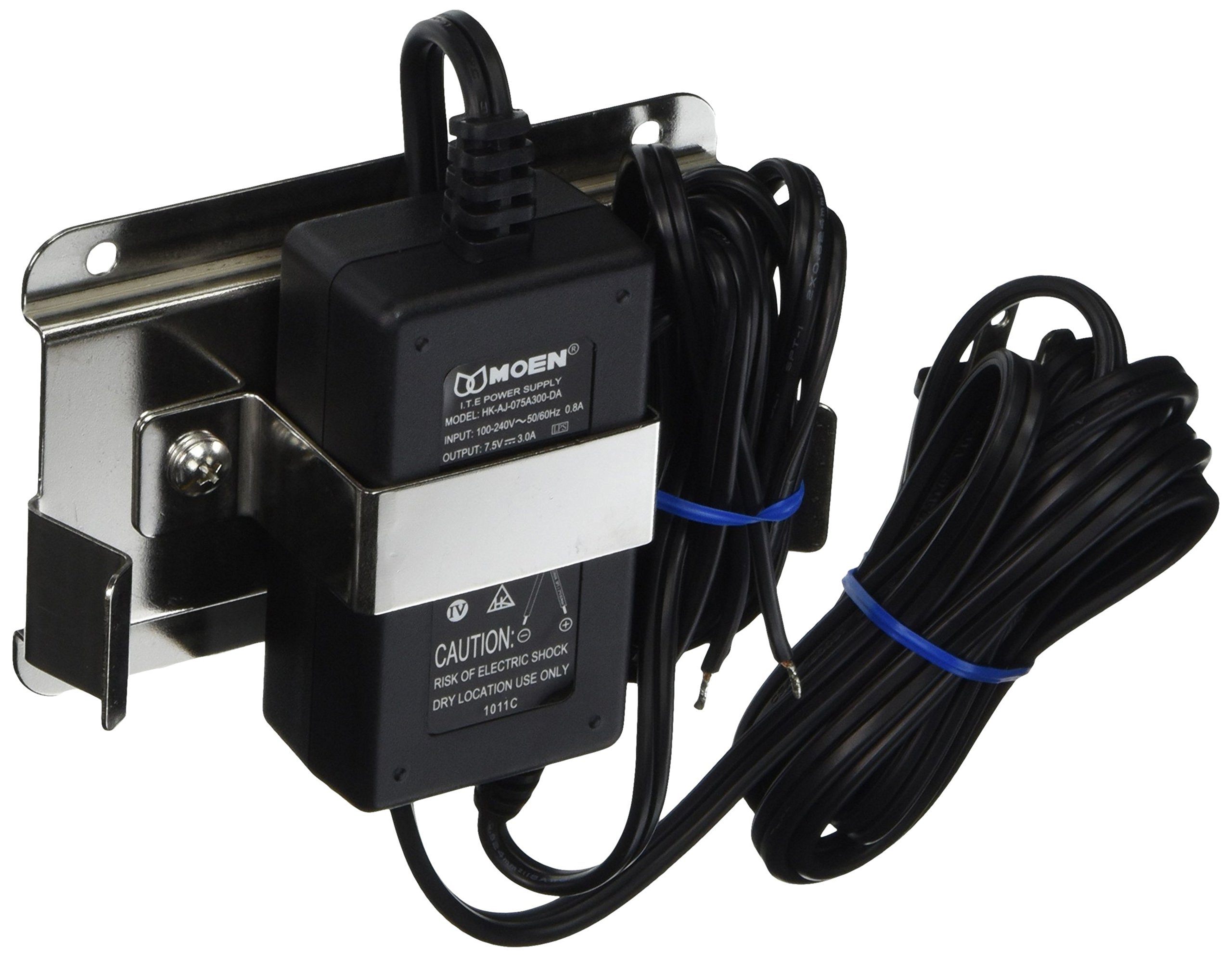
Image: Moen 104408 Commercial AC Adapter. This image shows the compact design of the adapter unit.
Sicherheitshinweise
Please read all instructions carefully before installation and operation. Failure to follow these instructions may result in electric shock, fire, or other hazards. Keep this manual for future reference.
- Vor jeglichen Installations- oder Wartungsarbeiten muss die Stromversorgung unterbrochen sein.
- This adapter is designed for indoor use only.
- Setzen Sie den Adapter weder Feuchtigkeit noch extremen Temperaturen aus.
- Use only with specified Moen commercial faucet models (8306, 8308).
- Versuchen Sie nicht, den Adapter zu öffnen oder zu reparieren. Wenden Sie sich an qualifiziertes Servicepersonal.
Setup und Installation
The Moen 104408 adapter can be mounted on a wall or deck. Choose a location that is dry, protected from physical damage, and allows for proper ventilation.
Benötigtes Werkzeug:
- Bohren
- Schraubendreher
- Maßband
- Bleistift
Installationsschritte:
- Montageort auswählen: Identify a suitable location near the faucets to be powered, ensuring the power cord can reach an outlet and the low-voltage cables can reach the faucets.
- Befestigungslöcher markieren: Use the adapter's mounting hardware as a template to mark the drill points on the wall or deck surface.
- Pilotlöcher bohren: Bohren Sie an den markierten Stellen Führungslöcher.
- Sicherer Adapter: Attach the adapter securely using the provided screws and mounting hardware.
- Connect Low-Voltage Kabel: Schließen Sie den Low-Vol-tage cables from the faucets to the adapter's output terminals. Ensure correct polarity if applicable (refer to faucet manual). The adapter can power up to 10 faucets.
- Netzkabel anschließen: Plug the adapter's power cord into a standard electrical outlet.
- Testsystem: Verify that all connected faucets are functioning correctly.

Bild: Example of commercial faucet installation in a laboratory setting. This image illustrates the type of environment where Moen commercial products are typically used.
Bedienungsanleitung
The Moen 104408 AC Adapter operates automatically once connected to a power source and the faucets. It provides continuous low-voltage power to the connected Moen commercial faucets.
- Ensure the adapter is plugged into a functional electrical outlet.
- The adapter does not have an on/off switch; it is always active when plugged in.
- Faucets connected to the adapter will draw power as needed for their operation.
Wartung
The Moen 104408 Commercial AC Adapter requires minimal maintenance. Regular inspection can help ensure its longevity and proper function.
- Reinigung: Wipe the exterior of the adapter with a dry, soft cloth. Do not use abrasive cleaners or solvents.
- Kabelinspektion: Periodically check the power cord and low-voltage cables for any signs of damage, fraying, or wear. Replace damaged cables immediately.
- Belüftung: Ensure the adapter's ventilation openings are not obstructed to prevent overheating.
- Umgebungsbedingungen: Confirm the adapter remains in a dry environment, free from excessive dust or humidity.
Fehlerbehebung
If you experience issues with your Moen 104408 Commercial AC Adapter, refer to the following common problems and solutions:
| Problem | Mögliche Ursache | Lösung |
|---|---|---|
| Faucets not receiving power. |
|
|
| Der Adapter fühlt sich heiß an. |
|
|
Technische Daten
| Besonderheit | Detail |
|---|---|
| Modellnummer | 104408 |
| Marke | Moen |
| Hersteller | Moen Incorporated |
| Ausgangsvolumentage | 7.5 Volt |
| AmpAlter | 3.0 Amps |
| Wastage | 22.5 Watt |
| Stromquelle | Kabelgebundene Elektrik |
| Artikelgewicht | 1.35 Pfund |
| Abmessungen (L x B) | 4-3/4 inches x 3 inches (approximate) |
| Im Lieferumfang enthaltene Komponenten | Multi-Unit Adapter, 7.5V, 3A, Wall/Deck Mounting Hardware |
| Besondere Merkmale | Secure Mounting Assembly, Powers up to 10 faucets |
| Kompatibilität | Moen Commercial Faucet Models 8306, 8308 |
Garantieinformationen
The Moen 104408 Commercial AC Adapter is backed by a Eingeschränkte lebenslange Garantie. This warranty covers defects in material and manufacturing workmanship under normal use. For full details regarding warranty coverage, limitations, and how to make a claim, please refer to the official Moen warranty documentation or contact Moen customer support.

Image: Shield icon with a checkmark, symbolizing product warranty and reliability.
Kundenservice
For technical assistance, replacement parts, or warranty inquiries, please contact Moen Customer Support:
- WebWebsite: Besuchen Sie die offizielle Moen-Website. webWebsite mit Supportressourcen und Kontaktinformationen.
- Telefon: Refer to your product packaging or the Moen webAuf der Webseite finden Sie die entsprechende Kundendienst-Telefonnummer.
Bitte halten Sie bei Kontaktaufnahme mit dem Support Ihre Produktmodellnummer (104408) und das Kaufdatum bereit.

Image: Headset icon, representing customer service and support availability.