
1. Einleitung
Thank you for choosing the Casio PQ-31-1EF Digital Wake Up Timer. This manual provides detailed instructions for the proper setup, operation, and maintenance of your new digital alarm clock. Please read this manual thoroughly before using the product to ensure correct usage and to prevent damage.
2. Sicherheitsvorkehrungen
- Setzen Sie das Gerät keinen extremen Temperaturen, direkter Sonneneinstrahlung oder hoher Luftfeuchtigkeit aus.
- Vermeiden Sie es, das Gerät fallen zu lassen oder starken Stößen auszusetzen.
- Versuchen Sie nicht, das Gerät zu zerlegen oder zu verändern. Dadurch erlischt die Garantie.
- Bewahren Sie Batterien außerhalb der Reichweite von Kindern auf. Bei Verschlucken sofort einen Arzt aufsuchen.
- Entsorgen Sie gebrauchte Batterien gemäß den örtlichen Vorschriften.
3. Packungsinhalt
Bitte überprüfen Sie, ob alle Artikel in Ihrem Paket vorhanden sind:
- 1 x Casio PQ-31-1EF Digital Wake Up Timer
- 2 x Lithium Metal batteries (pre-installed or included separately)
- 1 x Benutzerhandbuch (dieses Dokument)
4. Produktüberschreitungview
The Casio PQ-31-1EF is a compact digital alarm clock designed for reliability and ease of use. It features a clear digital display, an integrated alarm function, and a light for visibility in low-light conditions. The sturdy case provides impact resistance for daily use.
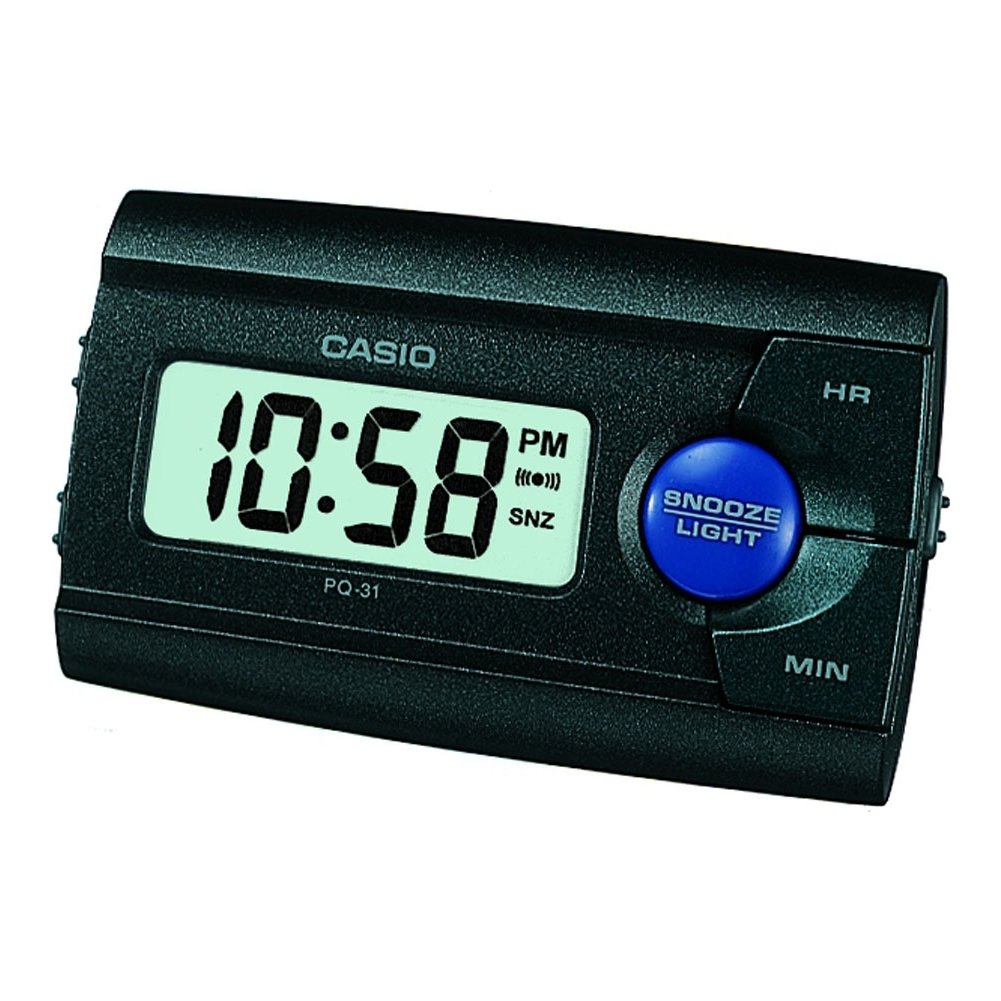
Abbildung 1: Vorderseite view of the Casio PQ-31-1EF Digital Wake Up Timer. Shows the digital display and general shape of the device.
Button Functions (Typical Layout - Refer to actual device for exact labels):
- MODUS-/EINSTELLUNGS-Taste: Used to switch between time, alarm, and timer modes, and to confirm settings.
- ADJUST/+/H Button: Used to increase values (hours) or move forward in settings.
- ADJUST/-/M Button: Used to decrease values (minutes) or move backward in settings.
- LICHT-Taste: Aktiviert die Hintergrundbeleuchtung für einige Sekunden.
- ALARM EIN/AUS-Schalter: Schaltet die Alarmfunktion ein und aus.
- Schlummertaste: Temporarily silences the alarm and activates snooze function.
5. Einrichtung
5.1 Einlegen der Batterie
Your Casio PQ-31-1EF requires 2 Lithium Metal batteries. These are typically included with the product.
- Suchen Sie die Abdeckung des Batteriefachs auf der Rück- oder Unterseite des Geräts.
- Open the cover by sliding it or unscrewing it (if applicable).
- Insert the 2 Lithium Metal batteries, ensuring the positive (+) and negative (-) terminals are aligned correctly according to the diagram inside the compartment.
- Bringen Sie den Batteriefachdeckel wieder fest an.
The clock display should now activate. If not, check battery orientation or replace with fresh batteries.
5.2 Anfangszeiteinstellung
- Halten Sie im normalen Zeitanzeigemodus die Taste gedrückt MODUS EINGESTELLT button for a few seconds until the hour digits begin to flash.
- Verwenden Sie die ADJUST/+ or ADJUST/- buttons to set the correct hour. Pay attention to AM/PM indicators if your clock uses a 12-hour format.
- Drücken Sie die MODUS EINGESTELLT button again to move to the minute setting. The minute digits will flash.
- Verwenden Sie die ADJUST/+ or ADJUST/- Tasten zum Einstellen der korrekten Minuten.
- Drücken Sie die MODUS EINGESTELLT button one more time to exit the time setting mode. The time will now be set.
6. Bedienungsanleitung
6.1 Wecker stellen
The daily alarm reminds you of events that recur every day.
- Drücken Sie im normalen Zeitdisplay die Taste MODUS EINGESTELLT button once to enter alarm setting mode. The alarm time will be displayed, and the hour digits may flash.
- Verwenden Sie die ADJUST/+ or ADJUST/- Tasten zum Einstellen der gewünschten Weckzeit.
- Drücken Sie die MODUS EINGESTELLT Drücken Sie erneut die Taste, um zur Minuteneinstellung zu wechseln.
- Verwenden Sie die ADJUST/+ or ADJUST/- Tasten zum Einstellen der gewünschten Alarmminuten.
- Drücken Sie die MODUS EINGESTELLT button one more time to confirm the alarm setting and return to normal time display.
6.2 Aktivieren/Deaktivieren des Alarms
To turn the alarm ON or OFF, locate the ALARM EIN / AUS switch (usually on the side or back of the unit) and slide it to the desired position. An alarm icon will typically appear on the display when the alarm is active.
6.3 Die Schlummerfunktion verwenden
Wenn der Alarm ertönt, drücken Sie die SCHLAFEN button (often a large button on top of the unit). The alarm will temporarily stop and sound again after a few minutes (typically 5-10 minutes, depending on the model).
6.4 Verwenden der Hintergrundbeleuchtung
To illuminate the clock face in dark environments, press the LICHT button. The light-emitting diode (LED) will illuminate the display for a short period, then automatically turn off.
7. Wartung
7.1 Reinigung des Geräts
To clean the Casio PQ-31-1EF, wipe it gently with a soft, dry cloth. Do not use abrasive cleaners, solvents, or chemical sprays, as these can damage the casing und Anzeige.
7.2 Batteriewechsel
When the display becomes dim or the clock functions erratically, it is time to replace the batteries. Follow the steps in Section 5.1 Battery Installation to replace the 2 Lithium Metal batteries. Ensure proper disposal of old batteries.
8. Fehlerbehebung
| Problem | Mögliche Ursache | Lösung |
|---|---|---|
| Das Display ist leer oder dunkel. | Die Batterien sind leer oder falsch eingelegt. | Ersetzen Sie die Batterien durch neue und achten Sie dabei auf die richtige Polarität. |
| Der Alarm ertönt nicht. | Der Alarm ist nicht aktiviert oder die Lautstärke ist zu niedrig (sofern einstellbar). | Ensure the ALARM ON/OFF switch is in the ON position. Check alarm settings. |
| Die Uhrzeit ist falsch. | Die Uhrzeit war nicht richtig eingestellt oder die Batterien wurden entfernt. | Reset the time following instructions in Section 5.2. |
| Tasten reagieren nicht. | Vorübergehender Softwarefehler oder niedriger Akkustand. | Remove and reinsert batteries to reset the unit. Replace batteries if necessary. |
9. Spezifikationen
| Besonderheit | Detail |
|---|---|
| Modellnummer | PQ-31-1EF |
| Marke | Casio |
| Anzeigetyp | Digitales |
| Farbe | Black (Unit color, display is typically grey/LCD) |
| Stromquelle | Batteriebetrieben |
| Akku-Typ | 2 x Lithium Metal batteries |
| Produktabmessungen (B x H) | 8.6W x 5H centimetres |
| Artikelgewicht | 45.4 Gramm |
| Besondere Merkmale | Alarm, Backlight (LED), Impact Resistance |
| Montagetyp | Tischhalterung |
| Innen-/Außenbereich | Innenbereich |
10. Garantie und Support
Casio products are manufactured to high-quality standards and are backed by a manufacturer's warranty. For specific warranty terms and conditions, please refer to the warranty card included with your purchase or visit the official Casio webWebsite für Ihre Region.
If you encounter any issues or require technical assistance, please contact Casio customer support through their official website or the contact information provided in your product packaging. Please have your model number (PQ-31-1EF) and proof of purchase ready when contacting support.
Hinweis: Die Garantiebedingungen können je nach Region variieren.